Server farms generate significant amounts of heat, making efficient server placement essential for lowering energy consumption. As the demand for Artificial Intelligence, cloud computing, and data processing continues to grow, so too does the need for server farms that can manage increasing thermal loads efficiently. Their growing energy consumption has challenged many, with cooling systems often accounting for up to forty percent of the total energy used in a data center. This project models heat transfer within a realistically scaled server room by numerically solving the two-dimensional heat equation using Wolfram Language. A series of visualization illustrate how different server configurations influence thermal behavior. These tools allow us to perform analysis on differing server room cooling strategies and can be extended to investigate more advanced thermal optimization techniques.
Associated Package
Associated Package
Below, we will import the associated package.
In[]:=
pFileName=FileNameJoin[$HomeDirectory,"Desktop","Wolfram Notebooks","WSRP26","RecentServerPlacement.wl"];FileExistsQ[pFileName]
Out[]=
True
In[]:=
Get[pFileName]
Introduction
Introduction
A server room consists of many computers operating simultaneously within an enclosed space. Each server converts part of the electrical energy it consumes into heat, creating numerous distributed heat sources throughout the room. This exchange of thermal energy can lead to localized hotspots, or, on a larger scale, heat islands. Due to the fact that this temperature distribution relies on the interaction of many heat sources over a period of time, it is difficult to predict how heat will spread through observation alone. Instead, a mathematical formula is needed to understand how heat diffuses throughout the room. This behavior is represented by the heat equation, one of the most fundamental partial differential equations in the modeling of heat transfers.
The central component of this notebook is the ServerPlacementSimulation function, which provides a framework for modeling heat transfer in server rooms. Through a collection of configurable parameters, the function enables users to simulate a wide range of server layouts, room conditions, and thermal properties. This makes it possible to reproduce all of the experiments presented in this notebook while also allowing users to investigate additional configurations and develop extensions beyond the scope of this project.
The central component of this notebook is the ServerPlacementSimulation function, which provides a framework for modeling heat transfer in server rooms. Through a collection of configurable parameters, the function enables users to simulate a wide range of server layouts, room conditions, and thermal properties. This makes it possible to reproduce all of the experiments presented in this notebook while also allowing users to investigate additional configurations and develop extensions beyond the scope of this project.
Breaking Down The Heat Equation
Breaking Down The Heat Equation
There are three fundamental components needed to properly model heat flow: the partial differential equation, a defined boundary condition, and a defined initial condition. First, the partial differential equation. The dependent variable in this equation is the temperature, T, which varies with both time, t, and spatial position, X. The equation also accounts for the physical properties of the medium through which thermal energy is transported. These properties include the density of the medium, , and its specific heat capacity, [J/(kg·K)].The PDE also contains a diffusion term, ∇⋅(−k∇T(t,X)), which models the conduction of heat through the medium and is guided by the thermal conductivity, . In addition, a convection term, , accounts for heat transport due to airflow, where V(t,X) is the fluid velocity [m/s].Finally, the term represents a heat source within the region being modeled. In this project, Q corresponds to the heat produced by the servers.While the heat equation describes how temperature diffuses over space and time, it cannot be solved without specifying both initial and boundary conditions. Initial conditions define the temperature distribution throughout the room at the start of the simulation, while boundary conditions describe how heat behaves at the boundaries in the simulation.
ρ+ρV·∇T(t,X)+∇·(-k∇T(t,X))=Q
C
p
∂T(t,X)
∂t
C
p
ρkg
3
m
C
p
k[W/(m·K)]
ρV·∇T(t,X)
C
p
Q[W/]
3
m
Project Workflow
Project Workflow
Before creating the simulation, we will outline the overall approach taken throughout this project. The process of developing and evaluating the server room model was divided into four steps: defining and solving the heat equation, creating visual representations of potential layouts, performing a series of experiments on different server configurations, and evaluating the resulting temperature distributions. The following chart summarizes this workflow and provides an overview of the sections that follow.
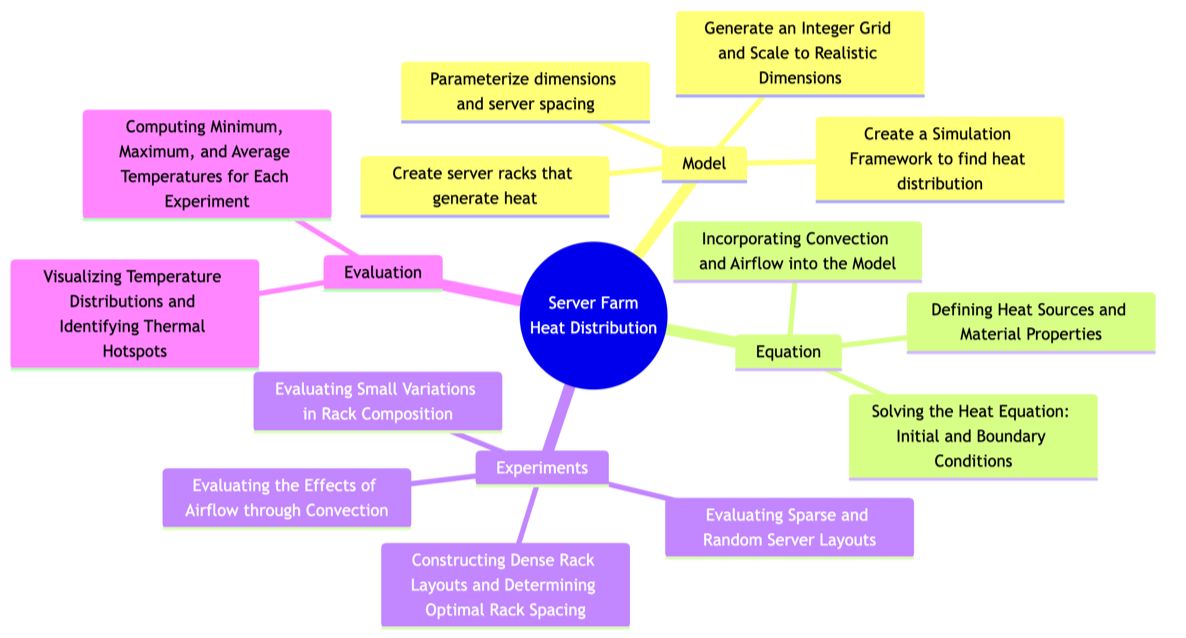
Planned experiments
Planned experiments
The following list outlines the experiments originally proposed for this project. Completed experiments are marked with a check mark (✓ ), while unchecked items (□) represent future investigations or possible extensions.
◼
✓ Single-Server Configurations
◼
Centered Placement
◼
Random Placement
◼
✓ Small Server Configurations
◼
Random Placement of 2-5 servers
◼
✓ Effect of Server Spacing
◼
Gradually increasing the distance between servers
◼
✓ Staggered Server Configuration
◼
✓ Rack-Based Server Configuration
◼
□ Cold and Hot Aisles
◼
✓ Differently Shaped Servers
◼
✓ Heated and Cooled Wall Boundaries
◼
✓ Chessboard Server Configuration
◼
✓ Hexagonal Server Configuration
◼
✓ Room With Obstacles
Implementation-wise our main simulation function -- serverPlacementSimulation -- uses both insulating walls and cooling walls. (Via Neumann and Dirichlet boundary conditions respectively.)
Constructing the Simulation Setup
Constructing the Simulation Setup
The first and most important step in building a reliable thermal simulation is to define a reusable function that accepts the room parameters, server locations, and physical parameters as inputs before numerically solving the heat equation and returning the resulting temperature distribution.
Define the simulation function and its configurable options:
In[]:=
Clear[serverPlacementSimulation];serverPlacementSimulation::nssh="The value of the option \"ServerShape\" is expected to be one of Automatic, Disk, or Rectangle.";serverPlacementSimulation::nhcv="The value of the option \"HeatConvectionVelocity\" is expected to be Automatic, a number, or a list of numbers.";
The OverMesh option determines whether the heat equation is solved directly over the geometric region or over a finite element mesh. A mesh divides the room into many small elements, allowing the geometry of the room and server regions to be represented more accurately. The PDE is then solved numerically on these elements, which can improve the accuracy of the simulation, particularly for complex shapes or irregular boundaries.
In[]:=
Options[serverPlacementSimulation]=Join "ServerShape"->Rectangle,"ServerRadius"->0.25,"HeatGeneration"->1000,"MaxTime"->600, "HeatConvectionVelocity"->Automatic,"InitialRoomTemperature"->22,"WallSurfaceTemperature"->10, "InsulationWalls"->True,"OverMesh"->True, Options[NDSolve], Options[ToElementMesh];
Out[]=
Table 1. ServerPlacementSimulation Options and Descriptions | ||||||||||||||||||||||||
|
Rather than hard coding each of these values they are created as parameters within this function. This allows the same function to be reused across many simulations in which we might change the server size, heat generation, simulation time, or airflow velocity.
The simulation can be initialized in two different ways. The first accepts an integer defining the number of servers to generate randomly, while the second accepts server coordinates. This duality makes the same function suitable for random simulations and precise experiments.
The first definition of the simulation function serves to generate random server layouts. It accepts the number of servers, the room dimensions, the simulation duration, and additional options. Using these inputs, the function randomly generates valid server coordinates within the boundaries of the room. These generated coordinates, together with the original simulation parameters, are then passed to the second definition of the function, where the heat transfer simulation is constructed and solved.
In[]:=
serverPlacementSimulationn_?IntegerQ,roomWidth_?NumericQ,roomHeight_ ?NumericQ,opts:OptionsPattern[]:= Module{spec,serverRadius,minX,maxX,minY,maxY}, serverRadius=OptionValue[serverPlacementSimulation,"ServerRadius"]; maxX=roomWidth; maxY=roomHeight; {minX,minY}={0,0}; spec=Transpose RandomReal[{minX+serverRadius,maxX-serverRadius},n], RandomReal[{minY+serverRadius,maxY-serverRadius},n]; serverPlacementSimulation[spec,roomWidth,roomHeight,opts] ;
The second definition of serverPlacementSimulation is what creates the main simulation. This version accepts an list of server coordinates. This makes it possible to test defined layouts, such as dense racks, sparse arrangements, or optimized configurations.
The function then constructs the room shape, defines the server heat-source regions, retrieves the physical properties of the medium, builds the heat transfer PDE, and solves it numerically.
The secondary definition of this function can be broken down into six main steps. First, it reads the user-specified options, including server size, heat generation, simulation time, and convection velocity. Second, it constructs the room as a rectangular domain. Third, it represents each server as a rectangular heat-generating region. Fourth, it retrieves the thermal conductivity, density, and specific heat capacity of air from Wolfram’s thermodynamic database. Fifth, it uses these quantities to construct the heat transfer PDE with HeatTransferPDEComponent. Finally, NDSolveValue solves the PDE and returns an association containing the server specification, the solved temperature function, and the room dimensions.
Using Proper Metrics
Using Proper Metrics
Creating Realistic Rooms
Creating Realistic Rooms
Throughout each of the below experiments the room dimensions, airflow velocity, heat generation, and simulation time were selected using values representative of real server rooms. The server radius was treated as an adjustable parameter, allowing different server sizes and packing densities to be investigated throughout the experiments
The heat generation parameter represents the rate at which thermal energy is produced by each server and is measured in watts (J/s). Because the heat equation is solved over time, the total amount of thermal energy introduced into the system depends on both the heat generation rate and the duration of the simulation.
Server layouts are initially generated on a dimensionless integer grid. These integer coordinates define only the relative positions of the servers and are independent of any units. The coordinates are then scaled according to the selected server radius and room dimensions, producing meaningful server locations while preserving the arrangement. This approach allows the same layout to be reused across multiple experiments with different server sizes and room dimensions without modifying the underlying grid.
Computing Statistics
Computing Statistics
Throughout each experiment, it is necessary to compute statistics of the temperature distribution in order to identify trends and compare different server configurations. Although the serverPlacementSimulation function solves the heat equation and produces the temperature distribution over time, an additional function is required to extract meaningful metrics from this solution. Specifically, this function computes the minimum, average, and maximum temperatures of the system at a specified point in time, enabling consistent quantitative comparisons between different layouts.
To begin constructing this function, Clear is first used to remove any previously assigned values. The available options are then defined, allowing the server shape and server radius to be specified later when the function is called.
The metricGeneration function accepts the interpolating temperature solution, simulation time, and room dimensions as inputs. It first retrieves the specified server radius and server shape from the function options, then determines the appropriate area. The function subsequently computes the maximum, minimum, and average temperatures using Maximum, Minimum, and NIntegrate, respectively.
Constructing a Realistically Scaled Server Room
Constructing a Realistically Scaled Server Room
There is no single way to arrange servers within a room. Different layouts produce different airflow paths, heat concentrations, and cooling requirements. To investigate how configuration influences thermal behavior, several different placement strategies were constructed and simulated.
Single Server - Baseline
Single Server - Baseline
The simplest possible server room consists of a single server positioned within the room. This baseline establishes a reference against which more complex layouts can later be compared. Since only one heat source is present, the resulting temperature distribution is expected to be relatively symmetric, making it easier to verify that the model behaves as expected before introducing additional servers.
The room is first defined as an 9×9 computational grid. At this stage, the coordinates simply represent potential server locations rather than realistic distances. A random point on the graph is selected to behave as the server and the selected server position is demarcated with a red dot.
A minimum spacing rule will now be used so that adjacent servers are separated by at least one server width. Because each server is modeled as 0.50 m wide, adjacent server centers must be at least 0.5 m apart. This prevents unrealistic overlap and creates a more physically reasonable server-room layout.
With the properly scaled server location now established, the serverPlacementSimulation function can be used to solve the heat equation. Using the server as the sole heat source and using defined physical parameters, the function solves for the resulting temperature distribution throughout the room.
The resulting solution can now be visualized using a temperature map. This provides a view of how thermal energy spreads throughout the room from the server heat source.
While the temperature map provides a qualitative visualization of the solution, it is also useful to quantify the behavior of the room. To accomplish this, the minimum, maximum, and average temperatures throughout the room are computed after the simulation reaches its final time.
For every set of server coordinates, the serverPlacementSimulation function solves the heat equation, after which the resulting interpolating temperature function is passed to metricGeneration to compute the minimum, maximum, and average temperatures using both continuous and grid-based methods. The computed metrics are then stored in an association and compiled into a tabular dataset for comparison.
Since only one heat source is present, the temperature distribution remains relatively uniform throughout the room. The average room temperature remains close to the initial temperature of 10, while the maximum temperature reaches approximately 10.12 at the server location. The minimum temperature remains at the initial room temperature, indicating that the heat generated by a single server has only a localized effect. These values serve as a baseline against which configurations containing multiple servers can be compared.
Creating an Interactive Server Room Simulation
Creating an Interactive Server Room Simulation
To allow for further analysis, we developed an interactive interface. This interface allows the user to adjust simulation parameters, including the room dimensions, number of servers, server size, heat generation, and simulation time. By immediately visualizing the effects of these changes on the temperature distribution, the interface provides a platform for exploring how different design choices influence the thermal behavior of a server room before conducting more experiments.
The Manipulate controls change the number of servers, room size, simulation time, and server radius. Each time these parameters are updated, serverPlacementSimulation recomputes the heat equation solution, and the resulting temperature field is displayed as a contour plot.
The If determines whether a new server layout needs to be generated. If the number of servers or room dimensions changes, then serverPlacementSimulation is called using the number of servers, which randomly generates a new configuration. If only the simulation time or server radius changes, the existing server coordinates are reused so that the same layout can be evaluated without randomizing the server positions again.
This simulation allowed for a few key observations. The relative placement of the servers had a significant influence on hotspot formation. Servers positioned close to one another consistently reached higher temperatures than isolated servers, leading to localized heat accumulation. A similar effect was observed near the room boundaries, where servers placed adjacent to walls tended to reach higher temperatures than those located nearer the center of the room.
Determining Optimal Spacing Between Square Servers
Determining Optimal Spacing Between Square Servers
The previous experiments suggested that the spacing between servers has a significant impact on heat distribution. To investigate this relationship more systematically, the distance between neighboring servers was varied while other simulation parameters were held constant.
Next, the parameters for solving the heat equation at each of these positions must be defined. A 5 .0 m × 5.0 m room with small servers is sufficient for this experiment because the objective is to study the relationship between the distance between two servers and the resulting heat distribution.
The first step is to generate a sequence of server positions that will be evaluated. Each pair of coordinates places the servers progressively closer together, ensuring that server spacing is the only variable changing between simulations.
Now, these parameters and coordinates will be plugged into the serverPlacementSimulation function and metricGeneration function to retrieve the minimum, maximum, and average temperature reached for each configuration.
Remark: We use the function Quiet in order to suppress warning messages. (Not error messages.)
The data collected in the table above can be visualized using a scatter plot to examine the relationship between server spacing and the maximum room temperature, making it easier to identify trends.
Thanks to this visualization, it can be observed that as servers are closer to one another or the walls of the room the heat they generate increases profoundly. Furthermore, the distance between two servers that resulted in the lowest maximum temperature is 4.50 servers apart. This makes sense with the inital prediction as the servers are relatively far apart; however, are not overly near the walls.
Chessboard Configuration
Chessboard Configuration
While increasing the distance between servers generally improves heat concentration, it also reduces the number of servers that can fit within a room. In practice, an optimal layout must balance heat with space. To investigate this, a checkerboard configuration was simulated. By placing servers on alternating grid positions, gaps are introduced between neighboring servers while still maintaining a relatively high density.
The first step in creating this grid was to define a 8 x 10 grid.
Grid points were then selected to create a checkerboard pattern, so that each server was separated from one another by an empty grid position. Finally, the selected coordinates were scaled to realistic dimensions.
Following this, the parameters for the Server Placement Simulation function, such as roomWidth, roomHeight, and plotTime, are defined. The coordinates for the selected servers alongside these parameters are then fed into the function and the solution is stored.
The solution stored above is then qualitatively visualized below as a temperature map.
To properly compare the chessboard configuration with the other layouts, performance metrics, specifically the minimum, maximum, and average temperatures, must first be computed using the metricGeneration and serverPlacementSimulation functions.
Upon comparing this table with the two-server configuration, it can be seen that the maximum temperature is higher than the largest maximum temperature observed in the two-server case. This suggests that the chessboard configuration does not distribute heat as effectively, despite introducing gaps between neighboring servers.
Disk Configuration
Disk Configuration
In an effort to further optimize the functionality of server farms, we hypothesize that circular servers could utilize natural convection patterns to substitute for cooling equipment. Below, we will experiment with the shape of the servers to determine whether a circular server allows for better convection than a square server. We are creating a simulation that is very similar to the single square server experiment, solely changing the shape to be able to obtain an accurate comparison.
As completed previously, a grid of potential positions is generated and scaled to realistic sizing. The position of the server is selected randomly and stored.
Once the location of our server has been generated we will call the serverPlacementSimulation function to solve the heat equation. However, unlike previously, we will specify the option “ServerShape” as a Disk.
Using these defined parameters, the function solves for the resulting temperature distribution throughout the room.
Once more, we will be visualizing the resulting solution using a temperature map. We can compare how thermal energy spreads throughout the room from the circular server heat source versus the previous visualization of circular server heat sources.
We will once again compute the minimum, maximum, and average temperatures throughout the room after the simulation reaches its final time.
Compared with the square-server results in both the chessboard and two-server configurations, the circular servers consistently produce a significantly lower maximum grid temperature. This suggests that the circular geometry may improve heat distribution. However, this comparison may be influenced by the fact that a circle has a smaller surface area than the corresponding square, resulting in a smaller heat-generating region. To isolate the effect of geometry from surface area, the following experiment controls for the area of each server, allowing the impact of shape alone to be evaluated.
Disk versus Square
Disk versus Square
To enable a more accurate comparison between disk-shaped and square-shaped servers, both configurations will be evaluated using identical coordinate positions on the grid. This ensures that server placement remains constant, allowing any differences in heat distribution to be attributed solely to the server shape. For each configuration, the maximum and average temperatures will be calculated and compared to determine whether disk-shaped or square-shaped servers produce higher temperatures, or whether it is effectively the same.
First, we must generate the grid of possible server positions and choose a random position for both to input into the Server Placement Simulation function.
We then solve the heat equation for both configurations using the serverPlacementSimulation function, and the resulting temperature values are recorded in separate tables for comparison.
Remark: We use the function Quiet in order to suppress warning messages. (Not error messages.)
Interestingly, the circular server configuration generally produced lower maximum and average temperatures than the square configuration. However, the square servers typically resulted in slightly lower minimum temperatures. This could suggest that, although circular servers tend to reduce overall heat accumulation, square servers may allow for slightly cooler regions to develop elsewhere in the room.
Constructing a Server Room with Racks
Constructing a Server Room with Racks
In many server farms, servers are not simply placed individually throughout a room. To maximize space efficiency, servers are typically organized into groups known as server racks. These racks allow a large number of servers to be housed in a compact area, making efficient use of floor space while facilitating power distribution, and cooling. To account for this, we will conduct an experiment that evaluates the heat distribution of a system in which servers are grouped together into racks.
This grid is created using the serverPosition function, which creates a grid of points arranged into server racks. The function is parameterized by number of columns and number of rows, allowing different rack configurations to be generated easily.
The room is first defined as an 8 × 10 computational grid. At this stage, the coordinates simply represent potential server locations rather than realistic distances.
Two sets of coordinates are then generated. The first contains every possible location within the room, while the second contains only those positions that will be occupied by servers.
This grid is then converted into realistic physical dimensions. Within our simulation each server occupies a 0.50 m × 0.50 m area; therefore, every coordinate is multiplied by a scaling factor of 0.50. This transforms the grid into a realistically sized 5 m × 4 m server room.
Finally, both sets of coordinates are plotted. The blue points represent every possible server location within the room, while the orange points indicate the locations occupied by servers.
The room dimensions are then scaled, and these parameters, together with the selected server locations, are passed as inputs to the serverPlacementSimulation function, which solves the Heat Equation.
The output of the serverPlacementSimulation function is returned as an association containing all information required for subsequent analysis. The interpolating function represents the numerical solution to the Heat Equation and can be evaluated at any point within the room, providing the basis for both visualization and the computation of thermal metrics .
I will now calculate the average, maximum, and minimum temperature for each of the servers in this server farm configuration which includes four racks.
Remark: We use the function Quiet in order to suppress warning messages. (Not error messages.)
Hexagonal Grids
Hexagonal Grids
In previous experiments, servers were placed on a rectangle, where each server location is equally spaced in the horizontal and vertical directions. While this provides a simple way to evaluate heat distribution, it does not necessarily represent the most efficient arrangement. To investigate an potential layout, this experiment uses a hexagonal grid, in which each server location has six nearby positions. This is one of the most efficient ways to arrange objects, allowing a greater density of servers while maintaining uniform spacing. Because server density and spacing directly influence heat transfer, evaluating a hexagonal grid provides insight into how alternative packing affects the temperature distribution throughout the room.
To begin, we initialize the serverGridPoints function and define its configurable options. These options control how the hexagonal grid is generated, allowing the spacing and positioning of the grid to be adjusted while ensuring that valid input values are provided.
The serverGridPoints function takes in the room dimensions, a tile shape, and a tile size, then generates a hexagonal grid across the room. The function creates a list of evenly spaced coordinate points within the room and passes them into ResourceFunction[“HextileBins”], which groups those points into hexagonal tile regions. Finally, the function returns the hexagonal polygons that make up the grid.
The function serverGridPoints constructs a hexagonal grid for a room measuring 16 × 12 units with a tile size of 1 unit. The generated hexagonal polygons are stored in the variable polys.
Finally, the generated hexagonal grid is visualized.
Now that the hexagonal grid has been generated, it can be used to evaluate the thermal behavior of the system. Each grid point represents a possible server location, allowing the heat equation to be solved across different placements and the resulting temperature distribution to be compared.
Below, the center of each hexagon is used to create a list of server locations.
These coordinates are then passed to the serverPlacementSimulation function to compute the resulting heat distribution for each placement.
Remark: We use the function Quiet in order to suppress warning message. (Not error messages.)
Now that the grid has been visualized we proceed by simulating and plotting the solution:
Now that the solution has been plotted we will quantitatively evaluate the metrics for this configuration using the metricGeneration function.
Hexagonal Grids with Obstacles
Hexagonal Grids with Obstacles
Oftentimes, server rooms don’t consist of unobstructed rectangular spaces. Structural features such as columns, pipes, cooling infrastructure, and electrical equipment can reduce the area available for server placement. To account for these real-world obstacles, we simulate a large obstacle at the center of the room, representing a physical obstruction such as a pipe or support column. A hexagonal grid is then generated around this obstacle, allowing us to investigate how restricted server placement influences heat distribution and to identify optimal server locations under these conditions.
A large set of random candidate points is first generated throughout the room. Any points that fall inside a circular region at the center of the room, representing the obstacle, are then removed. The remaining points define the valid locations from which the hexagonal grid will be constructed.
The coordinate points are then passed to the HextileBins resource function, which groups the points into a hexagonal tiling with a tile size of 0.5 units. The resulting collection of hexagonal polygons is stored in the variable polys.
Finally, the generated hexagonal grid is visualized. The center points represent the candidate server locations that will be used in the subsequent heat distribution simulations.
Now that our hexagonal grid has been generated with an obstacle in the center, we can evaluate the thermal behavior of a more realistic room. Once again, each grid point represents is the center of a server , allowing the heat equation to be solved across different placements and the resulting temperature distribution to be compared.
To begin, we extract the center points for each of the hexagons which be used to represent each individual server.
These coordinates are then passed to the serverPlacementSimulation function to compute the resulting heat distribution for each placement.
We will now again use a density plot to visualize how thermal energy spreads throughout this grid for a specific server.
Comparing Differently Sized Hexagonal Grids
Comparing Differently Sized Hexagonal Grids
One objective is to determine the appropriate level of spatial density needed for the analysis. A finer hexagonal grid may reveal localized findings that would otherwise be hidden, whereas a coarser grid may be better for estimating the overall thermal behavior.
To investigate the effect of spatial resolution, the room was partitioned using different hexagon sizes . A bin size of 1 produces a finer grid with more hexagons, while a bin size of 2 results in a coarser grid consisting of fewer, larger cells . Comparing these two allows us to evaluate how sensitive the measured thermal patterns are to the chosen spatial resolution and determine whether a coarse approximation is sufficient or if finer detail is necessary to identify localized hotspots .
To begin, we must first define the parameters that will be used to visualize both experiments -- the room size, boundaries, and coordinate points for server locations.
The coordinate points are then passed to the HextileBins resource function, which groups the points into a hexagonal tiling. The resulting collection of hexagonal polygons is stored in the variable polys.
The center coordinates of these polygons are then pulled and stored to visualize the hexagonal grid.
Finally, the generated hexagonal grid is visualized. The center points represent the candidate server locations that will be used in the subsequent heat distribution simulations. The below grid is for a cellSize of one. Similar calculations were performed for a grid with a cell size of two.
This evaluation has two main parts: first we run the heat simulation.
Second, we plot the temperature field for the two different hexagonal cell sizes.
Comparing the two visualizations shows that a hexagonal grid with a cell size of 1 captures a much greater concentration of localized heat than a grid with a cell size of 2. The finer discretization preserves more detailed thermal information and highlights hotspots that become less pronounced when larger hexagonal cells are used.
Making the Headline Image
Making the Headline Image
The headline image for this notebook was generated using cooled room boundaries rather than other cooling methodologies. In this model, the cooled walls serve as a simplified representation of active cooling systems, such as fans or air-conditioning units, which remove heat from the server room. While this approximation captures the overall effect of cooling, incorporating airflow and fan models remains a future extension we hope to complete.
Finally, the finite element mesh generated by the simulation was refined using MaxCellMeasure -> 0.05, producing a smoother numerical solution and higher-quality visualization. The resulting temperature field was then plotted to create the headline image shown at the beginning of this notebook.
Finally, the finite element mesh generated by the simulation was refined using MaxCellMeasure -> 0.05, producing a smoother numerical solution and higher-quality visualization. The resulting temperature field was then plotted to create the headline image shown at the beginning of this notebook.
The first step was to define a 9 x 16 room representing the dimensions of the server room . A list of server coordinates was then created manually using Table, placing servers in three evenly spaced horizontal rows to produce a clean and visually balanced arrangement . These coordinates were stored in scaledChosenPoints3 and supplied directly to the simulation function, ensuring that the server placement remained fixed rather than randomly generated .
The surrounding walls were held at a fixed temperature of 5 degrees Celsius by setting “InsulationWalls” -> False and specifying “WallSurfaceTemperature” -> 5, allowing the boundaries to remove heat from the room . This simplified boundary condition acts as an approximation of an active cooling system, producing a temperature distribution while maintaining an efficient model . The simulation was run for 30,000 time units, allowing the solution to approach a stable temperature distribution .
Before solving the heat equation, this configuration is visualized to ensure that it has been constructed correctly. The first command, displays the overall region while the second displays the squares that represent servers.
Finally, we created a visualization of how the temperature spreads within this configuration using the solution from serverPlacementSimulation and a ContourPlot.
Observations
Observations
We developed a simulation framework that enables reproducible investigations of heat transfer within server rooms. By exposing physical parameters, the framework allows a wide variety of thermal scenarios to be simulated while maintaining a consistent methodology for comparison. Throughout the experiments presented in this notebook, several expected trends emerged.
In particular, servers placed in close proximity to one another produced higher localized temperatures due to the overlap of their thermal fields. Likewise, servers positioned near insulated boundaries retained more heat, resulting in increased maximum and average room temperatures.
The framework also enabled comparisons between alternative server shapes. Across nearly all of the configurations examined, circular servers produced lower maximum and average temperatures than rectangular servers under comparable conditions.
Beyond reproducing expected physical behavior, the framework provides a platform for exploring what-if scenarios relevant to server room design. The experiments presented here examined the effects of server geometry, server placement, spacing between servers, and different thermal boundary conditions, including insulated and actively cooled walls. Because the simulation framework is highly configurable, it can readily be extended to investigate additional layouts, cooling strategies, airflow models, and optimization techniques, making it a useful tool for future studies of data center thermal management.
Future Directions
Future Directions
Several extensions could be explored to improve or expand the heat simulation model.
Cellular Automata
Cellular Automata
One possible direction is to use a cellular automata model instead of directly solving the heat equation. In this approach, the room would be divided into a grid of small cells, where each cell stores a temperature value. At each time step, the temperature of a cell would be updated based on the temperatures of its neighboring cells. Servers could be represented as cells that continuously add heat, while walls or cooling regions could remove heat. This method would be easier to implement and visualize, while still capturing the general idea of heat spreading through a room.
Custom Heat Simulation Rule
Custom Heat Simulation Rule
Another possible extension is to define a custom heat simulation rule rather than relying on a partial differential equation. For example, the temperature at each point could be updated using a manually designed rule that accounts for heat generation, diffusion to nearby regions, cooling from walls, and airflow. This would allow more control over the assumptions of the model and make it easier to experiment with simplified or approximate heat-transfer behavior.
Manual Equation Construction
Manual Equation Construction
Another extension would be to continue using the PDE-based heat model, but construct the equation manually rather than relying on built-in Wolfram components. Instead of using a predefined heat-transfer setup, the model could explicitly define the two-dimensional heat equation, including terms for diffusion, internal heat generation from servers, and optional convection from airflow. This would make the mathematics behind the equation more visible and allow more precise modifications to the equation.
Dirichlet Conditions for the server walls
Dirichlet Conditions for the server walls
In this experiment, we have created an option to modify the boundary conditions for the walls using Neumann and Dirichlet conditions. This means that the walls can either insulate heat or cool. However, the model could also be extended by experimenting with Dirichlet boundary conditions for the servers themselves. This means that the servers could either insulate heat or cool, allowing for an interesting analysis of different configurations.
In this project, an option was implemented to modify the wall boundary conditions using either Neumann or Dirichlet boundary conditions. With Neumann conditions, the walls are insulated, preventing heat from flowing across the boundaries, whereas Dirichlet conditions hold the walls at a fixed temperature, allowing them to act as cooling surfaces. An extension of this model would be to apply Dirichlet boundary conditions to the servers themselves. Rather than modeling servers only as heat sources, their surfaces could be maintained at temperatures, representing cooled servers. Investigating combinations of cooled and insulated servers would enable a more realistic analysis of modern data center cooling strategies.
Hot and Cold Aisles
Hot and Cold Aisles
In addition, servers could be arranged into alternating hot and cold aisles, similar to real data center layouts . Cold aisles would represent regions where cool air is supplied, while hot aisles would collect warmer exhaust air . Comparing these layouts could help determine how server arrangement and boundary cooling influence the formation of hotspots and overall room temperature.
References
References
[WR1] Wolfram Research (2020-2026), "Room Heating", Wolfram tech note, https://reference.wolfram.com/language/PDEModels/tutorial/SystemPhysics/ModelCollection/RoomHeating.html
[WR2] Wolfram Research (2024), “Modeling Heat Transfer in Server Rooms,” Wolfram Broadcast Video, https://www.wolfram.com/broadcast/video.php?c=370&disp=list&v=675&p=1
[WRIf1] Wolfram Research (2020), HeatTransferPDEComponent, Wolfram Language Function, https://reference.wolfram.com/language/ref/HeatTransferPDEComponent.html (updated 2026)
Acknowledgements
Acknowledgements
I would like to thank my mentor, Dr. Anton Antonov, for his guidance and expertise throughout this project. His knowledge and support were vital in both the development of the simulation framework and the completion of this research. I am especially grateful for his patience and willingness to help me overcome the many challenges encountered along the way.
I would also like to thank the Wolfram Research Summer Program directors -- Megan, Rory, and Eryn -- for their support, organization, and encouragement throughout the program. Additionally I would like to thank my TA, Divya Thota, my mentor group, and my TA group.
Finally, I would like to thank Stephen Wolfram and Wolfram Research for providing me with the opportunity to participate in the Wolfram Summer Research Program. I am truly grateful for the opportunity to learn from such an exceptional community.
I would also like to thank the Wolfram Research Summer Program directors -- Megan, Rory, and Eryn -- for their support, organization, and encouragement throughout the program. Additionally I would like to thank my TA, Divya Thota, my mentor group, and my TA group.
Finally, I would like to thank Stephen Wolfram and Wolfram Research for providing me with the opportunity to participate in the Wolfram Summer Research Program. I am truly grateful for the opportunity to learn from such an exceptional community.
CITE THIS NOTEBOOK
CITE THIS NOTEBOOK
Simulating heat distribution and layout optimization in a server farm
by Shaivi Koul
Wolfram Community, STAFF PICKS, July 9, 2026
https://community.wolfram.com/groups/-/m/t/3751523
by Shaivi Koul
Wolfram Community, STAFF PICKS, July 9, 2026
https://community.wolfram.com/groups/-/m/t/3751523