topic: classed data, empirical distribution function, empirical cumulative distribution function cdf, approximating an empirical distribution by a normal distribution , inputting classes into Mathematica, undocumented tricks
P(X≤x)≈ϕ
x-μ
σ
In[]:=
Clear[X,x,μ,σ];
Based on a geman highschool textbook example. A group of experimenters took measurements of the mass density [g/cm³] of a liquid. They gathered the detailed data in form of a list of 1-dimensional values. Let’s fakeproduce such a list since we know what the outcome should look like from the problem statement (you’ll see it later). Note that our data consists of exact numbers, head Rational, generated from intervals of length 0.02, and that quite a few of our data points are right on the border of an interval. Just as a reminder, an interval (or one can also call it a class) has a left border (start of interval) and a right border (end of interval). The experimenters sorted the data into 7 classes of equal class size 0.02.
n=100
x
In[]:=
data=RandomSample@(Join[RandomInteger[{4941,4960},7],RandomInteger[{4961,4980},14],RandomInteger[{4981,5000},23],RandomInteger[{5001,5020},24],RandomInteger[{5021,5040},19],RandomInteger[{5041,5060},9],RandomInteger[{5061,5080},4]]/1000);d=1;(*dimensionalityofthedatapoint*)n=100;(*numberofdatapoints*)nLength[data]
Out[]=
True
Visualizing such a set of raw data in a meaningful way is straight-forward, as is the calculation of the exact mean, the exact (sample or population) variance. And you could even define an empirical distribution with it.
In[]:=
e=EmpiricalDistribution[data];{Mean[e],Mean[data]}//N(*samesame*)StandardDeviation[e],Variance[data]//N
n-1
n
Out[]=
{5.00493,5.00493}
Out[]=
{0.0320959,0.0320959}
For a quick visualization we use the Histogram[] function. With a proper ε-adjustment, the columns (also called bins) can be interpreted as perfect representation of the 7 classes. We are interested in bin width equal to but we won’t use as bin width specification bspec because Mathematica defines all histogram bins to be right-continuous: and for this topic we need the bins (as representation of the classes) to be left-continuous:
The workaround trick: we use the explicit specification and shift the borders by a tiny amount ε to the right.
Hovering with the mouse over a bin shows then the “correct” absolute frequency for that class.
dx=0.02
{dx}
[,),[,),[,)…
b
1
b
2
b
2
b
3
b
3
b
4
(,],(,],(,]…
b
1
b
2
b
2
b
3
b
3
b
4
The workaround trick: we use the explicit
{{,,…}}
b
1
b
2
Hovering with the mouse over a bin shows then the “correct” absolute frequency for that class.
In[]:=
ε=;(*trywithε=0tolearnthedifference*)bspec=Range,,+ε;ticks=Ticks{Range[4.94,5.10,0.02],Automatic};Histogram[data,bspec,ticks,AxesLabel{"x","absolute frequency"}]
-5
10
494
100
510
100
2
100
Out[]=
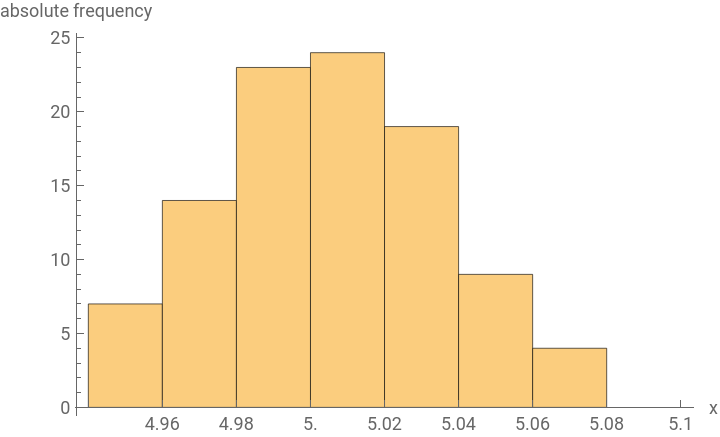
Using (not ) as third argument rescales the -axis to display the probability density. Meaning, the area of the bin will equal the probability of that class, if you multiply the value with the bin width of that class,
e.g. for the class “”:
"PDF"
"Probability"
y
e.g. for the class “
4.98<x≤5.00
11.5·0.02=0.23=23%
In[]:=
Histogram[data,bspec,"PDF",ticks,AxesLabel{"x","probability density"}]
Out[]=
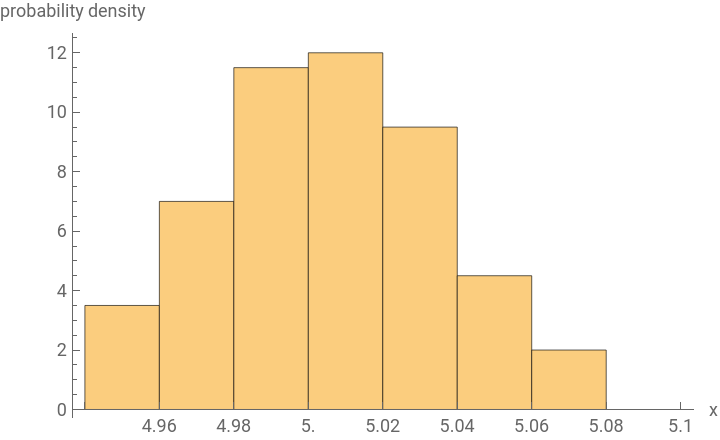
An alternative and maybe more intelligible way of plotting the probability density is by using the Plot[PDF[]] idiom. It makes clearer that the probability density is constant, namely equal to 11.5, throughout the entire interval from 4.98 to 5.00.
In[]:=
h=HistogramDistribution[data,bspec];Plot[PDF[h,x],{x,4.92,5.10},Evaluate@ticks,AxesLabel{"x","probability density"}]
Out[]=
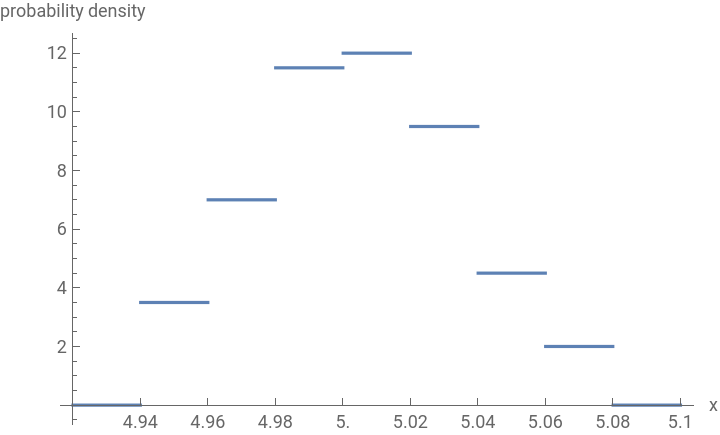
While using the HistogramDistribution[] function effectively destroys statistical information (unfortunately tbh), its advantage is that now you’re able to plot the probability density/understand its visualization more readily and do “continuous math” with it, like integration. You can’t do such a thing with the EmpiricalDistribution[]:
In[]:=
{Integrate[PDF[e,x],{x,-∞,∞}],Integrate[PDF[h,x],{x,-∞,∞}]}
Out[]=
{0,1}
So far so good.
Now let’s assume that the above list of raw data is undisclosed or simply unknown to the reader (of a newspaper article, of a textbook problem, etc). Instead, a “summary” of the data is given in form of a table with classes versus their counts (i.e. absolute frequency) or relative frequency. Typically, following some rules of thumb, class sizes (“bin widths”) are chosen equal, not too wide, not too narrow, but in general they don’t have to be equal. Placing data points into sized classes destroys statistical information irreversibly but gives a nicer overview of the data by smoothing out spikes within each class.
Now let’s assume that the above list of raw data is undisclosed or simply unknown to the reader (of a newspaper article, of a textbook problem, etc). Instead, a “summary” of the data is given in form of a table with classes versus their counts (i.e. absolute frequency) or relative frequency. Typically, following some rules of thumb, class sizes (“bin widths”) are chosen equal, not too wide, not too narrow, but in general they don’t have to be equal. Placing data points into sized classes destroys statistical information irreversibly but gives a nicer overview of the data by smoothing out spikes within each class.
As we can confirm, the below table is a correct “reduced” representation of our data. Statistical information has been destroyed at this point, oh well. This is actually what is given in the problem statement:
density x in g/cm³ | absolute frequency |
x ≤ 4.96 | 7 |
4.96 < x ≤ 4.98 | 14 |
4.98 < x ≤ 5.00 | 23 |
5.00 < x ≤ 5.02 | 24 |
5.02 < x ≤ 5.04 | 19 |
5.04 < x ≤ 5.06 | 9 |
5.06 < x | 4 |
“The advantage of the class division is that peak values are lumped together, this leads to a smoothing of the graphical representation and takes out the unrest.” - Not my Engrish ;-)
A very good question, and it hasn’t been answered in the documentation, is now:
How do we transfer/input this kind of easy-to-understand tabulated “data” (it is not really data or is it?) directly into Mathematica for further processing?
Vocab items which come to mind are EmpiricalDistribution[], WeightedData[], Histogram[], HistogramDistribution[], but none of them work here because they need a list of distinct values, e.g. in WeightedData[] you cannot assign probabilities to classes/intervals. Or you would have to calculate middle points of the intervals.
A very good question, and it hasn’t been answered in the documentation, is now:
How do we transfer/input this kind of easy-to-understand tabulated “data” (it is not really data or is it?) directly into Mathematica for further processing?
Vocab items which come to mind are EmpiricalDistribution[], WeightedData[], Histogram[], HistogramDistribution[], but none of them work here because they need a list of distinct values, e.g. in WeightedData[] you cannot assign probabilities to classes/intervals. Or you would have to calculate middle points of the intervals.
The (undocumented) trick here is to use the DataDistribution[] function. Write as first argument, followed by a list of two lists , followed by an indicator of the dimensionality d of the original raw data, followed by the length n of the raw data:The second list, , lists all bin boundaries, clearly marking the beginning/end of every interval, even if the outer classes are open-ended; it’s basically a flattened version of bspec from earlier.The first list, , lists the probability density of the class which lies between those bin boundaries; naturally its length is shorter by 1 than .And how do we calculate the probability densities from the given table? — Simply divide the relative frequency of the class by the class size (or bin width). For example for the 3rd bin: 0.02=0.02==11.5.Also make sure that the last bin is defined to be a zero.One Look Is Worth A Thousand Words:
"Histogram"
{,}
lis
1
lis
2
DataDistribution["Histogram",{,},d,n]
lis
1
lis
2
lis
2
lis
1
lis
2
23
n
23
100
23%
0.02
d=DataDistribution"Histogram",{7,14,23,24,19,9,4,0}*,{4.94,4.96,4.98,5.00,5.02,5.04,5.06,5.08,5.10}+ε,d,n;
1
n*0.02
What have we gained by this procedure? First of all, we managed to build a legitimate distributional representation of the “data” in Mathematica, namely of the histogram distribution (not the empirical distribution!):
In[]:=
d==h
Out[]=
True
So now we can profit from all the amenities which come with the built-in statistical functions like plotting, calculation of mean, variance, probabilities, finding a fitting distribution, and so on.
The exact values for the histogram distribution can be calculated directly, without the need for RandomVariate[] function. Note that the result is less accurate than calculating directly from the empirical distribution. Because of the general loss of accuracy when dealing with histogram-related quantities, we do want to depart from it as soon as possible and approximate it by a smoother distribution like a normal distribution. Also check out the SmoothHistogram[] function said jim.
Last but not least we haven’t forgotten that Mathematica has the built-in functions ProbabilityPlot[] (what’s that? i can’t figure it out) and ProbabilityScalePlot[]. Here we can use the latter and compare the plots based on the normal distribution approximation and on the original histogram distribution; even though the histogram distribution is original (but not as good/original as the list of raw data!), one should expect a slightly improved fit with the normal distribution.
It was very tricky to use the Point[] function for plotting the data points in the probability plot as well because of the transformed y-axis scaling. How to plot singular data points with Epilog in a ProbabilityScalePlot[] has not been documented, what a pity.
It was very tricky to use the Point[] function for plotting the data points in the probability plot as well because of the transformed y-axis scaling. How to plot singular data points with Epilog in a ProbabilityScalePlot[] has not been documented, what a pity.
A comparison of the three distributions shows that the empirical distribution is good enough for the estimation of the mean and variance but calculating probabilities is more accurate with a smooth distribution like the normal distribution.
One can use Plot[] or DiscretePlot[] to plot pdf’s and cdf’s, same difference. You are not surprised that the plot of the probability density function of the empirical distribution does not show, even with DiscretePlot[] and high plotting resolution, are you?
Fortunately the user doesn’t have to construct the formula for the cdf manually by using Piecewise[] or Boole[] or or. Mathematica does it automatically, you can check:
Personal comment: If you don’t really understand what i was trying to convey and teach (you, me, us) with this post, all the little things and technical details, then you’re in the same boat where i was half a year go. Back then i didn’t know what a distribution is, what it means, how one does maths or stuff with it. Thanks to my nice slow text and to Mathematica i caught up on the basics of probability theory (not so much statistics) and plan on continuing on that path a little further, i fully decided on blitzstein; let’s see how many of the blitz problems can be done/helped by our software. Anyway, this maths topic is fun and anyone with little math background can find a sure footing in the topic, and the problems are all of practical nature and relevant, cheers!