ORIGINAL PRESENTATION: Bart ter Haar Romeny, XAI: A model to explain StyleGANs. Wolfram Technology Conference, https://www.wolfram.com/events/technology-conference/2023/presentations/
1. Introduction
1
. IntroductionA StyleGAN (Style Generative Adversarial Network) is a type of generative model capable of generating realistic images. It is a deep learning architecture that combines the power of generative adversarial networks (GANs) with the concept of style transfer.
The classical movie by Tero Karras et al. (NVIDIA Corporation) [
0
]shows some of the style change effects:Like for most deep neural nets, it is not trivial to explain what happens inside. In this computational essay I propose an explanation based on active shape and active appearance models [
0
]. Mathematica turns out to be ideal for exploring. Many commands are one-liners.Traditional GANs consist of two neural networks: a generator and a discriminator. The generator network learns to generate synthetic images, while the discriminator network learns to distinguish between real and fake images. During the training process, the generator tries to produce images that can fool the discriminator into classifying them as real.
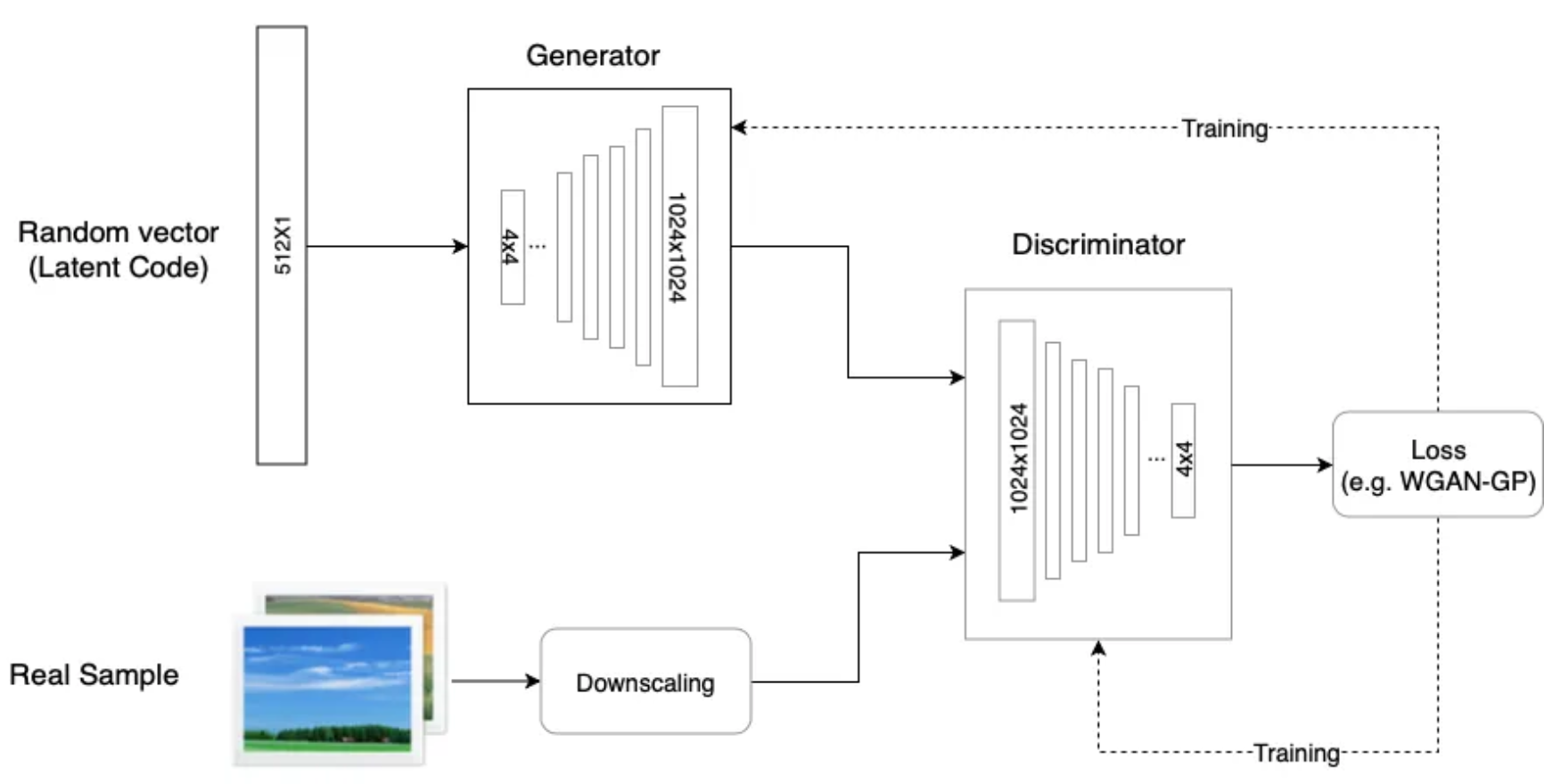
StyleGAN takes this concept further by introducing style transfer techniques. It allows for control over various aspects of image generation, such as the style, pose, and other visual attributes. By incorporating a mapping network and injecting style vectors at different layers of the generator, StyleGAN can disentangle different aspects of image generation and manipulate them independently.
Increasing the resolution (and training time) gives finer features:
In[]:=
AnimatedImage[Import["https://www.neuromath.net/images/StyleGAN02.gif"],FrameRate->1,ImageSize->500]
Out[]=
Coarse - resolution of up to 82 - affects pose, general hair style, face shape, etcMiddle - resolution of 162 to 322 - affects finer facial features, hair style, eyes open/closed, etc . Fine - resolution of 642 to 10242 - affects color scheme (eye, hair and skin) and micro features .
Is there a relation between ‘explainable computer vision’ and the ‘internal learned representation’?
2. Active shape and appearance models
2
. Active shape and appearance modelsIn order to vary style and pose, a learned representation is required.
Pose variations are described by an active shape model (ASM): a statistical model frequently used in computer vision and image analysis to represent and analyze shape variations in complex shapes such as human faces, organs or other biological structures. The ASM is built by capturing the shape variation from a training set of annotated examples, typically labeled landmarks or contour points on the objects of interest.
The inherent shape variations of the objects in the training set are determined by Principal Component Analysis (PCA). It represents the mean shape and the principal modes of shape variation as a low-dimensional subspace.
Style variations are described by an active appearance model (AAM): PCA of the pixel intensities or texture variations associated with the shapes.
3. Methodology
3
. MethodologyIn the next section a database is generated of 1000 high resolution random face images, captured with Mathematica from the website www.thispersondoesnotexist.com. From each face 68 keypoints are extracted for the outline, eyes, nose and mouth. Principal component analysis (PCA) on these points gives eigenmodes, from which deviations of he shape around the mean can be constructed.
()
2
1024
In order to generate active appearance images, the images have to be aligned to the mean keypoint set by deformation, which is done by interpolation by radial basis functions. The principal components of the pixel intensities enable lighting, expression and gender variations. AAM on a region including the eyes enables the generation of eye movements.
1
.2
.Active Shape Model: PCA on keypoints, study principal modes of variation
3
.We don’t want glasses and sunglasses:
Classification into glasses, no glasses, sunglasses with LeNet
Classification into glasses, no glasses, sunglasses with LeNet
4
.Active Appearance Model: deform to mean shape, PCA on intensities (nose, eye region)
5
.Generation of StyleGAN faces from ASM and AAM
4. Construction of the GAN face database
4
. Construction of the GAN face databaseThere is an interesting and easy way to collect a large database of high-resolution () realistic color images of faces by reading the generated image from the website https://thispersondoesnotexist.com:
2
1024
In[]:=
ImageCollage[Table[Pause[0.2];Import["https://thispersondoesnotexist.com/","Image"],{9}],ImageSize->400]
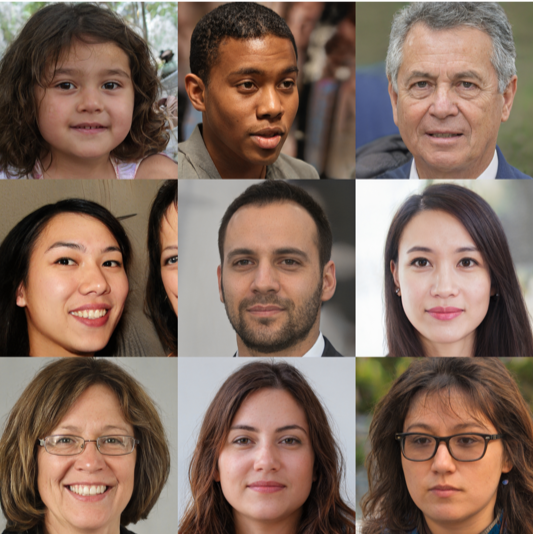
We will create a database with a root directory and several subdirectories.
NB: change the root directory when required. The total database will be ~ 300 MB.
NB: change the root directory when required. The total database will be ~ 300 MB.
Directory tree for the database (see the initialization cells at the bottom of this notebook):
root (typically set to NotebookDirectory[] ) GANFaces-Originals GANFaces-Highlighted GANFaces-Keypoints GANFaces-Thumbs64 GANFaces-Thumbs128 GANFaces-DeformedToMean
Do a first test with reading 20 face images to get an impression of the processing time, given the download speed on your system:
In[]:=
nFaces=20;n=1;ProgressIndicator[Dynamic[n],{1,nFaces}]First@AbsoluteTiming[Do[n=i;Export[NotebookDirectory[]~~"GANFace"~~"-"<>pad[i]<>".jpg",Import["https://thispersondoesnotexist.com/","Image"]];Pause[0.2];,{i,1,nFaces}]]
It might be tempting to Parallelize this function, but it turns out that the website is not fast enough: it takes some time to generate a new face on the website. The Pause statement prevents reading the same image again.
Now you can change nFaces to 1000 images and import all face images in about 12 minutes for the upcoming experiments.
We go create thumbnails, extract keypoints, deform images: it takes some time. It is better to import and extract the pre-calculated full database (300 MB) into the root directory.
Because it is a busy website, some occasional duplicates may occur. With the thumbnails a check is easy:
To extract the pose, landmarks (keypoints) are needed on the face image. These are conveniently determined with a trained neural net from the Wolfram Neural Net Repository. The net “2D Face Alignment Net Trained on 300W Large Pose Data” predicts the locations of 68 2D keypoints (17 for face contour, 10 for eyebrows, 9 for nose, 12 for eyes, 20 for mouth) from a facial image.
The output is 68 heat maps, one for each landmark, indicating the probability where it can be found:
This is not a very precise location. If we study the probability map in more detail, e.g. for the first heat map:
Rotating the image with our mouse, we see that there is surprisingly little noise, and we can just take the center of gravity to determine a sub-pixel precision position:
Landmarks associated with different facial features can be grouped by colors:
The keypoint sets for all original images are stored in *.dat files in the GanFaces-Keypoints subdirectory.
Download all pre-calculated data:
or calculate the keypoints for all 1000 GAN faces yourself (make the next cell ‘evaluatable’):
Test: here are the first 9 highlighted images:
The ratio between the distance between tip of the nose (keypoint 31) to the most left (keypoint 17) and most right point (keypoint 1) of the jaw line, is an indication of the angle different from ‘looking-forwardness’ .
With these networks we can estimate the age and gender:
We put all data into a dataset for convenience:
Paired histogram (population pyramid):
Youngest and oldest:
A random example of each available age:
Compute a 2048 element feature vector for a given face image:
With FeatureNearest we can find the closest match (from 1000 GANFaces) in the 2048-dimensional feature space:
The best match is not too bad.
To develop active appearance models we need faces without glasses or sunglasses.
Classification in three classes: {noGlasses -glasses - sunGlasses}.
Classification in three classes: {noGlasses -glasses - sunGlasses}.
We could use Classify, but it is nice to check the performance of one of the simplest convolutional neural networks to classify images: a slightly modified ‘vanilla’ LeNet network (made for MNIST), now with an encoder for RGB input images of size {64,64}, and a decoder for 3 classes as output. The network is uninitialized.
The net is trained with the 4000 examples, running on the GPU.
We use the test data as validation data:
We use the test data as validation data:
Check for 10 new images (with the Dataset function):
It does a good job.
With Switch[ ] we write the classified images to the resp. subdirectories:
The first step is to construct principal ‘modes of variation’ of the keypoint sets of many images by means of Principal Component Analysis (PCA).
We start from the 1000 keypoint sets of GAN faces, each with 68 face keypoint coordinate pairs:
The keypoint sets are flattened into 1000-long column vectors:
The variations are around the mean, visualized by unfolding the mean column vector by partitioning into pairs:
The covariance matrix:
Eigenvectors Eigenmodes
Eigenvectors Eigenmodes
The eigenmodes are distinct, and describe the principal shape variations of the set of all faces.
It is instructive to move the first and second eigenmode together on a 2D LocatorPane. The mean shape is in the center of the figure:
The first eigenmode can be extrapolated to very large angles, even with occlusion by the nose, a situation which is not in the original data.
Eigenvalues
Eigenvalues
The 136 eigenvalues decrease fast. The first 10 eigenmodes describe > 96% of the variations:
as also can be seen in the so-called ‘scree-plot’:
This is the key reason that this representation is so efficient: most shapes can be generated from a very small set of basis functions (modes).
The restricted set is keypointsR. Just as above, the ASM can be inspected for the first 10 eigenmodes:
The interpretation of the eigenmodes, in order of importance (for this dataset):
1. Cervical flexion: bending the head forward towards the chest
2. Camera motion up and down
3. Cervical rotation (turning the head to the left or the right)
4. Smile
5. Face width
6. Eye and mouth height
7. Eyebrow frowning
8. Trapezoid shape
9. Anti-trapezoid shape
10. Eyebrow length
2. Camera motion up and down
3. Cervical rotation (turning the head to the left or the right)
4. Smile
5. Face width
6. Eye and mouth height
7. Eyebrow frowning
8. Trapezoid shape
9. Anti-trapezoid shape
10. Eyebrow length
Active Appearance Model (AAM)
Active Appearance Model (AAM)
A cute example is the interactive deformation of Mona Lisa’s face by moving a few keypoints:
(source: Markus van Almsick, Wolfram Research, code given in the initializations section at the end, see also the video of his presentation at the Wolfram Technology Conference 2020)
(source: Markus van Almsick, Wolfram Research, code given in the initializations section at the end, see also the video of his presentation at the Wolfram Technology Conference 2020)
To see a bit more in detail how such Thin Plate Splines work, we use the following function RadialBasisInterpolation from Manan Aggarwal, Johns Hopkins University:
https://community.wolfram.com/groups/-/m/t/1381776.
https://community.wolfram.com/groups/-/m/t/1381776.
Experiment 01: deform a grid
Experiment 01: deform a grid
To exercise the radial basis interpolation, we start with a 1000 mm x 1000 mm test grid, one grid line per 20 mm, which we go deform at specific source positions. These source positions are each given a random shift vector to move to the respective new target positions. We digitize the grid into an image, and show the source points (red), shift vectors and target points (green):
You can calculate the movie, but it has been downloaded with the auxiliary data:
It works fine, as we see below (seeing is believing ☺).
Experiment 02: face orientation change
Experiment 02: face orientation change
The input is a left-looking styleGAN-generated non-existing face, #230.
The source points are the facial keypoints, scaled to 1024:
The source points are the facial keypoints, scaled to 1024:
The target points are the mean of all (pre-calculated) landmarks of all 1000 generated images:
The target positions are calculated as the mean of all the keypoints, and visualized with the displacement vectors:
In a movie the gradual displacement ‘left-to-forward’ is better visualized. Using Parallelize we can use (on my laptop) 8 cores simultaneously:
Deform all 1000 images to the mean shape
Deform all 1000 images to the mean shape
In order to create a pose-invariant dataset for the active appearance model, we deform all original styleGAN images to the mean shape. The deformed images have been preloaded, the code how they were generated is below.
The pre-calculated keypoint sets are imported:
Active Appearance Model on the eyes
Active Appearance Model on the eyes
We take 300 names of the faces without glasses, and create the filenames of the deformed faces:
Interactively estimate the locations of the eyes:
Perform PCA to get the eigenmodes:
The first 7 eigenmodes:
Eigenmode 7 is the eye focus direction.
Male to female
Male to female
Starting with the faces without glasses, we select those looking more or less forward, from which we create the filenames of the deformed-to-mean faces:
Principal component analysis:
It takes about 94 seconds to compute the first 25 eigenvectors and eigenvalues of a dense covariance matrix with over 150 million entries:
If we cannot wait, we can import the data:
This is a visualization of the first 25 eigenfaces [7]:
Eigenmode 23: girl to boy
Eigenmode 23: girl to boy
New images from randomly weighted eigenmodes
New images from randomly weighted eigenmodes
Each image is the mean + 25 randomly weighted eigenmodes.
We get male and female faces:
We get male and female faces:
Discussion
Discussion
◼
PCA gives a concise representation of shape and intensity variability.
◼
A wide variety of face features can be stored in just a few eigenmodes.
◼
PCA is a feasible explanation of the behaviour of styleGANs.
◼
Deep learning (and possibly brain learning) is representation learning.
◼
Computational essay in Mathematica:
highly interactive, visual, short, readable and fast code.
highly interactive, visual, short, readable and fast code.
References
References
CITE THIS NOTEBOOK
CITE THIS NOTEBOOK
XAI: A model to explain StyleGANs
by Bart ter Haar Romeny
Wolfram Community, STAFF PICKS, November 17, 2023
https://community.wolfram.com/groups/-/m/t/3067064
by Bart ter Haar Romeny
Wolfram Community, STAFF PICKS, November 17, 2023
https://community.wolfram.com/groups/-/m/t/3067064