This project developed a prototype tool for users to navigate through Entity data while providing concrete visualizations of conceptual relationships between entities. This functionality could find general purpose use, but is of particular interest for implementing pedagogical practices consistent with constructivist educational philosophy. An iterative approach was taken to design, generating successive implementations of the larger idea. A working prototype was developed and shared here for future improvements. Future development could be organized into two threads: refining functionality for specific use cases and developing design principles for capturing and representing conceptual relationships in structured data.
Working Prototype Navigation Tool
Working Prototype Navigation Tool
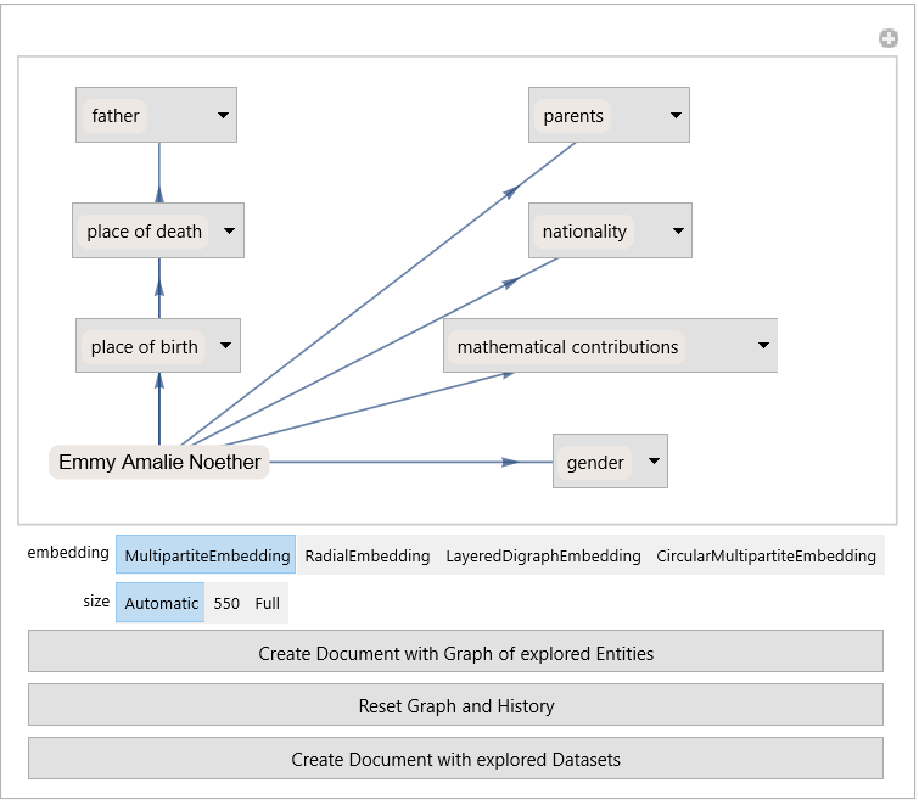
Explanation of the rationale and design process is left for subsequent sections in favor of showing the current prototype tool first. The prototype tool allows users to see a visual representation of a given Entity symbol’s EntityProperties that will lead to other Entity symbols when retrieved. Selecting one of these Entity symbols from an EntityProperty menu will grow a history where the last Entity “visited” is used to repopulate the menu options and extend the visualization. Buttons at the top of the display allow opening a new Notebook that shows either a visualization of the path followed or a more detailed Dataset for each Entity symbol in the history.
Interaction with the prototype below is recommended before proceeding to the sections explaining the rationale, goals, process, and code. There is also a rasterized (non-interactive) image of the tool provided below that to get a sense for its functionality before initializing and running a Kernel. Users should note that exploring in the direction of geographic areas often causes noticeable load time, since these entities are among the “largest” in some sense.
In[]:=
interactiveEntityNavigatorPrototype
In[]:=
interactiveEntityNavigatorPrototype//Rasterize
Out[]=
Code Implementing the Prototype Tool
Code Implementing the Prototype Tool
For completeness, the code implementing the prototype tool can be found below. Several helper functions are defined before the function implementing the tool. This section can be read after the rationale, goals, and process if desired. Some further discussion of this particular implementation can be found in the Future Developments section.
A helper function that takes a pair of entities already found to be connected through a property and prepares a labeled, directed edge with click-to-copy labels between the two:
In[]:=
entityPairToLabeledDirectedEdge[ source_Entity,dest_Entity ]:=DirectedEdge[ ClickToCopy[source], ClickToCopy[dest], ClickToCopy@First@Select[ EntityProperties[ source ],MemberQ[ EntityValue[ source, # ],dest, {0,Infinity} ]& ]]
A helper function that uses the previous helper function to create a labeled, directed graph from a list of entities previously found to have connections to one another:
In[]:=
visualizePath[ entitylist_List, embedding_:Automatic,size_:Automatic]:=Graph[ entityPairToLabeledDirectedEdge@@@Partition[ entitylist,2,1 ], VertexLabels->Placed[Automatic,Center], EdgeLabels->Automatic, GraphLayout->embedding, ImageSize->size]
A helper function that takes an association and returns an association where the values are modified to be lists of entities that were either in nested lists or in the first argument of rules in the original association: (Only keys still associated with a non-empty list of entities are kept. Note that a similar and perhaps better version of this helper function could be obtained with Extract and Position mapped to the values.):
In[]:=
homogenizeValuesToEntityLists[ assoc_Association ]:=Select[ Map[ DeleteCases[ Except[_Entity] ] @* ReplaceAll[ Rule[e_Entity,_]:>e ] @* Flatten @* List, assoc ], #!={}&]
The function which uses these helpers to run the interactive tool, accepting any entity as the argument to be the starting point: (Note that Manipulate is really only used for quick-prototyping of the control scheme, a DynamicModule with custom controls would be preferable for future iterations. There are also a few remaining undesired behaviors of the prototype tool.)
In[]:=
interactiveEntityNavigatorPrototype[ init_Entity ]:=DynamicModule[ active=init,history={},activeAssociation , Dynamic[ history = Join[ history,{active} ]; activeAssociation = homogenizeValuesToEntityLists[ EntityValue[active,"NonMissingPropertyAssociation"] ]; Manipulate[ Graph[ Join[ DirectedEdge@@@Partition[ history,2,1 ] , Thread[ active->Keys[ activeAssociation ] ] ], VertexLabels-> ent_Entity:>Placed[Automatic,Center], prop_EntityProperty:>Placed[ PopupMenu[ Dynamic[active],activeAssociation[prop],prop ],Center ] , EdgeShapeFunction->"Arrow", GraphLayout->embedding, ImageSize->size ], {embedding,{"MultipartiteEmbedding","RadialEmbedding","LayeredDigraphEmbedding","CircularMultipartiteEmbedding"}}, {size,{Automatic,550,Full}}, Button[ "Create Document with Graph of explored Entities", CreateDocument[ ExpressionCell[ visualizePath[history,"MultipartiteEmbedding"] ] ] ], Button[ "Reset Graph and History", history={};active=init;], Button[ "Create Document with explored Datasets", CreateDocument[ ExpressionCell[ Dataset[ EntityValue[ #,"NonMissingPropertyAssociation"] ] ]& /@ DeleteDuplicates[history] ] ], ControlPlacement->Bottom,SynchronousUpdating->False ], TrackedSymbols:>{active},SynchronousUpdating->False ]]
Design Goals and Rationale
Design Goals and Rationale
Design Goals
Design Goals
The overarching goal was to create a tool that allowed for visualization of relationships between Entity symbols that also allowed the user to navigate using only a mouse. Students new to Wolfram Language or to computation in general were one of the main use cases considered for the design. However, the usefulness of visualization is not limited students or learners of the Wolfram Language. Visualization of connections between Entity symbols is also of potential value for debugging and research purposes.
The goals were specified as several phases of refining the design, which can be summarized as follows:
◼
Develop rudimentary click-to-navigate functionality from one entity to another related entity.
◼
Incorporate visualization based on pre-defined relations between entities, which could include EntityClass, EntityTypeName, or EntityProperties.
◼
Investigate scoping constraints on the original problem that could lead to more focused designs.
◼
Incorporate user customization of the interface and organization scheme between entities.
◼
Iterate to refine features and functionality of the prototype tool as much as time allowed.
Rationale
Rationale
Visualization has long been the topic of research in both mathematics and science education [1], [2]. More recently, concepts like Visualization Onboarding [3] have also been explored as ways to think about learning tools for students. The interactivity of some visual tools can also allow for scaffolding student experiences in the sense of the constructivist philosophy of learning [3].
Aside from these historical and philosophical trends, visualization of relationships between Entity symbols also provides an arena to consider ways of encoding semantic information in a human-usable way. For example, EntityProperty[ “Person”, “Children” ] immediately suggests what one is likely to encounter when this property is applied to a “Person” Entity. More will be said about the specific example below in the Future Development section.
There are another related questions one might ask about Entity symbols. For example, what is the “path” between two given entities if a path exists? Conducting this search is, in general, a non-trivial exercise. Visualization and interactivity using the semantics implied by EntityProperty symbols allows users to bring human problem-solving “into the loop” in an interesting way. The fact that this is possible suggests general principles that could be developed to assist in algorithmic searches through structured data of this type. However, more will be said about that in the Future Development section.
Iterative Process and Findings
Iterative Process and Findings
Key Steps of Iteration
Key Steps of Iteration
The first phase of iteration addressed the basic issue of mouse-only navigation from one Entity to another Entity through the properties of the first. This phase eschewed the stronger visual component in favor of a simple dynamic grid that displayed “reachable” entities. Interestingly, this functionality was not far off from the logic of the helper function homogenizeValuesToEntityLists. While it was not originally conceptualized as a key step in the task, this reduction of the returned values to a specific kind was what allowed progress in future iterations.
While considering possible ways to organize the visual aspects, the “EntityCount”, number of “EntityClasses”, and number of “Properties” for each of the 344 entity type names were investigated. Clearly the number of individual entities is too large in most cases to visualize without some kind of additional structuring. EntityClass provides one interesting way to do that, with implicit classes being a particularly powerful way for users to define their domain of interest. However, for this prototype, the properties of each entity proved to be the most successful organization scheme.
Histograms from the earliest iterations:
The second phase of iteration focused on incorporating visual elements. The version of this which seemed most promising at the time involved the creation of a graph showing a source Entity as the central vertex, EntityProperties that led to other entities as vertices connected to the central vertex, and EntityTypeNames of the “reachable” entities as the outermost layer of the graph. At this stage the graphs were not directly interactive, but tried to visually capture the structure of the available options in the interactive menu.
Examples of the graphs made in the second phase of iteration:
The third phase of iteration was originally going to focus on ways to scope the interface and problem statement, but in the course of implementation actually wound up focusing on refining some of the user control mechanisms. The ability to dynamically scope the interface as a result of the user specifying options would still be a desirable feature. For example, the user might only want to see connections to “math related” or “physics related” objects as defined by some design choices to define the parameters of the scoping. This would be a fruitful area of further development for specific use-cases, as there is likely some low-hanging fruit.
The fourth and most recent major phase of iteration at the time of writing reworked the user interface to a form quite similar to the one presented here. This phase of iteration involved a rethinking of the visual elements away from EntityTypeName or EntityClass organization scheme and refocusing on the concept of an EntityProperty having a “source” entity and “targets” of many different kinds. The basic idea of organizing whatever “targets” came up into a predictable list of a specified kind was present all the way back in the first iteration of design. However, this was not originally conceptualized as a key task in creating the user interface. Making the connection that this was potentially the most important step allowed progress to be made in the design of the present tool, and in speculating about useful future developments.
Unexpected Fruits
Unexpected Fruits
While working on visualization of connections between Entity symbols, several of the visualization methods produced unexpectedly salient features that could be further investigated. For example, unexpected visualization led to the observation that some EntityTypeName categories appear to be “under construction” at time of writing. For example:
These are formatted with the symbolic Head of Entity:
They also have a predictable interaction with EntityTypeName:
However, they do not have the behavior one might predict from EntityValue:
This is interesting in its own right, but might cause potential pitfalls and corner cases for designers pattern matching by the symbolic Head Entity.
There are also interesting examples of an Entity existing both with and without a unique string identifier. This is likely desirable for backward compatibility but is interesting to note for those working with the systems. It might cause confusion for students or anyone who is not paying close attention to the unique string identifiers.
While exploring the visualization of “reachable” entities from a given entity, some unexpected “dead ends” also came up. For example, gold exists as both an “Element” and a “NaturalResource”, but the resource does not connect to the element.
A side-by-side of the Dataset of gold the “Element” and gold the “NaturalResource”:
These examples of interesting behavior were found in a relatively short period of time while trying to organize the connections in a visual way. While one could find cases like this programatically, one has to have the idea to conduct the search in the first place. Unexpected visual results are immediately salient and could lead to more systematic searches after a phenomena is identified.
Some Pedagogical Uses of the Present Tool
Some Pedagogical Uses of the Present Tool
Here are a few interesting questions students could seek to answer by exploring information available to them in the Entity framework visually:
How closely connected are Newton and Leibniz connected through mathematical contributions?
The prototype tool allows them to create this graph after exploring around for a bit. Notice that the non-rasterized version has click-to-copy for each of the Entity symbols and EntityProperty symbols so that students can continue to use them in other code. Students can also use the tool to obtain a fresh document with a dataset for each of the visited entities.
Is there a geographic connection between Elon Musk and Betsy Ross?
Is there a geographic connection between Elon Musk and Betsy Ross?
Note the apparent bug in visualizing this path, one of the property “connections” was not found by the visualizePath helper function. The path was found by using the visualization tool.
A path like this is not immediately obvious, but having a human “in the loop” to provide a little background knowledge leads to a straightforward connection. The human user’s background knowledge supplies heuristics for what is likely to come up by “following” each property to the next Entity. As discussed in the Future Development section, promoting these heuristics into a syntactic construct might allow for interesting design space for creating structured data.
Exploring the life and contributions of Emmy Noether
Exploring the life and contributions of Emmy Noether
Students doing preliminary research for a biographical research project could benefit from explorations like these, using the functionality to open a fresh document with each of these datasets for the next step of research. Allowing greater user control over the locations of vertices in a beginner-friendly way would be a particular feature that would be nice to develop for this use case
Future Development
Future Development
Semantics Implied by Key-Value Associations
Semantics Implied by Key-Value Associations
One of the things that make EntityProperty symbols more structured than arbitrary symbols that could be used in Key-Value pairings is that the EntityProperty symbols contain an EntityTypeName as well as their specific name. For example,
When a human thinks of querying about a person’s children, they automatically associate both the original object and the result objects of the query with conceptual category of “Person”. In the case of and Entity and EntityProperty, this information about conceptual category of the source object is explicitly encoded in the specification of the Wolfram Language symbols. Returning to an example from before:
In many cases, the returned symbols will also have a uniform structure, but the above example shows that this is not always the case. The most well-known child of Catherine the Great is represented as an Entity symbol, but the other two are returned as String symbols. Naturally, there are good historical and practical reasons why this is to be expected in some cases. However, search algorithms based on the semantic relationships implied by EntityProperties must account for corner cases like this. It also creates additional design decision-points that must take cases like this into account.
An interesting future research question would be to identify which EntityProperty symbols already suggest an expected return type to users and to then measure the extent to which expected return types have corner cases like the example above. Collecting data of this sort might allow one to build efficient algorithms for finding connections between Entity symbols or any collection of objects structured in a similar way.
“Categorification” of Data
“Categorification” of Data
Using the example above of Catherine the Great’s children, it would be useful from an algorithm-design perspective to be able to systematically retrieve associations related to entities where the keys “know” information about the types of things they can return as values. Having no such constraint on the most general possible associations is of course a desirable feature. However, for specific tasks related to searching through the “space” of connections between Entity symbols, one could potentially save large amounts of memory and time by using keys that have information about the “source” and “destination” types encoded into their syntax. This is illustrated by the diagram below.
When the number of objects associated to each property key is small, the cost of the property not knowing what it can return is less noticeable. However, as we have seen, various classes and types of entities contain many, many associated objects. This means that encoding semantic information within the syntax of the property-like keys could allow for people to design smarter search algorithms through the space of entities by leveraging this extra information encoded in the property.
Another example of a property not “knowing” what types it will return is illustrated below:
At first glance, one might imagine these could all return the same EntityTypeName, but they do not:
Again, there is nothing wrong with this behavior, as keys or Properties being able to associate to anything gives them great abstract power. Yet, iterations of designing the visual navigation tool in this project suggest there might be an interesting design space for building a more tightly constrained set of properties in addition to the more general ones. One could suggestively use the name “categorification” for this data-structuring design principle in analogy to the fact that every morphism in category theory must have a well defined source and target object.
A possible program of future research questions along these lines is sketched below for future development:
◼
Are there existing EntityProperty symbols that already exhibit the behavior of having well-defined source and target objects?
◼
How common are such semantically rich source-target keys in existing structured datasets?
◼
Are the cases of EntityProperty symbols mixing various source objects typically a case of “missing” data or of designing for advantages offered by the more flexible syntax?
◼
What kinds of efficient search algorithms and visualization tools could be developed if designers have access to these more constrained keys in their “categorified” structured data?
Concluding remarks
Concluding remarks
Visualization tools provide a rich arena both for thinking about pedagogical practice as well as conceptualizing potentially interesting ways to structure data. The prototype visualization tool shared here provides some initial functionality to refine the design space and further iterate. The initial design goals of the project provided interesting directions for exploration, with the areas of user-definition of the interface and user-defined scope as readily apparent ways to extend the functionality of the prototype.
After iterating to the point of a functioning prototype, considering the question “why wasn’t this solution immediately apparent?” leads to the idea of “categorifying” some of the relationships among Entity symbols and EntityProperty symbols, as well as considering how to extend this design principle more generally. Future development of the threads of this project could lead to refining features of the prototype or to considering methods of structuring data for more efficient search and design.
Keywords
Keywords
◼
Visualization
◼
Education
◼
User Interface
◼
Iterative Design
◼
Constructivism
Acknowledgment
Acknowledgment
This author would like to thank AnneMarie Torresen and Craig Carter for their mentorship throughout this project. Their suggestions, assistance, and encouragement were invaluable. This author would also like to thank all of the people who made the Wolfram Summer School 2022 possible through their organization and mentorship, including Stephen Wolfram, Danielle R Mayer, Emily Carter, Mads Bahrami, James Boyd, Jonathan Gorard, Xerxes Arsiwalla, Robert Nachbar, Paul Abbott, Markus van Almsick, Jesse Galef, Jeremy Stratton-Smith, Christopher Wolfram, Jason Sonnenberg, Jose Martin-Garcia, Brad Klee, Nikolay Murzin, Sotiris Michos, Connor Gray and many others. This author would also like to give special thanks to Jeff Bryant for offering his expertise and perspective.
References
References
◼
[1] Clements, Mckenzie. (2014). Fifty Years of Thinking About Visualization and Visualizing in Mathematics Education: A Historical Overview. 10.1007/978-94-007-7473-5_11.
◼
[2] Gilbert, J. K. (2005). Visualization: A metacognitive skill in science and science education. In Visualization in science education (pp. 9-27). Springer, Dordrecht.
◼
[3] Stoiber, C., et al. (2022). Visualization Onboarding Grounded in Educational Theories. arXiv preprint arXiv:2203.11134.