I watched a Dice Ideas Ltd’s video on a TV program where thousands of dice were used to make a mosaic from a photograph. Inspired by this, I attempted the same using Wolfram Language.
Make Dice
Make Dice
The first step is to make images of the six faces of the dice.
In[]:=
dotsize=0.3;imagesize={24,24};dicelist=;dice[n_,facecolor_:Black,dotcolor_:White]:=Rasterize[Graphics[{{facecolor,Rectangle[{-1,-1},{1,1}]},dotcolor,dicelist[[n]]},PlotRangePaddingNone],ImageSizeimagesize];
In[]:=
dices=dice/@Range[6]
Out[]=
,

,

,

,

,


Make Mosaic
Make Mosaic
Make a mosaic of the following photo using dices.
In[]:=
img=
;
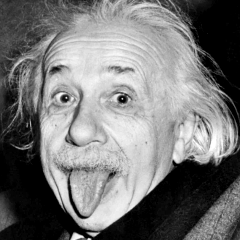
This photo is divided into 128*128 parts that form the base of the mosaic.
In[]:=
size=128;mosaic=ImageResize[img,{size}];imgparts=ImagePartition[mosaic,1];Dimensions@imgparts
Out[]=
{128,128}
Divide 128*128 parts into 6 clusters.
In[]:=
c=ClusterClassify[imgparts//Flatten,6];gb=GatherBy[imgparts//Flatten,c];
Get the positions in the six clusters in order of color intensity.
In[]:=
order=Ordering@gb[[All,1]]
Out[]=
{2,1,3,4,5,6}
Make sure they are in order of color intensity.
In[]:=
gb[[#,1]]&/@order
Out[]=
{
,

,

,

,

,

}

Define a rule that maps cluster numbers to dice numbers 1 to 6, based on color intensity.
In[]:=
order2index=Thread[order->Range[6]]
Out[]=
{21,12,33,44,55,66}
Correspond 128×128 parts to the numbers of the dice.
In[]:=
clusterimgparts=ParallelMap[c,imgparts,{2}];dicenumbers=clusterimgparts/.order2index;
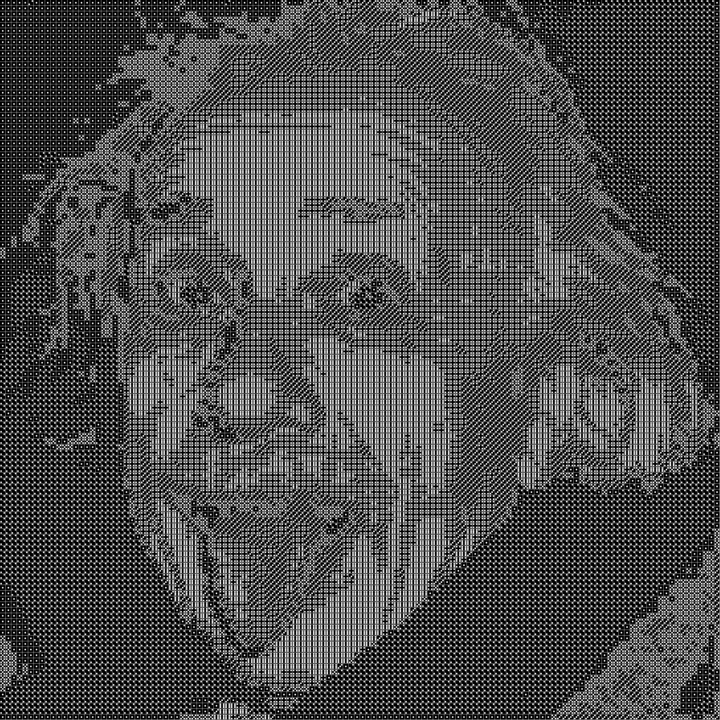
Make a mosaic using 128×128 dices.
In[]:=
diceimgs=ParallelMap[dices[[#]]&,clusterimgparts,{2}];dicemosaic=Rasterize[ImageAssemble[diceimgs],ImageSize->Medium]
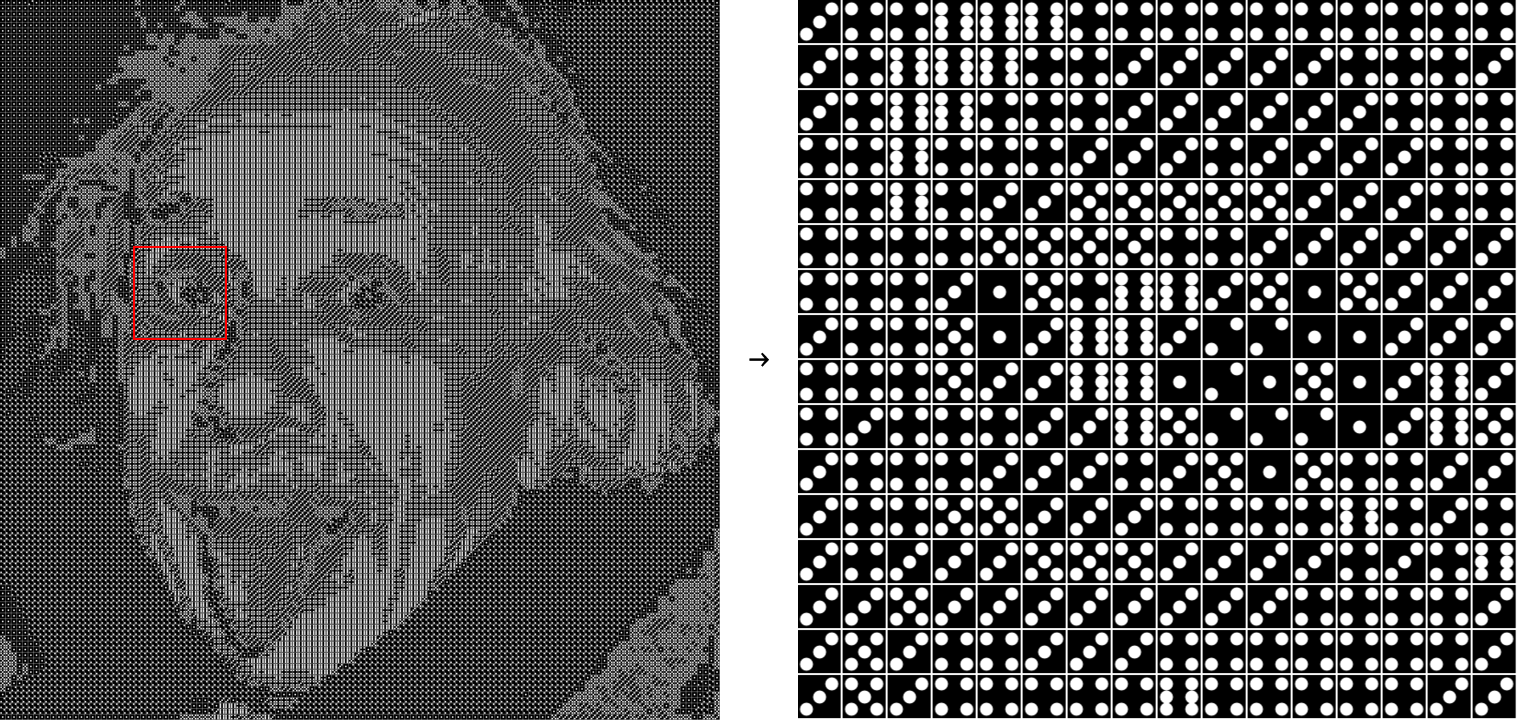
Zoom in around the right eye to see how the dices are arranged.
In[]:=
eye=Rasterize[ImageAssemble[diceimgs[[45;;60,25;;40]]],ImageSize->Medium];RowShowdicemosaic,," → ",eye
Dice color variations
Dice color variations
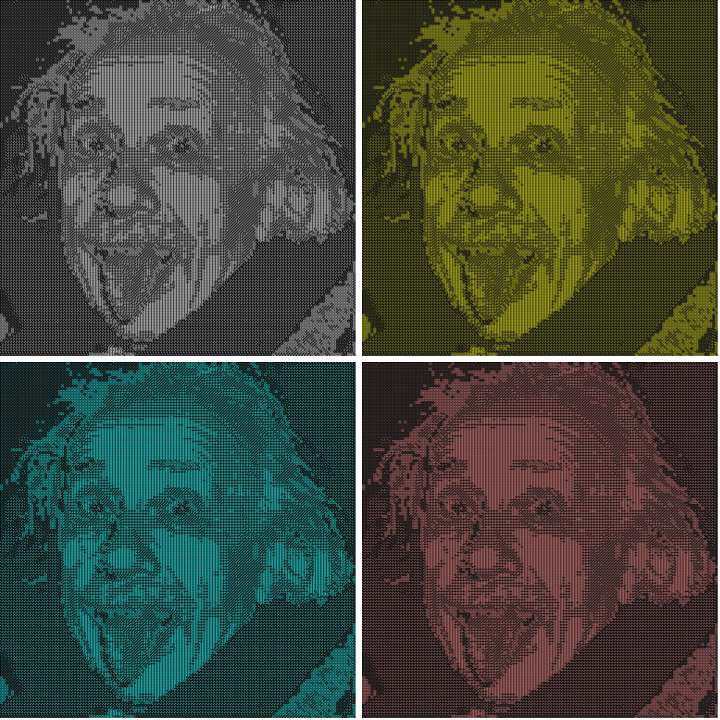
Make four-colour dices.
In[]:=
dicesWhite=dice[#,Black,White]&/@Range[6]dicesYellow=dice[#,Black,Yellow]&/@Range[6]dicesCyan=dice[#,Black,Cyan]&/@Range[6]dicesPink=dice[#,Black,Pink]&/@Range[6]
Out[]=
,
,
,
,
,
Out[]=
,

,

,

,

,


Out[]=
,

,

,

,

,


Out[]=
,

,

,

,

,


Make mosaics made using these.
makemosaic[d_List]:=Block[{diceimgs},diceimgs=ParallelMap[d[[#]]&,clusterimgparts,{2}];Rasterize[ImageAssemble[diceimgs],ImageSize->Medium]];mosaics=makemosaic/@{dicesWhite,dicesYellow,dicesCyan,dicesPink};
In[]:=
GraphicsGrid[Partition[mosaics,2],ImageSize->Medium,Spacings->16]
CITE THIS NOTEBOOK
CITE THIS NOTEBOOK
Making dice art from an image
by Kotaro Okazaki
Wolfram Community, STAFF PICKS, May 1, 2025
https://community.wolfram.com/groups/-/m/t/3453482
by Kotaro Okazaki
Wolfram Community, STAFF PICKS, May 1, 2025
https://community.wolfram.com/groups/-/m/t/3453482