Original setup: Tangents to the graphs of and are drawn at the point of intersection that lies between 0 and . Parallel lines are drawn to these tangents at the other tangents point of intersection with the x-axis. Claim: The quadrilateral created in this way is a golden rectangle.Reference: MEI Maths Items of the month (Oct. 2016)
ytanx
ycosx
x=
π
2
This is a very beautiful problem only involves simple calculus and basic trigonometry. can help you get everything you need with little coding. Mathematical analysis is not included here because the linked resource above is very comprehensive.
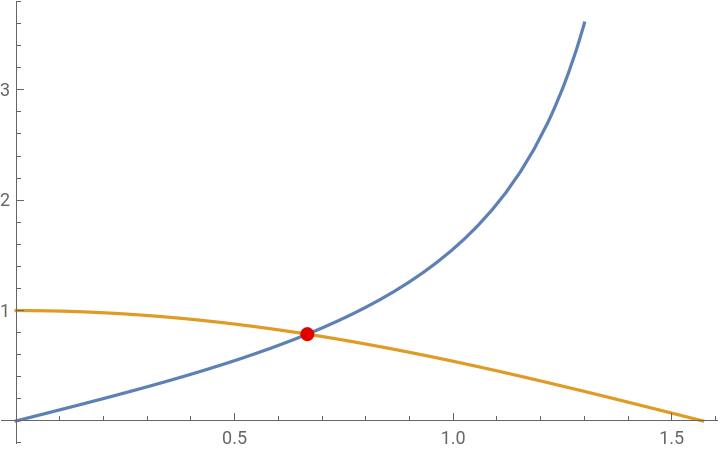
Let’s first pinpoint the exact location of the intersection:
Solve[{Tan[x]==Cos[x],0<=x<=π/2},x]
Out[]=
x2ArcTan

Extract the solution and convert the root object into the radical form:
sol=x/.Solve[{Tan[x]==Cos[x],0<=x<=π/2},x][[1]]//Simplify
Out[]=
2ArcTan1+
1
2
5
-2(1+
5
)The WFR function shows the intersection on graph in the given domain:
Out[]=


cosInfo=FullSimplify/@[y==Cos[x],{x,sol},y,"PointSlopeEquation"]
Out[]=
TangentLine1+2y
2(-1+
+x+2(-1+5
)5
)ArcTan1
2
5
-2(1+
5
)5
x+2y,NormalLine2(-1+
+(1+5
)5
)x+2(1+5
)ArcTantanInfo=FullSimplify/@[y==Tan[x],{x,sol},y,"PointSlopeEquation"]
Out[]=
TangentLine2y,NormalLine1+
2(-1+
+(1+5
)5
)x+2(1+5
)ArcTan2(-1+
+x+2(-1+5
)5
)ArcTan1
2
5
-2(1+
5
)5
x+2yNotice that the set of equations in the results above are exactly the same but switched in order. This means the tangent line for both trigonometric function are perpendicular to each other at the intersection.
The next step is to complete the information of the vertices for the right triangle above the x-axis and bounded by two tangents. This is simply done by switch the attribute of the to “HorizontalIntercept”. The Transpose function is used here to convert the two intercepts from {x1,x2} to {x1,0} and {x2,0} because we need the exact 2D coordinates for the graphics below.
Intercepts=TransposeFullSimplify/@[y==Cos[x],{x,sol},y,"HorizontalIntercept"]//Values,{0,0}
Out[]=
(1++2ArcTan1+1+
1
2
5
)1
2
5
-2(1+
,0,-5
)-2+
+2ArcTan5
1
2
5
-2(1+
,05
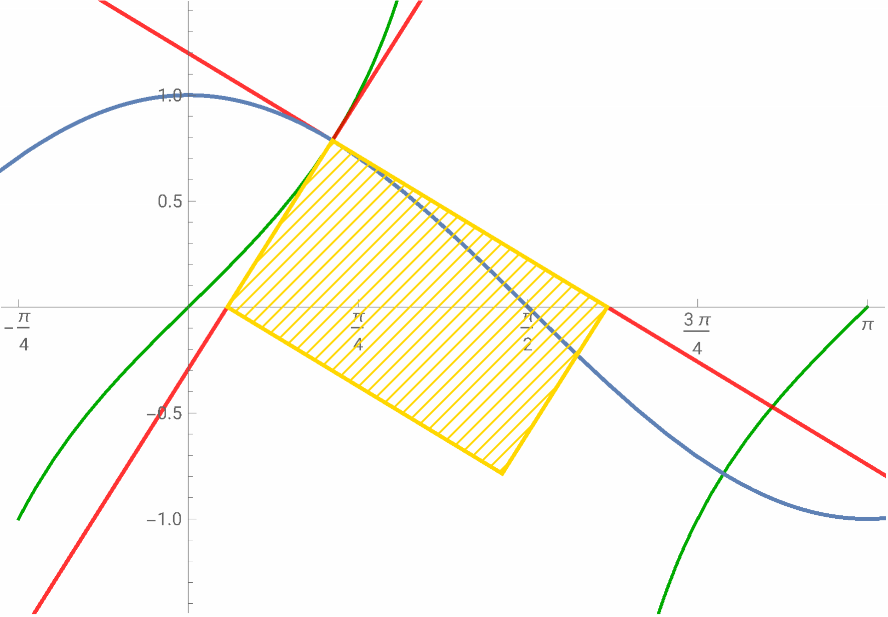
)To complete rectangle we can simply reflect the intersection of tan(x) and cos(x) w.r.t. the mid point of the two intercepts we have found:
In[]:=
pointReflection[p1_,p2_]:=ReflectionTransform[p1-p2,p2][p1]
reflect=pointReflection[{sol,Cos[sol]},Midpoint[Intercepts]]//FullSimplify
Out[]=
2ArcTan1+,
1
2
5
-2(1+
+5
)Generate a rectangle with the polygon function and the coordinates we have so far:
goldenRect=Polygon[{{sol,Cos[sol]},Intercepts[[1]],reflect,Intercepts[[2]]}]
Out[]=
Polygon


Visualize the rectangle altogether with the curve of tangent, cosine and their tangent and normal line at the intersection. This is completed partially by calling the with the “Plot” attribute:
Row@ShowPlot[Tan[x],{x,-π/4,π},Epilog{,HatchFilling[],EdgeForm[{,Thick}],goldenRect},PlotStyleDarker@Green],Values[y==Cos[x],{x,sol},y,"Plot"],,LineLegend,"Cos[x]","Tan[x]","Golden rectangle\nwith side ratio 1:"

1+
5
2
Out[]=


Remark
Remark
◼
Solve and to find and visualize the intersection of two given curves
◼
Use multiple attributes from to find the details of the quadrilateral formed by the tangents and normal lines to minimize laborious calculation