
Writing a Wolfram Language Function
Writing a Wolfram Language Function
THE BASICS OF FUNCTION STRUCTURE
Learning Objectives
Learning Objectives
Motivation
Motivation
Learn the qualities of a good function
The Basics
The Basics
Learn about standard function structure
Optional: learn about pure functions
Arguments
Arguments
Add arguments to a function
Restrict a single argument in a function
Restrict multiple arguments in a function
Add optional arguments and default values
Summary
Summary
Motivation
Motivation
Motivation
Motivation
Qualities of a Good Function
Qualities of a Good Function
Generally speaking, a “good” function is one that:
is robust to all input (i.e. it is difficult to break)
gives a clear output (i.e. it does what you expect it to do)
is flexible (i.e. it has the potential to be applied in contexts beyond its original scope)
has clear documentation (i.e. it can be used and understood by others)
In other words, when presented with a well-designed function, you should be able to read and understand its documentation, apply it in a variety of contexts and receive the results you expect.
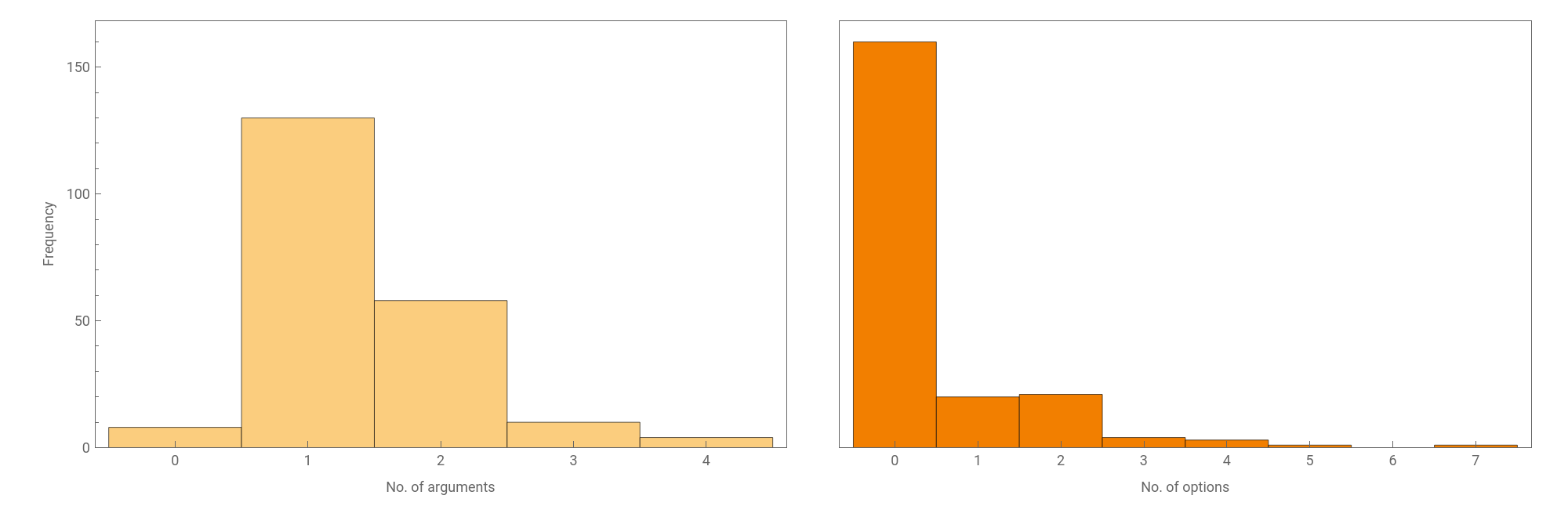
These are just guidelines, however; sometimes, for example, it is useful for a function to be deliberately inflexible, with few or no options. Functions of the form nameQ, for instance, often allow just one argument or no options:
nameQ functions in the Wolfram Language |
The Basics
The Basics
The Basics
The Basics
Function Structure
Function Structure
Standard structure
Standard structure
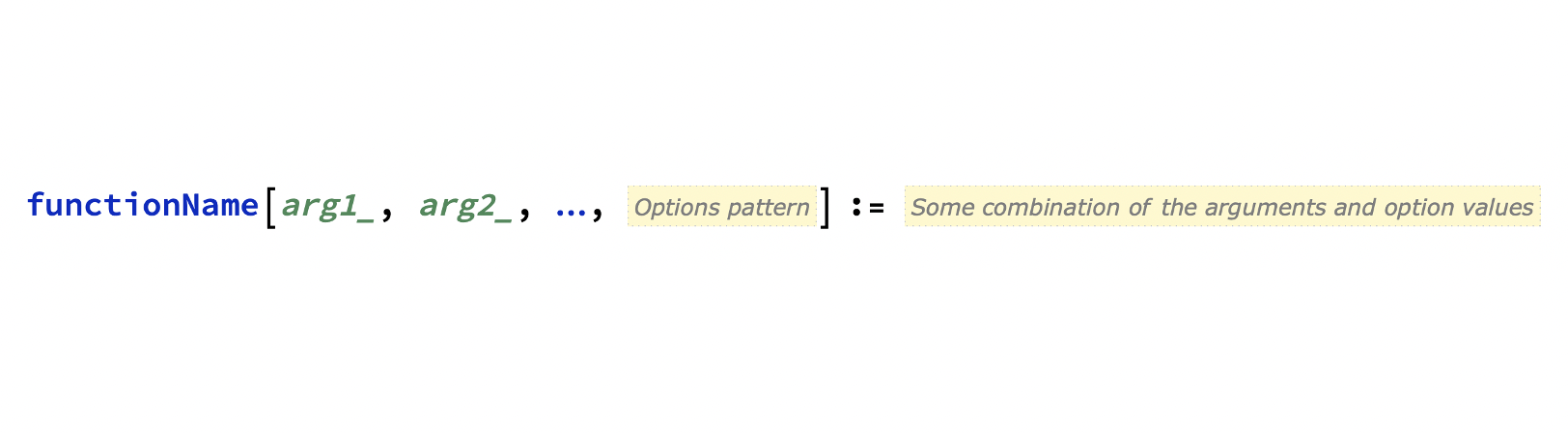
The definition of a function typically takes the following form (mouse over the image for labels):
Common practices
Common practices
For readability, it is usually best to:
use lowercaseCamelCase for the function name (and, to a lesser degree, its arguments)
use UppercaseCamelCase strings or symbols for any options
Other common conventions:
Quick example
Quick example
Here is an example of a function with one argument that multiplies the argument by three:
These lines add the option to take the modulus of the result:
Here is the function in action:
(The details of function construction will be covered later.)
The Basics
The Basics
Optional: Pure Functions
Optional: Pure Functions
The standard structure of a function definition requires you to give the function a name, which is not always desirable. The alternative—a pure function—has the benefit that it is defined in the same place it is used, meaning that someone reading your code will not have to go hunting for a definition.
Applications
Applications
You might want to use a pure function if your function is:
very simple
only being used once
part of a larger function
Forms
Forms
Function
Function is typically used in the form Function[parameters, body]:
(body) &
A pure function can be shortened further by replacing Function[body] with (body)&:
Arguments can be referenced by their positions (# is equivalent to #1):
When applied to associations, slots can be referenced by labels:
f[slots] &
Pure functions can even be used as arguments for other functions:
Precedence
Precedence
When code is evaluated, operators are applied sequentially according to their precedence. This can be thought of as an extension to mathematical precedence, where, for example, multiplication is applied before addition:
When using pure functions with an ampersand (&), it is usually best to include parentheses, both to make your intentions clear and to avoid errors.
Here, the pattern test (?) binds more tightly than the function (&), so parentheses are required for the code to work properly:
This can be checked by looking at the full form:
Arguments
Arguments
Arguments
Arguments
Implementing Arguments
Implementing Arguments
Generally, arguments should be descriptive and lowerCamelCase. To add arguments to a function, put them (comma-separated) inside the square brackets:
Note that there are underscores after the arguments on the left-hand side, but not on the right.
A function can have no arguments at all. Even in this case, it is good practice to use square brackets to indicate that it is a function and not a variable:
Arguments
Arguments
Restricting Arguments: Typical Approaches
Restricting Arguments: Typical Approaches
Tech Note: Patterns and Transformation Rules
Restricting the arguments a function can take can make it more robust. It can also help someone to understand what the function is doing. Argument restriction is done with pattern matching, and there are a few common ways to do this.
Head
Head
Pattern test
Pattern test
More complicated tests may require a pure function:
Pattern
Pattern
For simple patterns like this one, assigning a label is not really necessary. However, it can be very useful when patterns span multiple arguments (more on this later).
Condition
Condition
This can be done inside the square brackets:
…or outside the square brackets:
For a condition with a complicated pattern test, applying it outside the square brackets usually makes the function easier to read. For a computationally expensive test, it may also make the function run slightly more quickly.
Arguments
Arguments
Restricting Arguments: Multiple Arguments
Restricting Arguments: Multiple Arguments
Rather than restricting one argument at a time, you can apply a pattern to several arguments at once.
Pattern sequences
Pattern sequences
Repeated patterns
Repeated patterns
To enforce this, you will need to name the expression being repeated:
Arguments
Arguments
Optional Arguments and Default Values
Optional Arguments and Default Values
Having to insert all the arguments of a function every time it is used can be inconvenient. One solution is to make the arguments optional, replacing them with default values when the arguments are omitted.
Optional
Optional
As you may have noticed, the short form of Optional is the same as that for Pattern (a colon). However, it will usually be clear which is which from the context.
When using Pattern and Optional together, the pattern must go first:
The syntax arg_?test:value is not permitted. If you want to apply a pattern test and have a default value, you must use Pattern:
Overloading
Overloading
Rather than specifying optional or default values, you can simply give a function multiple definitions. This is known as overloading (more on this later):
Summary
Summary
In this part of the course, you have covered:
Qualities of a good function
Standard function structure
Optional: pure functions
Implementing arguments
Restricting single arguments
Restricting multiple arguments
Optional arguments and default values
Initialisation
Initialisation