In a recent Community post I talked about the Bokeh effect simulated by convolution. The result depends on composing large amount of images with alpha blending. Some of my friends have later pointed out to me that the alpha blending was implemented incorrectly. At first, I thought there’s an easy fix: convert to XYZ color space. But as it turns out, the story is much more interesting. Since then I did some reading on color, and would like to share my notes to anyone who is interested in the topic as well.
Helper functions
Helper functions
ClearAll[pipe,branch,branchSeq]pipe=RightComposition;branch=Through@*{##}&;branchSeq=pipe[branch[##],Apply@Sequence]&;
ClearAll[FindDivisionsExact]FindDivisionsExact[range:{_,_},n_Integer?(#≥2&)]:=Rescale[Range[n]//N//Rescale,{0,1},range]FindDivisionsExact[n_Integer?(#≥2&)]:=FindDivisionsExact[{0,1},n]
ClearAll[gammaEncode,gammaDecode]gammaEncode=Functionc,With{z=Abs[c]},Sign[c]Ifz≤,12.92z,1.055-0.055,Listable;gammaDecode=Functionc,With{z=Abs[c]},Sign[c]Ifz≤.04045,,,Listable;
.04045
12.92
1/2.4
z
z
12.92
2.4
z+0.055
1.055
ClearAll[imgGammaDecode,imgGammaEncode]imgGammaDecode=pipe[branchSeq[pipe[ImageData[#,"Real"]&,gammaDecode],Information[#,"ColorSpace"]&],Image[#1,ColorSpace#2]&];imgGammaEncode=pipe[branchSeq[pipe[ImageData[#,"Real"]&,gammaEncode],Information[#,"ColorSpace"]&],Image[#1,ColorSpace#2]&];
Color blending and Gamma correction
Color blending and Gamma correction
Firstly let’s see a classical RGB color blending triangle:
Polygon[CirclePoints[3],VertexColors{Red,Green,Blue}]//Graphics[#,BackgroundBlack]&
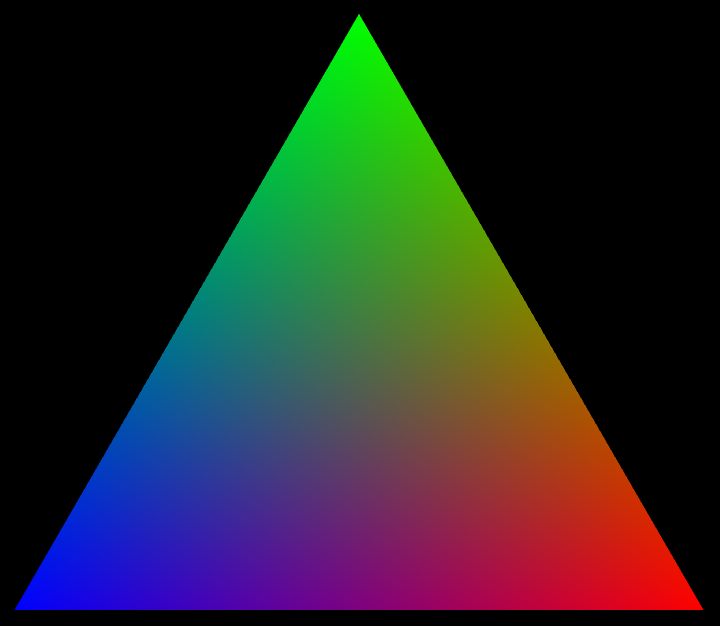
Here the VertexColors option makes sure colors inside the triangle are linear combination of 3 vertices, meaning RGB channel values should sum up to 1 at every point:
//pipe[Rasterize,ImageData[#,"Real",InterleavingFalse]&,Total,branch[pipe[Flatten,DeleteCases[c_?NumericQ/;c<.1],Histogram[#,PlotRangeAll,Ticks{Automatic,None}]&],pipe[Rescale,Image]],Row]
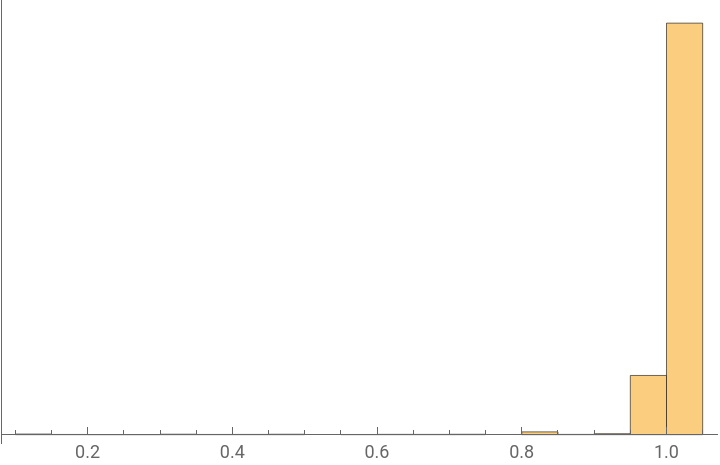
However, from a perceiving point of view, this color blending is not done properly. That is because the channel values in Wolfram Language’s RGBColor, as is the same for most of the digital world, are not linear representations of light intensity. A nonlinear transformation called “Gamma Correction” (or “Tone Response Curve”) is used to encode the normalized intensity (a real value) to the channel value of the RGB space - the color space mostly used.
∈[0,1]
//pipeRasterize,ChromaticityPlot3D[{#,"RGB"},"XYZ",FillingStyleNone]&,Show#,Graphics3DFaceForm[],EdgeForm[Thick],


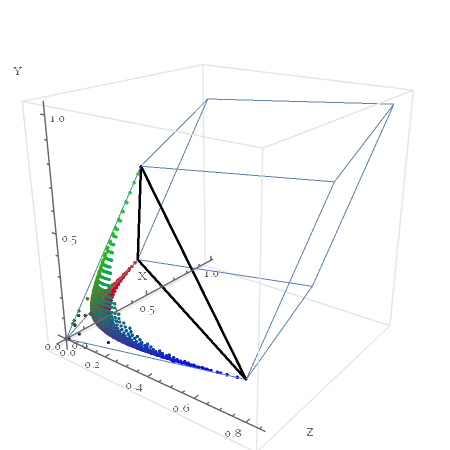
There seem to be lots of mixed reasons (please read the references for details) for the existance of gamma correction: characteristics of good old CRT displays, adaptive to human perception under certain bit-depth restrictions, etc. But the effect itself is visually obvious:
FindDivisionsExact[11]//pipe[branch[Identity,gammaEncode],TableForm[Map[Item["",BackgroundGrayLevel[#]]&,#,{2}],TableHeadings{{ToString[Style["Channel",Bold],StandardForm]<>" value\nrunning linearly",ToString[Style["Intensity",Bold],StandardForm]<>" value\nrunning linearly"},#〚1〛}]&]
0. | 0.1 | 0.2 | 0.3 | 0.4 | 0.5 | 0.6 | 0.7 | 0.8 | 0.9 | 1. | |
Channel valuerunning linearly | |||||||||||
Intensity valuerunning linearly |
Gamma transform from intensity to channel value is usually called gamma encoding:
Plot[gammaEncode[i],{i,0,1},FrameTrue,FrameLabel{"Intensity","Channel Value"}]
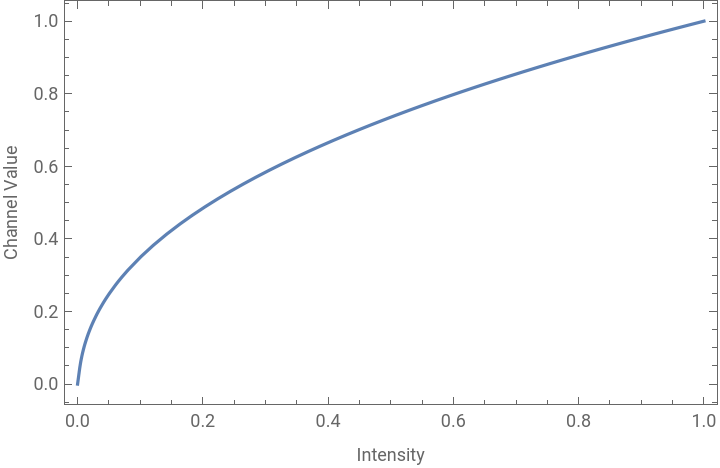
Its inverse function is then called gamma decoding:
So to mix up two colors, we should firstly convert to a linear space where the channel values are directly summable. It can be performed in the XYZ color space:
or in the linearized (i.e. gamma decoded) RGB color space:
but never in the RGB space directly:
Now XYZ color space is indeed a built-in linear color space, so blending can be performed linearly on the channel values - as we have seen. However, converting VertexColors to XYZ space will not work out-of-the-box. My guess is that during the rending pipeline, there is a stage that “regularize” all colors to RGB color space.
Instead, to approximate a correct blending here, we need to discretize the triangle and colorize each vertice manually. Note this is an approximation, as inside each mesh cell colors are still mixed in the RGB space.
And of course using the XYZ color space will also give the same result visually - just replacing
with
Indeed, that’s linear combination in a linear color space:
Alpha blending
Alpha blending
As we have mentioned in the previous post, alpha blending is just pixel-wise color blending with alpha layer as the blending weight, except that the previous post has wrongly stated that the blending is to be done on RGB channel values, when it should be done on intensity:
Consider a simple PSF,
which is used as convolution kernel on a one dimensional color distribution:
The intensity distribution across blurred edge should be
So to match the image size of clearImg we have mixing fraction across the edge as:
A case from real world
A case from real world
But before jumping into computing, let’s take a look at gamma correction in action in the real world.
rawPhoto is a photo (which I took with RAW mode) of defocused orange edge in front of white paper:
Across the edge, color varies from orange to white smoothly:
However if we take a Differences we can see that the variation is not symmetric, which suggests either the PSF of my camera happens to be asymmetric across the orange edge, or we are computing Differences on wrong numbers:
Compare that to what it looks like if we do the same thing on gamma encoded version of blendingFracFunc:
Of course, there was nothing wrong with my camera: once we perform gamma decoding before any computing, the result looks nicely symmetric indeed:
Alpha blending with flat background and overlay
Alpha blending with flat background and overlay
Now we can go back to our digital world to see what is the proper way to do alpha blending.
As we mentioned before, the blending should be done on intensity - or any linear color space that also linearly correlates to intensity. Be it XYZ space:
or linear RGB space:
The results are basically the same:
Also we can see rgbBlending covers a nonlinear path in XYZ color space:
Alpha blending with general background and overlay
Alpha blending with general background and overlay
Now there are two questions we want to ask:
1
.What does all this relate to the built-in function ImageCompose ?
2
.What is the general way to do alpha blending for general image?
The answer to the first question is of course to use alpha channel.
If the overlay image is gamma encoded (like usual images), then it should be gamma decoded before being fed into ImageCompose :
If the overlay image is already in linear color space, then it should be fed into ImageCompose directly:
The two results are almostly the same:
Either way, we can see that for the overlay image, ImageCompose requires the “blurring” effect being solely in alpha channel. So if we prepare the overlay image that way, everything works great:
However, what we see is just the simplest case with blurring effect on a pure color block. Things get more convoluted when the overlay image is more than that.
Take for example the following image:
We want it to be partially transparent, following a pattern like this:
More importantly: here we want what we see from img is itself already a result of alpha blending between a hypothetical RGB image and a flat white background with blending weight alpha .
How should we tackle the problem?
Now according to the formula:
So theoretically we can recover the hypothetical RGB image by
However in most cases there will be zero and near-zero value regions in alpha, which makes the division ill-posed. So for this kind of problem, using the formula directly will be quite handy. Especially notice if we blur img , then we get both the blurring effect and the blending result with pure white. This essentially leads to formula for the final result:
The result looks pretty convincing:
As a comparison, this is a naive approach:
Notice the left red edge of the window incorrectly turns into a washed-out white-ish color. Also notice the boundary of title bar, which has an unwanted bright halo.
Epilog
Epilog
This post is a distilled summary from my recent study notes of some small parts of color theory. Those who endured the length of my post, I sincerely hope you enjoyed its content as much as I enjoyed the learning experience. The articles in References are all well written and cover much more complete stories than this post, so I highly recommend them for further reading.
References
◼
Color: From Hexcodes to Eyeballs - by Jamie Wong
◼
Color Spaces - by Bartosz Ciechanowski
◼
Alpha Compositing - by Bartosz Ciechanowski
◼
CIE 1931 color space - Wikipedia
◼
Gamma correction - Wikipedia
◼
Green pine trees beside body of water during daytime - by Jordan Arnold