ABSTRACT (original article): We propose a simple and practical machine learning-based desktop solution for modeling biologically relevant protein motions. We termed our technology reinforced molecular dynamics (rMD) combining MD trajectory data and free-energy (FE) map data to train a dual-loss function autoencoder network that can explore conformational space more efficiently than the underlying MD simulation. The key insight of rMD is that it effectively replaces the latent space with an FE map, thus infusing the autoencoder network with a physical context. The FE map is computed from an MD simulation over a low-dimensional collective variable space that captures some biological function. One can directly use then the FE map for example, to generate more protein structures in poorly sampled regions, follow paths on the FE map to explore conformational transitions, etc. The rMD technology is entirely self-contained, does not rely on any pre-trained model, and can be run on a single GPU desktop computer. We present our rMD computations in a key area of molecular-glue degraders aimed at a deeper understanding of the structural transition from open to closed conformations of CRBN. CITATION (original article): István Kolossváry, Reinforced molecular dynamics: Physics-infused generative machine learning model simulates protein motion, PNAS Nexus, Volume 5, Issue 1, January 2026, pgaf408, https://doi.org/10.1093/pnasnexus/pgaf408
1. Simulation Video
1. Simulation Video
The video shows the animation of a protein simulation via molecular dynamics. The simulation is represented by 10,000 frames of the simulation trajectory with each frame constituting a different protein shape/conformation. The purpose of this exercise is building a network that can augment the simulation data by predicting biologically relevant conformations not directly explored by the simulation.
2. Input Data
2. Input Data
In[]:=
SetDirectory[NotebookDirectory[]]
In[]:=
nConf=10000;nAtom=3232;nColVar=3;
In[]:=
rawData=Import["protein_simulation_data.XYZcoords.gz","Table"]
In[]:=
flatData=Flatten[rawData];
In[]:=
confData=ArrayReshape[flatData,{nConf,nAtom*3}];
In[]:=
colVars=Import["protein_simulation_data.CVcoords.dat","Table"]
Data description
Data description
rawData imports the trajectory in a format that WL understands and is converted to confData suitable for training and validation. colVars is at the heart of the network design. colVars represents the same set of 10,000 protein structures but here each protein conformation is projected down to a single point in a 3D space that has physical meaning. The nature of the “physical meaning” is irrelevant from the network design perspective, it can be some experimental data, or as it is in this case can be some calculated physical property. In this particular case colVars represents a 3D free energy map with respect to three so-called collective variables that provide a low-dimensional representation of protein motion, e.g., key interatomic distances that vary a lot during shape shifting/conformational transitions.
The core idea of this network is to build an autoencoder with a 3D latent space that mimics the physical colVars space and the way to do it is to train the network such that the distribution of the training/validation data points in the latent space approximates the distribution of the data points in the colVars space.
3. Building the Network
3. Building the Network
In[]:=
mySeedVal=111SeedRandom[mySeedVal]
Out[]=
111
Out[]=
RandomGeneratorState
In[]:=
(*Step1:Combinedataintoasingledataset*)combinedData=Transpose[{confData,colVars}];(*Step2:Randomizeandsplitthedata*)nTrainingConf=IntegerPart[0.8*nConf];nValidationConf=nConf-nTrainingConf;{trainingCombined,validationCombined}=TakeDrop[RandomSample[combinedData],nTrainingConf];(*Step3:SeparatethecombineddatabackintoconfDataandcolVarscomponents*)trainingConfData=trainingCombined[[All,1]];trainingColVars=trainingCombined[[All,2]];validationConfData=validationCombined[[All,1]];validationColVars=validationCombined[[All,2]];
In[]:=
(*activationFunction=#*LogisticSigmoid[#]&*)activationFunction="Swish"
Out[]=
Swish
In[]:=
encoder=NetChain[{1000,ElementwiseLayer[activationFunction],300,ElementwiseLayer[activationFunction],100,ElementwiseLayer[activationFunction],30,ElementwiseLayer[activationFunction],10,ElementwiseLayer[activationFunction],3},"Input"nAtom*3]
Out[]=
NetChain


In[]:=
decoder=NetChain[{10,ElementwiseLayer[activationFunction],30,ElementwiseLayer[activationFunction],100,ElementwiseLayer[activationFunction],300,ElementwiseLayer[activationFunction],1000,ElementwiseLayer[activationFunction],nAtom*3},"Input"3]
Out[]=
NetChain
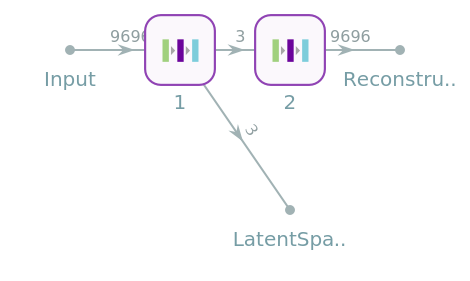
At this point we defined the encoder and the decoder separately. The encoder takes a length-9696 input vector (3-times the number of atoms representing their (x, y, z) coordinates) and compresses it to a 3D vector. The decoder takes the 3D output vector from the encoder as input at decompresses it back to the original space. Both encoding and decoding is done using a series of gradually shortening/lengthening linear layers with activation. Note that for the whole concept to work the original trajectory frames should be translated and rotated into a common reference coordinate frame.
In[]:=
autoencoderNetwork=NetInitialize@NetGraph[{encoder,decoder},{1->2,1->NetPort["LatentSpace"],2->NetPort["Reconstruction"]}]
Out[]=
NetGraph


Key concept
Key concept
The NetGraph has two output ports, the Reconstruction port and the LatentSpace port. Training will use a combined loss function to simultaneously optimizing the reconstruction of input structures and shaping the LatentSpace point distribution to mimic the colVars space distribution of the protein conformations.
4. Training the Network
4. Training the Network
Prepare the multiple associations for training and validation
Note: The code above prepares the multiple associations needed for applying the combined loss function. It works fine, but it is “old school.” As Arben pointed out, it could be done elegantly using association threading. I’ll look into that later.
Note: Since training takes some time (10,000 rounds took 2 hours on a RTX 4080 GPU) I included the cell above to import the already trained network instead of training it on the fly.
I did not use any automated stopping criterion. Instead after completing all 10,000 rounds I analyzed the log file and found the place where I wanted to finish training. I then restarted the training from the closest checkpoint and stopped at the desired step.
5. Visualizing Latent Space
5. Visualizing Latent Space
Figure 1
The plot shows the locations of the training and validation data in the Latent Space after training. This point distribution is now close to the trajectory frame-point distribution in colVars space. This will be further clarified later.
6. Working with the Network
6. Working with the Network
Below the thick separator line we assume that the network has already been trained and we can start evaluating cells here without touching anything above the separator.
Interpreting the Data
Interpreting the Data
If the network was trained properly we expect colVars coordinates and trajPointsInLatentSpace coordinates to be reasonably close, which indeed seems to be the case.
trajFrameColors is a new dataset, it was not needed for training the network. It represents the physical meaning of colVars space. Specifically, each value is the free energy (inverse probability) associated with a particular trajectory frame conformation. customColor is a simple color function to provide a color scale for plots.
Figure 2
This plot is identical to Figure 1 above except that the points are colored by their respective free energy values.
The next data set colorGrid is similar to trajFrameColors, but it contains an ultra fine grid representation of the colVars free energy map with close to 25 million points. In fact, the 10,000 trajFrameColors values were obtained by interpolating the colorGrid points around the trajectory frame-points in the colVars space.
The next data set colorGrid is similar to trajFrameColors, but it contains an ultra fine grid representation of the colVars free energy map with close to 25 million points. In fact, the 10,000 trajFrameColors values were obtained by interpolating the colorGrid points around the trajectory frame-points in the colVars space.
Comparing Latent Space and colVars Space
Comparing Latent Space and colVars Space
This side by side plot (double-click to make it interactive) shows the colored latent space points and the similarly colored density plot of the colorGrid data. This plot clearly shows that the network training was successful and these two spaces are structurally very similar.
The main outcome of this project is that the network was trained in a way that infused physical meaning into the latent space. So, now if we want to generate a new protein structure with the autoencoder network, instead of poking around randomly in a generic latent space, we can focus on the green volumes that contain the most probable structures. Moreover, the density plot has a 3 orders of magnitude finer resolution, so we might as well use the density plot directly to find interesting points to be decoded to full structures.
This Manipulate object is my poor man’s 3-dimensional mouse to pick points in the density plot. My original idea was to include a Button, which upon clicking would decode a full structure using the (x, y, z) coordinates of the tracking sphere and visualize it with BioMoleculePlot3D but, unfortunately, WL does not seem to support this. I submitted a feature request ticket [CASE:5218575] regarding this.
7. Neat Example
7. Neat Example
I manually picked points along an imaginary path exploring the green volume in the density plot using the 3D mouse. These served as anchor points to fit a 3D bspline. Using the parametric form of the bsplineFunction I then picked 20 equidistant points on the bspline curve and decoded them into full structures.
The two large black points show the location of two biologically relevant conformations in colVars space that had been experimentally determined via X-ray crystallography. The bspline (based on anchorPoints) represents a viable transition path between the two different X-ray conformations. The magenta points along the path serve as latent space points to be decoded to full structures so we can analyze the conformational transition visually. The full structures are exported in a format that auxiliary molecular modeling software can read and generate a movie of the transition. (It would be nice if I could do that not leaving the notebook.)
8. Predicted Conformational Transition Video
8. Predicted Conformational Transition Video
Note that everything in this video is ML generated!!! I just had to do a bit of cleanup.
9. References and Future Directions
9. References and Future Directions
This work was primarily inspired by an earlier autoencoder, but as far as I know infusing the latent space with physical meaning is my invention. I am going to write this up in a paper and post in on arXiv soon.
10. Acknowledgements
10. Acknowledgements
I am indebted to the entire Wolfram NNBC-2025 crew, especially Arben Kalziqi to help make this project come to full fruition after initial baby steps before the boot camp.
CITE THIS NOTEBOOK
CITE THIS NOTEBOOK
Reinforced molecular dynamics: physics-infused generative machine learning model explores CRBN activation process
by Istvan Kolossvary & Rory Coffey
Wolfram Community, STAFF PICKS, March 5, 2025
https://community.wolfram.com/groups/-/m/t/3411092
by Istvan Kolossvary & Rory Coffey
Wolfram Community, STAFF PICKS, March 5, 2025
https://community.wolfram.com/groups/-/m/t/3411092