Stream ciphers are a simple yet effective type of encryption; they work by generating long strings of bits, called a keystream, off of a base case, and then using that to encrypt a message. This is very similar to what cellular automata do, which suggests that cellular automata could be used to generate this same keystream and then be utilized for a stream cipher. In this project, I confirm that possibility by writing functions to encrypt and decrypt cellular automata-based stream ciphers. This project also successfully explores methods to break this type of stream cipher without being provided the key. It focuses on cases where you have a line of cellular automata some number of levels below the base case, and have to generate cellular automata backwards to find the key. It also explores cases where you have random points from the levels below the base case, and have to fill in a horizontal then work backwards.
Introduction
Introduction
Cellular automata (CA) refers to a set of rules which create cells on a grid. Each cell has a state, on or off / 0 or 1, and each iteration of the model causes changes in the states of the cells depending on the states of the cells around it. Which cells affect an individual cell is referred to as the cell’s neighborhood; for this project, a cell’s neighborhood is the two cells on either side of it. The rule which is used in this project, Rule 30, is known for not generally exhibiting regular patterns, which makes it a good rule to use for for cryptography.
An animation of one line of Rule 30 determining the next.
In[]:=
AnimatedImage["https://upload.wikimedia.org/wikipedia/commons/e/e2/One-d-cellular-automate-rule-30.gif"]
Out[]=
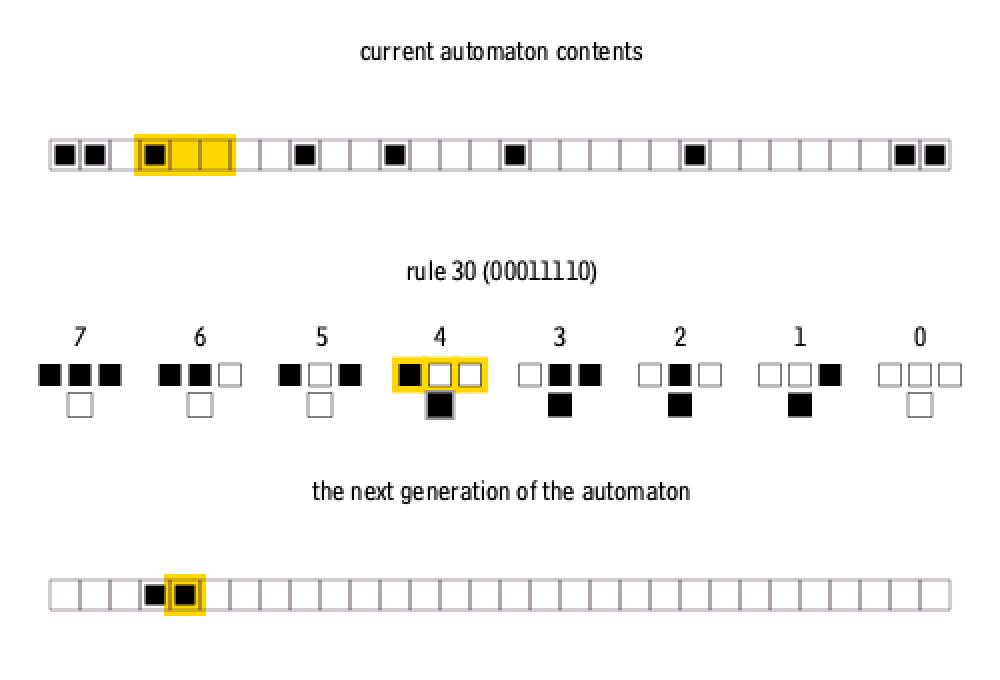
In the animation above, neighborhoods can wrap around to the other edge, another option is to generate on a background of 0s.
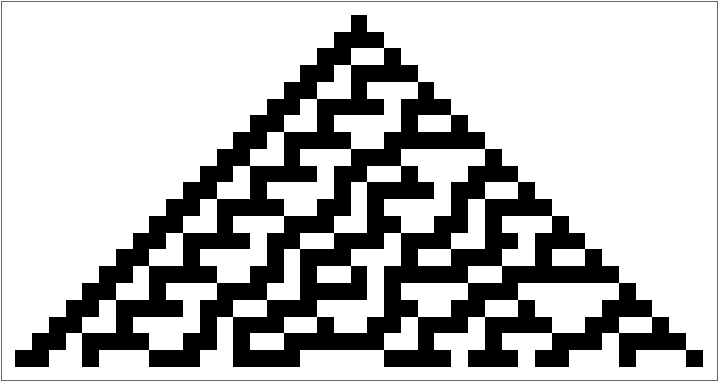
20 iterations of Rule 30 from a single cell with a background of 0s:
In[]:=
ArrayPlot[CellularAutomaton[{30,2},{{1},0},20]]
Out[]=
The RulePlot of Rule 30, showing which neighborhoods lead to what in each iteration:
In[]:=
RulePlot[CellularAutomaton[{30,2}]]
Out[]=
A stream cipher is a encryption system where the key is used to generate a keystream the same length as the message in bits. The content of the message is then one-to-one XOR’d into ciphertext using the keystream. To decrypt, the key is once again used to generate the keystream, which is then XOR’d into the ciphertext to get the original message. This is a type of symmetric-key encryption, where the same key can be used to both encrypt and decrypt. Stream ciphers are used in several common Wi-Fi encryption methods, such as WEP and WPA. The main weakness of a stream cipher is that if the same keystream is used to encrypt a message twice, it is possible to find the keystream and decrypt both messages. There are multiple reasons that stream ciphers are based on the keystreams generated off of a secret key, instead of just using a keystream, but one of these is that it’s easier to for both sides to agree upon and remember a short key that can generate as much keystream as they need than to have to re decide on a longer secret keystream every time they want to encrypt a very long message. For this project, the key is a base case for a CA system, and the keystream is generated off of that base case using Rule 30.
Here is usage of the encrypt and decrypt functions, with {1, 0, 1, 0, 1} as the base case:
In[]:=
ciphertext=encrypt["message",{1,0,1,0,1}]
Out[]=
{{1,0,0,0,1,0,0,0,1,1,0,0,1,0,0,0,0,0,0,1,1,0,0,0,0,0,1,0,1,0,0,1,1,0,1,1,0,1,1,1,1,1,0,1,0,0,1,0,1,1,0,0,1,0,0,0},{1,0,1,0,1}}
In[]:=
decrypt[ciphertext[[1]],{1,0,1,0,1}]
Out[]=
message
Encryption and Decryption Functions
Encryption and Decryption Functions
Encrypting
Encrypting
The first step in this project was to create a function that will encrypt text using the CA stream cipher. So if two people want to securely communicate, say Alice and Bob, Alice would use the encryption function before sending it to Bob, who knows the key.
The first step is to convert each character into its ASCII code and then into binary:
In[]:=
asciiCodes=ToCharacterCode["Hello","ASCII"]
Out[]=
{72,101,108,108,111}
ASCII number codes were chosen because they cover most commonly used characters, like letters, numbers and symbols, and have a standard binary length, as opposed to different types of number codes, like UTF, which has more character coverage such as emojis, but the lengths of the number codes vary, making it harder to reliably encrypt and decrypt.
In[]:=
messageDigits=IntegerDigits[asciiCodes,2,8]
Out[]=
{{0,1,0,0,1,0,0,0},{0,1,1,0,0,1,0,1},{0,1,1,0,1,1,0,0},{0,1,1,0,1,1,0,0},{0,1,1,0,1,1,1,1}}
In[]:=
binaryText=Flatten[messageDigits]
Out[]=
{0,1,0,0,1,0,0,0,0,1,1,0,0,1,0,1,0,1,1,0,1,1,0,0,0,1,1,0,1,1,0,0,0,1,1,0,1,1,1,1}
The encrypt function then generates the same number of rows as the length of the binary text so the keystream can be correctly matched with the message.
This is the cellular automata which is generated off of the base case key. Here’s what it would look like for our example base case of {1, 0, 1, 1, 1}:
In[]:=
ArrayPlot[CellularAutomaton[{30,2},{1,0,1,1,1},40]]
Out[]=

Then take one of the columns (in this case the center one):
In[]:=
{ArrayPlot[{Flatten[Table[{CellularAutomaton[{30,2},{1,0,1,1,1},39][[i,3]]},{i,1,40,1}]]}],column=Flatten[Table[{CellularAutomaton[{30,2},{1,0,1,1,1},40][[i,3]]},{i,1,40,1}]]}
Out[]=
{
,{1,1,1,0,1,1,0,1,0,1,1,0,1,0,1,1,0,1,0,1,1,0,1,0,1,1,0,1,0,1,1,0,1,0,1,1,0,1,0,1}}

In this case, a column of cellular automata acts as the keystream for the cipher
And XOR the keystream and message together:
In[]:=
Mod[binaryText+column,2]
Out[]=
{1,0,1,0,0,1,0,1,0,0,0,0,1,1,1,0,0,0,1,1,0,1,1,0,1,0,1,1,1,0,1,0,1,1,0,1,1,0,1,0}
All in all, this is the full function:
In[]:=
Mod[Flatten[IntegerDigits[ToCharacterCode["Hello","ASCII"],2,8]]+Flatten[Table[{CellularAutomaton[{30,2},{1,0,1,1,1},40][[i,3]]},{i,1,40,1}]],2]
Out[]=
{1,0,1,0,0,1,0,1,0,0,0,0,1,1,1,0,0,0,1,1,0,1,1,0,1,0,1,1,1,0,1,0,1,1,0,1,1,0,1,0}
The new ciphertext can only be decrypted by being XOR’d with the keystream again.
Here’s the encrypt function which puts together everything I just did:
In[]:=
encrypt[plaintext_,start_]:={Mod[#,2]&/@(Table[CellularAutomaton[{30,2},start,8*Length[Characters[plaintext]]][[i,Ceiling[Length[CellularAutomaton[{30,2},start,8*Length[Characters[plaintext]]][[1]]]/2]]],{i,1,8*Length[Characters[plaintext]],1}]+Flatten[IntegerDigits[ToCharacterCode[plaintext,"ASCII"],2,8]]),start}
In[]:=
encrypt["Hello",{1,0,1,1,1}]
Out[]=
{{1,0,1,0,0,1,0,1,0,0,0,0,1,1,1,0,0,0,1,1,0,1,1,0,1,0,1,1,1,0,1,0,1,1,0,1,1,0,1,0},{1,0,1,1,1}}
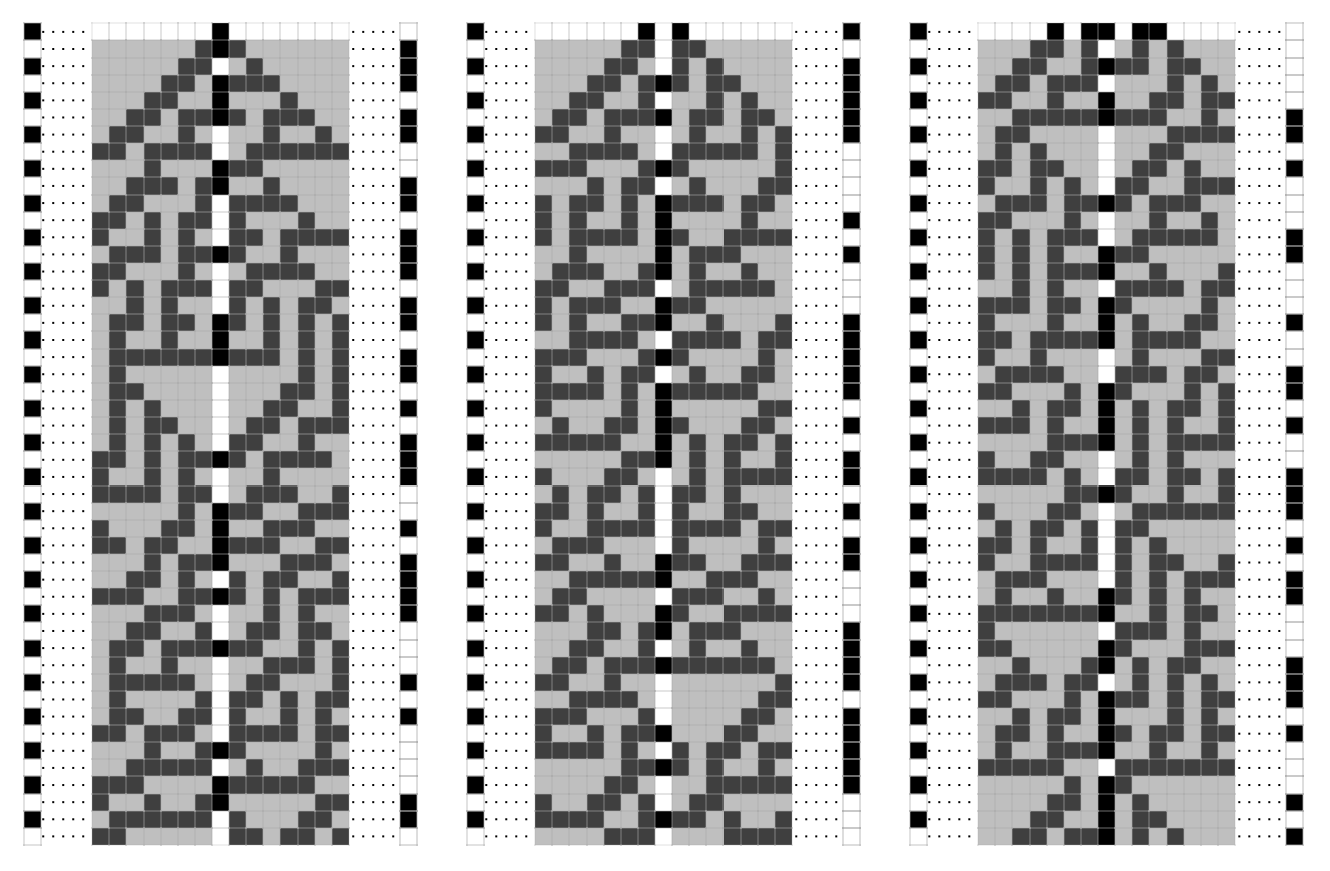
To visualize the encryption process with different base cases, view the graphics below. The column on the left is an example column to encrypt, the message that is being encrypted.
At the top of each graphic is the highlighted base case/key, which the keystream is generated off of. The highlighted column in the center is the one used to encrypt the left column, the keystream that is used to encrypt and decrypt. And on the right of each graphic is the now encrypted ciphertext, the result of XORing the input and keystream columns together. It’s clear to see that although the messages being encrypted are identical, the different base cases cause the ciphertext columns to look very different.
At the top of each graphic is the highlighted base case/key, which the keystream is generated off of. The highlighted column in the center is the one used to encrypt the left column, the keystream that is used to encrypt and decrypt. And on the right of each graphic is the now encrypted ciphertext, the result of XORing the input and keystream columns together. It’s clear to see that although the messages being encrypted are identical, the different base cases cause the ciphertext columns to look very different.
Out[]=
Decrypting
Decrypting
To decrypt, you follow a similar process in reverse. By taking in the ciphertext and base case key, Bob, who has the encrypted message, can now generate the keystream and decrypt the message that was received from Alice.
Generate the same encryption column off of the base case
XOR the ciphertext and keystream again:
This is where the ASCII choice is important, the function can now simply partition the list into eight instead of having to parse leading tags.
Split it into individual letters:
And convert from binary back into the characters of the original message:
Put together, the full decrypt function looks like this:
You can also encrypt and decrypt any symbol supported by ASCII, including special symbols such a parenthesis or dashes:
Breaking the Code: Extrapolating Higher Levels of Cellular Automata From a Horizontal Line
Breaking the Code: Extrapolating Higher Levels of Cellular Automata From a Horizontal Line
Imagine two people, Alice and Bob, are communicating using the technique outlined above. A third person, Eve, is trying to eavesdrop. Eve manages to get the full ciphertext, but not the base case. Later, Eve intercepts another message, a horizontal line of cellular automata generated off of the base case. How could Eve find the base case off of this?
The task here was to create a function that would find the level above a given level as many times as desired, the opposite of how cellular automata are typically generated .
This manipulate shows the full process of extrapolating the base case of off random spots, and then from a horizontal line. The black and white cells are typical cellular automata zeros and ones/ off and on, while the gray cells are cells whose true value is unknown. The end result of this manipulate is a mostly filled in set of cells, with a few cells in the lower corners that are still unfilled because they aren’t necessary to find the base case:
The cellular automaton function automatically generates its output in the form of matrix, while the more useful form for this type of functionality is a T shape, which can seen a the RulePlot.
The RulePlot of Rule 30:
The best way to emulate this is to use a list of three values associated to a fourth value.
This function puts the matrix with the random points into a better form for manipulating:
This wraps some of the values from the key around to the other side, because Cellular Automata does that when generating finite width tapes, you then need the same logic to generate up.
Everything is now set up to find the next level up. For any value in the lower row, there are multiple cases above that could be the correct one. Eventually, some of these cases will contradict themselves if evaluated for long enough.
This is the primary body of the extrapolation code. It tries multiple options for the very left case, then keeps filling in values from left to right. It follows all of those chains of reasoning until they contradict, in which case it removes them from the list of possibilities.
This smaller piece of code from inside levelUp replaces the fourth value in the level above with each matching case it finds, there is also matching code for the first three and fifth values int he new level:
Then, we test if the levels received from levelUp actually correctly generate the lower level.
Here's an example of the levelUp function. In this case it found two possibilities, both of which were verified by selectCAMatches.
levelUp only generates one level up at a time, and still needs to be integrated with the decrypt function once it find the base case.
This function gives levelUp an level specification of how far below the base case it is, e.g. how many levels up it needs to generate:
This function uses the possible base cases from extrapolateUp to decrypt the ciphertext.
Here’s an example of horizontalExtrapolate on the ciphertext from earlier, and a line 8 below the base case:
As you can see, it ended up with multiple possible base cases, but it is easy to tell which output is the correct one.
Breaking the Code: Extrapolating From Random Cellular Automata Values
Breaking the Code: Extrapolating From Random Cellular Automata Values
Eve once again has the ciphertext, but not the key. This time, Eve only intercepts a set of random points generated from the key. Eve knows that if a horizontal line can be found, then the key can be extrapolated from that and the message can be decrypted.
The goal of this function is to be able to get from a group of random spots to a horizontal line.
findCases looks for places that are easily fillable:
“Easily fillable” neighborhoods in this case are neighborhoods where three of the four cells are filled, this limits the possible cases the functions would then have to deal with, although multiple cases do still occur.
Then, this function fills in the spots that findCases identified:
Because the lists overlap, some values from one list need to be transferred from one list to another. This function does those manipulations, then also generates down from any completed row of three to get the cell below:
Once the base functions are done, they need to be compiled into a single function and given a condition for when to stop running.
This function compiles the prior helper functions to something that can be used in NestWhile:
Once a full horizontal line is found, the horizontalExtrapolate function should be used instead, as it is more reliable.
rowCompleteInverseQ checks if a full horizontal row has been completed:
This function is for converting the list and rule from that the other functions use into a matrix:
Some cases take more iterations than others, and some cases simply are too sparse or spread out for the function to fill in, the cells have to be a least relatively close together in order to prevent the code from following excessively huge numbers of cases.
The functions being used to fill in a mostly empty matrix with a few random spots until the filled-in values reach a line. This graphic uses the random spot functions to fill until it hits a line, while once again leaving some corner values unfilled. Once a line is reached, all the levels below it can be fully filled, but since the aim is to find the original base case, this would be unnecessary:
Once a horizontal line is found, horizontalExtrapolate can be used to find the base case and decrypt the ciphertext.
Conclusion
Conclusion
Given a part of the cellular automata generated off of the key, Eve now has the basis to decode Alice and Bob’s messages. Even if Alice and Bob are following the best practices for stream ciphers, such as not reusing keys, and making sure their keystream looks sufficiently random, Eve can still decode their messages with a relatively small amount of information. Some ways Alice and Bob could better protect their data would be by using a larger width key, which would make the horizontal extrapolate function return more cases, or choose a varying column as their keystream, which would cause Eve to have trouble decrypting the ciphertext even with the full key.
How well the functions I created work depends on the information given, but these functions serve as proof of concept that this type of cellular automata manipulation is possible. They also show that extrapolating cellular automata backwards, both from random values and a line, is achievable. The main extension to this project would be making the random point extrapolation function more robust. At the moment it can only fill in obvious spots, then use those cells to fill in the next obvious spots. Having the function be able to test multiple cases for less filled areas, like the horizontalExtrapolate function can, would greatly expand the range of random cases it can handle.
How well the functions I created work depends on the information given, but these functions serve as proof of concept that this type of cellular automata manipulation is possible. They also show that extrapolating cellular automata backwards, both from random values and a line, is achievable. The main extension to this project would be making the random point extrapolation function more robust. At the moment it can only fill in obvious spots, then use those cells to fill in the next obvious spots. Having the function be able to test multiple cases for less filled areas, like the horizontalExtrapolate function can, would greatly expand the range of random cases it can handle.
Citations
Citations
Cormullion. (2018, November 20). File:One-d-cellular-automate-rule-30.gif - Wikimedia Commons [Review of File:One-d-cellular-automate-rule-30.gif - Wikimedia Commons]. Wikimedia.Org. https://commons.wikimedia.org/w/index.php?curid=74536115
Wolfram, S. (2002). A New Kind of Science [Review of A New Kind of Science]. https://www.wolframscience.com/nks/p603--cryptography-and-cryptanalysis/
Acknowledgements
Acknowledgements
Thank you to Stephen Wolfram for making this program possible, and to the directors, Rory, Eryn, Megan, and Cyrus for running it. Thank you to my TA and mentor groups for all the support you gave, Shaivi, Shrika, Ava, Gracelyn, Ellie, Nupur, and Sophia, you guys are awesome. Lastly, thank you to my mentor, Anoushka, for helping me every step along the way in this project.
Additional thanks to Stephen Wolfram for suggesting this project.
CITE THIS NOTEBOOK
CITE THIS NOTEBOOK
Encrypting, decrypting, and breaking cellular automata-based stream ciphers
by Morgan Bergstrom
Wolfram Community, STAFF PICKS, July 9, 2026
https://community.wolfram.com/groups/-/m/t/3749919
by Morgan Bergstrom
Wolfram Community, STAFF PICKS, July 9, 2026
https://community.wolfram.com/groups/-/m/t/3749919