Affiliation
Affiliation
In December 2020 the Wolfram Lab opened at RAU (Russian-Armenian University, Yerevan, Armenia). The Wolfram Lab was created on the basis of the RAU research laboratory for mathematical modeling of quantum systems. This laboratory became the first laboratory in the world created by Wolfram Research on a university basis. Currently, the laboratory teaches courses for undergraduate students (major in programming and physics) and high school students (major in physical and mathematical sciences). Mher Mkrtchyan (mherm@wolfram.com) (Group: Sound & Vision, Manager: Shadi Ashnai) is responsible for the Wolfram Lab at RAU.
The project was completed by an 11th grade student.
The project was completed by an 11th grade student.
Idea
Idea
When studying physics at school, students have to solve different problems. Some of the most interesting and unusual tasks are tasks on optics, namely, constructing images, calculating refraction factors. Students need to draw the same lens several times each time to show how the image in the lens changes. And my goal was to write a program with which it would be possible to see how the image changes in different lenses (Collecting and Diverging), quickly calculate the value of the desired quantity, see how a beam is refracted in different media, see how a beam of light is refracted in different interesting prisms.
Firstly, I declared initial variables necessary for the simulation and added the necessary images (see Initial Setup section).
Then, I created a simulation of the image construction in different lenses (Converging and Diverging), and a function to calculate the different values (Focus Distance, Object Distance, Image Distance) (see Lens and Calculator).
Also, I created a simulation of the refraction of the sun’s rays in different environments and an automatic calculation of the critical angle (see Refraction).
After this, I created a simulation of the refraction of rays in various interesting prisms that they don’t teach you about in school (Porro Prism, Dove Prism, Pentaprism) (see Prisms).
Then, I created a simulation of the image construction in different lenses (Converging and Diverging), and a function to calculate the different values (Focus Distance, Object Distance, Image Distance) (see Lens and Calculator).
Also, I created a simulation of the refraction of the sun’s rays in different environments and an automatic calculation of the critical angle (see Refraction).
After this, I created a simulation of the refraction of rays in various interesting prisms that they don’t teach you about in school (Porro Prism, Dove Prism, Pentaprism) (see Prisms).
Initial Setup
Initial Setup
Function for finding the point of intersection
In[]:=
LineIntersection[Line[{a_,b_}],Line[{c_,d_}]]:=LineIntersection[{a,b},{c,d}];LineIntersection[{a_,b_},{c_,d_}]/;MatrixQ[{a,b}]&&MatrixQ[{c,d}]&&Dimensions[{a,b}]===Dimensions[{c,d}]:=If[With[{chk=Flatten[{a,b,c,d}]},AllTrue[chk,NumericQ]&&(Length[a]==3||Internal`EffectivePrecision[chk]<Infinity)],Module[{ls,p1,p2},ls=LeastSquares[Transpose[{b-a,d-c}],c-a];p1=a+ls[[1]](b-a);p2=c-ls[[2]](d-c);If[Chop[Norm[p1-p2]]==0,p1,Failure["NotIntersecting",<|"MessageTemplate""The lines `1` and `2` do not intersect.","MessageParameters"{{a,b},{c,d}}|>]]],Module[{denom,x1,y1,x2,y2,x3,y3,x4,y4},{x1,y1}=a;{x2,y2}=b;{x3,y3}=c;{x4,y4}=d;denom=(x1-x2)(y3-y4)-(x3-x4)(y1-y2);If[Not[PossibleZeroQ[denom]],{(x1y2-y1x2)(x3-x4)-(x1-x2)(x3y4-y3x4),(x1y2-y1x2)(y3-y4)-(y1-y2)(x3y4-y3x4)}/denom,Failure["NotIntersecting",<|"MessageTemplate""The lines `1` and `2` do not intersect.","MessageParameters"{{a,b},{c,d}}|>]]]]
Variables
In[]:=
text="";switchPos=0.52;inputSide=convergingInput;lens=convergingLens;focusInputCv=Null;thingDistanceInputCv=Null;imageDistanceInputCv=Null;focusInputDv=Null;thingDistanceInputDv=Null;imageDistanceInputDv=Null;focus=30;tooltipDesign=TooltipStyle->{Background->LightBlue,CellFrameColor->LightBlue,CellFrame->8};switchButton=Dynamic[EventHandler[EventHandler[EventHandler[Graphics[{RGBColor[{0.65,0.65,0.65}],Rectangle[{0,0},{2,1},RoundingRadius->0.5],White,Disk[{Dynamic[switchPos],0.5},0.41]},ImageSize->47,ImageMargins->{{0,0},{15,8}}],{"MouseClicked":>(switchPos=switchPos/.{0.52->1.47,1.47->0.52})}],{"MouseClicked":>(lens=lens/.{convergingLens->divergingLens,divergingLens->convergingLens})}],{"MouseClicked":>(inputSide=inputSide/.{convergingInput->divergingInput,divergingInput->convergingInput})}]];
Logo and Icons Import
In[]:=
logo=
;waterIcon=

;oilIcon=

;diamondIcon=

;amberIcon=

;iceIcon=

;keroseneIcon=

;glassIcon=

;imageIcon=

;refractionIcon=

;prismIcon=

;prism1Icon=

;prism2Icon=

;prism3Icon=

;

Refraction Indexes
In[]:=
water=1.333;diamond=2.417;amber=1.55;kerosene=1.39;oil=1.47;ice=1.31;glass=1.49;angleB=0;angle=0;
Lens and Calculator
Lens and Calculator
Refraction
Refraction
Prisms
Prisms
Project’s GUI
Project’s GUI
How to use the GUI
How to use the GUI
Please use the following function to run the GUI
In[]:=
opsim
Out[]=



First you need to select the window you need from the menu(Constructing an Image with a Thin Lens, Refraction of a Ray of Light, Simulation of the Refraction of Light Rays in Different Prisms)
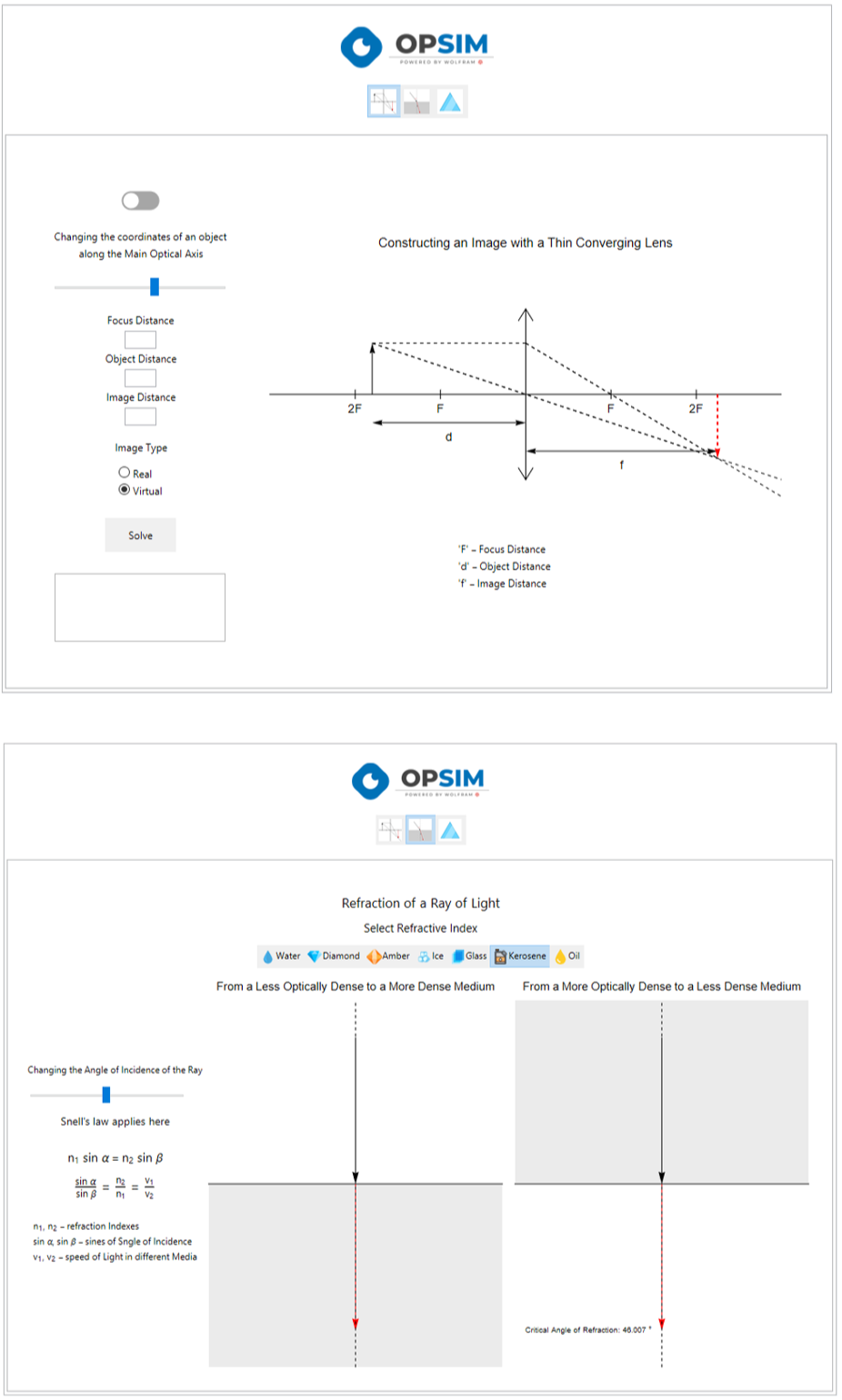
Constructing an Image with a Thin Lens
Constructing an Image with a Thin Lens
Refraction of a Ray of Light
Refraction of a Ray of Light
Simulation of the Refraction of Light Rays in Different Prisms
Simulation of the Refraction of Light Rays in Different Prisms
Conclusion
Conclusion
Finally, I managed to create a program that can simulate the construction of an image in various lenses, the refraction of rays in different media and prisms.
For calculations, I used physical and mathematical equations that students study in school mathematics and physics courses.
For calculations, I used physical and mathematical equations that students study in school mathematics and physics courses.
Acknowledgement
Acknowledgement
I want to thank our mentor Mher Mkrtchyan for his immeasurable help and support throughout this project.
CITE THIS NOTEBOOK
CITE THIS NOTEBOOK
Simulation of light rays in optics using Wolfram Language
by Narek Arakelyan
Wolfram Community, STAFF PICKS, October 31, 2024
https://community.wolfram.com/groups/-/m/t/3312729
by Narek Arakelyan
Wolfram Community, STAFF PICKS, October 31, 2024
https://community.wolfram.com/groups/-/m/t/3312729