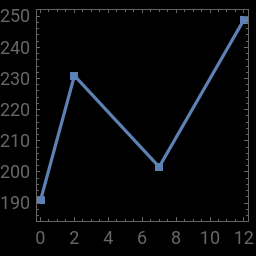
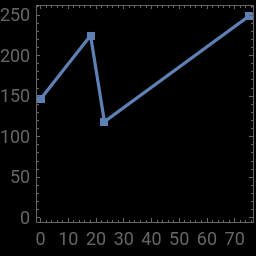
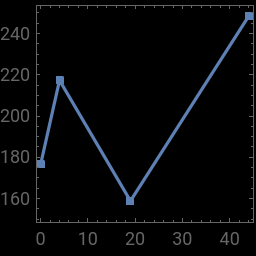
Here we have 3 sets of coordinates. Each set is just made up of 4 points forming 3 line segments.
In[]:=
images={{{0,190.88099670410156`},{2,230.89999389648438`},{7,201.6280059814453`},{12,248.83999633789062`}},{{0,146.5`},{18,224.63999938964844`},{23,118.5`},{75,248.38999938964844`}},{{0,176.52099609375`},{4,217.3000030517578`},{19,158.83999633789062`},{44,248.38999938964844`}}};
Then we plot the images and we get
In[]:=
(*Weplotthe3imagesandwegettheimagesbelow*)plots=Table[ListLinePlot[images[[n]],Background->Black,ImageSize{128,128},Frame->True,Axes->False,AspectRatio1,PlotMarkers{{●,2}}],{n,1,Length[images]}]
Out[]=
,
,
Let us now Binarize the images
In[]:=
Binarize[#]&/@plots
Out[]=
,

,


So far so good. However, I want the plots to only have a single black frame around them. So, based on suggestions from Rohit and Henrik I do this:
In[]:=
plots=Table[ListLinePlot[images[[n]],Background->Black,ImageSize{128,128},Frame->False,Axes->False,AspectRatio1,PlotMarkers{{●,2}}]//Framed,{n,1,Length[images]}]
Out[]=
,,



Above is what I want (except for the 2nd image which somehow does not fill the whole Y range like the 2 outside plots). Also, now, I can no longer binarize the image
In[]:=
Binarize[#]&/@plots(*Thatlastcommandgivesanerror*)




Out[]=
Binarize,Binarize,Binarize
But if I remove the frame. as in
In[]:=
plots=Table[ListLinePlot[images[[n]],Background->Black,ImageSize{128,128},Frame->False,Axes->False,AspectRatio1,PlotMarkers{{●,2}}],{n,1,Length[images]}]
Out[]=
,
,
I can, again, binarize the images
In[]:=
Binarize[#]&/@plots
Out[]=
,
,