In engineering understanding fluid flow around a particular shape helps evaluate a lot of properties of that shape. In my project I emphasize on airfoils. Studying fluid flow around an airfoil can help us estimate the amount of lift or drag it produces. Our ultimate goal is to maximize lift and minimize drag. In this essay, I aim to create a program which allows me to analyze data around an airfoil in different situations and study their characteristics.
Introduction
Introduction
What is an airfoil?
What is an airfoil?
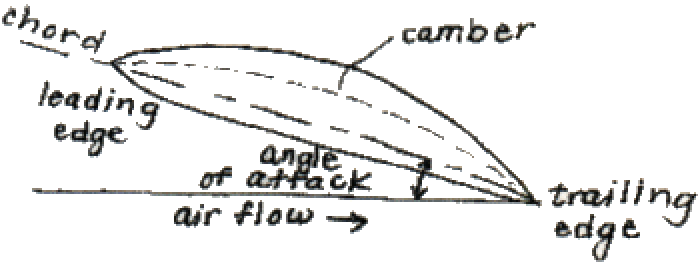
An airfoil is the primary aerodynamic shape that represents the cross section of wings or tails on an aircraft. Properties of a typical airfoil are explained below.
Figure 1 |
◼
Leading edge is the front-most point of an airfoil. It is the very first part of the wing to encounter the oncoming air.
◼
Trailing edge is the rear-most point where the upper and lower surfaces meet on an airfoil.
◼
Chord is the straight-line segment connecting the leading edge to the trailing edge.
◼
Camber represents the curvature of the airfoil, specifically the “mean camber line” which is halfway between the lower and upper surfaces.
◼
Angle of Attack(α) is the angle between the chord line and the direction between the oncoming airflow.
How does an airfoil work?
How does an airfoil work?
The curved asymmetrical shape of an airfoil creates a difference in the velocity after hitting the tip of the airfoil as shown below:
Figure 2 |
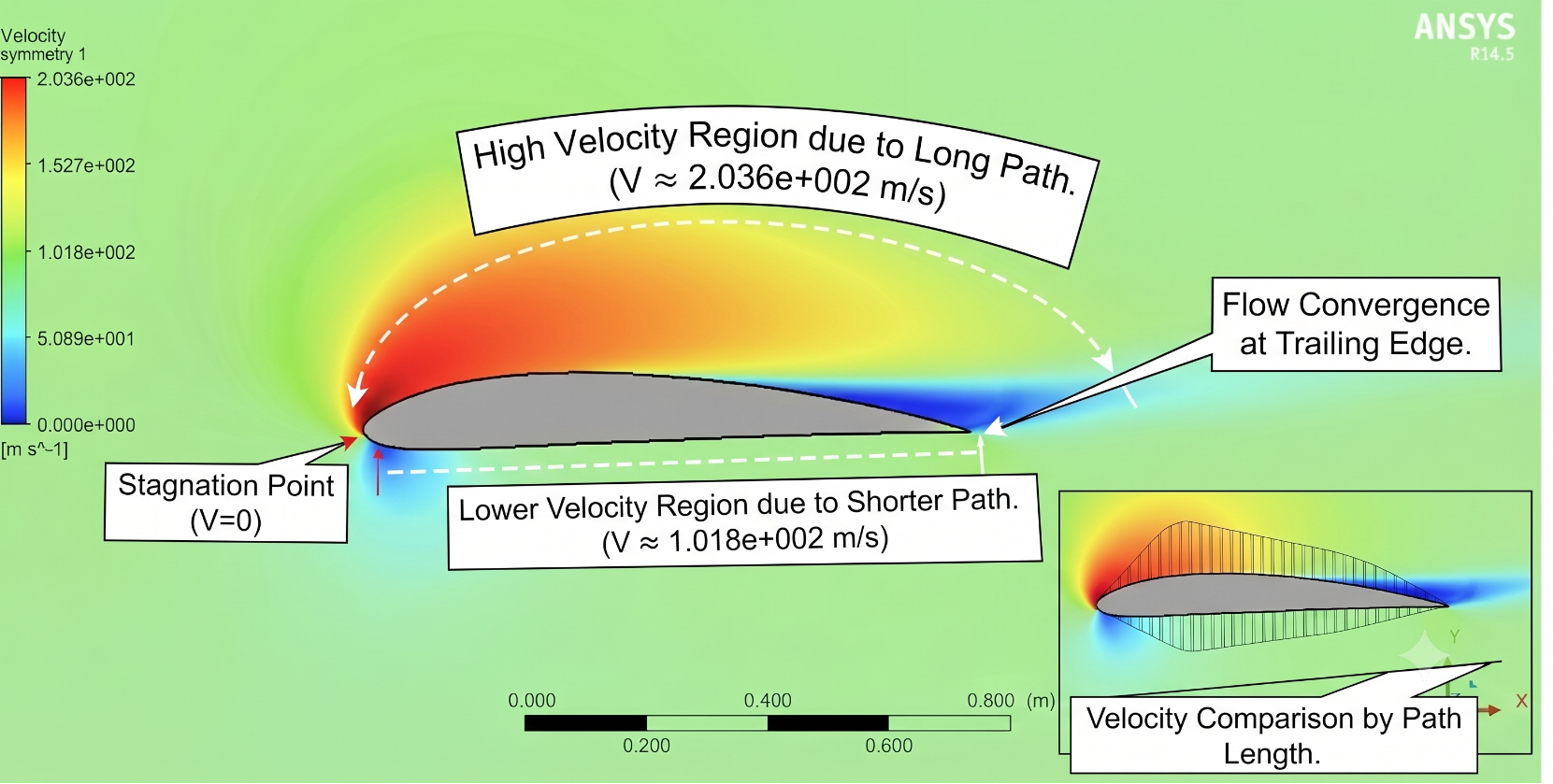
This is because after diverging, the air has to cover a larger distance above the wing than underneath, due to the shape. The velocity differential creates a low-pressure suction zone on the top of the surface and a high-pressure zone underneath. This pressure mismatch, combined with viscous friction of the air sliding along the wing’s skin, produces two primary aerodynamic forces: Lift (the upward force perpendicular to the oncoming stream) and Drag (the backward force parallel to the stream).
The curved asymmetrical shape of an airfoil creates a difference in the velocity after hitting the tip of the airfoil as shown in the Figure 2.
Why the need to simulate?
Why the need to simulate?
Flight is defined by a system of four forces:
Weight: Weight is a force that depends on the mass of an airplane. It always acts towards the center of the earth at a single point, known as the center of gravity.
Lift: To overcome the weight force, the airplane generates an opposing force called lift. It is directed perpendicular to the flight direction and it’s mostly generated by the wings.
Drag: As the airplane moves through air, there is a force that resists the motion of the aircraft, called the drag force.
Thrust: To overcome drag, airplanes use propulsion systems that push them forward at a rate that allows them to generate enough lift.
Weight: Weight is a force that depends on the mass of an airplane. It always acts towards the center of the earth at a single point, known as the center of gravity.
Lift: To overcome the weight force, the airplane generates an opposing force called lift. It is directed perpendicular to the flight direction and it’s mostly generated by the wings.
Drag: As the airplane moves through air, there is a force that resists the motion of the aircraft, called the drag force.
Thrust: To overcome drag, airplanes use propulsion systems that push them forward at a rate that allows them to generate enough lift.
Figure 3 |
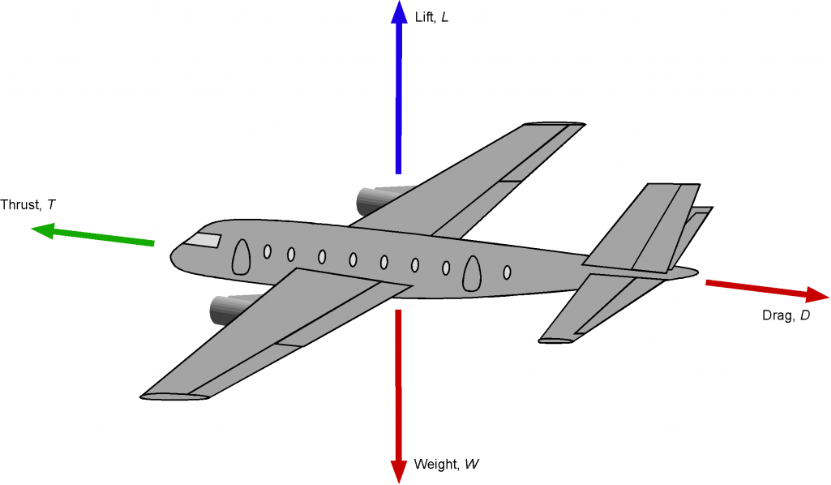
These forces must be managed to maintain controlled motion. Understanding the flight envelope requires analyzing the interaction between these forces, which act in two opposing pairs:
The Horizontal Pair: Thrust and Drag act along the direction of flight. Thrust, provided by the propulsion system, serves as the energy input to overcome the aircraft’s inertia. Opposing it is Drag, the aerodynamic resistance resulting from the aircraft’s movement through the air. Efficiency in flight is largely determined by the ability to minimize this resistance while maximizing the effectiveness of thrust.
The Vertical Pair: Weight and Lift act perpendicular to the horizon. Weight represents the force of gravity acting on the aircraft’s mass. To sustain flight, the aircraft must generate an equal or greater upward force: Lift.
Our computational goal is to quantify this relationship. By simulating the flow around an airfoil, we calculate the precise Lift and Drag coefficients for various flight conditions. These calculations allow us to optimize wing performance for real-world applications.
The Horizontal Pair: Thrust and Drag act along the direction of flight. Thrust, provided by the propulsion system, serves as the energy input to overcome the aircraft’s inertia. Opposing it is Drag, the aerodynamic resistance resulting from the aircraft’s movement through the air. Efficiency in flight is largely determined by the ability to minimize this resistance while maximizing the effectiveness of thrust.
The Vertical Pair: Weight and Lift act perpendicular to the horizon. Weight represents the force of gravity acting on the aircraft’s mass. To sustain flight, the aircraft must generate an equal or greater upward force: Lift.
Our computational goal is to quantify this relationship. By simulating the flow around an airfoil, we calculate the precise Lift and Drag coefficients for various flight conditions. These calculations allow us to optimize wing performance for real-world applications.
Working
Working
A Catalogue of Wing Shapes
A Catalogue of Wing Shapes
Engineers have been drawing and testing airfoil shapes for over a century, and the UIUC Airfoil Database keeps a public library of about 1,600 of them, each stored as a simple list of points tracing the outline. The code below connects to that library and builds a little lookup table: give it a name, and it hands back the shape.
In[]:=
baseURL="https://m-selig.ae.illinois.edu/ads/coord_seligFmt/";links=Import[baseURL,"Hyperlinks"];datLinks=Select[links,StringEndsQ[ToLowerCase[#],".dat"]&];fullDatLinks=Map[If[StringStartsQ[#,"http"],#,baseURL<>#]&,datLinks];airfoilURLs=AssociationThread[FileBaseName/@fullDatLinks,fullDatLinks];allNames=Keys[airfoilURLs];getAirfoil[name_String]:=Module[{url,imported},url=Lookup[airfoilURLs,name,Missing["NotFound"]];If[MissingQ[url],Return[$Failed]];imported=Quiet@Import[url,"Table"];Cases[imported,{x_?NumericQ,y_?NumericQ}:>{x,y}]];
The command helps you obtain the coordinates of an airfoil from the database. To make it easier for the user to search airfoils, a command was also created where you could enter a string and anything similar to it would appear:
getAirfoil[]
similarAirfoil[]
In[]:=
getAirfoil["clarky"]
Out[]=
{{1.,0.0005993},{0.99,0.002969},{0.98,0.0053335},{0.97,0.0076868},{0.96,0.0100232},{0.94,0.0146239},{0.92,0.0191156},{0.9,0.0235025},{0.88,0.0277891},{0.86,0.031974},{0.84,0.0360536},{0.82,0.0400245},{0.8,0.0438836},{0.78,0.0476281},{0.76,0.0512565},{0.74,0.0547675},{0.72,0.0581599},{0.7,0.0614329},{0.68,0.0645843},{0.66,0.0676046},{0.64,0.0704822},{0.62,0.0732055},{0.6,0.0757633},{0.58,0.0781451},{0.56,0.080348},{0.54,0.0823712},{0.52,0.0842145},{0.5,0.0858772},{0.48,0.0873572},{0.46,0.0886427},{0.44,0.0897175},{0.42,0.0905657},{0.4,0.0911712},{0.38,0.0915212},{0.36,0.0916266},{0.34,0.0915079},{0.32,0.0911857},{0.3,0.0906804},{0.28,0.0900016},{0.26,0.089084},{0.24,0.0878308},{0.22,0.0861433},{0.2,0.0839202},{0.18,0.0810687},{0.16,0.0775707},{0.14,0.073436},{0.12,0.0686204},{0.1,0.0629981},{0.08,0.0564308},{0.06,0.0487571},{0.05,0.0442753},{0.04,0.0391283},{0.03,0.0330215},{0.02,0.0253735},{0.012,0.0178581},{0.008,0.013735},{0.004,0.0089238},{0.002,0.0058025},{0.001,0.0037271},{0.0005,0.002339},{0.,0.},{0.0005,-0.00467},{0.001,-0.0059418},{0.002,-0.0078113},{0.004,-0.0105126},{0.008,-0.0142862},{0.012,-0.0169733},{0.02,-0.0202723},{0.03,-0.0226056},{0.04,-0.0245211},{0.05,-0.0260452},{0.06,-0.0271277},{0.08,-0.0284595},{0.1,-0.0293786},{0.12,-0.0299633},{0.14,-0.0302404},{0.16,-0.0302546},{0.18,-0.030049},{0.2,-0.0296656},{0.22,-0.0291445},{0.24,-0.0285181},{0.26,-0.0278164},{0.28,-0.0270696},{0.3,-0.0263079},{0.32,-0.0255565},{0.34,-0.0248176},{0.36,-0.024087},{0.38,-0.0233606},{0.4,-0.0226341},{0.42,-0.0219042},{0.44,-0.0211708},{0.46,-0.0204353},{0.48,-0.0196986},{0.5,-0.0189619},{0.52,-0.0182262},{0.54,-0.0174914},{0.56,-0.0167572},{0.58,-0.0160232},{0.6,-0.0152893},{0.62,-0.0145551},{0.64,-0.0138207},{0.66,-0.0130862},{0.68,-0.0123515},{0.7,-0.0116169},{0.72,-0.0108823},{0.74,-0.0101478},{0.76,-0.0094133},{0.78,-0.0086788},{0.8,-0.0079443},{0.82,-0.0072098},{0.84,-0.0064753},{0.86,-0.0057408},{0.88,-0.0050063},{0.9,-0.0042718},{0.92,-0.0035373},{0.94,-0.0028028},{0.96,-0.0020683},{0.97,-0.0017011},{0.98,-0.0013339},{0.99,-0.0009666},{1.,-0.0005993}}
In[]:=
similarAirfoil["w"]
Out[]=
{w1011,w1015,waspsm,wb140,wb13535sm,whitcomb}
Meet the Clark Y
Meet the Clark Y
Clark Y is chosen from the catalogue of shapes as a standard test subject, it looks like this:
(Note: α = 20° is chosen as the standard for all computes in this code but you can change it by changing the value of alpha in the code)
In[]:=
airfoilName="clarky";alpha=20;
In[]:=
GraphicsRow[{Graphics[{EdgeForm[Black],FaceForm[LightBlue],Polygon[Most[pts]]},PlotLabel->"Clark Y as drawn (α = 0°)",AspectRatio->Automatic,Axes->True],Graphics[{EdgeForm[Black],FaceForm[LightOrange],Polygon[airfoilPts]},PlotLabel->"Tilted to α = "<>ToString[alpha]<>"°",AspectRatio->Automatic,Axes->True]},ImageSize->Large]
This airfoil was used in mail planes in the 1920’s, the Spirit of St. Louis across the Atlantic, and countless model aircraft since.
Setting up the Environment
Setting up the Environment
For understanding fluid flow around an airfoil, we need to let an oncoming stream of undisturbed air flow through it. To imitate this I made a wind tunnel which is a rectangle of empty space, three and a half wing-lengths long and one wing-length tall, with the airfoil sitting near the left end where the “fan” blows in.
A computer cannot track every molecule of air – there are far too many. The standard trick, called the finite element method, is to chop the space around the wing into thousands of tiny triangles and keep track of the average behavior of the air inside each one. Where the action is intense – right at the wing’s surface – we make the triangles very small so no detail is missed; far away, where the air just cruises by, big triangles are fine. It is exactly like using more pixels on the part of a photo you care about. In the picture below, you can see the cloud of fine triangles hugging the airfoil.
Out[]=
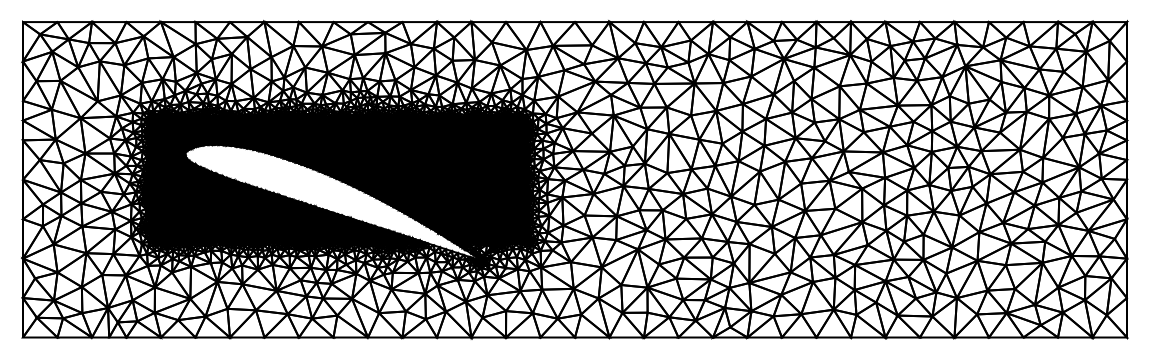
Notice the the white portion in the middle of the dense black meshes, that is our airfoil or the test model. Fluid flows around it, but never through it, so the inside of the airfoil is simply cut out of the world.
Fluid Flow
Fluid Flow
Now we turn on the fan. The behavior of moving air is described by the Navier–Stokes equations – essentially Newton’s “force equals mass times acceleration” written for a fluid, plus the rule that air cannot be created or destroyed. Nobody can solve these equations with pen and paper for a shape like a wing; that is precisely why we built the triangle mesh. The computer solves them approximately, triangle by triangle, time-step by time-step.
The setup mimics a real wind-tunnel run. At the start everything is still. Then the inflow speed ramps up smoothly from zero – switching the wind on instantly would be like hitting the air with a hammer, and the mathematics reacts just as badly as real air would. Air sticks to every solid surface (the walls and the wing), a genuine physical fact known as the no-slip condition, and at the far right end the air is free to leave. We let the virtual wind blow for five seconds of simulated time, enough for the flow to settle into its pattern, and keep the final snapshot. On a laptop this single run takes about a minute and a half of real time.
We use the FluidFlowPDEComponent to solve the Navier Stokes equation and the following code declares the three unknowns (the sideways speed u, the vertical speed v, and the pressure p at every point and moment), states the physical properties of our fluid, lists the boundary rules using DirichletCondition described above, and hands the whole problem to the solver NDSolveValue.
In[]:=
ClearAll[u,v,p,t,x,y];AbsoluteTiming[Uinlet=1;mu=0.001;vars={{u[t,x,y],v[t,x,y],p[t,x,y]},t,{x,y}};pars=<|"DynamicViscosity"->mu,"MassDensity"->1|>;op=FluidFlowPDEComponent[vars,pars];ramp[t_]:=Uinlet*(1-Exp[-t^2]);ic={u[0,x,y]==0,v[0,x,y]==0,p[0,x,y]==0};bcs={DirichletCondition[u[t,x,y]==ramp[t]*(1-4*y^2),x==x1],DirichletCondition[v[t,x,y]==0,x==x1],DirichletCondition[p[t,x,y]==0,x==x2],DirichletCondition[{u[t,x,y]==0,v[t,x,y]==0},y==y1||y==y2],DirichletCondition[{u[t,x,y]==0,v[t,x,y]==0},ElementMarker==2]};tEnd=5;{uSolT,vSolT,pSolT}=NDSolveValue[{op=={0,0,0},ic,bcs},{u,v,p},{x,y}∈mesh,{t,0,tEnd},Method->{"PDEDiscretization"->{"MethodOfLines","SpatialDiscretization"->{"FiniteElement","InterpolationOrder"->{u->2,v->2,p->1}}}}];uSol[x_,y_]:=uSolT[tEnd,x,y];vSol[x_,y_]:=vSolT[tEnd,x,y];pSol[x_,y_]:=pSolT[tEnd,x,y];]
With the flow computed, we can finally see it. First, a speed map: red means fast air, blue means slow. Look at the top surface of the tilted wing – a bright fast ribbon – and the region just behind and below the nose, where the air has nearly stopped.
Next, the paths the air actually follows – streamlines, like long-exposure photographs of dust particles riding the wind. Ahead of the wing they are calm and parallel. Over the wing they crowd together and bend. Behind a steeply tilted wing they curl into lazy swirls: the wake.
And the pressure map – the one that explains lift. Cool colors above the wing mark low pressure; warm colors beneath it mark high pressure. The wing is being pushed up from below and sucked up from above at the same time.
Measuring the Push
Measuring the Push
Pretty pictures are not measurements. To get an actual number for the force on the wing, we walk around its outline segment by tiny segment and add up two contributions on each one: the pressure pressing straight against the surface, and the friction of air rubbing along it. Summing all the little pushes gives one total force arrow, which we split into its two natural parts: the component pointing backward along the wind (drag) and the component pointing straight up (lift).
The Force Calculation
The Force Calculation
For each little segment of the surface, we find its midpoint, its outward direction, the pressure there, and the local velocity gradients (how sharply the air speed changes near the wall, which sets the friction). The stress formula below is the standard one for a viscous fluid.
At α = 20 degrees the vertical force comes out around 0.91 in our simulation units, while the horizontal component is more than five times smaller. Even tilted this steeply, the wing converts the oncoming wind into upward push remarkably efficiently – which is, of course, the whole point of being wing-shaped.
The final results help us analyze the airfoil’s behavior but it is still restricted only to a singular angle. Next step is to keep simulating it for multiple angles and plot the Coefficient of Lift (Cl) v/s Alpha (α) and the Coefficient of Drag (Cd) v/s Alpha (α) graphs which would help us compare the performance of this particular airfoil to other airfoils.
The final results help us analyze the airfoil’s behavior but it is still restricted only to a singular angle. Next step is to keep simulating it for multiple angles and plot the Coefficient of Lift (Cl) v/s Alpha (α) and the Coefficient of Drag (Cd) v/s Alpha (α) graphs which would help us compare the performance of this particular airfoil to other airfoils.
The Stall Experiment
The Stall Experiment
One angle tells us one story. The real question is how lift changes as we keep tilting. Intuition says more tilt means more lift, and up to a point intuition is right. But the streamline picture already hinted at the danger: the more the wing tilts, the harder it is for the air to stay attached to the curved upper surface as it bends around. At some angle the air simply lets go, the smooth fast ribbon over the top tears away into swirling eddies, and the low-pressure zone that was doing the lifting collapses. Pilots call it a stall, and it is the reason aircraft pitch their noses down, not up, to recover speed when lift runs low.
To find how our Clark Y performs, the loop below repeats the entire experiment – tilt the shape, rebuild the mesh, blow the wind for five seconds, sum the surface forces – at 0°, 10°, 15°, 20° and 25°. To compare angles fairly, the forces are converted into dimensionless scores: the lift coefficient Cl and drag coefficient Cd, which are just the forces divided by the pushing power of the oncoming wind.
You could also try various angles of your choice to plot a graph for a particular scenario by altering the alphaList in “The Sweep Loop” section below.
Lift and Drag Curves
Lift and Drag Curves
Concluding Remarks
Concluding Remarks
Future Scope
Future Scope
Our wind tunnel is only two-dimensional – a slice of an infinitely long wing – so effects at real wingtips are absent. The simulated airflow is slow and syrupy compared with real flight: the Reynolds number here is about a thousand, whereas a real aircraft wing operates in the millions, which is why our Clark Y holds on to angles (25 degrees and beyond) that would stall a full-scale wing closer to 15. No turbulence model is used, the tunnel walls sit close enough to squeeze the flow slightly, and forces are sampled at segment midpoints rather than integrated exactly. None of this changes the shape of the story – lift rising, then stalling – but the precise numbers should be read as illustrations, not as flight data.
Acknowledgements
Acknowledgements
I would like to thank my mentor, Jesús Montesinos, for his guidance, insight, and thoughtful feedback throughout the program — this project would not have taken shape without him. I am also deeply grateful to Stephen Wolfram for helping me choose a project that turned out to be as fascinating as it was challenging. Finally, to every participant, TA, and mentor I shared these three weeks with: your stories, ideas, and energy are what I will remember most.
References
References
1
.Mealani Nakamura (1999), “Airfoil ”. https://web.mit.edu/2.972/www/reports/airfoil/airfoil.html
2
.J. Gordon Leishman (2022), “Introduction to Aerospace Flight Vehicles”. https://eaglepubs.erau.edu/introductiontoaerospaceflightvehicles/chapter/anatomy-of-aircraft-and-spacecraft/
3
.Micheal Sellig, “UIUC Airfoil Coordinate Database”. https://m-selig.ae.illinois.edu/ads/coord_database.html
4
.Alex Trounev (2020),”Drag and lift force acting on an airfoil”. https://mathematica.stackexchange.com/questions/225928/drag-and-lift-force-acting-on-an-airfoil
AI Disclosure
AI Disclosure
The following generative AI tools were used in this project: Claude Fable 5.0 was used to debug part of the code. All code and written content was reviewed, understood and approved by the author.
CITE THIS NOTEBOOK
CITE THIS NOTEBOOK
Finite Element Analysis of Transient Incompressible Flow around 2-D Airfoils
by Maurya Gajjar
Wolfram Community, STAFF PICKS, July 16, 2026
https://community.wolfram.com/groups/-/m/t/3762320
by Maurya Gajjar
Wolfram Community, STAFF PICKS, July 16, 2026
https://community.wolfram.com/groups/-/m/t/3762320