This notebook introduces the visualization and analysis of protein structures, specifically focusing on the interaction between a designed protein binder and a snake venom toxin. The code uses the Protein Data Bank (PDB) IDs of the binder-toxin complex to load and visualize the structures. This work is based on the findings from the article: Vázquez Torres, S., Benard Valle, M., Mackessy, S.P. et al. De novo designed proteins neutralize lethal snake venom toxins. Nature (2025). https://doi.org/10.1038/s41586-024-08393-x
We load a protein structure from the PDB using the ID “9BK5” (which corresponds to the LNG binder in complex with α-cobratoxin) and visualize it in 3D. The binder and toxin are color-coded (green for the binder, orange for the toxin) to distinguish their interaction. The two other binders have PDB ID “9BK6” and ”9BK7”, and should work in the same way:
In[]:=
id="9BK5";(*useotheridshere:"9BK6","9BK7"*)
In[]:=
binder1=BioMolecule[ExternalIdentifier["PDBStructureID",id]];
{color1,color2}={,};BioMoleculePlot3Dbinder1,,BioMoleculePlot3Dbinder1,

Out[]=
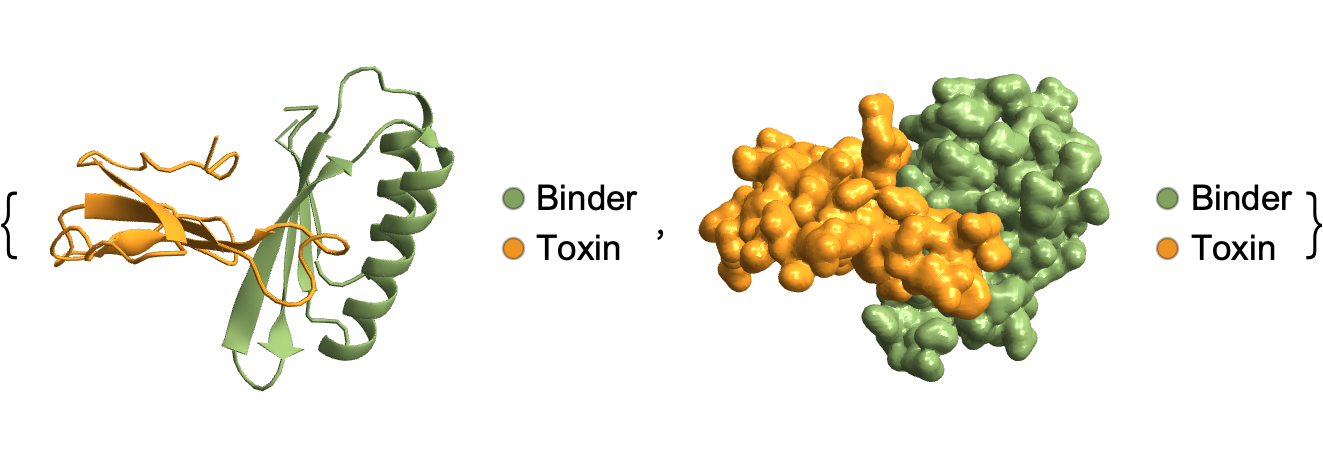
The code here extracts the residues (3 letter amino acid codes) of the protein structure and lists them for both chains (A: binder and B: toxin). This step is crucial for understanding the amino acid composition of the binder and toxin.
In[]:=
res=binder1["Residues"]
Out[]=
A{GLY,ARG,ILE,VAL,VAL,ARG,GLY,ASP,VAL,ALA,ILE,ALA,GLU,ALA,VAL,VAL,ARG,LYS,VAL,GLY,GLU,VAL,ALA,GLY,LYS,GLU,VAL,ILE,LEU,LEU,ILE,SER,TYR,ARG,LYS,ASN,GLY,GLU,TRP,ILE,THR,TYR,GLN,ARG,ASN,LEU,GLU,ALA,THR,PRO,GLU,ASP,VAL,GLU,ARG,THR,ILE,ALA,VAL,ILE,ARG,GLU,ILE,TYR,GLU,GLU,SER,GLY,GLY,ASP,PHE,ILE,LEU,ALA,ILE,PHE,SER,ASP},B{ILE,ARG,CYS,PHE,ILE,THR,PRO,ASP,ILE,THR,SER,LYS,ASP,CYS,PRO,ASN,GLY,HIS,VAL,CYS,TYR,THR,LYS,THR,TRP,CYS,ASP,ALA,PHE,CYS,SER,ILE,ARG,GLY,LYS,ARG,VAL,ASP,LEU,GLY,CYS,ALA,ALA,THR,CYS,PRO,THR,VAL,LYS,THR,GLY,VAL,ASP,ILE,GLN,CYS,CYS,SER,THR,ASP,ASN,CYS,ASN,PRO,PHE,PRO,THR,ARG}
Now we want to visualize inter-residue distance in the toxin-binder complex, which might indicate which residue pairs are involved in the interactions. For this we install and load the latest version of the ProteinVisualization paclet:
In[]:=
PacletInstall["WolframChemistry/ProteinVisualization",UpdatePacletSites->True]
Out[]=
PacletObject

In[]:=
Needs["WolframChemistry`ProteinVisualization`"]
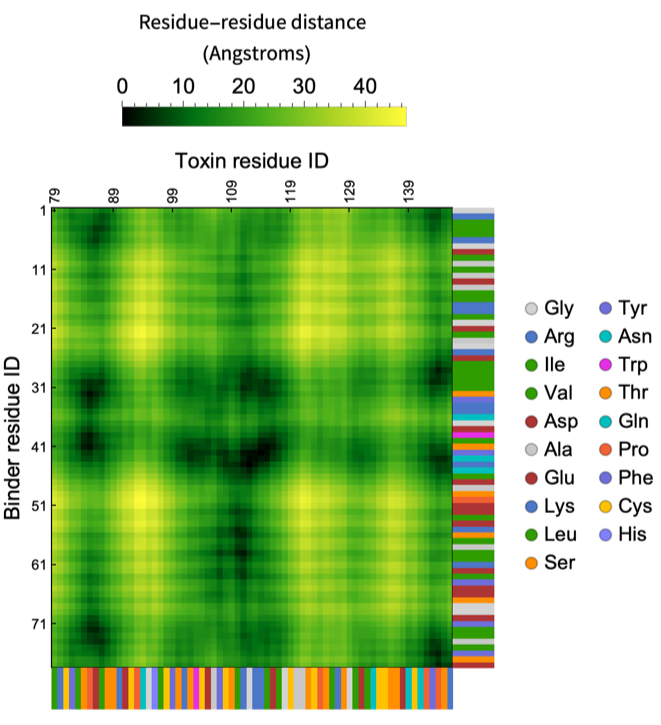
Generating a protein contact map, showing the distances between residues of the binder (Chain A) and the toxin (Chain B). This map helps identify key interaction points between the two molecules.
ProteinContactMapbinder1,
Out[]=
Extracting the coordinates of the α-carbon atoms of amino acid residues in the protein structure using ExtractBackboneCoordinates function, which are essential for calculating distances and interactions between the binder and toxin.
In[]:=
backboneCoords=ExtractBackboneCoordinates[binder1];
In[]:=
chains=binder1["PolymerChainLabels"]
Out[]=
{A,B}
Calculating the minimum distances (in Å) between the residues (α-carbon atoms) of the binder and toxin, provides data on how closely a residue in the binder is located to the toxin and vice versa. It is similar to taking the minimum distance in each of the rows and columns of the protein contact map above.
In[]:=
minimumDistances=AssociationThread[chains,{Table[Min[EuclideanDistance[backboneCoords[[1,i]],#]&/@backboneCoords[[2]]],{i,Length@backboneCoords[[1]]}],Table[Min[EuclideanDistance[backboneCoords[[2,i]],#]&/@backboneCoords[[1]]],{i,Length@backboneCoords[[2]]}]}]
These are the range of the distances of residues from the toxin (Chain A) and from the binder (Chain B) respectively:
In[]:=
MinMax/@minimumDistances
Out[]=
A{4.4761,21.3902},B{4.4761,23.24}
We now assign colors to residues based on their minimum distance to the other chain, keeping the hues the same. The darker the color the closer the distance:
In[]:=
colors=AssociationThread[chains,{Lighter[color2,#]&/@Rescale[minimumDistances[[1]]],Lighter[color1,#]&/@Rescale[minimumDistances[[2]]]}]
We make a list colorRules which will dictate how each residue in the chain will be colored using BioMoleculePlot3D:
In[]:=
colorRules=Normal@AssociationThread[Flatten[Table[{chains[[i]],#}&/@Range@Length@colors[[i]],{i,2}],1],Flatten@Values@colors]
Visualizing the protein structure with residues color-coded by amino acids, using a rainbow color scheme. This helps in identifying specific amino acids involved in the binding interaction. Along with this we also visualize the binder-toxin complex where residues are colored based on their distance from the other chain:
uniqueRes=Sort@DeleteDuplicates@Flatten@Values@res;colorRes=ColorData["Rainbow"][#]&/@Rescale[Range@Length@uniqueRes];resColorRules=Normal@AssociationThread[uniqueRes,colorRes];ShowBioMoleculePlot3Dbinder1,,BioMoleculePlot3D[binder1,PlotTheme->"Tubes"],BioMoleculePlot3Dbinder1,,BioMoleculePlot3Dbinder1,
Out[]=
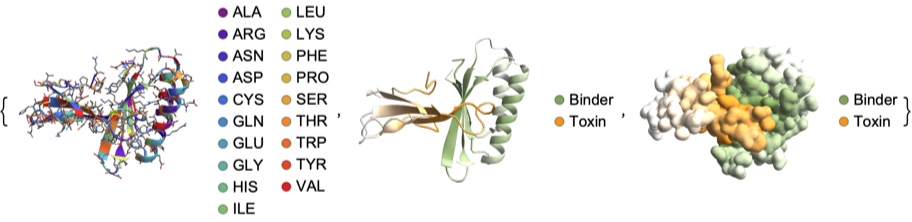
Another color map based on the minimum distances between the binder and toxin, using the same color scheme as the protein contact map to represent proximity. A bar legend is added to indicate the distance scale.
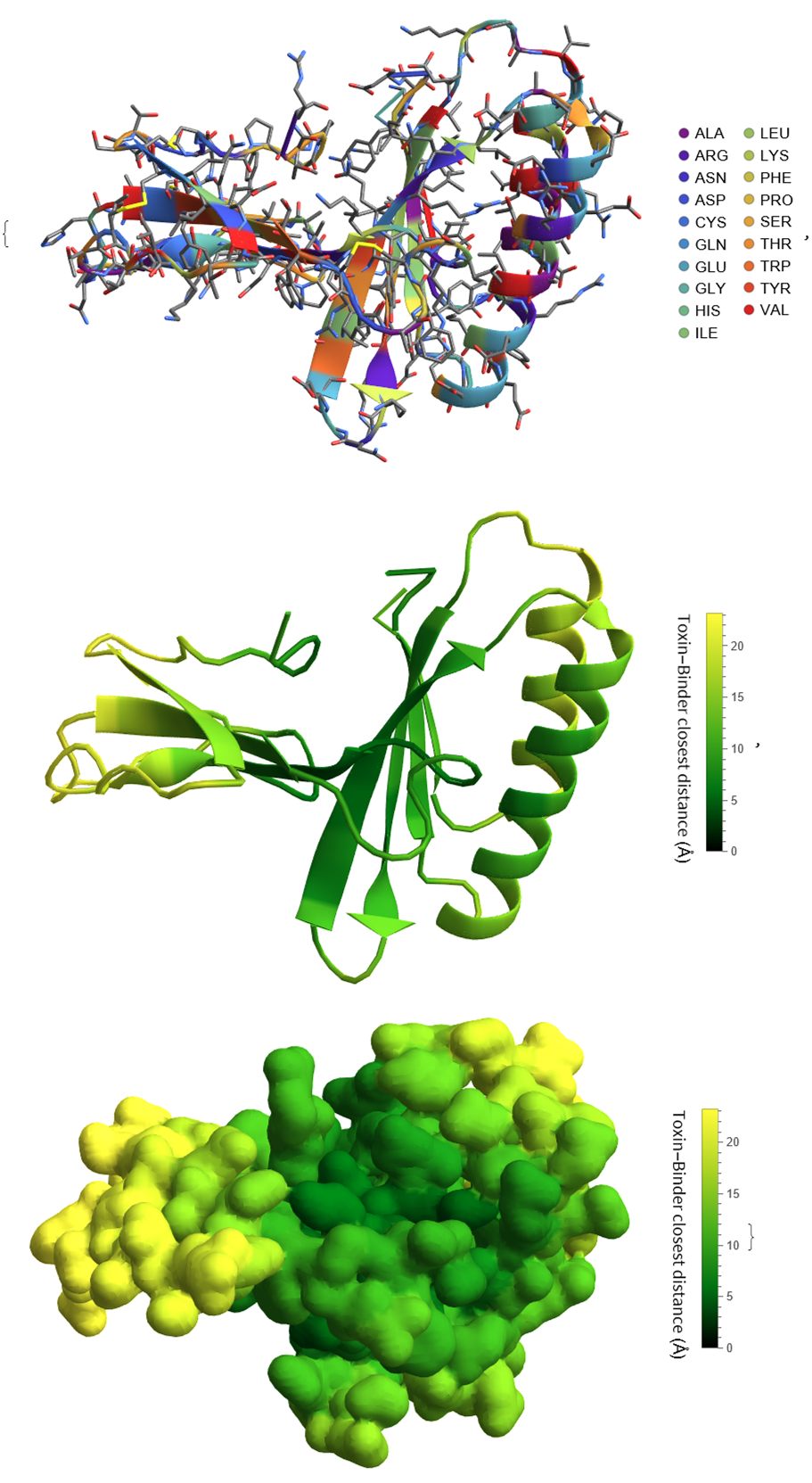
Extracting individual chains from the protein structure, allowing for a visualization of each component (binder and toxin) separately with a Gaussian surface representation:
And color - coded by the distance to the other chain, to highlight regions of close interaction:
Using Wolfram Language functions BioMolecule, BioMoleculePlot3D, BioMoleculeValue and functions from the ProteinVisualization paclet more in-depth analysis can be done for the structure of the binder-toxin complex.
CITE THIS NOTEBOOK
CITE THIS NOTEBOOK
Visualization of designed protein binders for snake venom toxins
by Soutick Saha
Wolfram Community, STAFF PICKS, February 19, 2025
https://community.wolfram.com/groups/-/m/t/3397335
by Soutick Saha
Wolfram Community, STAFF PICKS, February 19, 2025
https://community.wolfram.com/groups/-/m/t/3397335