Consider this a postscript to Gay Wilson’s post “Nutrients by the Numbers -Food and Nutrition Statistics”. I was inspired by her post on food entities. Unbeknownst to me, food entities require their own syntax, in a manner I had not seen before. In this post, I will use the berries list of Gay’s post as an example. I would like to share how to construct food entity varieties from scratch as to retrieve detailed nutritional data. Moreover, I would like to share how we can find the taxonomic data associated with the berries’ plant species. At last, I will use the taxonomic data to find more berry plant entities.
Introducing Food Entities
Introducing Food Entities
The way the entity framework manages food entities is very different from most entities. Let’s copy the berries list from Gay Wilson’s post to see it for ourselves:
In[]:=
berries=,,,,,,,,,,,,,,,;

The food entity object obfuscates its type, so we need to expand the object in InputForm, for example “strawberry:
In[]:=

Out[]//InputForm=
Entity[Food, {EntityProperty[Food, FoodType] -> ContainsExactly[{Entity[FoodType, Strawberry]}], EntityProperty[Food, AddedFoodTypes] -> ContainsExactly[{}]}]
Notice the composite syntax: the “food” entity comprises of matching Entity Type and -Properties to define e.g. a strawberry as food.
Apparently the concept “food” in the Entity Framework is complex; it comprises of many entity components as we can see from this list of all “food”-related types:
Apparently the concept “food” in the Entity Framework is complex; it comprises of many entity components as we can see from this list of all “food”-related types:
Out[]=
{BasicFoodGroup,Food,FoodAge,FoodAlcoholLabel,FoodBeefGrade,FoodBoneContent,FoodBrandName,FoodCaffeineLabel,FoodCalorieLabel,FoodComposition,FoodConcentration,FoodCrustType,FoodCulture,FoodDataSource,FoodFatLabel,FoodFatType,FoodFiberLabel,FoodFlavor,FoodGeometryType,FoodGlutenContent,FoodIntendedUse,FoodIronLabel,FoodLocation,FoodMaltType,FoodManufacturer,FoodMeatCut,FoodMeatQuality,FoodMoistureLevel,FoodNutritionalSupplement,FoodNutritionalSupplementNotAdded,FoodPackaging,FoodPart,FoodPattyCount,FoodPeelingType,FoodPreparation,FoodProcessingType,FoodSeafoodVariety,FoodSeedContent,FoodServingType,FoodShape,FoodSize,FoodSkinContent,FoodSodiumLabel,FoodState,FoodStorageType,FoodSubBrandName,FoodSugarLabel,FoodSugarType,FoodTexture,FoodTrimmingLevel,FoodType,FoodTypeGroup,FoodVariety,FoodVegetablePart,FoodYeastType,USDAFoodGroup}
GeneralizedEntityFilter
GeneralizedEntityFilter
What kind of entity object is the food entity object shown in expanded form above?
If we look closely, we will see that the food entity object comprises of a “+” icon and an object icon.
The “+“ (expander) icon signifies a composite entity. I searched my Wolfram installation directory on Windows for icons and found this one, named GeneralizedEntityFilter.
If we look closely, we will see that the food entity object comprises of a “+” icon and an object icon.
The “+“ (expander) icon signifies a composite entity. I searched my Wolfram installation directory on Windows for icons and found this one, named GeneralizedEntityFilter.

So I assume that the Food entity object is named a GeneralizedEntityFilter object.
Strawberry as FoodType Entity: generic nutritional information
Strawberry as FoodType Entity: generic nutritional information
Let’s consider the “strawberry” to illustrate how much nutritional information we can retrieve from two different entity types.
The obvious way to find the strawberry entity is as a FoodType entity (more on this in the section below) .
If you look at the properties of the “strawberry” FoodType entity you will see that it comprises of a limited amount of nutritional data:
The obvious way to find the strawberry entity is as a FoodType entity (more on this in the section below) .
If you look at the properties of the “strawberry” FoodType entity you will see that it comprises of a limited amount of nutritional data:
In[]:=
Out[]=
| ||

Strawberry as a Food Entity: detailed nutritional information
Strawberry as a Food Entity: detailed nutritional information
So the FoodType Entity is not a suitable entity to retrieve detailed nutritional information from.
We need to use the syntax below if we want to find detailed nutritional properties of the strawberry entity as food:
We need to use the syntax below if we want to find detailed nutritional properties of the strawberry entity as food:
In[]:=
Entity["Food",{EntityProperty["Food","FoodType"]->ContainsExactly[{Entity["FoodType","Strawberry"]}],EntityProperty["Food","AddedFoodTypes"]->ContainsExactly[{}]}];%["Dataset"]//
Out[]=


Personally, I like to be able to construct my entities deliberately. The alternative is to try my luck with the Interpreter to define food entities.
So how can we use the “food” syntax to create our own valid food types?
So how can we use the “food” syntax to create our own valid food types?
Berries as food
Berries as food
Gay Wilson’s “berries” list generated by the Interpreter comprises of the two currant varieties: black and red. The total number of berries the interpreter found is 16.
I guess we can find more berries when we start from scratch i.e. at the FoodTypeGroup level where we will include all berry varieties.
I guess we can find more berries when we start from scratch i.e. at the FoodTypeGroup level where we will include all berry varieties.
Find berries in FoodTypeGroup
Find berries in FoodTypeGroup
There is a “FoodTypeGroup” type in the entity framework with the following entities:
In[]:=
EntityValue["FoodTypeGroup","Entities"]
Out[]=
,,,,,,,,,,,,,,,,,,,,,,,,,,,,,,,,,,,,,,,,,,,,,,,,,,,,,,,,,,,,,,,,,
We found a fruits FoodTypeGroup entity, now let’s view its properties:
In[]:=
Out[]=
,,,,,,,,,,,,,
We will apply the “food types” property to retrieve a list of fruits FoodType entity objects:
In[]:=
Out[]//Shallow=
,,,,,,,,,,140
We retrieved a list of fruits from which to select berries. We have to make sure we select named berries, add the “currant” berries type and ignore the generic “berry” foodtype:
In[]:=
BerryType=Select[StringMatchQ[#,(__~~"berry")|"currant",IgnoreCase->True]&]@CanonicalName@@
Out[]=
{Blackberry,Blueberry,Boysenberry,Cloudberry,Cranberry,Currant,Elderberry,Gooseberry,Huckleberry,Loganberry,Mulberry,Pokeberry,Raspberry,Salmonberry,Strawberry,AcaiBerry,OheloBerry,Lingonberry,Bilberry,CapeGooseberry,Olallieberry,Dewberry,Juneberry,Marionberry,Tayberry,Youngberry}
Now we found 10 more berries in our BerryType list compared to the original berries list.
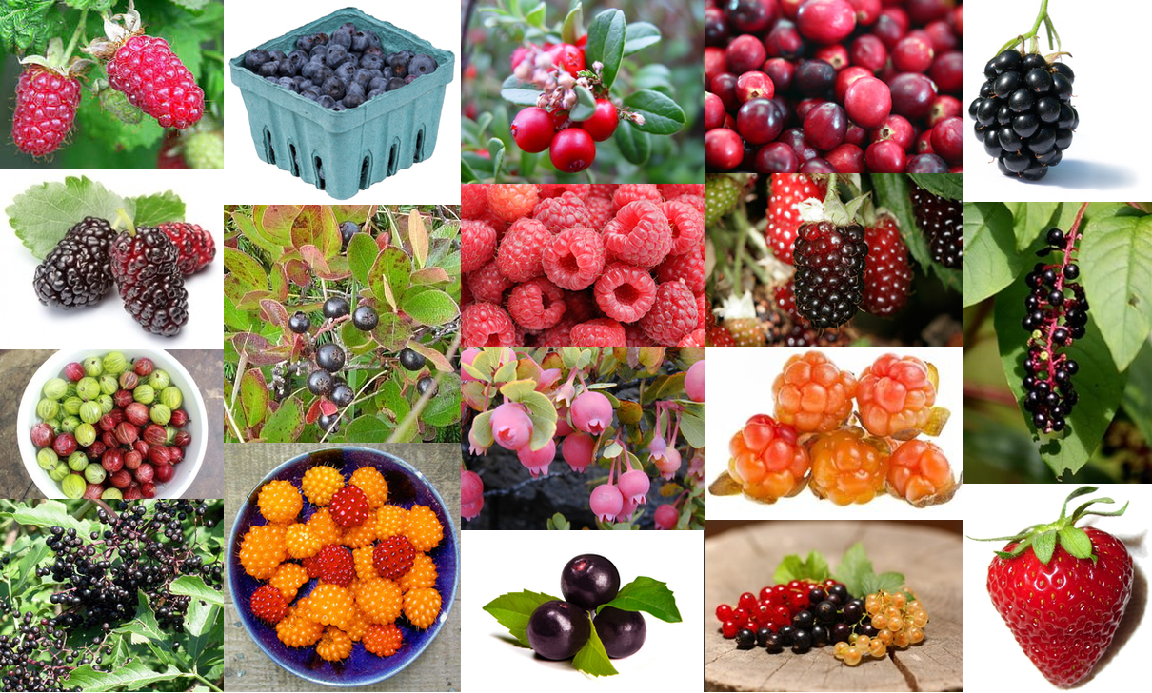
Let’s create an image collage of the food berries:
Let’s create an image collage of the food berries:
In[]:=
Select[StringMatchQ[CanonicalName@#,(__~~"berry")|"currant",IgnoreCase->True]&]@@;ImageCollage[EntityValue[%,"Image"],"ImageSize"->Large]
Out[]=
Berry varieties: categorical property values
Berry varieties: categorical property values
The original “berries” list includes two “currant” varieties i.e. red and black.
We want to expand the list of berries to include all of their varieties available in the entity framework.
I am not not in a position to evaluate the validity of the berry variety taxonomy, so I will use the varieties in the entity framework as-is.
As a starting point we can create a list of objects of the entities in the BerryType list to use as a data source:
We want to expand the list of berries to include all of their varieties available in the entity framework.
I am not not in a position to evaluate the validity of the berry variety taxonomy, so I will use the varieties in the entity framework as-is.
As a starting point we can create a list of objects of the entities in the BerryType list to use as a data source:
All berry varieties can be found in the ”categorical property values”. If we display the output as a Dataset, we can use the latter to get to the variety properties as so:
Create berries and their varieties as Food Entities
Create berries and their varieties as Food Entities
We will use the BerryVarieties Dataset to create one comprising of only canonical names as so:
Next we define a template for the food entity we would like to create:
At last, we compute the berry food variety entities:
Now we can expand our original 16 berries list by 27 more:
Note: Speed up food property values computation with EntityClasses
Note: Speed up food property values computation with EntityClasses
I will conclude this section with an example of how we can compute nutritional properties with an Implicit EntityClass as so:
We can see the power of EntityClass at work. If we compare the timing of Gay Wilson’s berriesZinc expression to the implicit EntityClass expression we will find:
Instead of mapping over each individual entity, each with a trip to the Entity database, we can calculate the zinc properties in one go.
This is about 16 times faster, even though my list of entities is a bit larger. In our berries example, the time saving is not such a big deal - it’s a total of about 0.25 seconds - but you can see where this going with hundreds or more entities types.
This is about 16 times faster, even though my list of entities is a bit larger. In our berries example, the time saving is not such a big deal - it’s a total of about 0.25 seconds - but you can see where this going with hundreds or more entities types.
Berries as plant species
Berries as plant species
In the section, I would like to identify the plants associated with the berry types from the previous section. We will useTaxonomicSpecies, an Entity type that was introduced in version 14 of the Wolfram Language.
Normally, we will start looking for entities with the EntityValue function.
Normally, we will start looking for entities with the EntityValue function.
The new TaxonomicSpecies entity type contains 1.8M values. Downloading all of them to get the CanonicalNames will fail around 1.3 M values every time in my installation. Also, I do not seem to be able to prefetch the entity type either.
So in this case I have no other choice than to use the Interpreter to find the TaxonomicSpecies of the berries:
So in this case I have no other choice than to use the Interpreter to find the TaxonomicSpecies of the berries:
We can create an image collage of the above berry species:
Taxonomic Tree of the berry plant species
Taxonomic Tree of the berry plant species
In this section, we will create a taxonomic tree of the berries plant species.
We have to work our way up the “taxon” tree, applying the property “parent taxon” iteratively to create a taxonomic tree of the berry species in the list.
It is easier to create a combined graph than a combined tree with nesting, so we’ll start with NestGraph.
We will aggregate the VertexLists of each individual berry species graph into one VertexList.
Then we will reverse the edge rules to enable the conversion from a Graph to a GraphTree.
It is easier to create a combined graph than a combined tree with nesting, so we’ll start with NestGraph.
We will aggregate the VertexLists of each individual berry species graph into one VertexList.
Then we will reverse the edge rules to enable the conversion from a Graph to a GraphTree.
We will convert the tree entities displayed in the tree plot to “friendly” names:
We can get all parent taxa, one level below “flowering plants” i.e. level 5 as so:
In the framework’s taxonomy, this level is the plant “order” :
From the taxonomic tree we can see that the berries belong to 6 different flowering plant orders. The strawberry is related to the rose family.
How many species can we find for each order?
How many species can we find for each order?
Now that we have found the berries’ plant “order”, what other berries can we find?
More berry plants: the Aquifoliales and Dipsacales order
More berry plants: the Aquifoliales and Dipsacales order
Unfortunately, performance-wise we’re a bit limited in how many berries we can retrieve within an acceptable time from the common names of all plant orders.
At present, retrieving over 2000 common names in a Dataset format will take too long (>> 4 minutes) even with entityclasses.
So we’ll focus on the two smallest species-sized orders i.e. Aquifoliales and Dipsacales and retrieve all species with “berry” or “currant” as a common name.
At present, retrieving over 2000 common names in a Dataset format will take too long (>> 4 minutes) even with entityclasses.
So we’ll focus on the two smallest species-sized orders i.e. Aquifoliales and Dipsacales and retrieve all species with “berry” or “currant” as a common name.
At a glance, we found some other common names for berries: honeysuckle and holly, but let’s stick with berry and currant:
Don’t be misled by the names of the Dataset keys: they are displayed in the CommonName format, but they are actually entities:
These type of berries can be found in countries, mostly located in the Northern hemisphere:
Conclusion
Conclusion
In this post I used the berries food entities as an example to show how the food entity syntax works. I have shown that we were able to exploit the syntax to create food entity varieties and compute their properties. Also, we were able to define an implicit EntityClass to drastically speed up entity property values computation.The new TaxonomicSpecies entity type has been employed to associate the berries’ entities with their respective plant species. I have demonstrated how we can create a taxonomic tree that we subsequently used to identify additional berry plant species.
The TaxonomicSpecies type comprises of over 1.8 M values and working with it in practice has been challenging. The TaxonomicSpecies type cannot be prefetched; aggregate entity properties (e.g. EntityCount) may require a complete values download, which often fails. Hopefully these challengers will be addressed in a future update of the Wolfram Language.
The TaxonomicSpecies type comprises of over 1.8 M values and working with it in practice has been challenging. The TaxonomicSpecies type cannot be prefetched; aggregate entity properties (e.g. EntityCount) may require a complete values download, which often fails. Hopefully these challengers will be addressed in a future update of the Wolfram Language.
References
References
CITE THIS NOTEBOOK
CITE THIS NOTEBOOK
Food and TaxonomicSpecies Entities: a Berries Example
by Dave Middleton
Wolfram Community, STAFF PICKS, January 29, 2024
https://community.wolfram.com/groups/-/m/t/3111601
by Dave Middleton
Wolfram Community, STAFF PICKS, January 29, 2024
https://community.wolfram.com/groups/-/m/t/3111601