Motivated by Around’s recent function, WildFire[], I quickly explore the NASA active fire archived data from the MODIS. The MODIS Collection 6 is available from 11 November 2000, and can be requested here. I’ve turned this NASA dataset into two computable datasets in the Wolfram Language: standard data products, and Near Real-Time (NRT) fire products. I’ve also provided some simple visualizations.
Set the current working direction as the notebook directory:
In[]:=
SetDirectory[NotebookDirectory[]];
Import the raw data elements:
In[]:=
Import["DL_FIRE_M6_152693.zip","Elements"]
Out[]=
{Centering,CentralScaleFactor,CoordinateSystem,CoordinateSystemInformation,Data,Datum,Graphics,GraphicsList,GridOrigin,InverseFlattening,LayerNames,LayerTypes,LinearUnits,Projection,ProjectionName,ReferenceModel,SemimajorAxis,SemiminorAxis,SpatialRange,StandardParallels}
Import the data:
In[]:=
dt=Import["DL_FIRE_M6_152693.zip","Data"];
Give list of dimensions
In[]:=
dt//Dimensions
Out[]=
{2,4}
For the 1st element, return labels (keys):
In[]:=
dt〚1〛//Association//Keys
Out[]=
{LayerName,Geometry,Labels,LabeledData}
For the 2nd element, return labels (keys):
In[]:=
dt〚2〛//Association//Keys
Out[]=
{LayerName,Geometry,Labels,LabeledData}
Note the Near Real-Time (NRT) fire products are generated within approximately 3 hours of satellite observation. The standard quality data (available with a 2-3 month lag) is processed by the MODIS Fire Team at the University of Maryland. More info can be found here.
Look for LayerName is the data:
In[]:=
Lookup["LayerName"][dt]
Out[]=
{fire_archive_M6_152693,fire_nrt_M6_152693}
Look for Labels in the 1st element of data:
In[]:=
Lookup["Labels"]@dt〚1〛
Out[]=
{LATITUDE,LONGITUDE,BRIGHTNESS,SCAN,TRACK,ACQ_DATE,ACQ_TIME,SATELLITE,INSTRUMENT,CONFIDENCE,VERSION,BRIGHT_T31,FRP,DAYNIGHT,TYPE}
Look for Labels in the 1st element of data:
In[]:=
Lookup["Labels"]@dt〚2〛
Out[]=
{LATITUDE,LONGITUDE,BRIGHTNESS,SCAN,TRACK,ACQ_DATE,ACQ_TIME,SATELLITE,INSTRUMENT,CONFIDENCE,VERSION,BRIGHT_T31,FRP,DAYNIGHT}
Note that “fire_archive_M6_152693” (1st element of dt) has one more label, “TYPE”. Now let’s look at the number of data points for NRT and the processed standard data. We can do by counting the number of data points for only one label. I shall do it for “LATITUDE”.
In[]:=
Lookup["LATITUDE"]@Lookup["LabeledData"]@dt〚1〛//Dimensions
Out[]=
{2329615}
In[]:=
Lookup["LATITUDE"]@Lookup["LabeledData"]@dt〚2〛//Dimensions
Out[]=
{51254}
Look for LabeledData, thread labels (keys) over corresponding values, transpose the results and return new association:
In[]:=
as0=AssociationThread[{"FireArchiveM6","FireNRT"},#]&@Apply[Association,Transpose/@Apply[Thread[StringDelete[#1,"_"]#2]&,Lookup["LabeledData"][dt],{2}],{2}];
Give the dates for ACQDATE column:
In[]:=
dsARCHIVE=Dataset[as0["FireArchiveM6"]][All,{"ACQDATE"(DateObject[#〚;;3〛]&)}];
Deploy the dataset on cloud
In[]:=
CloudDeploy[dsARCHIVE,"/FireArchiveM6",Permissions->"Public"]
Out[]=
Give the dates for ACQDATE column:
In[]:=
dsNRT=Dataset[as0["FireNRT"]][All,{"ACQDATE"(DateObject[#〚;;3〛]&)}];
Deploy the dataset on cloud
In[]:=
CloudDeploy[dsNRT,"/FireNRT",Permissions->"Public"]
Out[]=
Simple exploration of FireArchiveM6 dataset
Simple exploration of FireArchiveM6 dataset
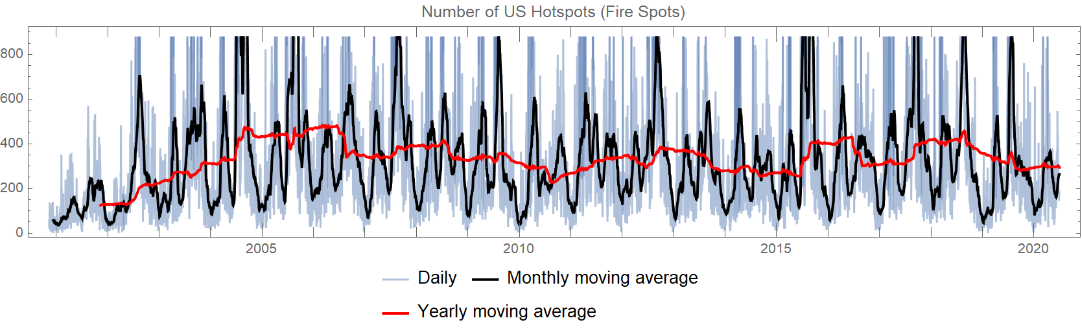
Collect LATITUDE and LONGITUDE as LOCATION, and keep only ACQDATE in every row. Group them by ACQDATE and count number of locations per day as a TimeSeries:
In[]:=
ts=TimeSeries@Normal[dsARCHIVE[All,<|"LOCATION"Values[#〚;;2〛],"ACQDATE"#ACQDATE|>&][GroupBy["ACQDATE"]][All,Length@#〚All,1〛&]];
In[]:=
DateListPlotts,MovingAverage[ts,],MovingAveragets,,
Out[]=
Collect LATITUDE and LONGITUDE as LOCATION, and keep only ACQDATE in every row. Group them by month and collect geo locations:
In[]:=
dsGeoPoints=dsARCHIVE[All,<|"LOCATION"Values[#〚;;2〛],"ACQDATE"#ACQDATE|>&][GroupBy[DateObject[#ACQDATE,"Month"]&]][All,GeoPosition@#〚All,1〛&][KeyValueMap[<|"Month"#1,"GeoLocations"#2|>&]];
Set colors, bins and coloring functions:
In[]:=
colors=Table[Blend[{Red,Yellow},x],{x,1,0,-1/5}];bins=Join[Range[10,50,10]];cfunc[x_]:=Which@@Riffle[Join[x≤#&/@bins,{x>Last[bins]}],colors]
Generate corresponding legend for the colors and their bins :
In[]:=
legend=SwatchLegend[colors,ToString/@Join[{"<"<>ToString@First[bins]},ToString@#1<>"-"<>ToString@#2&@@@Partition[bins,2,1],{">"<>ToString@Last[bins]}],LabelStyle{FontSize8},LegendFunction"Frame",LegendLayout"Column"];
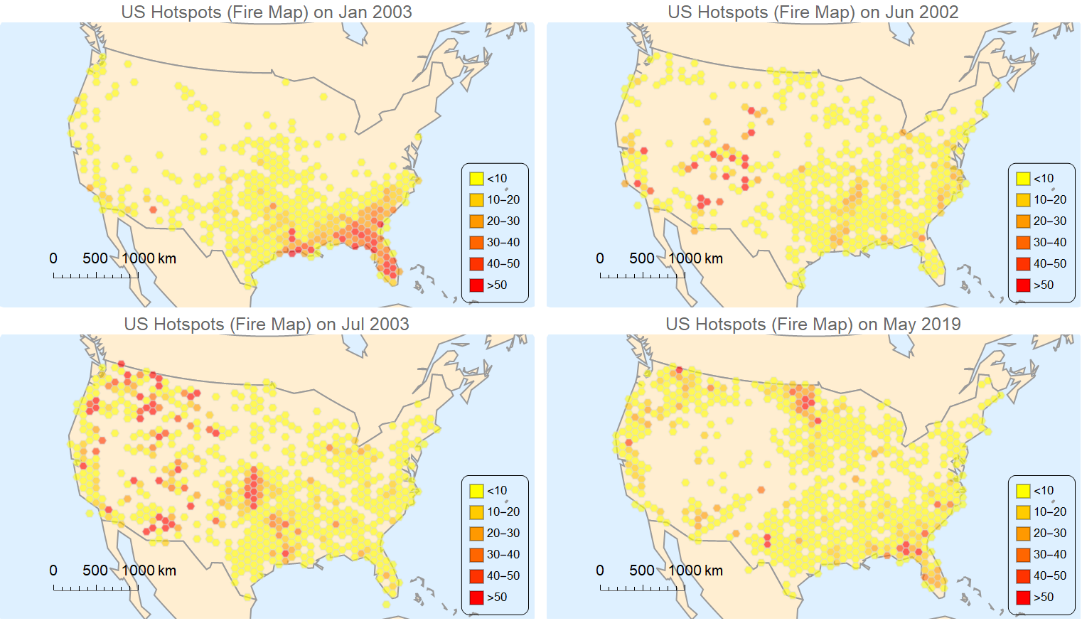
Generate geo histogram of all rows:
In[]:=
data=dsGeoPointsAll,GeoHistogram#GeoLocations,,GeoScaleBar"Metric",GeoRange,ColorFunctioncfunc,ColorFunctionScalingFalse,ImageSizeMedium,GeoBackground->"CountryBorders",PlotLegendsPlaced[legend,{Right,Bottom}],PlotStyle{EdgeForm[{Opacity[.4],LightGray}],Opacity[.6]},PlotLabel"US Hotspots (Fire Map) on "<>DateString[#Month]&//Normal;
Give 4 random samples of data in 2-column form:
In[]:=
RandomSample[data,4]//Multicolumn[#,2]&
Out[]=
Export collection of plots in data into a GIF:
Export["animation.gif",data,"DisplayDurations".3,AnimationRepetitions100]