Overview
Overview
This notebook has two purposes, first to show how Grok can work with Mathematica, and second to provide an all Mathematica interface to the Schwab API for anyone who has a Schwab account. The version of Grok is 3 beta, which comes with a free X account (no check-mark). That’s right, the code in this notebook cost me nothing, but a few minutes of my time. My experience with Grok 3 beta over the past two months suggests it is continuously improving. It is much faster than Notebook Assistant. Grok can handle things like the Schwab API, because it has retained all the code on the internet, mostly in Python on GitHub, thus it has a knowledge base apparently not available to Notebook Assistant. It has told me that it does not have access to the Schwab website for the API, but it knows all the options to web queries.
Grok cannot run Mathematica code, but recently it has been able to run Python code. Not long ago I gave it Mathematica code using data from Yahoo; it was able to convert the code to Python and run it. While it cannot draw graphs, it can describe what curves look like from the data and confirm data points which with the code I gave it.
I have had access to the Schwab API for two days during which I was able to generate the supplemental notebook. The code in the notebook has not been thoroughly tested, but if you want to build an interface to the Schwab API it will get you started. There is no documentation, but if you copy a function to your clipboard and paste it as a Grok prompt you will get a full description and probably a lot of supplemental code in Mathematica.
Grok cannot run Mathematica code, but recently it has been able to run Python code. Not long ago I gave it Mathematica code using data from Yahoo; it was able to convert the code to Python and run it. While it cannot draw graphs, it can describe what curves look like from the data and confirm data points which with the code I gave it.
I have had access to the Schwab API for two days during which I was able to generate the supplemental notebook. The code in the notebook has not been thoroughly tested, but if you want to build an interface to the Schwab API it will get you started. There is no documentation, but if you copy a function to your clipboard and paste it as a Grok prompt you will get a full description and probably a lot of supplemental code in Mathematica.
The information given to Grok
The information given to Grok
"https://api.schwabapi.com/marketdata/v1/chains?symbol=AAPL&contractType=ALL&strikeCount=10&includeUnderlyingQuote=true&strategy=SINGLE&interval=10&strike=200&range=OTM&fromDate=2025-05-02&toDate=2025-07-02&expMonth=JUL";
I gave Grok the string above which I got from the Schwab API site along with working code for the site to get prices, which can be found in the supplemental notebook. Grok generated the function below. When I reported back to Grok that it was a success, it generated all the rest of the code in the notebook as examples of how to use the function in a few seconds. Grok also generated text on how to use the option parameters in the cell below.
Output from Grok
Output from Grok
Let’s break down the query parameters to understand their purpose and ensure you can customize them:
symbol=AAPL: The underlying stock or ETF symbol for the option chain (e.g., AAPL for Apple).
contractType=ALL: Specifies the type of options to retrieve:
ALL: Both calls and puts.
CALL: Only call options.
PUT: Only put options.
strikeCount=10: The number of strike prices to return, centered around the at-the-money (ATM) strike or a specified strike. For example, strikeCount=10 returns 5 strikes above and 5 below the ATM or specified strike.
includeUnderlyingQuote=true: If true, includes the current quote (e.g., bid, ask, last) for the underlying symbol (AAPL) in the response.
strategy=SINGLE: Specifies the option strategy. For basic option chains, use SINGLE to retrieve individual option contracts. Other strategies (e.g., COVERED, SPREAD) are for advanced multi-leg strategies, but they’re less common for basic price retrieval.
interval=10: The difference between strike prices (in dollars). For example, interval=10 returns strikes at intervals of $10 (e.g., 190, 200, 210). This is optional and may not always apply, as Schwab typically uses standard strike intervals.
strike=200: Specifies a target strike price to center the chain. If provided, the API returns strikes around this value (based on strikeCount). If omitted, the chain centers around the ATM strike.
range=OTM: Filters the strike range:
ITM: In-the-money options only.
OTM: Out-of-the-money options only.
NTM: Near-the-money (close to ATM).
ALL: All available strikes (ignores strikeCount).
SOTM: Slightly out-of-the-money.
SNM: Slightly near-the-money.
fromDate=2025-05-02: Filters options with expiration dates on or after this date (format: YYYY-MM-DD).
toDate=2025-07-02: Filters options with expiration dates on or before this date.
expMonth=JUL: Filters options expiring in the specified month (e.g., JUL for July). Use three-letter abbreviations (JAN, FEB, ..., DEC). This is optional and typically used with fromDate/toDate.
Notes:
Not all parameters are required. At minimum, you need symbol and contractType.
The interval parameter may be ignored by the API if it conflicts with standard strike intervals for the symbol.
The response is a JSON object containing the underlying quote (if requested) and arrays of call and put options, each with fields like strikePrice, bid, ask, last, openInterest, volatility, and greeks.
symbol=AAPL: The underlying stock or ETF symbol for the option chain (e.g., AAPL for Apple).
contractType=ALL: Specifies the type of options to retrieve:
ALL: Both calls and puts.
CALL: Only call options.
PUT: Only put options.
strikeCount=10: The number of strike prices to return, centered around the at-the-money (ATM) strike or a specified strike. For example, strikeCount=10 returns 5 strikes above and 5 below the ATM or specified strike.
includeUnderlyingQuote=true: If true, includes the current quote (e.g., bid, ask, last) for the underlying symbol (AAPL) in the response.
strategy=SINGLE: Specifies the option strategy. For basic option chains, use SINGLE to retrieve individual option contracts. Other strategies (e.g., COVERED, SPREAD) are for advanced multi-leg strategies, but they’re less common for basic price retrieval.
interval=10: The difference between strike prices (in dollars). For example, interval=10 returns strikes at intervals of $10 (e.g., 190, 200, 210). This is optional and may not always apply, as Schwab typically uses standard strike intervals.
strike=200: Specifies a target strike price to center the chain. If provided, the API returns strikes around this value (based on strikeCount). If omitted, the chain centers around the ATM strike.
range=OTM: Filters the strike range:
ITM: In-the-money options only.
OTM: Out-of-the-money options only.
NTM: Near-the-money (close to ATM).
ALL: All available strikes (ignores strikeCount).
SOTM: Slightly out-of-the-money.
SNM: Slightly near-the-money.
fromDate=2025-05-02: Filters options with expiration dates on or after this date (format: YYYY-MM-DD).
toDate=2025-07-02: Filters options with expiration dates on or before this date.
expMonth=JUL: Filters options expiring in the specified month (e.g., JUL for July). Use three-letter abbreviations (JAN, FEB, ..., DEC). This is optional and typically used with fromDate/toDate.
Notes:
Not all parameters are required. At minimum, you need symbol and contractType.
The interval parameter may be ignored by the API if it conflicts with standard strike intervals for the symbol.
The response is a JSON object containing the underlying quote (if requested) and arrays of call and put options, each with fields like strikePrice, bid, ask, last, openInterest, volatility, and greeks.
In[]:=
Clear[SchwabGetOptionChain];(*Defineoptions*)Options[SchwabGetOptionChain]={"contractType"->"ALL","strikeCount"->10,"includeUnderlyingQuote"->True,"strategy"->"SINGLE","interval"->None,"strike"->None,"range"->"ALL","fromDate"->None,"toDate"->None,"expMonth"->None};(*Definethefunction*)SchwabGetOptionChain[symbol_String,accessToken_String,opts___?OptionQ]:=Module[{url,headers,query,response},url="https://api.schwabapi.com/marketdata/v1/chains";headers=<|"Authorization"->"Bearer "<>accessToken,"Accept"->"application/json"|>;(*ConstructquerywithOptionValue*)query=Select[<|"symbol"->symbol,"contractType"->OptionValue[SchwabGetOptionChain,{opts},contractType],"strikeCount"->OptionValue[SchwabGetOptionChain,{opts},strikeCount],"includeUnderlyingQuote"->ToString@OptionValue[SchwabGetOptionChain,{opts},includeUnderlyingQuote],"strategy"->OptionValue[SchwabGetOptionChain,{opts},strategy],"interval"->OptionValue[SchwabGetOptionChain,{opts},interval],"strike"->OptionValue[SchwabGetOptionChain,{opts},strike],"range"->OptionValue[SchwabGetOptionChain,{opts},range],"fromDate"->OptionValue[SchwabGetOptionChain,{opts},fromDate],"toDate"->OptionValue[SchwabGetOptionChain,{opts},toDate],"expMonth"->OptionValue[SchwabGetOptionChain,{opts},expMonth]|>,#=!=None&(*ExcludeNonevalues*)];(*SendHTTPrequest*)response=URLRead[HTTPRequest[url,<|"Method"->"GET","Headers"->headers,"Query"->query|>]];(*Processresponse*)If[response["StatusCode"]==200,ImportString[response["Body"],"RawJSON"],"StatusCode "<>ToString[response["StatusCode"]]]];
(*ThesenextlinesaretheonlycodeinthisnotebookthatIwrote*)apiTokens=Import[tokenFile,"RawJSON"];apiTokens=refreshTokens[apiTokens["refresh_token"],appKey,appSecret];
In[]:=
options=SchwabGetOptionChain["LLY",apiTokens["access_token"]]
Out[]=
In[]:=
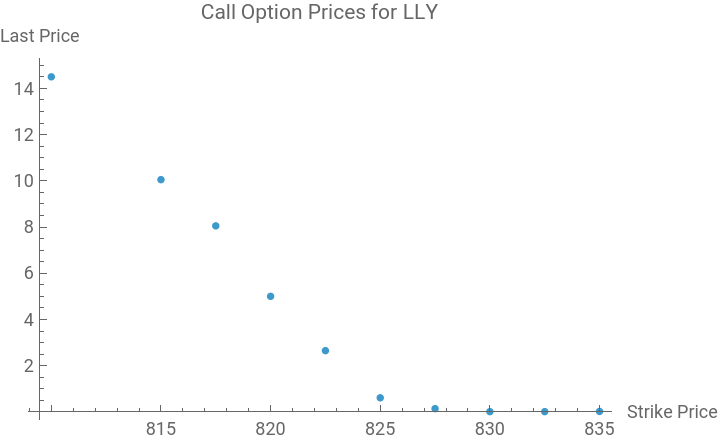
(*Extractcalloptionpricesforaspecificexpiration*)calls=options["callExpDateMap"];expiration=First[Keys[calls]];(*e.g.,"2025-07-18:0"*)callOptions=calls[expiration];prices={#[["strikePrice"]],#[["last"]]}&/@Flatten[Values[callOptions],1];ListPlot[prices,PlotLabel->"Call Option Prices for LLY",AxesLabel->{"Strike Price","Last Price"}]
Out[]=
In[]:=
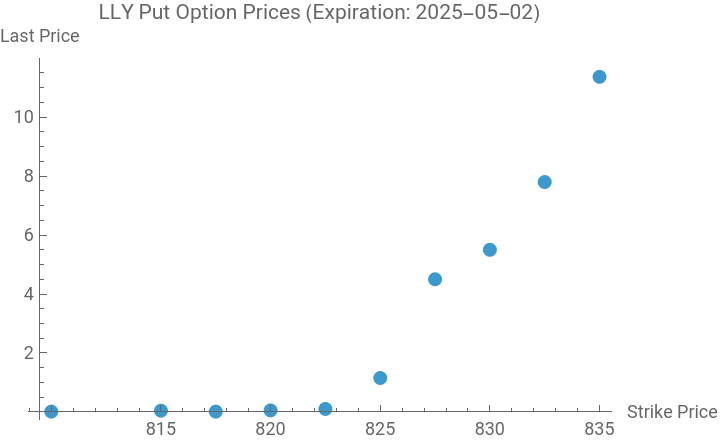
(*Assuming'result'containstheAPIresponse*)result=Out[(*youroutputcellnumber*)];(*Replacewiththecorrectcellnumber,e.g.,Out[1]*)(*Extractputoptionsforthe2025-05-02expiration*)puts=options["putExpDateMap"];expiration="2025-05-02:0";putOptions=puts[expiration];(*Extractstrikepricesandlastprices*)prices={#[["strikePrice"]],#[["last"]]}&/@Flatten[Values[putOptions],1];(*Visualizetheprices*)ListPlot[prices,PlotLabel->"LLY Put Option Prices (Expiration: 2025-05-02)",AxesLabel->{"Strike Price","Last Price"},PlotMarkers->Automatic]
Out[]=
In[]:=
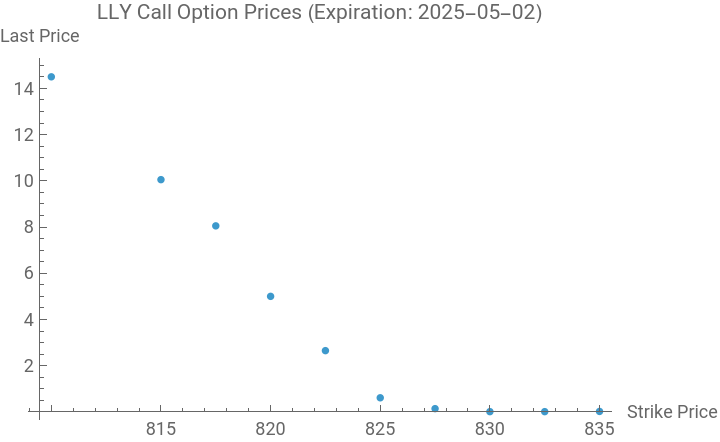
calls=options["callExpDateMap"];expiration="2025-05-02:0";callOptions=calls[expiration];prices={#[["strikePrice"]],#[["last"]]}&/@Flatten[Values[callOptions],1];ListPlot[prices,PlotLabel->"LLY Call Option Prices (Expiration: 2025-05-02)",AxesLabel->{"Strike Price","Last Price"}]
Out[]=
In[]:=
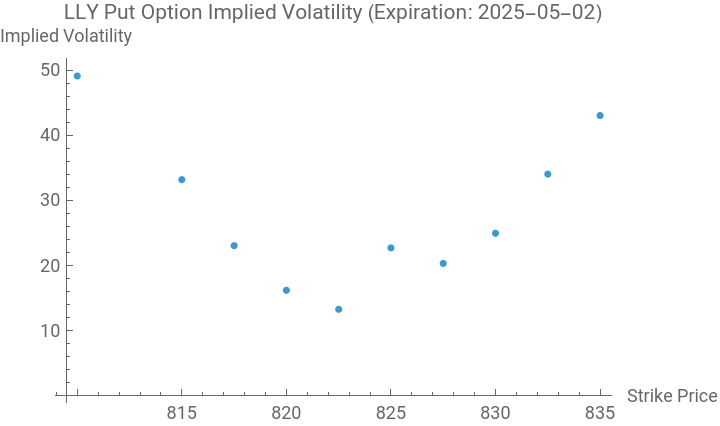
volatilities={#[["strikePrice"]],#[["volatility"]]}&/@Flatten[Values[putOptions],1];ListPlot[volatilities,PlotLabel->"LLY Put Option Implied Volatility (Expiration: 2025-05-02)",AxesLabel->{"Strike Price","Implied Volatility"}]
Out[]=
In[]:=
result=SchwabGetOptionChain["LLY",apiTokens["access_token"],"strike"->820,"strikeCount"->5,"range"->"NTM","fromDate"->"2025-05-02","toDate"->"2025-05-02"]
Out[]=
In[]:=
result=SchwabGetOptionChain["LLY",apiTokens["access_token"],"range"->"NTM","strikeCount"->5,"fromDate"->"2025-05-02","toDate"->"2025-05-02"]
Out[]=
CITE THIS NOTEBOOK
CITE THIS NOTEBOOK
Developing an interface to the Schwab API with Wolfram
by Robert Rimmer
Wolfram Community, STAFF PICKS, May 3, 2025
https://community.wolfram.com/groups/-/m/t/3454378
by Robert Rimmer
Wolfram Community, STAFF PICKS, May 3, 2025
https://community.wolfram.com/groups/-/m/t/3454378