This is possible. It’s a little involved.
Time series data
Time series data
In[]:=
BTC=FinancialData["BTC/USD",{{2013,1,1},{2013,1,31},"Day"}];
In[]:=
wd=WeatherData["Chicago","Temperature",{{2013,1,1},{2013,1,31},"Day"}];
Setting up custom function
Setting up custom function
You can get the interpolation function used to plot the time series data like this:
In[]:=
wd["PathFunction"]
Out[]=
Functionx.,InterpolatingFunction[x.],Listable


In plots, the ColorFunction option can be any function you want, and the documentation will tell you how inputs get fed to the ColorFunction function. You can also do this trick to just look at what values get passed to ColorFunction:
In[]:=
DateListPlot[BTC,ColorFunctionPrint@*List,ColorFunctionScaling->False]
{3.56599×,13.24}
9
10
{3.56607×,13.22}
9
10
{3.56616×,13.09}
9
10
{3.56625×,13.19}
9
10
{3.56633×,13.19}
9
10
{3.56642×,13.15}
9
10
{3.56651×,13.15}
9
10
{3.56659×,13.2}
9
10
{3.56668×,13.5}
9
10
{3.56676×,13.58}
9
10
{3.56685×,14.}
9
10
{3.56694×,14.}
9
10
{3.56702×,13.89}
9
10
{3.56711×,13.64}
9
10
{3.5672×,14.1}
9
10
{3.56728×,14.2}
9
10
{3.56737×,14.53}
9
10
{3.56746×,15.36}
9
10
{3.56754×,15.57}
9
10
{3.56763×,15.38}
9
10
{3.56772×,15.5}
9
10
{3.5678×,16.52}
9
10
{3.56789×,17.35}
9
10
{3.56797×,17.5}
9
10
{3.56806×,17.29}
9
10
{3.56815×,17.49}
9
10
{3.56823×,17.49}
9
10
{3.56832×,17.6}
9
10
{3.56841×,18.67}
9
10
{3.56849×,19.35}
9
10
{3.56858×,19.45}
9
10
{3.56599×,13.24}
9
10
{3.56607×,13.22}
9
10
{3.56616×,13.09}
9
10
{3.56625×,13.19}
9
10
{3.56633×,13.19}
9
10
{3.56642×,13.15}
9
10
{3.56651×,13.15}
9
10
{3.56659×,13.2}
9
10
{3.56668×,13.5}
9
10
{3.56676×,13.58}
9
10
{3.56685×,14.}
9
10
{3.56694×,14.}
9
10
{3.56702×,13.89}
9
10
{3.56711×,13.64}
9
10
{3.5672×,14.1}
9
10
{3.56728×,14.2}
9
10
{3.56737×,14.53}
9
10
{3.56746×,15.36}
9
10
{3.56754×,15.57}
9
10
{3.56763×,15.38}
9
10
{3.56772×,15.5}
9
10
{3.5678×,16.52}
9
10
{3.56789×,17.35}
9
10
{3.56797×,17.5}
9
10
{3.56806×,17.29}
9
10
{3.56815×,17.49}
9
10
{3.56823×,17.49}
9
10
{3.56832×,17.6}
9
10
{3.56841×,18.67}
9
10
{3.56849×,19.35}
9
10
{3.56858×,19.45}
9
10
Out[]=
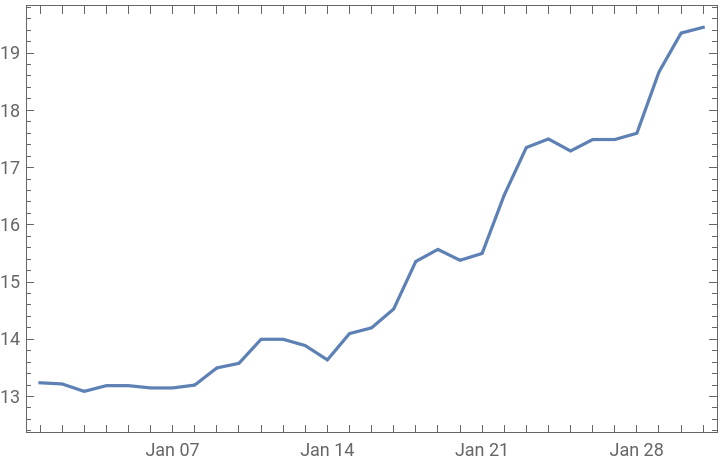
I used ColorFunctionScaling->False because I don’t want to have to manually scale things myself. So, the date is actually the AbsoluteTime applied to the date. And we only care about the first input, but we will need a function that takes two inputs.
If we use TemperatureMap as our color palette, we’ll need to scale values to the {0,1} range. Let’s define a constant for that range for convenience.
In[]:=
wdRange=QuantityMagnitude[MinMax[wd["Values"]]]
Out[]=
{-15,10.44}
Let's also define a function based on the weather interpolation function but that strips the units:
In[]:=
wdPathFn=QuantityMagnitude@*wd["PathFunction"]
Out[]=
QuantityMagnitude@*Functionx.,InterpolatingFunction[x.],Listable
Now we’re ready to define a color function.
In[]:=
customColor[x_,y_]:=ColorData["TemperatureMap"][Rescale[wdPathFn[x],wdRange]]
A quick test...
In[]:=
customColor[AbsoluteTime[{2013,1,1}],1]
Out[]=

Applying the color function
Applying the color function
In[]:=
DateListPlot[BTC,ColorFunctioncustomColor,ColorFunctionScaling->False]
Out[]=
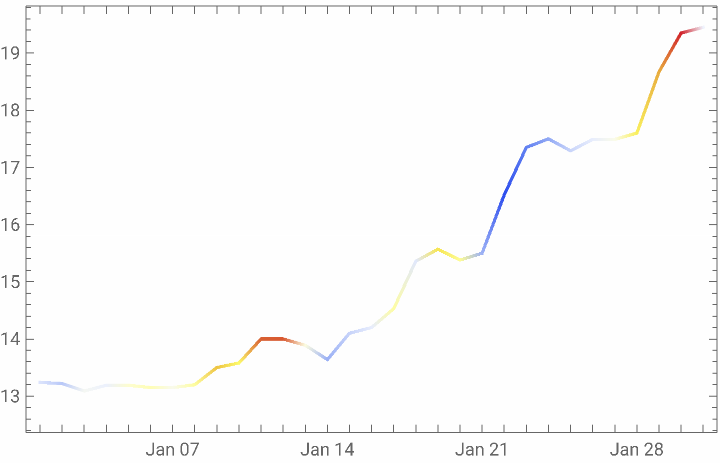
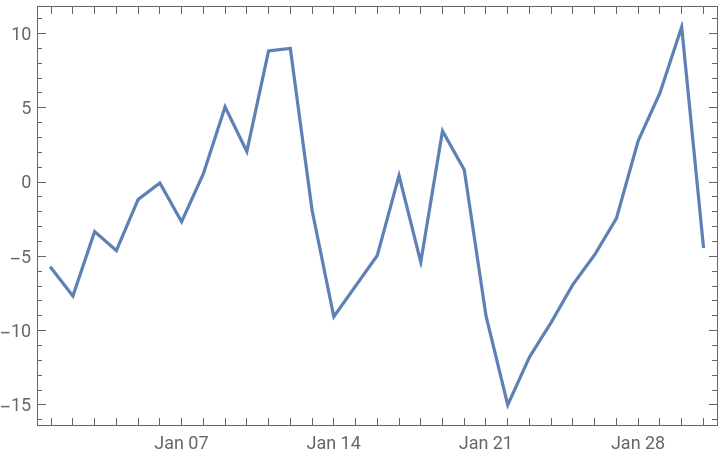
A quick comparison to the weather data plot. It looks reasonable to me.
In[]:=
DateListPlot[wd]
Out[]=