In Wolfram Language 12.2, many functions were added for manipulating and analyzing spatial point data. Among these functions is SpatialMedian, which finds the point (not necessarily in the dataset) with the minimum median distance from the input points. CentralFeature, on the other hand, locates the point in the dataset with the minimum median distance from the input. These functions allow for geographical analysis of points across the globe. Using this, it is possible to find out the “center” of many geographical feature locations. These include large cities and countless more.
Spatial median
Spatial median
The following example demonstrates what the spatial median is and shows its value in a simple case. The spatial median is calculated by finding the hypothetical point which has the minimum distance to each point in the dataset. This is usually calculated through the Euclidian distance, but for geographical data, it is computed using geodesic distance instead. This is similar to the center of mass, which is the location which has the minimum sum of the squares of the distances to each point, assuming equal weights and metrics.
Define example data:
In[]:=
z={{1,2},{3,4},{2,6}};
Plot this data:
In[]:=
ListPlotz,
Out[]=
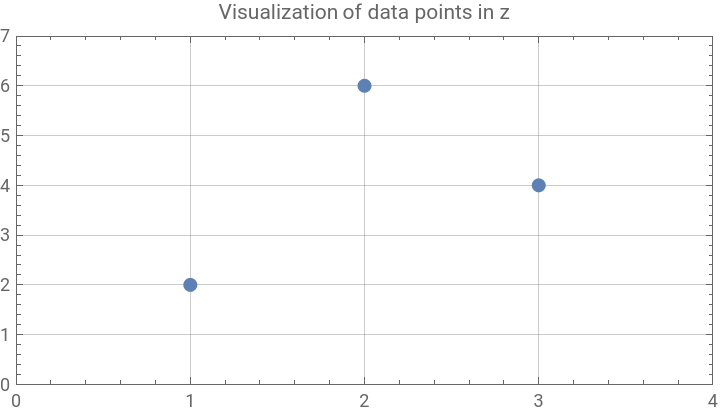
Manually calculate the spatial median of the example data:
In[]:=
sm=ArgMin[Sum[EuclideanDistance[z[[i]],{x,y}],{i,Length[z]}],{x,y},WorkingPrecision100];//AbsoluteTiming
Out[]=
{136.811,Null}
In[]:=
Round[sm,.001]
Out[]=
{2.714,4.05}
Note that in above code with ->100, you get an approximate minimum point. We did it so because finding an exact minimum point can take a long time.
Show the spatial median on the plot:
In[]:=
ListPlot{z,{sm}},
Out[]=
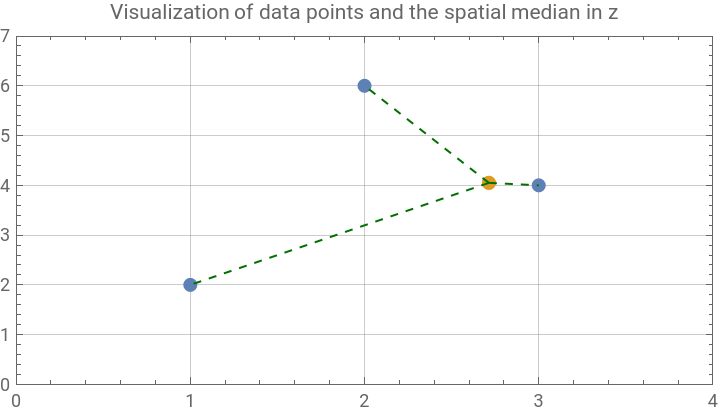


The spatial median is less sensitive to outliers than the center of mass.
Compute the center of mass of the three points:
In[]:=
com=RegionCentroid[Triangle[z]];
Plot the difference between the spatial median and the center of gravity:
In[]:=
ListPlot{z,{sm},{com}},
Out[]=
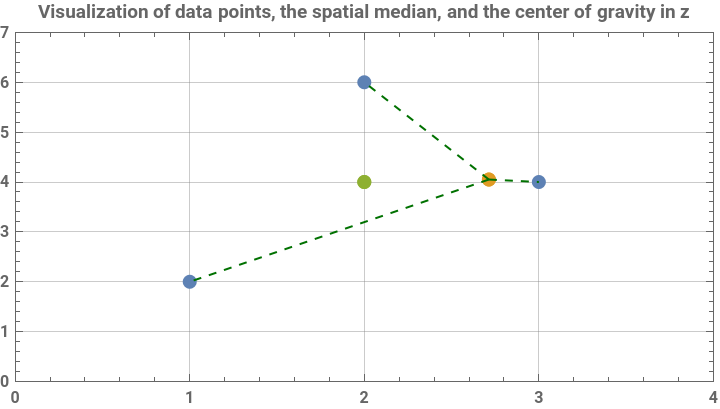

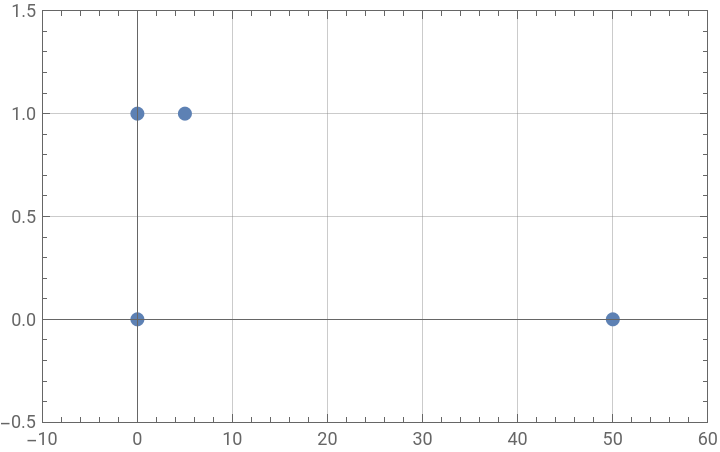
We now define a new set of points as a more obvious demonstration of the difference between spatial median and the center of gravity (also called as the center of mass).
Define a new set of points:
In[]:=
newPoints={{0,0},{0,1},{5,1},{50,0}};
Plot these points:
In[]:=
ListPlot[newPoints,PlotRange{{-10,60},{-.5,1.5}},PlotStylePointSize[Large],FrameTrue,GridLinesAutomatic]
Out[]=
Calculate the spatial median (using the built-in spatial median function):
In[]:=
sm2=Quiet[SpatialMedian[newPoints]];
Calculate the center of gravity:
In[]:=
cg=N[RegionCentroid[Point[newPoints]]];
Plot the two values:
In[]:=
ListPlot{newPoints,{sm2},{cg}},
Out[]=
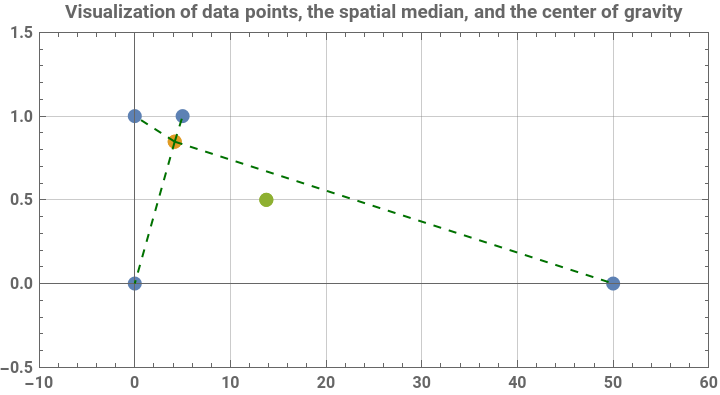
Here, it is quite clear that the center of gravity is far more swayed by the effect of a single point than the spatial median. However, the spatial median has no direct formula, and must be approximated. Next, the formulae for the center of gravity and the spatial median are defined. The center of gravity formula is a direct computation, while the spatial median calculation uses ArgMin, which approximates the point with the minimum distance from the input points. It does this by “guessing” a point which is likely to be near the correct point, then calculating which direction to move the guess based on the derivative at that point. The centroid, assuming the use of Euclidian distance and equal weights, is located at the point with each coordinate equal to the mean of the other coordinates, while with other distance formulae, it can more generally be calculated as the point with the minimum sums of squares of distances.
Define a formula for the center of gravity of a list of points with weights, assuming Euclidian distance:
In[]:=
cog[points_,weights_]:=Table[1/Total[weights]*Sum[points[[l,q]]*weights[[l]],{l,Length[points]}],{q,Length[points[[1]]]}]
Calculate the center of gravity of z, assuming all points have equal weights:
In[]:=
cog[z,{1,1,1}]
Out[]=
{2,4}
Define an iterative approximate formula (cylindrical algebraic decomposition) for the spatial median with arbitrary working precision:
In[]:=
spatMed[points_,wp_]:=ArgMin[Sum[EuclideanDistance[points[[i]],{x,y}],{i,Length[points]}],{x,y},WorkingPrecisionwp]
Calculate the approximate spatial median of z:
In[]:=
spatMed[z,100]
Out[]=
{2.71377355318164558336234015011884780614575694455483985757137334686,4.0499343876087781992614894934214206144520292873868157}
Large Cities in US
Large Cities in US
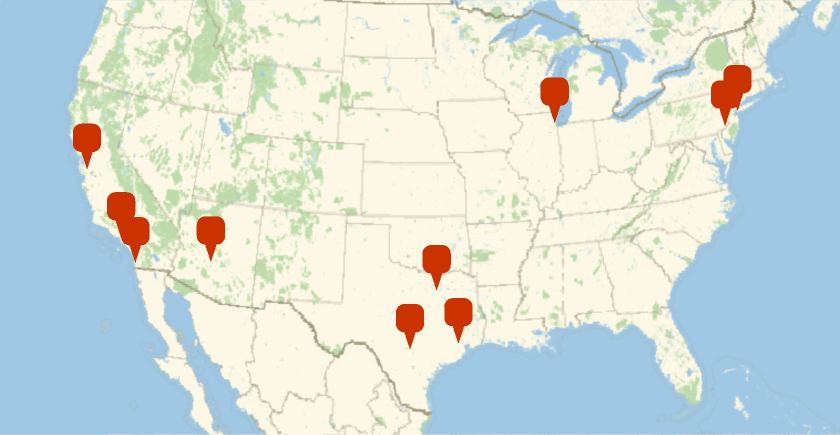
In this section, Wolfram Language’s new SpatialMedian function, along with other functions, are used to analyze the locations of the 10 largest US cities in terms of population. For geographical data, instead of using EuclidianDistance, Wolfram Language automatically uses GeoDistance to account for the curvature of the Earth.
Find the 10 most-populated US cities:
In[]:=
top10=EntityList@EntityClass"City",,TakeLargest[10]
Out[]=
,,,,,,,,,
Plot all these cities:
In[]:=
GeoGraphics[GeoMarker@top10,GeoProjection"LambertAzimuthal"]
Out[]=
Compute the coordinates of these cities:
Find the spatial median:
Visualize the spatial median together with cities:
In a hypothetical scenario, a company plans to ship their products to New York, Dallas, Phoenix, Bismark, Chicago, San Francisco and Los Angeles, weighted by the populations of the cities. The company could use the spatial median to calculate the ideal location for a distribution center.
List the shipping locations:
List the populations of said locations:
Plot those locations:
Get the position of the locations:
Find the weighted spatial median of the data:
Plot the location of the spatial median, which, in this case, is the location at which the distance per person is minimized:
Interestingly, in this case, the ideal distribution location is in Chicago, likely due to its large population, relative proximity to New York, and reasonable distance to the West Coast cities. This means, surprisingly, that the spatial median isn’t located in NYC, even though the population of the city is nearly equal to the population of all the other cities combined.
Central Feature vs Spatial Median
Central Feature vs Spatial Median
CentralFeature, another new function in Wolfram Language 12.2, finds the point in a dataset which has the lowest total distance to all other points in that dataset. This differs from SpatialMedian in that the point must be originally in the dataset. For example, in the cities dataset, the central feature would be the city with the lowest total distance to the rest of the cities. For geographical data, GeoDistance is used, while for other data, it uses Euclidian distance.
Find the city with the lowest distance to the cities:
Visualize the central feature, the spatial median and cities:
One more time, note that the CentralFeature returns an output which is a member of input dataset (Dallas, the green dot above), while the SpatialMedian can return a point outside of input dataset (the blue dot in above).
Geo-distance of the central feature with the spatial median:
Distance Metrics and Differing Centers
Distance Metrics and Differing Centers
Depending on the distance function used, the “center” of a dataset can change dramatically. There are many different distance functions in Wolfram Language, from the traditional Euclidian distance to the Warping Distance and many more. These all have their uses at different times, but using the wrong distance function can lead to a wildly incorrect result. The dataset below contains random points from {-10,-10} to {10,10}, and its center will be calculated using several of these distance functions, demonstrating the different “centers” the distance functions give.
Create a new (originally randomly generated) dataset:
Plot the points:
List all distance functions for multiple points of numerical data:
Calculate the spatial median with each of these functions:
Plot these medians alongside the spatial medians:
Many of these are near the location of the Euclidian center, but there several distance functions that are very far away from there. This shows the importance of choosing the right distance function for the task. CentralFeature also can use multiple different distance functions, so it has the same problem.
The major possibility of mistake that comes with calculating the Euclidian centroid (also known as the center of mass) is choosing the wrong object to take the centroid of. It is possible to take the centroid of both a list of points and the polygon that list forms when sorted appropriately, and both will usually have different values. The centroid of the polygon is less sensitive to points far from the other points, since it calculates by the area in each direction, while the centroid of the points will consider an isolated point equally to a point near several others. However, at the same time, the centroid of the points is more accurate if the data is not distributed equally across the region contained by the points, but is instead clustered at those locations, since otherwise points which are near very little of the polygon contribute less. In this section, both centroids are calculated and plotted with each other to show the difference.
Define a function to sort a list of points into an order in which they form a simple polygon:
Sort the random list of points:
Calculate the polygon centroid:
Calculate the point centroid:
Plot the polygon formed by these points and the two different centroids:
For example, to emphasize the difference, let’s calculate the Lebesgue measure:
SpatialMedian, CentralFeature, and RegionCentroid are all very useful for finding the center of a dataset, but, it is necessary to pick the correct distance function and/or calculation technique for the situation to obtain correct information.
Conclusion
Conclusion
Both SpatialMedian and CentralFeature are quite useful for locating the “center” of a dataset, whether that be geographical or abstract. Other possibilities with these functions include using them alongside a similarity score function to calculate what members of a dataset are most similar to each other and what a combined dataset would be or even using it on image data to create an “average” photo from several input pictures.
Acknowledgment
Acknowledgment
I’d like to thanks Mads Bahrami (WRI) and the Wolfram Community for their comments to improve this essay.