decodeFIT
decodeFIT
This function requires that java be loaded on to the computer, according to the instructions on the FITSDK. I have used it only on Windows, but it should be adaptable to other platforms. The tool converts a FIT file to a CSV format file which can be imported and parsed in Mathematica. The Garmin instructions are probably a little outdated, but this command line works. The qfn function is required because my file path contains a space character. To use this function the file paths must be changed for your system.
In[]:=
decodeFit[fitFileName_]:=Module[{outfile,jarToolPath,qfn},outfile=FileNameJoin[DirectoryName[fitFileName],FileBaseName[fitFileName]<>".csv"];jarToolPath="C:\\Mathematica 14\\Garmin\\FITSDK\\java\\FitCSVTool.jar";qfn[fn_String]:="\""<>fn<>"\"";Run["java -jar "<>qfn[jarToolPath]<>" -b "<>qfn[fitFileName]<>" "<>qfn[outfile]];outfile];
Hike data
Hike data
The function, decodeFITHike, parses the structure of a hike activity from a Garmin Instinct 3 watch to a Tabular data structure. The data in the CSV file can be easily parsed into a list of Associations. This code converts some of the metric units to feet and miles. Since the Garmin data is in units compatible with Quantity, they are easy to convert.
In[]:=
decodeFITHike[fitFileName_String]:=Module[{outfile,csv,records,recordT,recordDS,keys,tcorr,sccorr},outfile=decodeFit[fitFileName];csv=Import[outfile,MissingValuePattern->None];DeleteFile[outfile];records=Select[csv,#[[3]]=="record"&];records=Take[#,{2,11}]&/@(Partition[#,3]&/@Rest[records]);recordT=Tabular[Table[Association[Flatten[{#[[1]]->If[#[[3]]==""||#[[2]]=="",Missing[#[[2]]],Quantity[#[[2]],#[[3]]]]}&/@records[[i]]]],{i,Length[records]}]];keys=Keys[Normal[recordT[[1]]]];tcorr=AbsoluteTime[DateObject[{1989,12,31},TimeZone->0]];sccorr=180./2^31;recordT=TransformColumns[recordT,{"Timestamp"->Function[TimeZoneConvert[DateObject[QuantityMagnitude[#timestamp]+tcorr,TimeZone->0],$SystemTimeZone]],"GeoPosition"->Function[GeoPosition[{QuantityMagnitude[#"position_lat"]sccorr,QuantityMagnitude[#"position_long"]sccorr}]],"Distance"->Function[UnitConvert[#distance,"Miles"]],"Altitude"->Function[UnitConvert[#"enhanced_altitude","feet"]],"Speed"->Function[UnitConvert[#"enhanced_speed","Miles"/"Hour"]],"HeartRate"->Function[#"heart_rate"],"Cadence"->Function[#cadence],"FractionalCadence"->Function[#"fractional_cadence"],"CycleLength"->Function[#"cycle_length16"]}];DeleteColumns[recordT,keys]];
In[]:=
fname="C:\\Mathematica 14\\Garmin\\Activity\\2025-10-16-06-54-12.fit";fitdata=decodeFITHike[fname]
Out[]=
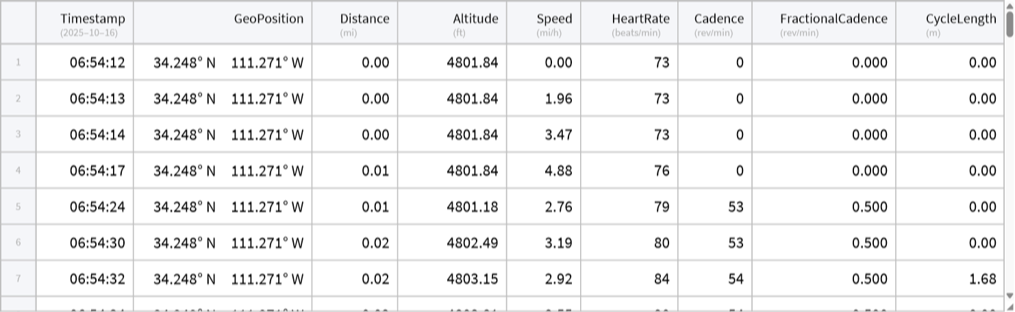
When parsing an activity FIT file, the easiest way to start is to look at column 3 of the CSV data to see what is available. There is generally a lot of redundancy in the CSV output that is probably not present in the actual FIT file. In the case of a hike activity most everything is in the “record” structure
In[]:=
outfile=decodeFit[fname];csv=Import[outfile,MissingValuePattern->None];DeleteFile[outfile];csv[[All,3]]//Tally
Out[]=
{{Message,1},{file_id,2},{file_creator,2},{activity,2},{unknown,3546},{session,2},{time_in_zone,4},{lap,2},{timestamp_correlation,2},{event,4},{device_info,14},{device_settings,2},{user_profile,2},{sport,2},{training_settings,2},{zones_target,2},{record,538},{gps_metadata,3078}}
In[]:=
records=Select[csv,#[[3]]=="record"&];Take[records[[2]],36]
Out[]=
{Data,1,record,timestamp,1129557252,s,position_lat,408599762,semicircles,position_long,-1327515311,semicircles,distance,0.,m,enhanced_speed,0.,m/s,enhanced_altitude,1463.6,m,cycle_length16,0.,m,heart_rate,73,bpm,cadence,0,rpm,fractional_cadence,0.,rpm,unknown,1,}
In[]:=
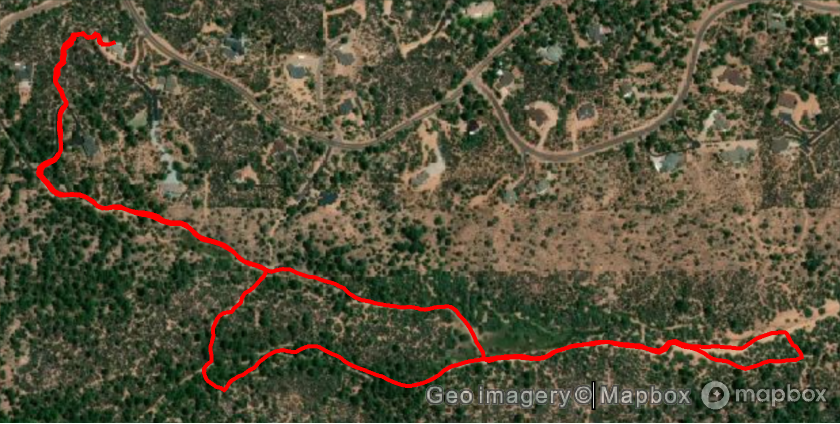
GeoGraphics[{Red,Thick,Line[fitdata[All,"GeoPosition"]]},GeoBackground->"Satellite"]
Out[]=
In[]:=
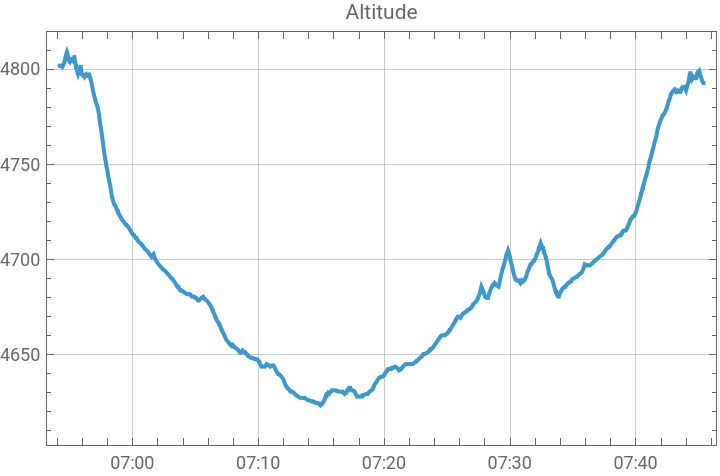
DateListPlot[Values[Normal[fitdata[All,{"Timestamp","Altitude"}]]],GridLines->Automatic,PlotLabel->"Altitude"]
Out[]=
Oxygen saturation data
Oxygen saturation data
I haven’t yet decided on a full Tabular for this data so just the spo2_data is shown. On the Instinct 3 watch Garmin erases the oxygen saturation data in the Monitor folder any time the watch is synchronized, so to collect data for analysis, the connection from the watch to a paired phone must be turned off and if the computer used to access the FIT file has Garmin Express on it, the best way to prevent the files from being erased is to disconnect from the internet, before using the watch as a USB drive. The data files must be transferred to the computer for the program to use them. A single night of monitoring on the watch uses two files.
In[]:=
fname1="C:\\Mathematica 14\\Garmin\\Monitor\\MAG00000.FIT";fname2="C:\\Mathematica 14\\Garmin\\Monitor\\MAG90037.FIT";
In[]:=
outfile=decodeFit[fname1];csv1=Import[outfile,MissingValuePattern->None];DeleteFile[outfile];
In[]:=
outfile=decodeFit[fname2];csv2=Import[outfile,MissingValuePattern->None];DeleteFile[outfile];
In[]:=
csv1[[All,3]]//Tallycsv2[[All,3]]//Tally
Out[]=
{{Message,1},{file_id,2},{device_info,2},{software,2},{unknown,1775},{monitoring_info,2},{monitoring,1101},{monitoring_hr_data,4},{ohr_settings,2},{event,149},{stress_level,977},{respiration_rate,975},{spo2_data,183}}
Out[]=
{{Message,1},{file_id,2},{device_info,2},{software,2},{unknown,1098},{monitoring_info,2},{monitoring,679},{ohr_settings,4},{event,37},{stress_level,555},{respiration_rate,554},{spo2_data,357},{monitoring_hr_data,2}}
In[]:=
spo2data1=Select[csv1,#[[3]]=="spo2_data"&];spo2data2=Select[csv2,#[[3]]=="spo2_data"&];data=Select[Join[Rest[spo2data1],Rest[spo2data2]],#[[5]]>1&];
In[]:=
tcorr=AbsoluteTime[DateObject[{1989,12,31},TimeZone->0]]
Out[]=
2840029200
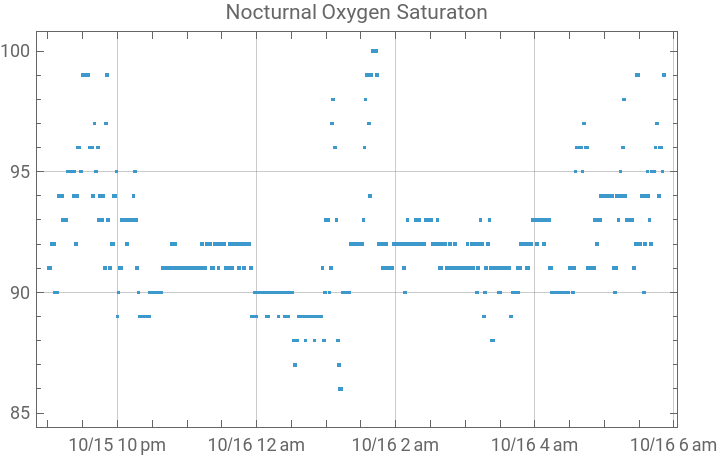
I live at altitude 4800 feet so my oxygen saturations are lower than one would expect at sea level. But it appears possible to get medical quality data from the watch by pushing it up from the wrist before falling asleep.
In[]:=
DateListPlot[{DateObject[#1+tcorr],#2}&@@@data[[All,{5,8}]],Joined->False,GridLines->Automatic,PlotLabel->"Nocturnal Oxygen Saturaton"]
Out[]=
In[]:=
Count[If[#<88,True,False]&/@data[[All,8]],True]
Out[]=
4
C sharp and Python
C sharp and Python
The FITSDK also contains C sharp and Python code. I have not yet been able to get Python working in 14.3 on my computer, but the code looks promising. There is also a C sharp DLL which loads with NETLink, but I have not yet figured out how to get it to read a file correctly.
If anyone with NETLink experience knows how to write a NETBlock function to Dynastream.FIT.Decode, I would appreciate the help. The DLL has many functions so this interface looks like Mathematica could access all of Garmin’s products, through NETLink.
CITE THIS NOTEBOOK
CITE THIS NOTEBOOK
Access and visualize Garmin FIT data: nocturnal oxygen saturation, hike activity and GPS
by Robert H. Rimmer
Wolfram Community, STAFF PICKS, October 16, 2025
https://community.wolfram.com/groups/-/m/t/3561569
by Robert H. Rimmer
Wolfram Community, STAFF PICKS, October 16, 2025
https://community.wolfram.com/groups/-/m/t/3561569