Reimplementation of DOOM (1993) “Fire Effect” using the Wolfram LanguagePedro Cabral — Researcher, Data Scientist, Computer Scientist
ABSTRACT: In this article, the “fire effect” algorithm from DOOM (1993) is explained and reimplemented.
Introduction and Origins
Introduction and Origins
Doom is a 1993 first-person shooter (FPS) game developed by id Software for MS-DOS. One of its interesting features was a fire effect widely used in the game. After many years after the game publishing, Randy Linder performed a reverse-engineering on the fire effect. In this article, I’ll reimplement this algorithm using Matrices and ArrayPlot.
Understanding the “Fire Effect” Algorithm
Understanding the “Fire Effect” Algorithm
◼
The first step in the algorithm is to create a zero-matrix with a “w” width and “l” length.
0 | 0 | 0 | 0 |
0 | 0 | 0 | 0 |
0 | 0 | 0 | 0 |
0 | 0 | 0 | 0 |
◼
The next step is to set all of the zeroes of the bottom row to 37, the maximum number in the color palette.
0 | 0 | 0 | 0 |
0 | 0 | 0 | 0 |
0 | 0 | 0 | 0 |
37 | 37 | 37 | 37 |
◼
Now, the fire is propagated: for every row, set its value to the bottom value minus a random value called “decay”. For extra randomness and a “windy” effect, with a certain chance, propagate the fire to the upper left value.
0 | 0 | 0 | 0 |
0 | 0 | 0 | 0 |
37-1 | 37-3 | 37-2 | 37-4 |
37 | 37 | 37 | 37 |
◼
Repeat the last step.
Preliminary Functions
Preliminary Functions
For starting the fire, the bottom row needs to have all it’s values set to 37, the maximum value.
(*Setsallelementsinthebottomrowfromamatrixas37.*)SetFire[matrix_]:=Module[{m=matrix},Set[m〚-1,All〛,37];Return[m]];
For operating on matrices without underflowing or overflowing their indexes, the function BoundMinMax will be used to bound values.
(*Boundsavaluetoaminimumandmaximumvalue.*)BoundMinMax[value_,min_,max_]:=Min[Max[value,min],max]
Constructing the Fire Matrix
Constructing the Fire Matrix
Now, with the SetFire function, we can create the fire matrix using Table.
In[]:=
SetFire[Table[0,{x,1,8},{x,1,8}]]//MatrixForm
Out[]//MatrixForm=
0 | 0 | 0 | 0 | 0 | 0 | 0 | 0 |
0 | 0 | 0 | 0 | 0 | 0 | 0 | 0 |
0 | 0 | 0 | 0 | 0 | 0 | 0 | 0 |
0 | 0 | 0 | 0 | 0 | 0 | 0 | 0 |
0 | 0 | 0 | 0 | 0 | 0 | 0 | 0 |
0 | 0 | 0 | 0 | 0 | 0 | 0 | 0 |
0 | 0 | 0 | 0 | 0 | 0 | 0 | 0 |
37 | 37 | 37 | 37 | 37 | 37 | 37 | 37 |
Constructing the Pallete
Constructing the Pallete
In order to visualize the with “fire” colors, let’s create a pallete ranging from black to orange to yellow to white.
In[]:=
(*Createacolorlist,applyingevery{R,G,B}valuetothefunctionRGBColor.*)colorList=ReverseApplyRGBColor,N@*1.5&/@
#
255
Out[]=
,,,,,,,,,,,,,,,,,,,,,,,,,,,,,,,,,,,,,


Now, with all the colors, let’s create a color rule (palette) using AssociationThread.
(*Threadeverycolorwithanumber,startingfromzeroandendingat37.*)colorPalette=Normal@AssociationThread[Range[0,Length@colorList-1],colorList]
Out[]=
0,1,2,3,4,5,6,7,8,9,10,11,12,13,14,15,16,17,18,19,20,21,22,23,24,25,26,27,28,29,30,31,32,33,34,35,36,37
Propagation Function
Propagation Function
Using everything from the “Understanding the “Fire Effect” Algorithm” section, let’s create a function that propagates the fire for one step.
In[]:=
PropagateFire[matrix_]:=Module[{m=matrix,i,j,d=Dimensions[matrix],decay,neighbor},(*Foreverysinglecolumn..*)For[i=1,i<d〚1〛,i++,(*Foreverysinglerow*)For[j=1,j≤d〚2〛,j++,(*Definearandomdecayinteger.*)decay=RandomInteger[{1,4}];(*Withacertainchance,updatetheupleftneighbor,nottheupperneighbor.*)If[RandomReal[]>RandomReal[{0.25,1}],(*Updatetheupperleftneighbor.*)m〚i,BoundMinMax[j-1,1,d〚2〛]〛=Max[m〚i+1,BoundMinMax[j,1,d〚2〛]〛-decay,0],(*Updatetheupperneighbor.*)m〚i,j〛=Max[m〚i+1,j〛-decay,0]]]];m];
Now, executing the PropagateFire function on a matrix with MatrixForm gives us a more clear visualization of how the algorithm operates on the matrix.
(*Propagatethefireonafirematrixforonlyonestep.*)Nest[PropagateFire,SetFire[Table[0,{x,1,6},{x,1,6}]],1]//MatrixForm
Out[]//MatrixForm=
0 | 0 | 0 | 0 | 0 | 0 |
0 | 0 | 0 | 0 | 0 | 0 |
0 | 0 | 0 | 0 | 0 | 0 |
0 | 0 | 0 | 0 | 0 | 0 |
35 | 35 | 36 | 36 | 0 | 36 |
37 | 37 | 37 | 37 | 37 | 37 |
Visualizing the Fire Matrix
Visualizing the Fire Matrix
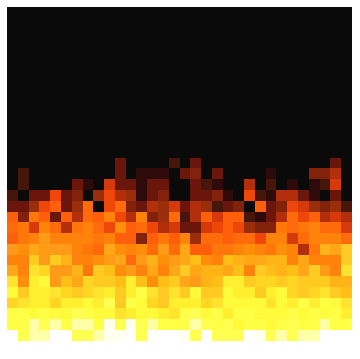
Finally, with all the functions needed, let’s visualize the fire effect.
In[]:=
(*Setthewidthandthelength.*)width=length=32;
(*Propagatethefirefor75steps,thenreturntheresult.*)Module[{matrix=SetFire[Table[0,{x,1,width},{x,1,length}]]},matrix=Nest[PropagateFire,matrix,75];Rasterize[ArrayPlot[matrix,ColorRulescolorPalette,FrameFalse]]]
Out[]=
Exporting as a MP4 Video
Exporting as a MP4 Video
Now, for exporting the fire effect as a video, this function easily produces the frames and assembles it into a MP4 file.