NextWaveCovidAlert | |
ByAntonioAlvaroRanhaNevesandMatheusPessôa |

Get Covid Data
Get Covid Data
From Johns Hopkins University at GitHub, https://github.com/CSSEGISandData/COVID-19.
Since USA is the country with the largest amount of cases, we can treat each state as an equivalent country if desired.
Since USA is the country with the largest amount of cases, we can treat each state as an equivalent country if desired.
URL Import of the data
URL Import of the data
In[]:=
DeathsGlobal=Import["https://raw.githubusercontent.com/CSSEGISandData/COVID-19/master/csse_covid_19_data/csse_covid_19_time_series/time_series_covid19_deaths_global.csv"];ConfirmedGlobal=Import["https://raw.githubusercontent.com/CSSEGISandData/COVID-19/master/csse_covid_19_data/csse_covid_19_time_series/time_series_covid19_confirmed_global.csv"];DeathsUS=Import["https://raw.githubusercontent.com/CSSEGISandData/COVID-19/master/csse_covid_19_data/csse_covid_19_time_series/time_series_covid19_deaths_US.csv"];ConfirmedUS=Import["https://raw.githubusercontent.com/CSSEGISandData/COVID-19/master/csse_covid_19_data/csse_covid_19_time_series/time_series_covid19_confirmed_US.csv"];
A few discussion from the data
A few discussion from the data
Some data for countries are detailed by regions, therefore we need to separate those accordingly. For instance, in Canada, the data is divided between the different provinces.
Take[Sort[Tally[Drop[ConfirmedGlobal[[All,2]],1]],#1[[2]]>#2[[2]]&],10]//Grid
Out[]=
China | 33 |
Canada | 14 |
United Kingdom | 11 |
France | 11 |
Australia | 8 |
Netherlands | 5 |
Denmark | 3 |
Zimbabwe | 1 |
Zambia | 1 |
Yemen | 1 |
We can get the dada from a random country,
In[]:=
Data=ConfirmedGlobal[[RandomInteger[Length[ConfirmedGlobal]-1],All]];
ListPlot[Drop[Data,5],PlotLabelData[[2]],PlotRangeAll,PlotTheme"Detailed",FrameLabel{"days","Total cases"}]
Out[]=
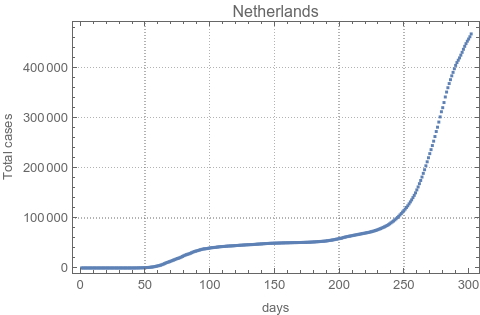
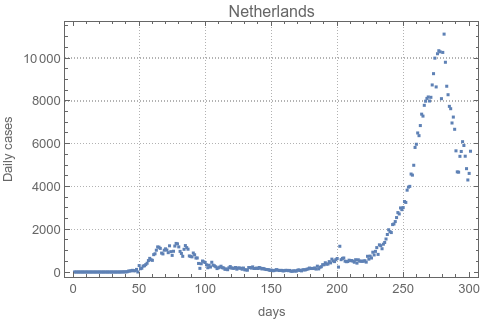
We are interested in daily new cases. Therefore, we apply the function Differences[] to subtract between adjacent days, and get the daily new cases. This will be important in our analysis as we will see further on.
ListPlot[Differences[Drop[Data,5]],PlotLabelData[[2]],PlotRangeAll,PlotTheme"Detailed",FrameLabel{"days","Daily cases"}]
Out[]=
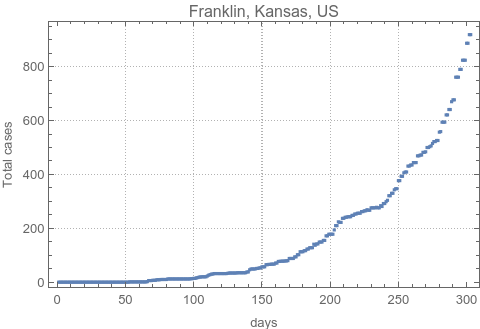
For the USA, we can treat each state as a different country, due to the high number of cases across each state.
In[]:=
Data=ConfirmedUS[[RandomInteger[Length[ConfirmedUS]-1],All]];
ListPlot[Drop[Data,11],PlotLabelData[[11]],PlotRangeAll,PlotTheme"Detailed",FrameLabel{"days","Total cases"}]
Out[]=
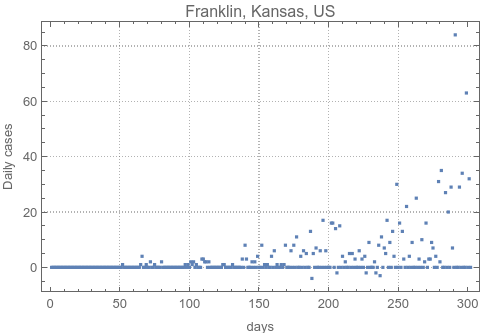
The same way, we can compute the daily cases.
ListPlot[Differences[Drop[Data,11]],PlotLabelData[[11]],PlotRangeAll,PlotTheme"Detailed",FrameLabel{"days","Daily cases"}]
Out[]=
Need to combine same States together
Need to combine same States together
In this part of the code, we show how to take each of the data from different states individually, and accounting for the cumulative numbers as the sum that is show in the Johns Hopkins database.
In[]:=
SingleStates=Union[Drop[ConfirmedUS[[All,7]],1]];
Example from one state, Alabama (corresponding to position 7 in the complete database).
pos=Flatten[Position[ConfirmedUS[[All,7]],SingleStates[[1]]]]
Out[]=
{2,3,4,5,6,7,8,9,10,11,12,13,14,15,16,17,18,19,20,21,22,23,24,25,26,27,28,29,30,31,32,33,34,35,36,37,38,39,40,41,42,43,44,45,46,47,48,49,50,51,52,53,54,55,56,57,58,59,60,61,62,63,64,65,66,67,68,69,70}
ConfirmedUS[[pos,7]]
Out[]=
{Alabama,Alabama,Alabama,Alabama,Alabama,Alabama,Alabama,Alabama,Alabama,Alabama,Alabama,Alabama,Alabama,Alabama,Alabama,Alabama,Alabama,Alabama,Alabama,Alabama,Alabama,Alabama,Alabama,Alabama,Alabama,Alabama,Alabama,Alabama,Alabama,Alabama,Alabama,Alabama,Alabama,Alabama,Alabama,Alabama,Alabama,Alabama,Alabama,Alabama,Alabama,Alabama,Alabama,Alabama,Alabama,Alabama,Alabama,Alabama,Alabama,Alabama,Alabama,Alabama,Alabama,Alabama,Alabama,Alabama,Alabama,Alabama,Alabama,Alabama,Alabama,Alabama,Alabama,Alabama,Alabama,Alabama,Alabama,Alabama,Alabama}
TotalPerState=Total[Drop[ConfirmedUS[[#,All]],11]&/@pos]
Out[]=
{0,0,0,0,0,0,0,0,0,0,0,0,0,0,0,0,0,0,0,0,0,0,0,0,0,0,0,0,0,0,0,0,0,0,0,0,0,0,0,0,0,0,0,0,0,0,0,0,0,3,4,8,15,28,36,51,61,88,115,149,180,224,298,472,574,684,801,880,1001,1063,1175,1371,1606,1727,1905,2079,2308,2614,2954,3112,3346,3667,3870,4041,4307,4465,4557,4788,4978,5163,5404,5692,5899,6092,6274,6475,6621,6820,6979,7187,7440,7700,7977,8203,8520,8769,9115,9437,9720,9982,10262,10566,10822,11161,11494,11828,12137,12438,12825,13186,13590,13954,14328,14676,15309,15899,16263,16749,17262,17689,18200,18525,18734,18954,19262,19910,20355,20777,21268,21834,22659,23370,24405,25364,26182,26485,27034,27941,28676,29225,29683,30122,30771,31889,32878,33880,34903,35083,36503,37589,38477,39647,41340,42255,43216,44022,44932,46348,48149,49695,51329,52802,54781,56168,58284,60194,62128,64152,66181,67733,69236,70600,72594,74685,76795,78188,79948,81256,82698,84652,86664,88266,90299,91458,92502,93457,95323,97044,98895,99854,101466,102391,103485,104219,104976,106096,106926,107667,109092,110415,111696,112737,114212,114809,115485,116045,118190,119904,121041,122879,124155,124944,126500,127234,128240,129225,130373,130914,131690,132221,133005,134061,135138,136107,137166,137861,138619,139660,140423,141454,142768,143578,144325,145202,145859,146897,149263,150239,150965,151604,152350,153584,154772,155727,157402,158181,158717,159476,160485,161085,162683,163897,164698,165414,166514,167396,168620,169845,171157,172137,173002,174078,175210,176605,180437,182567,183831,184723,185938,187267,188775,190113,191932,193613,194458,195692,197504,198927,200528,202131,203518,204665,206523,206562,208637,210637,213617,215843,217822,219232,220848,223486,225910}
We can treat data from all states and get the total cases, as well as the daily new cases.
Same for countries which have multiple entries
Same for countries which have multiple entries
Example for Canada
Data For All Countries
Putting all together and save the data for later
Putting all together and save the data for later
Not all data are good for processing due to the low counts and therefore bad statistics. We therefore selected countries, whose current fatalities are above 500.
For the USA
For the USA
For the World
For the World
Load Data (if needed)
Load Data (if needed)
Importing Covid Data from DumpSave[]
Analysis of the trends
Here we present a brief overview of our analysis procedure and later apply it to our data.
Explain the acceleration of a trend, by the rate of change in daily cases
Explain the acceleration of a trend, by the rate of change in daily cases
For our analysis, some important definitions needs to be made. We will define the trends for the different behaviors in our data by considering three different variables that analogously represent what we want to investigate in our problem.
First, we can consider a function that represent the displacement, as being the variable f(t). Suppose this variable corresponds to a sine function, f(t) = sin(6. t), plotted below, as a function of time.
First, we can consider a function that represent the displacement, as being the variable f(t). Suppose this variable corresponds to a sine function, f(t) = sin(6. t), plotted below, as a function of time.
The derivative of sin(6 t) is 6 cos(6 t), which we can see below. In our analogy, cos(x) would represent the rate at which the cases are increasing or decreasing; from our data, since we have a discrete increase or decrease, this is only given by the result of using the function Difference[] applied to the data we are interested in.
In our analysis, taking the derivative of the function in blue (the rate at which changes everyday) will provide us the curve represented in red: the rate at which the rates are increasing or decreasing. By analysing this rate, we define the tendencies of having, or not, a second wave. In our definitions, a wave is defined as the positive tendency shown here in the red graph, representing how the rate changes positively or negatively. A positive dip in the red curve indicates that the cases are increasing, and therefore may indicate the edge of a second wave. A negative dip shows a decrease in the rate of new cases.
Before we proceed our data needs smoothing
Before we proceed our data needs smoothing
In order to classify different countries in different scenarios, we apply the following reasoning: we take the rate at which the rate of daily new cases is increasing/decreasing, and indicate these cases with a thermometer with three colors: green (cases decreasing), red (cases increasing), gray (not able to define a tendency correctly, or that the slope of the rate of daily cases is small).
To treat the data, we know some countries have different ways of collecting them. So, first, we apply a smoothing function by using a GaussianFilter (7-days), to remove irregularities.
To treat the data, we know some countries have different ways of collecting them. So, first, we apply a smoothing function by using a GaussianFilter (7-days), to remove irregularities.
We apply the same procedure for daily cases, which is smooth at the last step by a GaussianFilter (7-days), to remove irregularities.
For Canada we have
We can calculate the rate of daily new cases by taking the derivative of the blue curve shown below. This will yield the black curve.
We can see that the rate of daily new cases increases, but the rate at which this rate changes is decreasing, which is inconsistent. We now apply a better averaging function: a function that is a triple exponential moving average, defined below and represented in black.
A typical example for Second Wave: Italy
A typical example for Second Wave: Italy
An increase in cases corresponds to a positive rate of change in daily cases, i.e.,
A second wave can be characterized by this positive "acceleration", above the axis. Therefore, if the next day's rate is bigger than the previous we are in danger of a next wave.
To see this closely we can make a 2D-distribution, of the pairs {yesterday rate,today rate}.
To see this closely we can make a 2D-distribution, of the pairs {yesterday rate,today rate}.
Below we emphasize this distribution with a SmoothHistogram3D plot,
Data on the central distribution corresponds to most common and non-extreme cases. On the other hand, if in the third quadrant, then this represents a decreasing number of cases which is highly desired. Unfortunately, the positions in the first quadrant, away from the distribution represents another wave.
We can convert this to a 1D representation, as the length, times (+1) if in first quadrant, times (-1) if in third quadrant.
We can convert this to a 1D representation, as the length, times (+1) if in first quadrant, times (-1) if in third quadrant.
A current thermometer can be made to indicate its current state with respect to the distribution.
Animate it in time
Animate it in time
A typical example for Second Wave: Brazil
A typical example for Second Wave: Brazil
An increase in cases corresponds to a positive rate of change in daily cases, i.e.,
A second wave can be characterized by this positive "acceleration", above the axis. Therefore, if the next day's rate is bigger than the previous we are in danger of a next wave.
To see this closely we can make a 2D-distribution, of the pairs {yesterday rate,today rate}.
To see this closely we can make a 2D-distribution, of the pairs {yesterday rate,today rate}.
Below we emphasize this distribution with a SmoothHistogram3D plot,
Data on the central distribution corresponds to most common and non-extreme cases. On the other hand, if in the third quadrant, then this represents a decreasing number of cases which is highly desired. Unfortunately, the positions in the first quadrant, away from the distribution represents another wave.
We can convert this to a 1D representation, as the length, times (+1) if in first quadrant, times (-1) if in third quadrant.
We can convert this to a 1D representation, as the length, times (+1) if in first quadrant, times (-1) if in third quadrant.
A current thermometer can be made to indicate its current state with respect to the distribution.
Animate it in time
Animate it in time
For all countries
For all countries
Timeline for all countries per week status
Timeline for all countries per week status
As the weeks progress, we can see as the first waves finished in the southern hemisphere the second has already started in the northern hemisphere.
Conclusion
Conclusion
We have enjoyed this Hackathon, and hope that this type of analysis will help authorities determine upcoming waves of COVID, by simply analysing the rate of change in the daily cases.
Epilogue (Logo Design)
Epilogue (Logo Design)
We have been inspired by Wolfram Logo Design Widget (https://www.wolfram.com/language/gallery/make-a-logo-design-widget/), and make our logo in the title, using,
We upload from Wikipedia a famous wave painting,
We pick its color and apply it to our pre-logo,
Next we use machine learning to apply the same painting characteristics to our logo design,
And finally, we make it round,
And save.