— or how to fit B-spline onto contour surface
Happy New Year to everyone who reached this post! Today we are going to explore a mixed power of B-spline and neural network!
When plotting contour surface, have you, like me, done things like increasing PlotPoints so to have smooth looking surface and mesh lines, in the cost of bloomed up notebook size and/or less responsive Graphics3D result? If the answer is yes, then please do take a look at the approach of B-spline. As a nice function approximator, we may not need that much control points to have a applause B-spline if it’s just for meeting the eyes. And for RAM efficiency, we are going to do the computing with differentiable programming, through Wolfam Language’s neural network framework.
Helper functions
Helper functions
ClearAll[FindDivisionsExact]FindDivisionsExact[range:{_,_},n_Integer?(#>=2&)]:=Rescale[Range[n]//N//Rescale,{0,1},range]FindDivisionsExact[n_Integer?(#>=2&)]:=FindDivisionsExact[{0,1},n]
ClearAll[pipe,branch,branchSeq]pipe=RightComposition;branch=Through@*{##}&;branchSeq=pipe[branch@##,Apply@Sequence]&;
The contour surface model — a well-known example
The contour surface model — a well-known example
For demonstration I’ll use one of my favourite example, the transcendental periodic implicit surface in ContourPlot3D’s documentation, constrained in a ball region:
ClearAll[,ℛ]=Function[{x,y,z},Cos[x]Sin[y]+Cos[y]Sin[z]+Cos[z]Sin[x]];ℛ=Ball[{0,0,0},π];
contourGraph=ContourPlot3D[[x,y,z]0,{x,y,z}∈ℛ,PlotPoints40,MaxRecursion0,MeshStyleGrayLevel[.7],RegionBoundaryStyleNone,BoxedFalse,AxesFalse,Lighting"Accent",ContourStyleWhite]
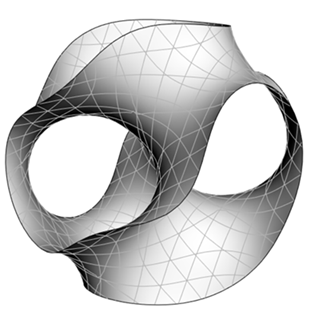
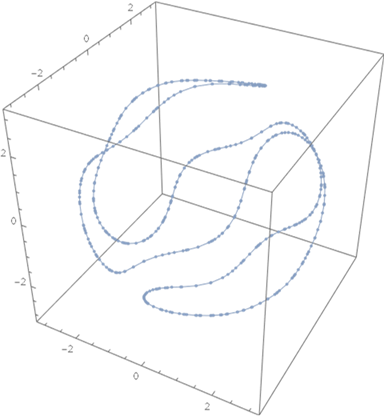
We are going to find mesh lines (curves) on with their terminals being randomly selected from the surface of ball ℛ:
ClearAll[bℛ]bℛ=And[[x,y,z]0,{x,y,z}∈RegionBoundary[ℛ]]//pipe[ImplicitRegion[#,{x,y,z}]&,DiscretizeRegion[#,BoxedTrue,AxesTrue]&]
The B-spline curve model
The B-spline curve model
As we have talked about in past posts, a uniform B-spline curve is simply a linear combination of its control points with BSplineBasis as the weights:
C(t):=(t),t∈[0,1]
n
∑
i=1
P
i
N
i,d
(
1
)For our purpose here, we discretize the curve by a naïve uniform sample over , so it becomes:
C(t)
t∈[0,1]
C
c×s×d
N
s×n
P
n×c×d
(
2
)where is the discrete B-spline basis matrix, is the array of control points. The meaning of their dimensions are
N
P
Symbol | Meaning | Variable name | Typical value |
c | number of curves | $curveNum | 11 |
s | sample size | $sampleNum | 100 |
d | embedded dimension | $embeddedDim | 3 |
n | number of control points | $CPtsNum | 5 |
Prototype for the curve
Prototype for the curve
As we have shown, the curves are represented as . But we can’t just throw a LinearLayer for it because we want the terminals predefined and fixed while keeping the “internal” control points trainable. So instead we separate them as
C=N·P
C
c×s×d
N
s×n
P
startingterminal
1×c×d
P
middle
(n-2)×c×d
P
endingterminal
1×c×d
(
3
)<<NeuralNetworks`
ClearAll[curvePrototype]curvePrototype=NetGraph[(*s*n*)"basis"PlaceholderLayer[InputPorts{},OutputPorts{MatrixT[]}],"startCpts"ReplicateLayer[1],"endCpts"ReplicateLayer[1],(*(n-2)*c*d*)"midCpts"NetArrayLayer["Output"TensorOfRankT[3]],(*n*c*d*)"cpts"CatenateLayer[],"curve"DotLayer[],(*c*s*d*)"curveSet"TransposeLayer[],{Thread[(NetPort/@{"start","end"}){"startCpts","endCpts"}],{"startCpts","midCpts","endCpts"}"cpts",{"basis","cpts"}"curve""curveSet"}//Flatten,(*c*d*)"start"MatrixT[],(*c*d*)"end"MatrixT[]]
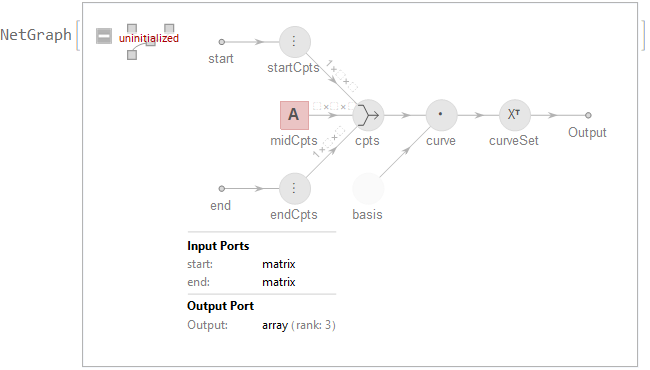
Module[{$sampleNum=5,$CPtsNum=3,$curveNum=11,$embeddedDim=2,data,net},net=NetReplacePart[curvePrototype,{"basis"NetArrayLayer["Array"RandomReal[1,{$sampleNum,$CPtsNum}]],{"midCpts","Array"}RandomReal[1,{$CPtsNum-2,$curveNum,$embeddedDim}]}];data=RandomReal[1,{2,$curveNum,$embeddedDim}]//AssociationThread[{"start","end"},#]&;data//pipe[net,MapThread[{#2,Line@#1}&,{#,#//Length//FindDivisionsExact//Map[ColorData@"Rainbow"]}]&,Graphics]]
B-spline basis
B-spline basis
To specify a set of B-spline basis through BSplineBasis, we need to firstly decide how “smooth” we want the curves to be (the degree of the spline $bsDegree), and how capable of fitting wiggle shapes we want the curves to be (the number of control points for each spline $CPtsNum). Then the uniform knots can be determined unambiguously. To discretize the basis we need to specify the sample size $sampleNum. The basis set will then be generated and stored in an un-trainable NetArrayLayer:
ClearAll[basisNet]basisNet[$sampleNum_Integer?Positive,{$CPtsNum_Integer?Positive,$bsDegree_Integer?Positive,$fullKnot_List}]:=Table[BSplineBasis[{$bsDegree,$fullKnot},i-1,#],{i,$CPtsNum}]//pipe[Map@Function,Apply@branch,Map,branchSeq[Identity,FindDivisionsExact[$sampleNum]&],Construct,NetArrayLayer["Array"#,LearningRateMultipliersNone]&]
Instance of curves
Instance of curves
Replacing “basis” layer with basisNet will instantize a group of B-spline curves:
The contour surface as a neural network
The contour surface as a neural network
Solve the fitting problem with neural network optimizer
Solve the fitting problem with neural network optimizer
Generally, higher spline degree and more control points result in better fitting:
Mean fit-goodness per point:
We can see the result indeed fits well to the contour surface:
It takes two splines to make a ribbon
It takes two splines to make a ribbon
Last section gives us a convenient way to fit BSpline curve onto contour surface. And one pair of such curves with sufficient close shape will make a nice ribbon as tensor product BSplineSurface. (Please refer to my last community post.)
Then we combine both set into single one suitable for previous neural net:
Visualizations
Visualizations
As we mentioned before, ribbons are visualized as BSplineSurface:
Playing with the different shadings and Lighting etc. gives all kinds of interesting visualizations:
Some left questions
Some left questions
◼
Traditional way (formula + fit) is theoretically doable and sometimes faster, but neural network provides an alternative way to represent the computing process (i.e. the formula), with much less RAM requirement
◼
What about geodesic on curved surface? Can we fitting them with similar method?
Well, for contour surface it becomes a constrained optimization problem which can be tricky to train. But for parametrized surface it can be done with reasonable performance.