In real-world scenarios like determining the strength of a car shaft, managing heat in electronic devices, or optimizing water flow in urban systems, understanding how different factors vary across the body is crucial. Understanding spatial variations is where Partial Differential Equation (PDE) analysis becomes crucial. However, obtaining accurate insights requires the correct boundary conditions, which can often be difficult to establish. By using system modeling, we can derive these conditions directly from real-world dynamics, ensuring more reliable results. Wolfram System Modeler excels in capturing multi-domain dynamics, while Mathematica shines in PDE analysis. Together, they form a powerful combination that allows for easy model tuning and provides reliable boundary conditions. In this post, we’ll showcase how this duo can be effectively integrated for precise modeling solutions, offering a clear context for easier understanding.
We will explore room heat distribution in this application example using a combined System Modeler and partial differential equation (PDE) model. We’ll couple them uni-directionally, using the system modeler model to drive the PDE analysis. First, we’ll use the System Modeler’s “Thermal College Virtual Lab” to explore a virtual model of a room. Then, in the second step, we will create a PDE model to compute the actual heat distribution in the room.
The System Modeler part of this application example being based on a virtual lab offers the benefit of a well-documented system model. If this is a first exposure to system modeler models, going through the “Thermal College Virtual Lab” is advised to gain an understanding of how the System Modeler works.
Lumped Room Model
Lumped Room Model
In this section, we’ll bring the room model that was created with System Modeler into the Wolfram language. We’ll take a closer look, to understand how different settings affect the room energy dynamics.
Import Lumped System Model
Import Lumped System Model
As a first step we import the system model library . When we do this, then there is no need to open the System Modeler application separately. The model library provides us with several premade models.
"CollegeThermalFEM.mo"
Import the College Thermal Library:
ctLibrary=ImportString,"MO";
To use a specific model, in this case the , we select that from the model library. We can open the model by checking its children.
"RoomModelRome"
Inspect the models provided by the model library:
In[]:=
SystemModel["CollegeThermalFEM","Children"]
Out[]=
,
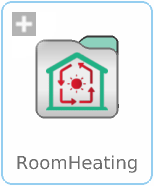
Drill deeper into the model:
In[]:=
SystemModel["CollegeThermalFEM.RoomHeating","Children"]
Out[]=
,


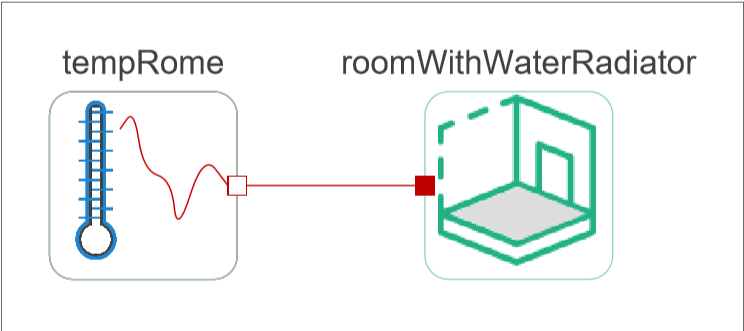
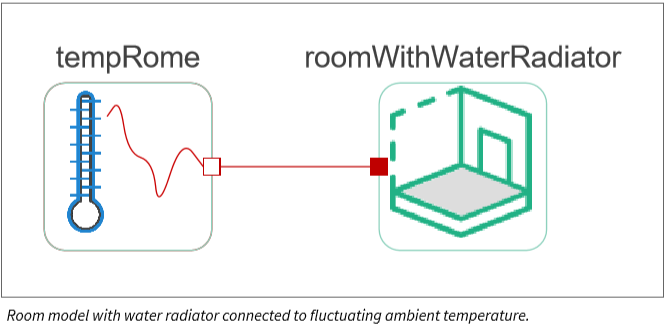
Open the room heating model and visualize a diagram of it:
In[]:=
model=SystemModel["CollegeThermalFEM.RoomHeating.Exercises.RoomModelRome"];model["Diagram"]
Out[]=
Now, that the model is loaded, we can simulate the model. For this, we use .
Run the simulation:
In[]:=
sim=SystemModelSimulate[model]
Out[]=
SystemModelSimulationData


The result is a that contains all simulation results of interest.
Visualize default System Modeler plots with the function:
In[]:=
SystemModelPlot[sim]
Out[]=
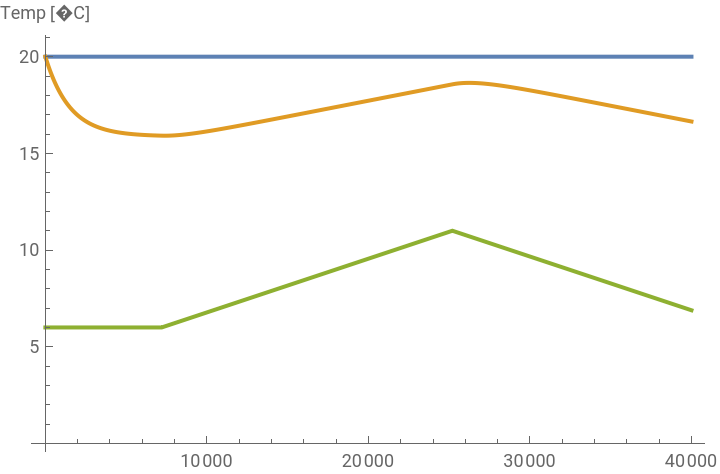


Other variables can also be plotted by specifying the correct variable name.
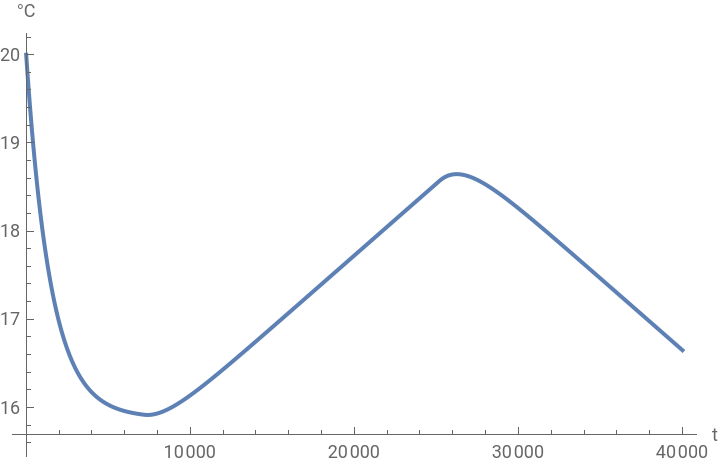
Plot the room temperature:
In[]:=
SystemModelPlot[sim,{"roomWithWaterRadiator.room.temp"}]
Out[]=
Varying Outside Temperature
Varying Outside Temperature
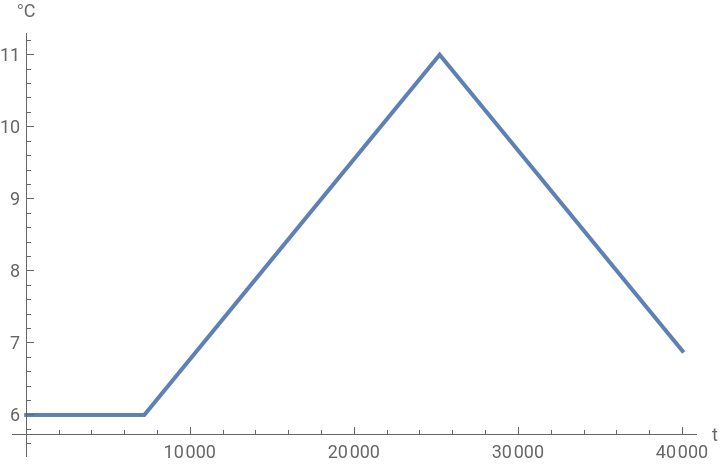
We’ll analyze the room behavior with time-dependent temperature data. The model has some predefined temperature data as a function of time in seconds.
t
Visualize the temperature data used in the model:
In[]:=
SystemModelPlot[sim,{"tempRome.port.T"}]
Out[]=
Let us now test the model for the varying spring temperature.
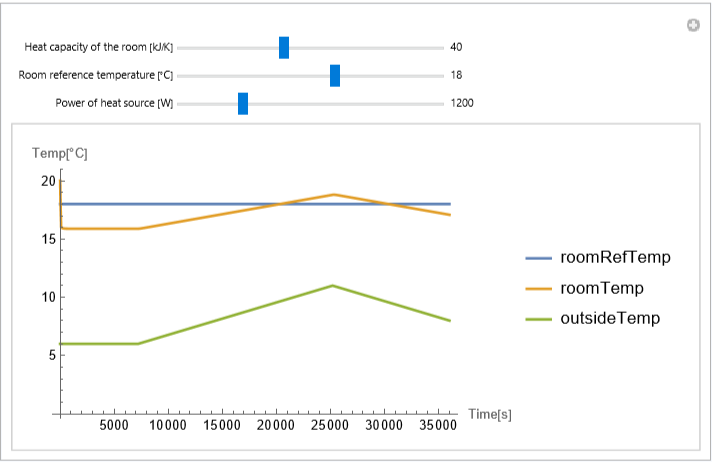
Since during spring the outside temperature is around the reference temperature of 20 °C, the radiator is mostly in the OFF state. It is switched ON during the evening when the temperature goes below the reference temperature.
For effective testing of the various scenarios, parameters with sliders are created in the following interactive plot. (To see it run the following cell)
In[]:=
ManipulateSystemModelPlot[SystemModelSimulate["CollegeThermalFEM.RoomHeating.Exercises.RoomModelRome",36000,<|"ParameterValues"->{"heatSupplied"->x1,"heatCapacityRoom"->x2*1000,"roomRefTemp"->x3}|>],ImageSize->Medium,AxesLabel->{"Time[s]","Temp[°C]"}],{{x2,40,"Heat capacity of the room [kJ/K]"},Row[{Slider[#,{0.1,100,1}],Spacer[5],#}]&},{{x3,20,"Room reference temperature [°C]"},Row[{Slider[#,{0,30,1}],Spacer[5],#}]&},{{x1,1200,"Power of heat source [W]"},Row[{Slider[#,{0,5000,1}],Spacer[5],#}]&},ContinuousAction->False,SynchronousUpdating->False,SynchronousInitialization->False,SaveDefinitions->True,Initialization:>ImportString,"MO"
Out[]=
PDE Room Model
PDE Room Model
In this section, we’ll build a 2D model of our room and study how temperature changes across the room by using values for the boundary conditions that come from the System Modeler model.
The idea is to find the heat distribution in the room that ensures an average temperature of 20 degrees in the room. For this we set up a parametric partial differential equation where a parameter models the heat generated by the heater. For a given value of heater we will find a temperature distribution in the room. The integration over this temperature distribution will give us an average temperature in the room for a given value of the heater. We then will find the value of the heater such that the average temperature in the room is 20 degrees.
Load the FEM package:
Heat Transfer Model Setup
Heat Transfer Model Setup
One possibility to model the heat distribution in the room is to use a heat transfer equation and use a partial differential equation model to describe the room. The room will be a simple rectangular geometry.
The heat transfer PDE is given as:
Model Parameter Setup
Model Parameter Setup
Our goal is to find a steady-state temperature distribution of the room. This means that the temperature dependent terms can be dropped and we arrive at:
Set up the PDE model variables:
We set up a rectangular domain with a width of 4 [m] and a length of 4 [m] to model the room and we have a radiator close to the wall.
Create the room model geometry in meters:
Create a mesh:
Inspect the mesh:
In this model, the focus is on the temperature distribution within the room, with air assumed as the medium. The thermal conductivity of air is required for the heat transfer PDE model. The value of the room medium's thermal conductivity, however, was not required for the System Modeler model. There the thermal conductivity of the walls was utilized in its computation. This means that the thermal conductivity of the room's medium air was not set in the system model and we set it here.
Get a value thermal conductivity value for air:
Set up the PDE model parameters:
Setting Boundary Conditions by Using System Modeler
Setting Boundary Conditions by Using System Modeler
Set up the temperature at the walls with the value from System Modeler:
Set up the PDE:
We now have all components to set up the parametric function.
Set up the parametric function:
To get a better understanding of how the model behaves we start by probing the model with a somewhat random value for the heat source.
Visualize the steady-state temperature distribution:
Visualize the temperature distribution for an average room temperature of 20 degrees.
Our Journey Thus Far
Our Journey Thus Far
Transitioning from a simplified representation, such as a lumped model, to a more comprehensive analysis with a PDE deepens our insights and offers a broader perspective on the system’s dynamics. The lumped model’s inherent uniformity, especially in factors like temperature across elements like radiators, rooms, or interior walls, provides an initial simplification. However, the true beauty of our approach lies in the synergy between the System Modeler and PDE.
System Modeler facilitates an intuitive understanding of the system’s external dynamics and eases the process by providing accurate boundary conditions (B.C.) and initial conditions (I.C.). On the other hand, the PDE delves deeper, revealing the intricate internal dynamics that might be overlooked. By cohesively integrating both, we ensure a holistic understanding of heat distribution, capitalizing on the strengths of each model and methodology.
CITE THIS NOTEBOOK
CITE THIS NOTEBOOK
Exploring room heating dynamics: bridging System Modeler with FEA
by Vedat Senol and Oliver Rübenkönig
Wolfram Community, STAFF PICKS, August 7, 2023
https://community.wolfram.com/groups/-/m/t/2985428
by Vedat Senol and Oliver Rübenkönig
Wolfram Community, STAFF PICKS, August 7, 2023
https://community.wolfram.com/groups/-/m/t/2985428