Overview
Overview
I posted Access and visualize Garmin FIT data: nocturnal oxygen saturation, hike activity and GPS recently and noted that there was also a Python interface to FIT data. This notebook shows how to access the data via the Mathematica Python interface.
I decided to make this a separate post, to document the incredible help I had from two artificial intelligence programs. I have been playing with computers for a long time, but since 1995, I have not learned any new languages; I began using Mathematica in 1988. I have never written a line of Python by myself. I can sort of get the gist of what is going on from reading the code. My approach was to discover the names of the functions and the input they required, then I would get the output into Mathematica where I could competently deal with it.
I decided to make this a separate post, to document the incredible help I had from two artificial intelligence programs. I have been playing with computers for a long time, but since 1995, I have not learned any new languages; I began using Mathematica in 1988. I have never written a line of Python by myself. I can sort of get the gist of what is going on from reading the code. My approach was to discover the names of the functions and the input they required, then I would get the output into Mathematica where I could competently deal with it.
Loading the Python package
Loading the Python package
The hard part was getting Python configured in Mathematica 14.3. Once I solved that by accident, it turned out to be incredibly easy to install the Python package. I had the whole Garmin FITSDK on my computer but I couldn’t figure out how to get it into Mathematica. I did finally accomplish that, but there is an incredibly easier method, using a ResourceFunction, as the package is also on the internet.
In[]:=
Out[]=
Success

Notebook Assistant
Notebook Assistant
I asked Notebook Assistant for help in learning about the package contents stepping through each level until I finally was showed help files, which documented how the functions worked.
In[]:=
ExternalEvaluate["Python","import garmin_fit_sdk.decoder as decoderhelp(decoder.Decoder.read_file_header)"]
Help on function read_file_header in module garmin_fit_sdk.decoder:
read_file_header(self, reset, decode_mode=<DecodeMode.NORMAL: 1>)
Reads the file's header and returns its parameters.
In[]:=
ExternalEvaluate["Python","import garmin_fit_sdk.decoder as decoderhelp(decoder.Decoder.read)"]
Help on function read in module garmin_fit_sdk.decoder:
read(self, apply_scale_and_offset=True, convert_datetimes_to_dates=True, convert_types_to_strings=True, enable_crc_check=True, expand_sub_fields=True, expand_components=True, merge_heart_rates=True, mesg_listener=None, decode_mode=<DecodeMode.NORMAL: 1>)
Reads the entire contents of the fit file and returns the decoded messages
That was about as far as Notebook Assistant could get. It tried a variety of methods and finally could read a FIT file but ended up outputting the same FIT file that it read in. I gave up on that.
Grok 4 Fast beta
Grok 4 Fast beta
I have used the free version of Grok that comes with an X account for most of this year. It is usually a little better than Notebook Assistant with Mathematica code, but mostly doesn’t know ResourceFunctions or Wolfram Alpha content. It has very wide information, however, about Python. So I gave it the very explicit prompt below after pasting the Mathematica output above along with the filepath.
The above code shows that I have loaded the garmin_fit_sdk Python package into Mathematica. What I would like now is to have an ExternalEvaluate Python string for a function which will work in Mathematica to first read and decode the file header then read and decode a .fit file. To do this you cannot just wing it. You will need to do a deep search of the garmin_fit_sdk for example code that works. The filepath below gives the file location. I am not going to run this code right away so you may think on it as long as you want and I will look at everything later today.
Grok result
Grok result
After 38 seconds Grok gave me a text string which Mathematica could reformat as it was pasted to pythonStr
In[]:=
pythonStr="from garmin_fit_sdk import Decoder, StreamfilePath = r\"C:\\Mathematica 14\\Garmin\\Activity\\2025-10-17-08-22-16.fit\"stream = Stream.from_file(filePath)decoder = Decoder(stream)header = decoder.read_file_header(reset=True)messages, errors = decoder.read()(header, messages, errors)";
I executed the result expecting failure but was amazed to see output of an ExternalObject containing everything that I knew was in the file from using the java tool.
In[]:=
result=ExternalEvaluate["Python",pythonStr]
Out[]=
Parsing the output with Mathematica
Parsing the output with Mathematica
It did not take too much time to find where the relevant information was and the output was conveniently in the form of a list of Associations, which shows the excellence of the Mathematica interface.
In[]:=
Dimensions@result
Out[]=
{3}
headers and errors form Python were empty; the middle column, messages, contained all the data.
In[]:=
keys=Keys@result[[2]]
Out[]=
{file_id_mesgs,file_creator_mesgs,activity_mesgs,140,session_mesgs,time_in_zone_mesgs,lap_mesgs,288,327,326,timestamp_correlation_mesgs,event_mesgs,device_info_mesgs,22,141,394,device_settings_mesgs,user_profile_mesgs,79,sport_mesgs,training_settings_mesgs,zones_target_mesgs,record_mesgs,gps_metadata_mesgs,233,325,499,517,104}
The desired data was in record_mesgs.
In[]:=
records=result[[2]]["record_mesgs"];
In[]:=
records[[1]]records[[-1]]
Out[]=
timestampDateObject[{2025,10,17,15,22,16.},Instant,Gregorian,UTC],position_lat408599644,position_long-1327516416,distance2.54,enhanced_speed0.,enhanced_altitude1462.,cycle_length160.12,heart_rate66,cadence0,fractional_cadence0.,1071,13511,13666,14380
Out[]=
timestampDateObject[{2025,10,17,16,12,25.},Instant,Gregorian,UTC],position_lat408599494,position_long-1327516985,distance3287.57,enhanced_speed1.092,enhanced_altitude1459.6,cycle_length160.,heart_rate100,cadence0,fractional_cadence0.,1071,13598,136100,14370
Dataset could interpret the DateObjects, but Tabular needed a list of lists rather than a list of Associations.
In[]:=
recordT=Normal[Take[#,10]]&/@records//Tabular
Out[]=
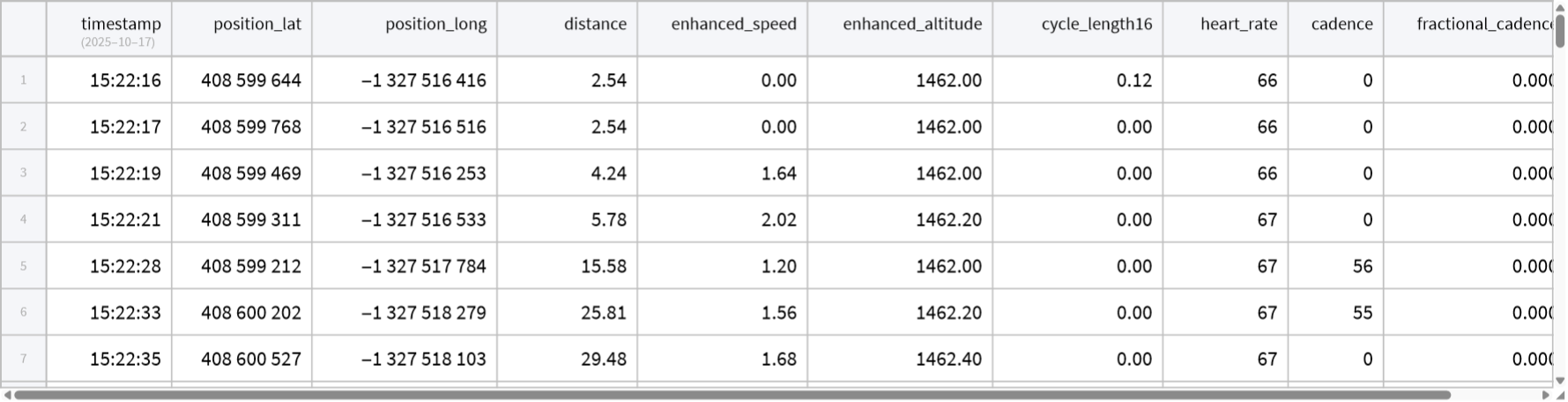
The above could then be put into data formatted for Mathematica. There was a bogus Key, “107” which had to be removed manually. Since all the data keys were the same as the java output, only a slight modification of the code for the java tool was needed.
In[]:=
keys=Keys[Normal[recordT[[1]]]][[1;;10]]sccorr=180./2^31;
Out[]=
{timestamp,position_lat,position_long,distance,enhanced_speed,enhanced_altitude,cycle_length16,heart_rate,cadence,fractional_cadence}
In[]:=
recordT=TransformColumns[recordT,{"Timestamp"->Function[TimeZoneConvert[#timestamp,$SystemTimeZone]],"GeoPosition"->Function[GeoPosition[{#"position_lat"sccorr,#"position_long"sccorr}]],"Distance"->Function[UnitConvert[Quantity[#distance,"m"],"Miles"]],"Altitude"->Function[UnitConvert[Quantity[#"enhanced_altitude","m"],"feet"]],"Speed"->Function[UnitConvert[Quantity[#"enhanced_speed","m/s"],"Miles"/"Hour"]],"HeartRate"->Function[#"heart_rate"],"Cadence"->Function[#cadence],"FractionalCadence"->Function[#"fractional_cadence"],"CycleLength"->Function[#"cycle_length16"]}];DeleteColumns[DeleteColumns[recordT,keys],{1}]
Out[]=
Tabular

Visualizing the data
Visualizing the data
In[]:=
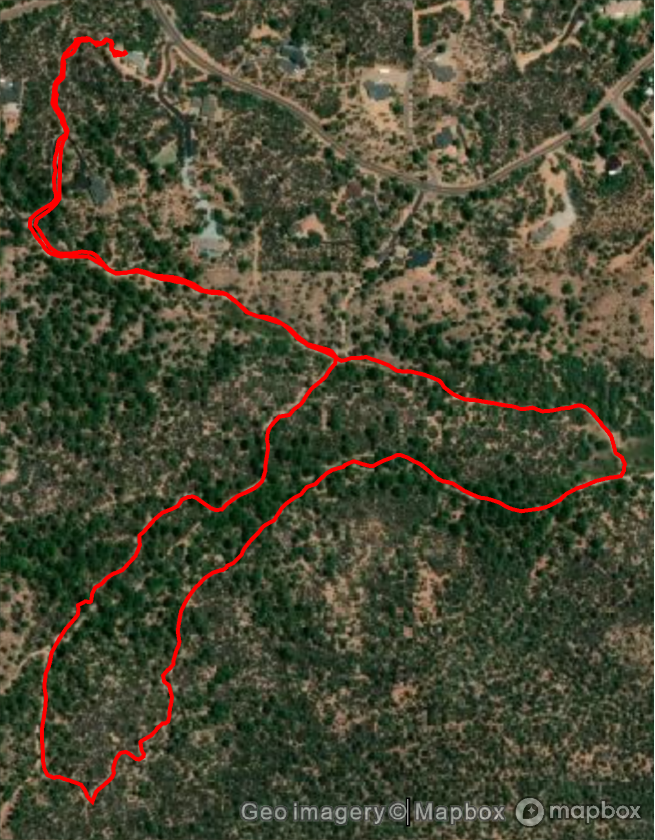
GeoGraphics[{Red,Thick,Line[recordT[All,"GeoPosition"]]},GeoBackground->"Satellite"]
Out[]=
Conclusion
Conclusion
It has taken me longer to write this notebook than to get the data from the garmin_fit_sdk, once I discovered how easy it was to load a Python package. Grok probably has knowledge about every Python package, so with AI assistance it should not be too difficult to use Python code in Mathematica.
CITE THIS NOTEBOOK
CITE THIS NOTEBOOK
AI assisted access of Garmin FIT data via Python interface
by Robert Rimmer
Wolfram Community, STAFF PICKS, October 18, 2025
https://community.wolfram.com/groups/-/m/t/3562391
by Robert Rimmer
Wolfram Community, STAFF PICKS, October 18, 2025
https://community.wolfram.com/groups/-/m/t/3562391