Introduction
Introduction
I bought my copy of "A New Kind of Science" in 2007.
At that time I knew very little about cellular automata.
I set myself the task of understanding the techniques used in the book and reproducing some of the examples.
During this time I was writing my own code. This was tedious and time consuming.
My recent switch to using the Wolfram Engine and Wolfram Cloud has significantly increased the speed of my research.
Having now retired at the age of 70 I have started to study one dimensional 4 color totalistic cellular automata in more detail.
I have downloaded the free Wolfram Engine onto my Linux laptop and I am engaged in sampling the 4 color totalistic CA in batches of 100 looking for interesting behaviour.
I have also just signed up for the free Wolfram Cloud and I am getting a great deal of enjoyment learning how to use this.
So after just 2 weeks of using Wolfram Cloud I thought I would post this short article together with the examples below.
At that time I knew very little about cellular automata.
I set myself the task of understanding the techniques used in the book and reproducing some of the examples.
During this time I was writing my own code. This was tedious and time consuming.
My recent switch to using the Wolfram Engine and Wolfram Cloud has significantly increased the speed of my research.
Having now retired at the age of 70 I have started to study one dimensional 4 color totalistic cellular automata in more detail.
I have downloaded the free Wolfram Engine onto my Linux laptop and I am engaged in sampling the 4 color totalistic CA in batches of 100 looking for interesting behaviour.
I have also just signed up for the free Wolfram Cloud and I am getting a great deal of enjoyment learning how to use this.
So after just 2 weeks of using Wolfram Cloud I thought I would post this short article together with the examples below.
Some of my efforts using Wolfram Cloud and Wolfram Engine
Some of my efforts using Wolfram Cloud and Wolfram Engine
I'm using Wolfram Engine on my Linux laptop to evaluate one dimensional 4 color totalistic CA.
Here's an example that demonstrates some interesting behaviour.
Here's an example that demonstrates some interesting behaviour.
ArrayPlot[CellularAutomaton[{500086,{4,1}},{{1},0},100],ColorRules{0White,1Gray,2Red,3Black}]
Out[]=
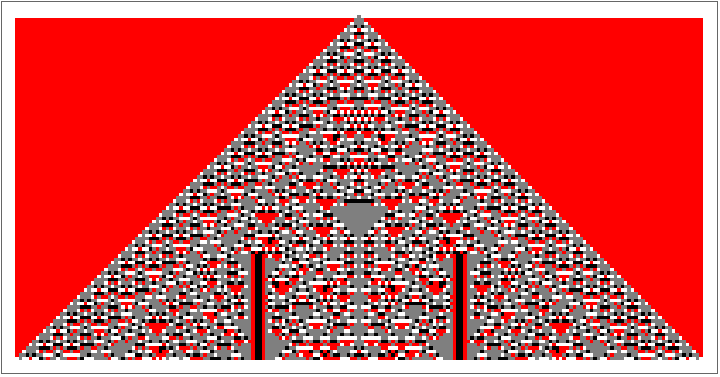
I generally run using just 200 steps .
Any CA that demonstrates interesting behaviour is re - run for a few thousand steps .
So far, the following codes have shown some interesting behaviour :
37131, 100003, 100017, 100019, 100022, 100023, 107395, 107396, 107398, 300012, 500009, 500029, 500086, 670008, 670018, 670019, 670030, 670124, 800013, 800014, 800030, 800039, 800072.
There is a general expression that can be used to calculate the color of any cell in a one dimensional nearest neighbor k - color totalistic cellular automaton :
Any CA that demonstrates interesting behaviour is re - run for a few thousand steps .
So far, the following codes have shown some interesting behaviour :
37131, 100003, 100017, 100019, 100022, 100023, 107395, 107396, 107398, 300012, 500009, 500029, 500086, 670008, 670018, 670019, 670030, 670124, 800013, 800014, 800030, 800039, 800072.
There is a general expression that can be used to calculate the color of any cell in a one dimensional nearest neighbor k - color totalistic cellular automaton :
In[]:=
Quotient[Mod[c,(k^(n+1))],k^n]
Where
c = the code number of the CA
k = the number of colors, assigned integer values 0, 1, 2, . . . (k - 1)
n = the total color value of the cell and its two neighbors on the previous row
The following tool calculates the color of any cell in a one dimensional nearest neighbor 4 color totalistic cellular automaton given the values of :
c = the code number between 0 and 1, 048, 575
n = the total colour value of the cell and its two neighbors on the previous row
Where the colour values are :
0 = White
1 = Gray
2 = Red
3 = Black
So if the colors of the cell and two neighbors on the previous row were Gray, Red, Black the total would be 6.
Just move the sliders to evaluate different codes .
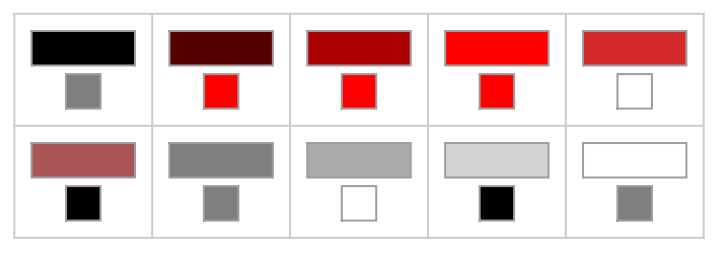
I have followed the graphic for this tool with the equivalent RulePlot function graphic, to illustrate that the tool generates the correct results .
The RulePlot function displays "average" color values of the cell and two neighbors from the previous row .
c = the code number of the CA
k = the number of colors, assigned integer values 0, 1, 2, . . . (k - 1)
n = the total color value of the cell and its two neighbors on the previous row
The following tool calculates the color of any cell in a one dimensional nearest neighbor 4 color totalistic cellular automaton given the values of :
c = the code number between 0 and 1, 048, 575
n = the total colour value of the cell and its two neighbors on the previous row
Where the colour values are :
0 = White
1 = Gray
2 = Red
3 = Black
So if the colors of the cell and two neighbors on the previous row were Gray, Red, Black the total would be 6.
Just move the sliders to evaluate different codes .
I have followed the graphic for this tool with the equivalent RulePlot function graphic, to illustrate that the tool generates the correct results .
The RulePlot function displays "average" color values of the cell and two neighbors from the previous row .
In[]:=
Manipulate[Manipulate[Switch[Quotient[Mod[c,4^(n+1)],4^n],0,White,1,Gray,2,Red,3,Black],{n,9,0,-1}],{c,0,1048575,1},SaveDefinitionsTrue]
Out[]=


Manipulate[RulePlot[CellularAutomaton[{c,{4,1}}],ColorRules{0White,1Gray,2Red,3Black}],{c,0,1048575,1}]
Out[]=
Thanks to the team at Wolfram for making such wonderful tools available at no cost.
I can't remember the last time I had more fun without a glass of wine in my hand!
Thanks Stephen for making my time in retirement more meaningful.
I can't remember the last time I had more fun without a glass of wine in my hand!
Thanks Stephen for making my time in retirement more meaningful.