Have you already seen a graphic on books, PDF article, sites or papers that you would like to have the data source, but there is not a reference for that data???
Now with artificial intelligence assistance (aid by AI) we can reverse engineer graphics with LLMs to get the original data and recreate the graphic with Wolfram Language and LLMs...
Now with artificial intelligence assistance (aid by AI) we can reverse engineer graphics with LLMs to get the original data and recreate the graphic with Wolfram Language and LLMs...
We can use LLMs to analyze an image with a graphic and reproduce it as code, here I am using Wolfram Notebook Assistant (Wolfram LLM Kit):
Can you please write a code in Wolfram Language in order to replicate this graphic in the image:
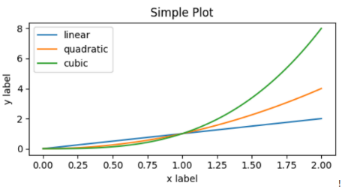

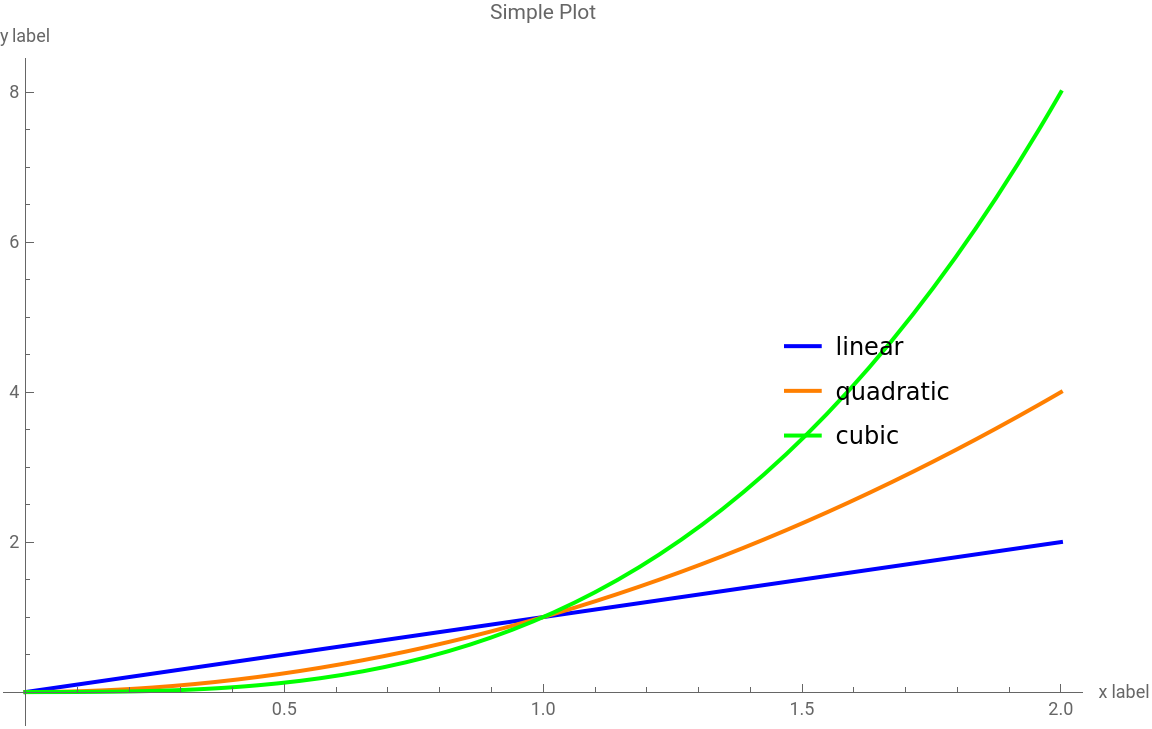
To replicate the graphic shown in the image using Wolfram Language, you can create a plot with three functions: linear, quadratic, and cubic. Use different styles for each function and add labels and a legend to the plot. Here's the code:
This code uses to draw the functions, specifies to set different colors, and applies to add a legend. The and options are used to set the labels for the axes and the title of the plot, respectively. Adjustments are made to the position of the legend to match the original style.


In[]:=
Plot[{x,x^2,x^3},{x,0,2},PlotStyle->{Blue,Orange,Green},PlotLegends->Placed[{"linear","quadratic","cubic"},{0.8,0.5}],AxesLabel->{"x label","y label"},PlotLabel->"Simple Plot",ImageSize->Large]
Out[]=
Now from a book image photo with smartphone:
This is a graphic from a book, photo taken with a cell phone. Can you please create a list with the point in red for x (Years of Education) and y (Income) axis, and reproduce the graphic in Wolfram Language code. Both graphics has the same data points:
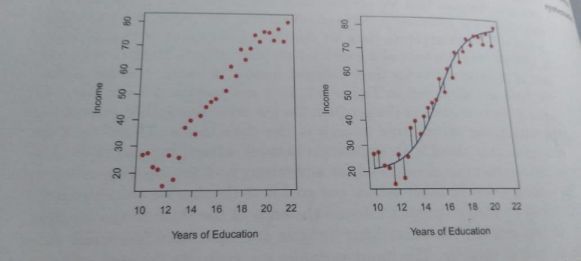
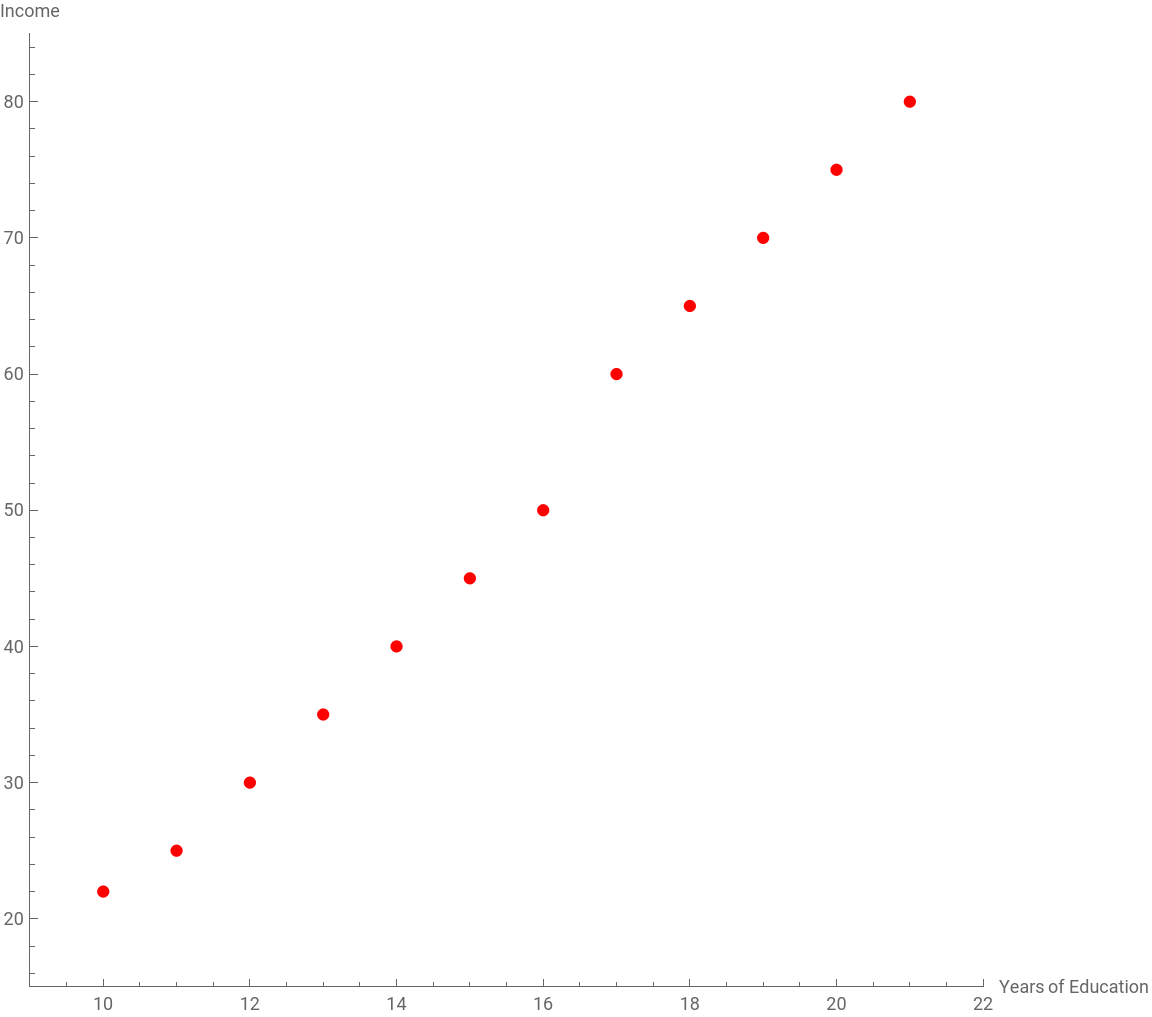
To create a list of the red points and generate a similar plot in Wolfram Language, we need to approximate the data points from the image. Let's create a list of points and then plot them.Here is an approximation of the data points for the plot:
You can use this data to plot the points:
This code uses to plot the data points, setting the style to red to match the image. It also labels the axes and adjusts the plot range to fit the data as closely as possible. You can further refine the data points based on more precise measurements or additional information.
In[]:=
data={{10,22},{11,25},{12,30},{13,35},{14,40},{15,45},{16,50},{17,60},{18,65},{19,70},{20,75},{21,80}};
In[]:=
ListPlot[data,PlotStyle->Red,AxesLabel->{"Years of Education","Income"},PlotRange->{{9,22},{15,85}},AspectRatio->1,ImageSize->Large]
Out[]=
The image bellow has two graphics, can you please create the data points in a lists for those data graphics, extracting data from both images, and reproduce the graphics win Wolfram Language code:
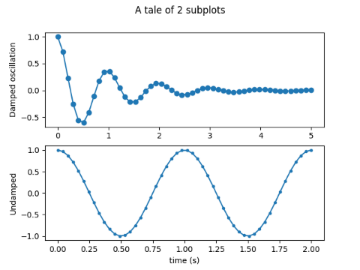
LLMs are getting good on reverse engineering graphics to get back to the original data...
You can keep the prompt conversation for refinement at the data extraction from graphics...
There is work needed, but it is a good point for now...
You can keep the prompt conversation for refinement at the data extraction from graphics...
There is work needed, but it is a good point for now...
CITE THIS NOTEBOOK
CITE THIS NOTEBOOK
Reverse engineering images of graphics to data and Wolfram code using LLMs
by Daniel Carvalho
Wolfram Community, STAFF PICKS, March 13, 2025
https://community.wolfram.com/groups/-/m/t/3416125
by Daniel Carvalho
Wolfram Community, STAFF PICKS, March 13, 2025
https://community.wolfram.com/groups/-/m/t/3416125