In the opening a master should play like a book,
in the mid-game he should play like a magician,
in the ending he should play like a machine
- Rudolf Spielmann
in the mid-game he should play like a magician,
in the ending he should play like a machine
- Rudolf Spielmann

I just watched the Netflix miniseries on weekend and now I am with both the drama and the charm of chess. Thanks to internet, it is very easy to find high quality resources to learn the basics and appreciated the duel between grandmasters with detailed narrative analysis. It is also by NYT that chess game streaming hours and view counts on popular platforms (like Twitch, chess.com and YouTube) soar during the Covid-19 pandemic. I think it is a perfect time to write two short blogs about simple chess functions I created with Wolfram languages inspired by open source community.
obsessed
reported
◼
Forsyth–Edwards Notation(FEN) parser
Lets take a look the implementation of FEN parser first.
FEN Parser
FEN Parser
According to
Wikipedia
Forsyth–Edwards Notation (FEN) is a standard notation for describing a particular board position of a chess game. The purpose of FEN is to provide all the necessary information to restart a game from a particular position.
Please also read the definition section in the wiki link above to understand the meaning of symbols and arrangement in the notation.
let me quickly show how to use the parser works before explaining the implementation. I download a FEN from vs game, found on chesstempo.com.
Kasparov
Aronian
In[]:=
fen="1r1qr1k1/1b3p1p/1p1p1bp1/p1p5/P1n1P3/2N3PP/1PPQ1PBN/1R2R1K1 w - - 4 19";
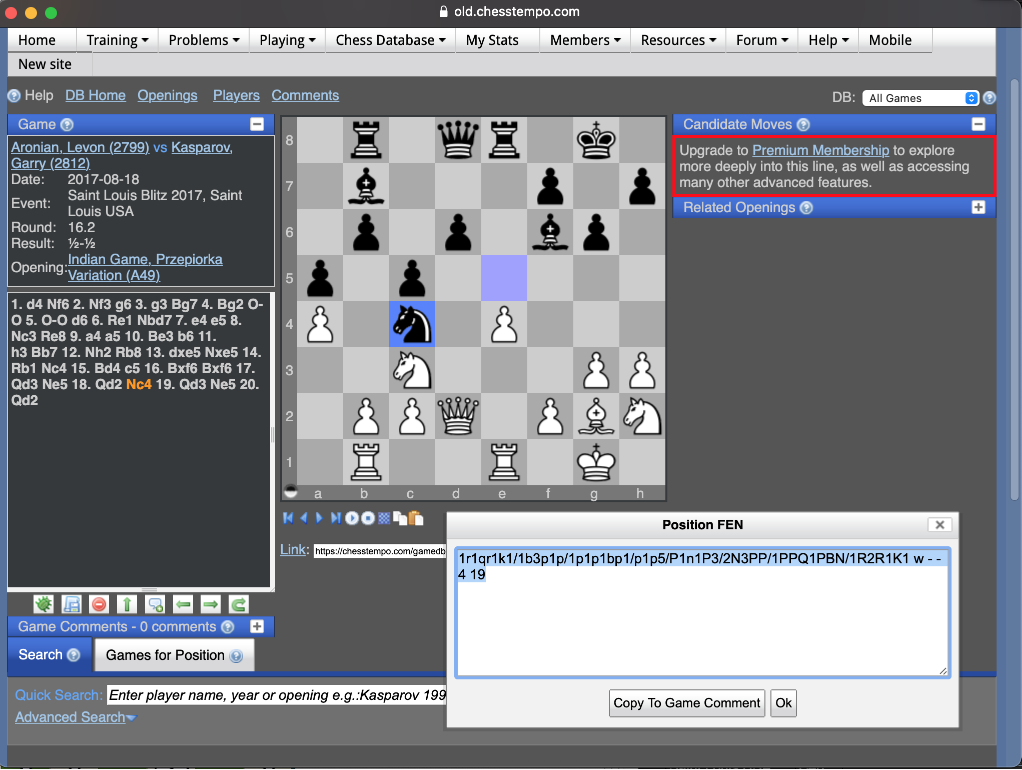
Wrap up the output of my FEN parser with Grid function you should see a grid similar to the book in the screenshot above
In[]:=
FENParser[fen]//Grid[#,FrameAll]&
Out[]=
· | r | · | q | r | · | k | · |
· | b | · | · | · | p | · | p |
· | p | · | p | · | b | p | · |
p | · | p | · | · | · | · | · |
P | · | n | · | P | · | · | · |
· | · | N | · | · | · | P | P |
· | P | P | Q | · | P | B | N |
· | R | · | · | R | · | K | · |
In[]:=
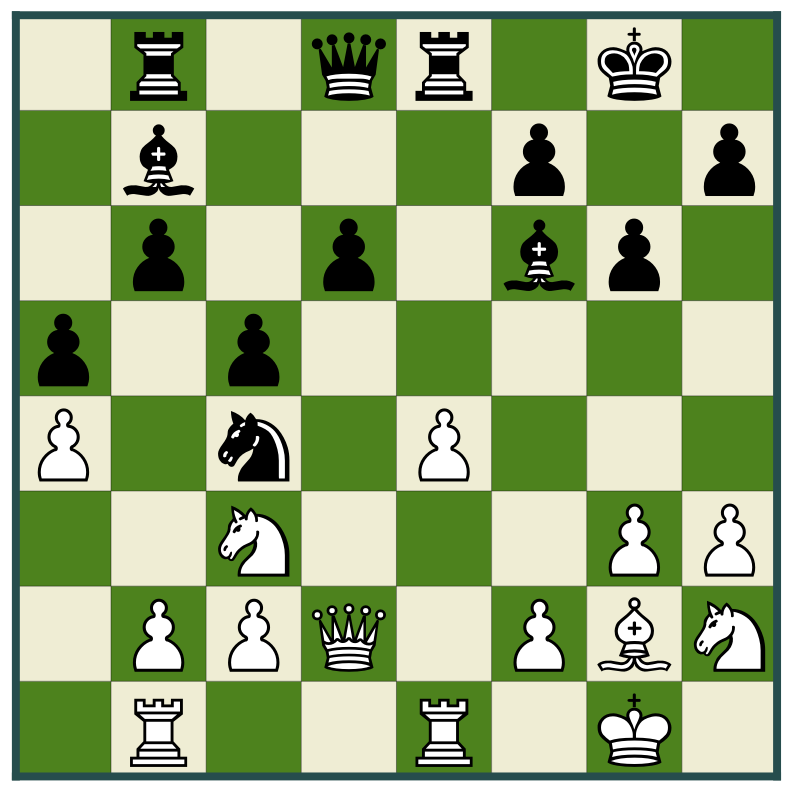
ChessStatusFromFEN[fen]
Out[]=
I read the source code of Python implementation which is based on regular expression matches. So here are the same thing I can quickly do in WL in the Utility section at the bottom:
◼
Split FEN by “/” into 8 ranks (rank = row) : fenRank[fen_]
◼
Each number in a rank means consecutive empty grid. For instance p1p5 mean:
black pawn , empty, black pawn, empty,empty,empty,empty,empty
So fenSpaceExpand[...] converts number into a list of empty space and expandOrNoop checks if a symbol is a number or piece first and calls the expand function
black pawn , empty, black pawn, empty,empty,empty,empty,empty
So fenSpaceExpand[...] converts number into a list of empty space and expandOrNoop checks if a symbol is a number or piece first and calls the expand function
◼
Then parseRank creates a row/rank and FENParser builds the whole status
◼
ChessStatusFromFEN needs to rotate the array from our parser 90 degree clockwise first and display the graphics with some functions from ChessPGNDisplay
Summary
Summary
◼
Use regular expression to parse FEN according to its definition on Wikipedia
◼
Pick functions from the source notebook of to render chessboard and pieces
◼
Use StartProcess/WriteLine/ReadString as streaming interface and core of the communication from Wolfram product side
◼
Acknowledgement to the following repo’s for FEN parser and binding details
Utility
Utility
In[]:=
$darkSquareColor=RGBColor[0.305882,0.509804,0.117647];$lightSquareColor=RGBColor[0.941176,0.929412,0.835294];$lineThickness2=0.0005;$borderSquareColor=RGBColor[0.152941,0.305882,0.305882];$lineThickness1=0.01;
In[]:=
CGDTranslateAndScaleGraphic[graphic:Blank[Graphics],(dx_)?NumberQ,(dy_)?NumberQ,(s_)?NumberQ]:=Module[{},graphic/.fc_FilledCurveMapAt[s*#1+dy&,MapAt[s*#1+dx&,fc,{2,All,All,1}],{2,All,All,2}]]
In[]:=
CGDBoardGraphic[]:=Graphics[Flatten[Join[Table[Style[Rectangle[{i,j},{i+1,j+1}],If[EvenQ[i+j],$darkSquareColor,$lightSquareColor]],{i,0,7},{j,0,7}],Table[{Thickness->$lineThickness2,Line[{{i,0},{i,8}}]},{i,1,7}],Table[{Thickness->$lineThickness2,Line[{{0,i},{8,i}}]},{i,1,7}],{$borderSquareColor,Thickness->$lineThickness1,Line[{{0,0},{0,8}}],Line[{{0,8},{8,8}}],Line[{{8,8},{8,0}}],Line[{{8,0},{0,0}}]}]]]
In[]:=
$graphicsLookup:=$graphicsLookup=;
In[]:=
fenSpaceExpand[numstr_String]:=With[{n=ToExpression[numstr]},Table["·",n]]
In[]:=
fenRank[fen_]:=StringSplit[StringSplit[fen," "][[1]],"/"]
In[]:=
expandOrNoop[piece_String]:=Module[{retval=""},If[StringStartsQ[piece,RegularExpression["[kqbnrpKQBNRP]"]],retval=piece,fenSpaceExpand[piece]]]
In[]:=
parseRank[rank_]:=expandOrNoop/@StringCases[rank,RegularExpression["(\\d|[kqbnrpKQBNRP])"]]
In[]:=
FENParser[fen_]:=Flatten@*parseRank/@fenRank[fen]
In[]:=
ChessStatusFromFEN[fen_String]:=Show[Module[{boardArray=Transpose@Reverse@FENParser[fen]},Prepend[Flatten[Table[If[boardArray[[i,j]]==="·",Nothing,CGDTranslateAndScaleGraphic[Lookup[$graphicsLookup,boardArray[[i,j]]],i-0.5,j-0.9,0.6]],{i,1,8},{j,1,8}]],CGDBoardGraphic[]]]]