CCD astronomical imaging: image acquisition
by Tom Sherlock
Second part (color image processing): https://community.wolfram.com/groups/-/m/t/2565596
by Tom Sherlock
Second part (color image processing): https://community.wolfram.com/groups/-/m/t/2565596
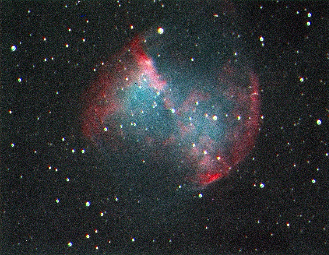
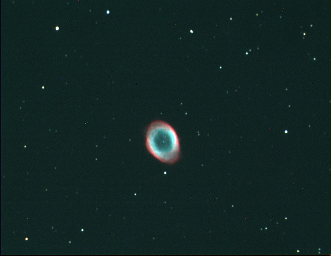
I captured these images of M57 and M27 from my backyard in Urbana. Both were captured using a monochrome CCD camera through a series of red, green and blue filters.
The imaging frames plus the calibration frames (dark and bias) were all captured using Mathematica to control the CCD camera and the filter wheel using the ASCOM API and NETLink.
All the alignment, stacking and calibration plus the initial image processing were also done in the same notebook using WL plus some Python routines called from WL code. The only thing not done in Mathematica was the control of the guiding camera which kept the telescope locked onto these objects and some minor touchups in Gimp.
Both images consist of 10, 30-second subframes captured through each of the 3 filters, plus 10 bias frames and 10 dark frames. The camera was cooled to 0 degrees C and this was also set using WL.
The imaging frames plus the calibration frames (dark and bias) were all captured using Mathematica to control the CCD camera and the filter wheel using the ASCOM API and NETLink.
All the alignment, stacking and calibration plus the initial image processing were also done in the same notebook using WL plus some Python routines called from WL code. The only thing not done in Mathematica was the control of the guiding camera which kept the telescope locked onto these objects and some minor touchups in Gimp.
Both images consist of 10, 30-second subframes captured through each of the 3 filters, plus 10 bias frames and 10 dark frames. The camera was cooled to 0 degrees C and this was also set using WL.
Implementation
Implementation
ASCOM Interface
ASCOM Interface
In[]:=
Needs["NETLink`"];
In[]:=
InitDeviceInterface32[]:=Module[{},InstallNET["Force32Bit"->True];LoadNETAssembly/@Map["ASCOM."<>#&,{"Astrometry","Attributes","DriverAccess","Exceptions","Helper","Helper2","Interfaces","Utilities"}];LoadNETType["ASCOM.DriverAccess.Camera"];LoadNETType["ASCOM.DriverAccess.FilterWheel"];];
In[]:=
SelectDevice[deviceName_String]:=Module[{theDevice},theDevice=NETNew["ASCOM.DriverAccess."<>deviceName,ToExpression[deviceName<>"`Choose[\"\"]"]];theDevice@Connected=True;theDevice]
In[]:=
DisconnectDevice[theDevice_]:=Module[{},theDevice@Connected=False;];
Filter Wheel Control
Filter Wheel Control
In[]:=
(*FilterWheelFunctions*)SetFilterWheelPosition[theFilterWheel_,filterPos_]:=Module[{},theFilterWheel@Position=filterPos-1;filterPos];SetFilterWheelPosition[theFilterWheel_,filterName_String]:=Module[{l},l=FirstPosition[GetFilterWheelNames[theFilterWheel],filterName,{}];If[Length[l]==1,SetFilterWheelPosition[theFilterWheel,First[l]];filterName,$Failed]];GetFilterWheelPosition[theFilterWheel_]:=theFilterWheel@Position+1;GetFilterWheelPosition[theFilterWheel_,filterName_String]:=Module[{l},l=FirstPosition[GetFilterWheelNames[theFilterWheel],filterName,{}];If[Length[l]==1,First[l],$Failed]];GetFilterWheelNames[theFilterWheel_]:=Module[{},theFilterWheel@Names];
Camera Control
Camera Control
In[]:=
GetCameraSensorTemperature[theCamera_]:=Module[{},theCamera@CCDTemperature];
In[]:=
SetCameraSensorTemperature[theCamera_,tempDegreesCelcius_]:=Module[{},theCamera@SetCCDTemperature=tempDegreesCelcius;tempDegreesCelcius];
In[]:=
askDarkFrame=True;SetAskDarkFrame[ask_]:=Block[{},askDarkFrame=ask;ask];
In[]:=
SetCameraCoolerOn[theCamera_,theValue_]:=Block[{},theCamera@CoolerOn=theValue;theCamera@CoolerOn];
In[]:=
GetCameraExposureMin[theCamera_]:=theCamera@ExposureMin;
In[]:=
GetCameraMaxBinX[theCamera_]:=theCamera@MaxBinX;GetCameraMaxBinY[theCamera_]:=theCamera@MaxBinY;GetCameraXSize[theCamera_]:=theCamera@CameraXSize;GetCameraYSize[theCamera_]:=theCamera@CameraYSize;SetCameraNumX[theCamera_,theValue_]:=Block[{},theCamera@NumX=theValue;theCamera@NumX];SetCameraNumY[theCamera_,theValue_]:=Block[{},theCamera@NumY=theValue;theCamera@NumY];
SetCameraBinning[theCamera_,bin_Integer]:=Module[{xres,yres},If[bin>GetCameraMaxBinX[theCamera],Return[$Failed]];If[bin>GetCameraMaxBinY[theCamera],Return[$Failed]];If[bin<1,Return[$Failed]];xres=GetCameraXSize[theCamera]/bin;yres=GetCameraYSize[theCamera]/bin;theCamera@BinX=bin;theCamera@BinY=bin;SetCameraNumX[theCamera,xres];SetCameraNumY[theCamera,yres];{bin,bin}];
GetCameraBinning[theCamera_]:=Module[{},List[theCamera@BinX,theCamera@BinY]];
Capture Utilities
Capture Utilities
In[]:=
AcquireImageToFITSFile[theCamera_,duration_,shutterOpen_,fileName_]:=Module[{im,sample},theCamera@StartExposure[duration,shutterOpen];While[theCamera@ImageReady!=True,Pause[0.5]];im=Image[Transpose[theCamera@ImageArray],"Bit16"];Export[fileName,ImageData[im,Interleaving->False,DataReversed->True]]];buildImageFITSFileName[prefix_String,outputDir_String,index_]:=FileNameJoin[{outputDir,prefix<>"_"<>StringReplace[DateString["DateShort"]," "->"_"]<>"_"<>ToString[index]<>".fit"}];AcquireFITSImageSequence[theCamera_,duration_,shutterOpen_,count_,prefix_String,outputDir_String]:=Module[{i,fileName,imageType},If[shutterOpen==False&&theCamera@HasShutter==False&&askDarkFrame==True,CreateDialog[{TextCell["Acquiring dark frames. Cover the telescope objective"],DefaultButton[]}]];For[i=1,i<=count,i++,fileName=buildImageFITSFileName[prefix,outputDir,i];AcquireImageToFITSFile[theCamera,duration,shutterOpen,fileName]];If[shutterOpen==False&&theCamera@HasShutter==False&&askDarkFrame==True,CreateDialog[{TextCell["Acquisition complete. Uncover the telescope objective"],DefaultButton[]}]];];
In[]:=
AcquireLRGBSequence[theCamera_,theFilterWheel_,frameExposure_,frameCount_,outputDir_]:=Module[{},(*Uselowresolutionforcolorframes*) SetCameraBinning[theCamera,1]; Print["Acquiring Red Frames..."]; SetFilterWheelPosition[theFilterWheel,"Red"]; AcquireFITSImageSequence[theCamera,frameExposure,True,frameCount,"red",outputDir]; Print["Acquiring Green Frames..."];SetFilterWheelPosition[theFilterWheel,"Green"]; AcquireFITSImageSequence[theCamera,frameExposure,True,frameCount,"green",outputDir]; Print["Acquiring Blue Frames..."]; SetFilterWheelPosition[theFilterWheel,"Blue"]; AcquireFITSImageSequence[theCamera,frameExposure,True,frameCount,"blue",outputDir]; Print["Acquiring Luminance Frames..."]; SetFilterWheelPosition[theFilterWheel,"Luminance"]; AcquireFITSImageSequence[theCamera,frameExposure,True,frameCount,"luminance",outputDir];];
Initialize the ASCOM interface
In[]:=
InitDeviceInterface32[];
Collection
Collection
Setup
Setup
Location for data
In[]:=
outputDir="C:\\Users\\tom\\Pictures\\TestArea2";
Number of frames to collect of each type
In[]:=
frameCount=10;
Basic exposure for each light and dark frame in seconds
In[]:=
frameExposure=30.0;
Offset in degrees Celsius below ambient temperature for the CCD sensor
In[]:=
sensorTemperatureOffset=20.0;
Select devices
Select devices
Evaluating this cell will bring up dialogs to choose the camera and filter wheel.
Show the filter names
Show the filter names
Set camera temperature
Set camera temperature
Acquire images at 20 degrees C below ambient to minimize thermal noise from the CCD chip.
Collect Calibration Frames (Bias and Dark Frames)
Collect Calibration Frames (Bias and Dark Frames)
Bias Frames
Bias Frames
Bias frames are collected at a very short exposure time with the shutter closed to estimate the noise associated with reading a light frame. This camera doesn’t have a dedicated shutter so I use an opaque filter as a shutter. For this reason we don’t need to ask the user to cover the telescope.
Dark Frames
Dark Frames
Dark frames are collected with the shutter closed at the same exposure time and temperature as the light frames to estimate the thermal noise associated with the camera.
Flat Frames
Flat Frames
In this demo I don’t collect ‘flat’ frames, but for precise work or larger sensors you need to do so. Flat frames are exposed with the telescope pointed at an evenly illuminated surface, like a dedicated flat frame target or simply the evening sky. You need to collect flat frames for each filter to compensate for things like dust on the filter.
Acquire LRGB Light Image Frames
Acquire LRGB Light Image Frames
These frames contain the actual image data. We collect them for the R, G, B filters as well as a clear filter to get luminance data.
An alternative procedure is to collect the R,G and B frames at half the resolution by setting the binning to 2. This will collect 4 times the light per ‘pixel’ at the expense of half the lower spatial resolution for the color data, which isn’t critical. The luminance frames will always be collected at high resolution. If low resolution frames are collected, you will also need to collect low resolution dark and bias frames too.
An alternative procedure is to collect the R,G and B frames at half the resolution by setting the binning to 2. This will collect 4 times the light per ‘pixel’ at the expense of half the lower spatial resolution for the color data, which isn’t critical. The luminance frames will always be collected at high resolution. If low resolution frames are collected, you will also need to collect low resolution dark and bias frames too.
Disconnect devices
Disconnect devices