This is a continuation to the posts listed at: https://community.wolfram.com/web/ggoff/
Abstract
Abstract
The Wolfram Language commands ComplexPot3D and ComplexPlot were at the center of the preparation phase. In Example 1 four complex functions and some of their features were visualized as colored analytical surfaces. Example 2 used recreations of Riemann-surfaces as building blocks.
Experiments
Experiments
In[]:=
myDir=SetDirectory[NotebookDirectory[]]
Out[]=
E:\heute\ams6pub
Example 1: Landscapes
Example 1: Landscapes
In[]:=
EmbeddedService[{"Vimeo","614239373"}]
Out[]=
Clear[fz,zf,z,p11,p12,p21,p22,p31,p32,p41,p42]
Double Tower
Double Tower
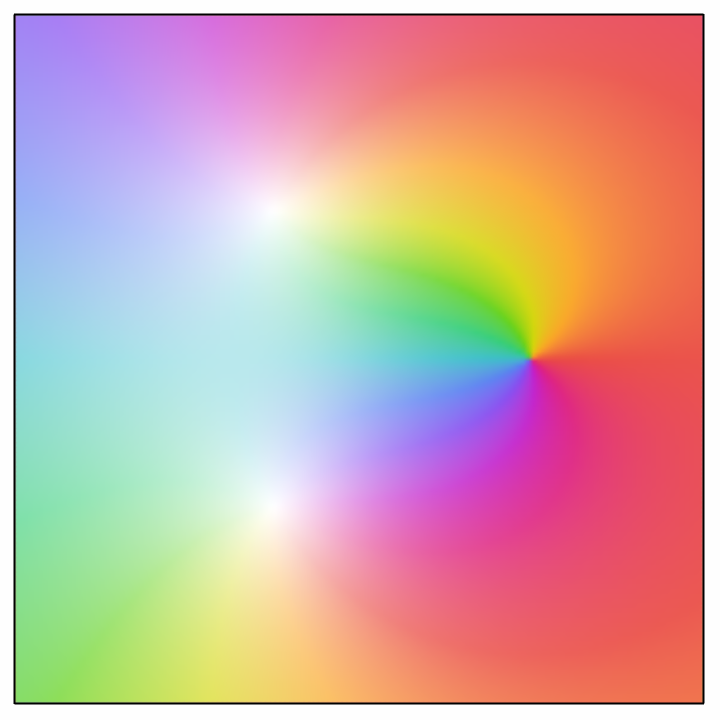
The following complex expression was plotted in 2D and 3D:
In[]:=
fz=(z-1)/(z^2+z+1)zf=2
Out[]=
-1+z
1+z+
2
z
Out[]=
2
In[]:=
Solve[fz==0,z]
Out[]=
{{z1}}
In[]:=
p11=ComplexPlot[fz,{z,zf},FrameTicksNone,Frame->None]
Out[]=
The 2D plot was exported as png-file :
In[]:=
Export[myDir<>"/out/towers.png",p11]
Out[]=
E:\heute\ams6pub/out/towers.png
In[]:=
p12=ComplexPlot3D[fz,{z,zf},BoxedFalse,Axes->False]
Out[]=

The 3D plot was exported as dxf-file :
In[]:=
Export[myDir<>"/out/towers.dxf",p12]
Out[]=
E:\heute\ams6pub/out/towers.dxf
The plots show one zero and two poles for the above complex function via cyclic color gradients . Around a zero the colors change from blue to red in clockwise direction. The colors change from blue to red in counter-clockwise direction around poles.
Further possible features of complex functions are multiple poles, multiple zeros and essential singularities. Multiple cyclic gradients around poles and zero indicate their multiplicity. Essential singularities are hinted at through infinite cycles of color changes.
Further possible features of complex functions are multiple poles, multiple zeros and essential singularities. Multiple cyclic gradients around poles and zero indicate their multiplicity. Essential singularities are hinted at through infinite cycles of color changes.
Saddle
Saddle
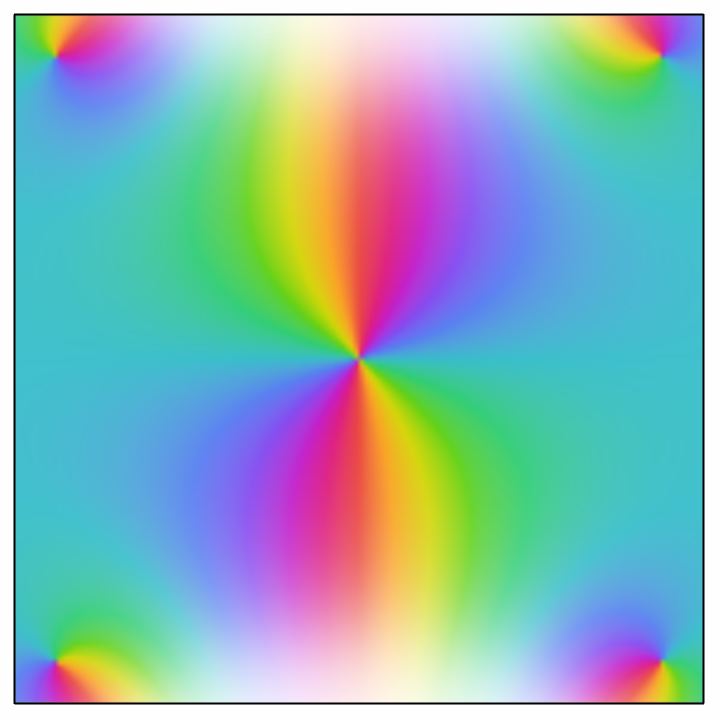
The following complex expression was plotted in 2D and 3D and exported in png- and dxf-format:
In[]:=
fz=E^(-z^2)-1zf=2
Out[]=
-1+
-
2
z
Out[]=
2
In[]:=
Solve[fz==0,z]
Out[]=
z,z
In[]:=
p21=ComplexPlot[fz,{z,zf},FrameTicksNone,Frame->None]
Out[]=
In[]:=
Export[myDir<>"/out/saddle.png",p21]
Out[]=
E:\heute\ams6pub/out/saddle.png
In[]:=
p22=ComplexPlot3D[fz,{z,zf},BoxedFalse,Axes->False]
Out[]=

In[]:=
Export[myDir<>"/out/saddle.dxf",p22]
Out[]=
E:\heute\ams6pub/out/saddle.dxf
Bowl
Bowl
Again a 2D-plot and a 3D-plot is delivered. Both are exported accordingly:
In[]:=
fz=z^5-z^4-z-1zf=2
Out[]=
-1-z-+
4
z
5
z
Out[]=
2
In[]:=
Solve[fz==0]
Out[]=
z,z,z,z,z

Handle
Handle
Two plots were created and exported.
Blender
Blender
For each of the the four complex functions the following procedure was used in Blender:
The exported 3D-plot was imported as dxf-file. For the material the 2D-plot was used as image texture to colorize the imported 3D-plot. Then the landscape was subdivided and given thickness via subdivision - and solidify-modifiers. A keyframed animation was rendered. The changed property was the height of the landscape object. In a second animation the landscape was rotated around the vertical axis.
The exported 3D-plot was imported as dxf-file. For the material the 2D-plot was used as image texture to colorize the imported 3D-plot. Then the landscape was subdivided and given thickness via subdivision - and solidify-modifiers. A keyframed animation was rendered. The changed property was the height of the landscape object. In a second animation the landscape was rotated around the vertical axis.
Example 2: Homage2Riemann
Example 2: Homage2Riemann
Part 1
Part 1
As a preparation for the first object an animation was developed.
In the next step a similar object was recreated in Rhino with curves, exported as obj-file.
For part 1 of the animation the object was divided in four parts (three sigmoid parts and a three parallel half-planes).
In Blender the half planes and the sigmoid surfaces were imported, given a shiny metal material. Additionally a thickness was applied via the solidify-modifier. The animation was keyframed starting with height 0 for the sigmoid surfaces (3 planes) and ending with the full height in above object.
In Blender the half planes and the sigmoid surfaces were imported, given a shiny metal material. Additionally a thickness was applied via the solidify-modifier. The animation was keyframed starting with height 0 for the sigmoid surfaces (3 planes) and ending with the full height in above object.
Part 2
Part 2
Above object was rotated around the vertical axis in Blender.
Part 3
Part 3
The Riemann-surface for log(z) was plotted with a function from M. Trott in the function repository:
The result was exported in dxf-format.
The surface was imported in Blender and placed in stacks of three nine times using the array-modifier. The pillars were given a wood-like material. Some thickness was applied via the solidify-modifier.
Part 4 + 5
Part 4 + 5
The path for a roundtrip was recreated in Rhino and exported as pdf-file.
In Blender the path was imported as dxf-file. The curves were beveled round and given a fitting emissive material. The development of the glowing cables was animated. Finally the completed object was rotated around the vertical axis.
References
References
Collection of animations
Collection of animations
References
References
Landscapes
Scene: Modified Colored Analytical Landscapes
“Complex Visualization—Wolfram Language Documentation.” Accessed September 25, 2021. https://reference.wolfram.com/language/guide/ComplexVisualization.html.
Wegert, Elias. Visual Complex Functions: An Introduction with Phase Portraits. Birkhäuser Basel, 2012. p28+58+67+96. https://doi.org/10.1007/978-3-0348-0180-5. (accessed 2021-09-25)
Audio:
Stock Music & Sound Effects - Royalty Free Audio - Storyblocks
https://www.storyblocks.com/audio (accessed 2021-09-25)
Media-Music Group. Dreamy Atmospheric And Ambient Piano For Timelapse. Accessed September 25, 2021. Asset ID: SBA-346548095.
Scene: Modified Colored Analytical Landscapes
“Complex Visualization—Wolfram Language Documentation.” Accessed September 25, 2021. https://reference.wolfram.com/language/guide/ComplexVisualization.html.
Wegert, Elias. Visual Complex Functions: An Introduction with Phase Portraits. Birkhäuser Basel, 2012. p28+58+67+96. https://doi.org/10.1007/978-3-0348-0180-5. (accessed 2021-09-25)
Audio:
Stock Music & Sound Effects - Royalty Free Audio - Storyblocks
https://www.storyblocks.com/audio (accessed 2021-09-25)
Media-Music Group. Dreamy Atmospheric And Ambient Piano For Timelapse. Accessed September 25, 2021. Asset ID: SBA-346548095.
Homage2Riemann
Scene: Modified Riemann Surface
Trott, Michael. “RiemannSurfacePlot3D | Wolfram Function Repository.” Accessed September 28, 2021. https://resources.wolframcloud.com/FunctionRepository/resources/RiemannSurfacePlot3D/.
Wegert, Elias. Visual Complex Functions: An Introduction with Phase Portraits. Birkhäuser Basel, 2012. p315. https://doi.org/10.1007/978-3-0348-0180-5. (accessed 2021-09-28)
Audio:
Stock Music & Sound Effects - Royalty Free Audio - Storyblocks
https://www.storyblocks.com/audio (accessed 2021-09-28)
Music-Media Group. Uplifting Light Piano With A Driving Beat 30 Sec. Accessed September 28, 2021. Asset ID: SBA-346428818.
Scene: Modified Riemann Surface
Trott, Michael. “RiemannSurfacePlot3D | Wolfram Function Repository.” Accessed September 28, 2021. https://resources.wolframcloud.com/FunctionRepository/resources/RiemannSurfacePlot3D/.
Wegert, Elias. Visual Complex Functions: An Introduction with Phase Portraits. Birkhäuser Basel, 2012. p315. https://doi.org/10.1007/978-3-0348-0180-5. (accessed 2021-09-28)
Audio:
Stock Music & Sound Effects - Royalty Free Audio - Storyblocks
https://www.storyblocks.com/audio (accessed 2021-09-28)
Music-Media Group. Uplifting Light Piano With A Driving Beat 30 Sec. Accessed September 28, 2021. Asset ID: SBA-346428818.