Image capture: Wolfram Cloud (Wolfram Language) vs Colaboratory
(Python & JavaScript)
by Daniel Carvalho
(Python & JavaScript)
by Daniel Carvalho
This is a real code examples about how to capture images on two cloud coding environments:
Wolfram Cloud
Wolfram Cloud
At Wolfram Cloud we can open a Wolfram Notebook and do advanced computation at the web browser without to install any software, we code in Wolfram Language, we have basically all the language features online.
Mathematica
Mathematica
With Mathematica UI on the desktop (Mac, Windows and Linux) in additional to Wolfram Language, we can run code in Julia, Python, SQL, Bash, JavaScript and others...
Colaboratory
Colaboratory
Colaboratory is a Google cloud service used by Data Scientists where you can code in Python and JavaScript online, with a kind of Jupyter Notebook user interface.
This service is very close to the Wolfram Cloud idea.
This service is very close to the Wolfram Cloud idea.
Wolfram Cloud vs Colaboratory
Wolfram Cloud vs Colaboratory
Objective: Just capture a webcam image in both cloud environments:
At Mathematica and Wolfram Cloud, it is exactly the same function to capture the current image:
In[]:=
CurrentImage[]
Out[]=

At Colaboratory, you can do the same thing. They provide you an source code snippets example about how to capture the current image using a combinations of Python and JavaScript at the Jupyter Notebook kind of interface, in two cells of code:
First cell at Colaboratory:
from IPython.display import display, Javascript
from google.colab.output import eval_js
from base64 import b64decode
def take_photo(filename='photo.jpg', quality=0.8):
js = Javascript('''
async function takePhoto(quality) {
const div = document.createElement('div');
const capture = document.createElement('button');
capture.textContent = 'Capture';
div.appendChild(capture);
const video = document.createElement('video');
video.style.display = 'block';
const stream = await navigator.mediaDevices.getUserMedia({video: true});
document.body.appendChild(div);
div.appendChild(video);
video.srcObject = stream;
await video.play();
// Resize the output to fit the video element.
google.colab.output.setIframeHeight(document.documentElement.scrollHeight, true);
// Wait for Capture to be clicked.
await new Promise((resolve) => capture.onclick = resolve);
const canvas = document.createElement('canvas');
canvas.width = video.videoWidth;
canvas.height = video.videoHeight;
canvas.getContext('2d').drawImage(video, 0, 0);
stream.getVideoTracks()[0].stop();
div.remove();
return canvas.toDataURL('image/jpeg', quality);
}
''')
display(js)
data = eval_js('takePhoto({})'.format(quality))
binary = b64decode(data.split(',')[1])
with open(filename, 'wb') as f:
f.write(binary)
return filename
from google.colab.output import eval_js
from base64 import b64decode
def take_photo(filename='photo.jpg', quality=0.8):
js = Javascript('''
async function takePhoto(quality) {
const div = document.createElement('div');
const capture = document.createElement('button');
capture.textContent = 'Capture';
div.appendChild(capture);
const video = document.createElement('video');
video.style.display = 'block';
const stream = await navigator.mediaDevices.getUserMedia({video: true});
document.body.appendChild(div);
div.appendChild(video);
video.srcObject = stream;
await video.play();
// Resize the output to fit the video element.
google.colab.output.setIframeHeight(document.documentElement.scrollHeight, true);
// Wait for Capture to be clicked.
await new Promise((resolve) => capture.onclick = resolve);
const canvas = document.createElement('canvas');
canvas.width = video.videoWidth;
canvas.height = video.videoHeight;
canvas.getContext('2d').drawImage(video, 0, 0);
stream.getVideoTracks()[0].stop();
div.remove();
return canvas.toDataURL('image/jpeg', quality);
}
''')
display(js)
data = eval_js('takePhoto({})'.format(quality))
binary = b64decode(data.split(',')[1])
with open(filename, 'wb') as f:
f.write(binary)
return filename
Second cell at Colaboratory:
from IPython.display import Image
try:
filename = take_photo()
print('Saved to {}'.format(filename))
# Show the image which was just taken.
display(Image(filename))
except Exception as err:
# Errors will be thrown if the user does not have a webcam or if they do not
# grant the page permission to access it.
print(str(err))
try:
filename = take_photo()
print('Saved to {}'.format(filename))
# Show the image which was just taken.
display(Image(filename))
except Exception as err:
# Errors will be thrown if the user does not have a webcam or if they do not
# grant the page permission to access it.
print(str(err))
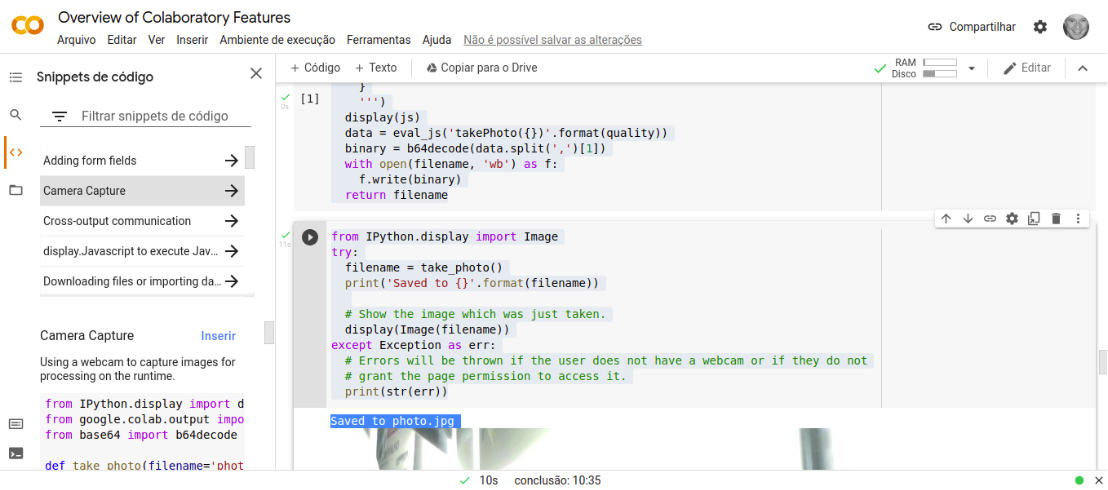
The output:
Saved to photo.jpg

This is a screen capture from Colaboratory: