Background and Goals:
Modeling of surgical site infection risks in the operating room setting will allow for data-driven changes in wound management strategies to decrease infection risks. The goal of this project was to use the Wolfram Language to create a binary classifier of surgical infection risk that is suitable for real-time use the operating room. Because of the clinical application of such an algorithm, it was also important that the output be rapidly explainable to the end users in this setting. Deploying such a classifier into the operating room setting must be sensitive to currently available IT infrastructure within this setting and it was therefore desirable to deploy the classifier in a lightweight way using into the web browser.
Brief Summary:
I created and validated a Gradient Boosted Tree surgical site infection classifier that produces a binary output regarding risk of surgical site infection using clinically meaningful thresholds. It also implements the use of Shapley values to explain the relative importance of features in an individual prediction. This classifier and its accompanying decision support were deployed into a browser interface using the Wolfram Web Engine.
Modeling of surgical site infection risks in the operating room setting will allow for data-driven changes in wound management strategies to decrease infection risks. The goal of this project was to use the Wolfram Language to create a binary classifier of surgical infection risk that is suitable for real-time use the operating room. Because of the clinical application of such an algorithm, it was also important that the output be rapidly explainable to the end users in this setting. Deploying such a classifier into the operating room setting must be sensitive to currently available IT infrastructure within this setting and it was therefore desirable to deploy the classifier in a lightweight way using into the web browser.
Brief Summary:
I created and validated a Gradient Boosted Tree surgical site infection classifier that produces a binary output regarding risk of surgical site infection using clinically meaningful thresholds. It also implements the use of Shapley values to explain the relative importance of features in an individual prediction. This classifier and its accompanying decision support were deployed into a browser interface using the Wolfram Web Engine.
Real-time knowledge of which surgical patients are likely to develop infections of their surgical site in the days following the procedure would provide the basis for systematic application of changes in wound management strategies to mitigate the risk. My goals in this project were to:
1
.Build a machine learning classifier that can consume data from the electronic health record to calculate the risk of surgical site infection in real-time.
2
.Make the classifier explainable. Since this classifier would be deployed to surgeons in a healthcare setting, it was important that the model be explainable in terms of which features were important in assigning the probability scores, and not a “black box” model.
3
.Make the classifier deployable in a browser interface. Operating rooms have a great deal of technology, but the computing infrastructure is highly variable and it is not desirable to maintain computational infrastructure in each operating room. For this reason, performing the computations in a central location and deploying the classifier so that it can be displayed on a browser interface using a local API was preferred.
Building the Classifier
Building the Classifier
Data from 5,574 surgical procedures was used for building a classifier. The rate of surgical infections in this data was noted to be approximately 1.4%, so the classifier would need to deal with a significant class imbalance. For creation of a classifier, the data was randomized into training, testing, and validation cohorts. Because of there were several nominal features with a large number of possible values, a feature extraction/dimension reduction strategy was implemented to remap the data into a new feature space. This can be accomplished quite easily in Wolfram Language using the FeatureExtraction function:
In[]:=
fe = FeatureExtraction[dataFeatures, FeatureTypes -> <|"feature1" -> "Nominal", "feature2" -> "Nominal"|>];
Using such a feature extractor was able to return a length 48 vector for each row of features in the dataset, effectively reducing the dimension of the dataset, compared to other techniques for dealing with a large number of nominal values such as one-hot encoding.
From here, numerous classifier models were screened. Building classifiers is done using the Classify function:
In[]:=
cl=Classify[trainingFe,ValidationSettestingFe,Method"GradientBoostedTrees",UtilityFunction<|0<|01,10|>,1<|0-100,11|>|>,PerformanceGoal"Quality"];
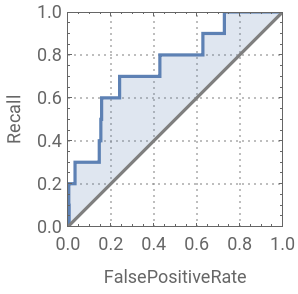
In the example above, the training and validation sets are passed to the function. While a specific method can be designated, leaving this blank will result in screening a number of different algorithm types. Because of the significant class imbalance present in the data, I chose to use a utility function to introduce misclassification costs (100/1 in this example) against false negative results. Without this, model is likely to predict no surgical infections and remain 98.6% accurate. Ultimately, a Gradient Boosted Tree classifier was found to perform the best, with AUC of 0.75 and this ROC curve:
Making the Classifier Explainable
Making the Classifier Explainable
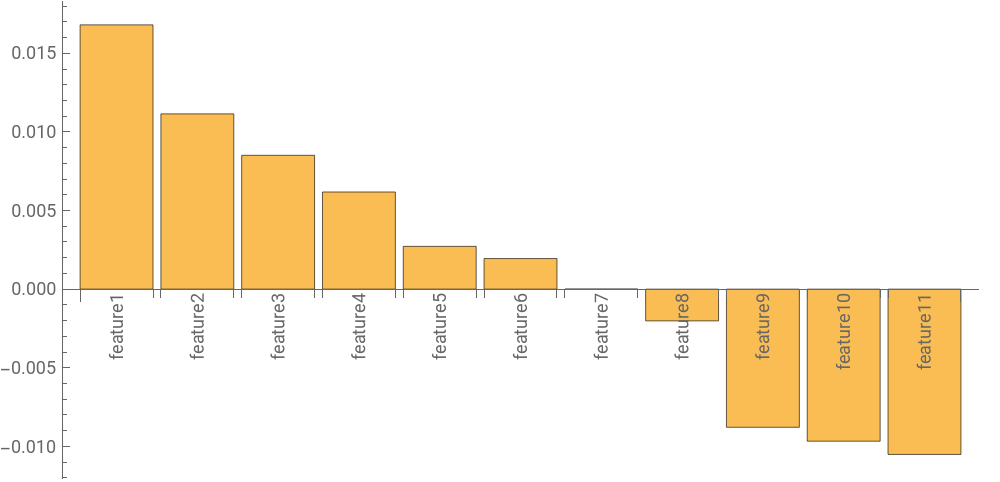
While some machine learning algorithms, such as logistic regression and Naive Bayes, are inherently understandable, other are not. I wished to develop an algorithm-agnostic approach to understanding the relative contribution of each feature to an individual prediction. To do this, a computation of Shapley values was performed on each class prediction. Shapley values are calculated by iteratively perturbing the input value of each feature in a model and calculating the change in probability assigned to the class prediction.The marginal contributions are calculated as such for each feature:The marginal contributions are then averaged to get the Shapley value for a single feature: This module performs such a calculation by accepting the features, classifier function, and data used to train the classifier. It generates random replacement values for each feature by taking random samples from the training set:


In[]:=
getShapleyValues[case_Association,cl_ClassifierFunction,trainingData_List,sampleSize_Integer:1000]:=Module[{values,plotImportance,clProbs,inputKeys,inputProb,createSample,getImportance,c,t,k,n,caseData,caseFixed},caseFixed=Drop[case,1];clProbs=cl[#,"Probabilities"]&;inputKeys=Keys[caseFixed];inputProb=clProbs[caseFixed][[2]];createSample[t_,key1_,n_:sampleSize]:=RandomChoice[Union@Thread[key1-> t[[All,key1]]],n];getImportance[c_,key2_]:=Mean[inputProb-clProbs[Join[c,Association[#]]&/@createSample[training[[All,1]],key2]][[All,2]]];plotImportance[shap_Association]:=BarChart[shap,ChartLabels->Placed[Keys[shap],Axis,Rotate[#,Pi/2]&],ImageSize->{UpTo[500],UpTo[500]},AspectRatio->1/2];values=ReverseSort@Association[#->getImportance[caseFixed,#]&/@inputKeys];<|"values"->values,"plot"->plotImportance[values]|>]
Here is an example of the output of the module, with the features ranked in their contribution to predicting a surgical site infection (the actual feature names were replaced by generic labels):
Deploying the Classifier in the Browser
Deploying the Classifier in the Browser
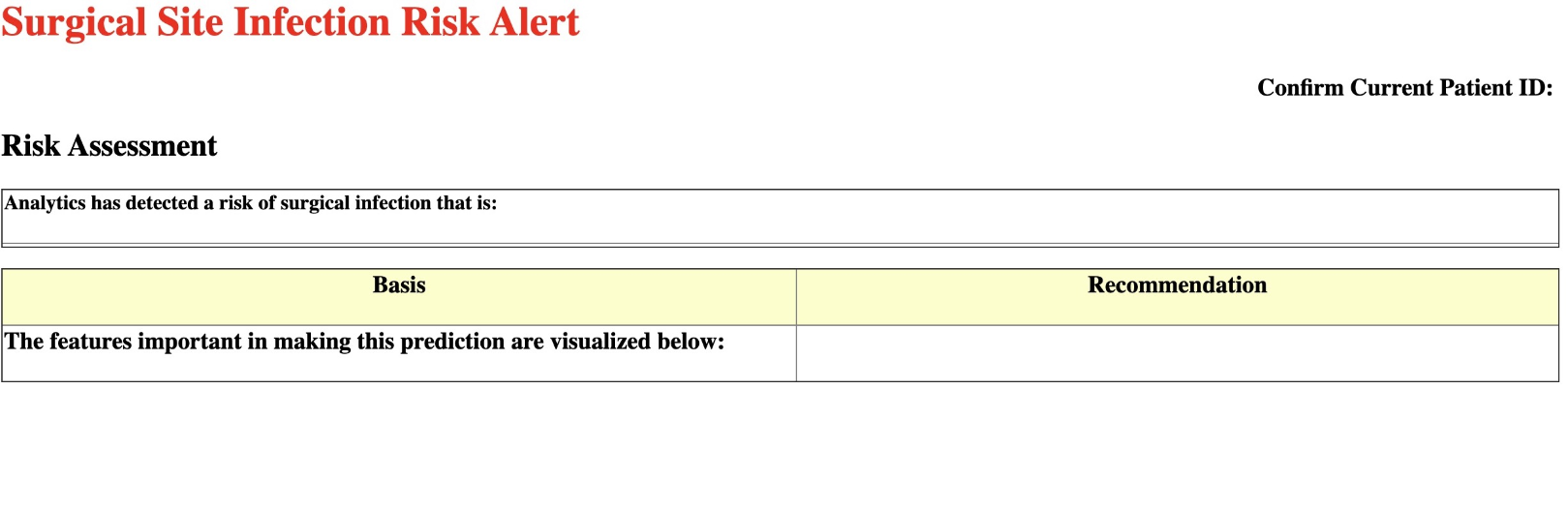
The Wolfram Web Engine was chosen for serving classifier output into a browser interface as it facilitates building the interface using symbolic templating. A simple HTML template was built:With this simple HTML template built, slot constructs (<wolfram:slot arg=’argument’/> for example) are placed into the HTML which mark the locations for injection of computational outputs. Next, a Wolfram Language file was created to serve as the dispatcher for the Wolfram Web Engine. A URLDispatcher function is placed into that file
In[]:=
URLDispatcher[{ "/ssi" -> APIFunction["enc" -> "String", getSSIRisk[#enc] &] }];
which accepts URL parameters and passes these parameters to the appropriate functions for performing the infection risk computations and placing the output back into the URL template using the slot constructs above. Also within the dispatcher file I make use of the XMLTemplate function which is passed the simple HTML file above to convert it into and XML template.
In[]:=
temp=XMLTemplate[Import[FindFile["ssi_interface2.html"],"String"]];

The TemplateApply function is then used to inject output from the classifier and Shapley value calculator functions back into the XML template before it is converted back to HTML to be passed back as a response to the browser:
In[]:=
form=TemplateApply[temp,<|"risk"->estimate,"rl"->riskLevel,"mrn"->enc,"shap"->ExportForm[shap,"JPEG"],"rec"->rec|>];
The final output from the deployment on the web browser:
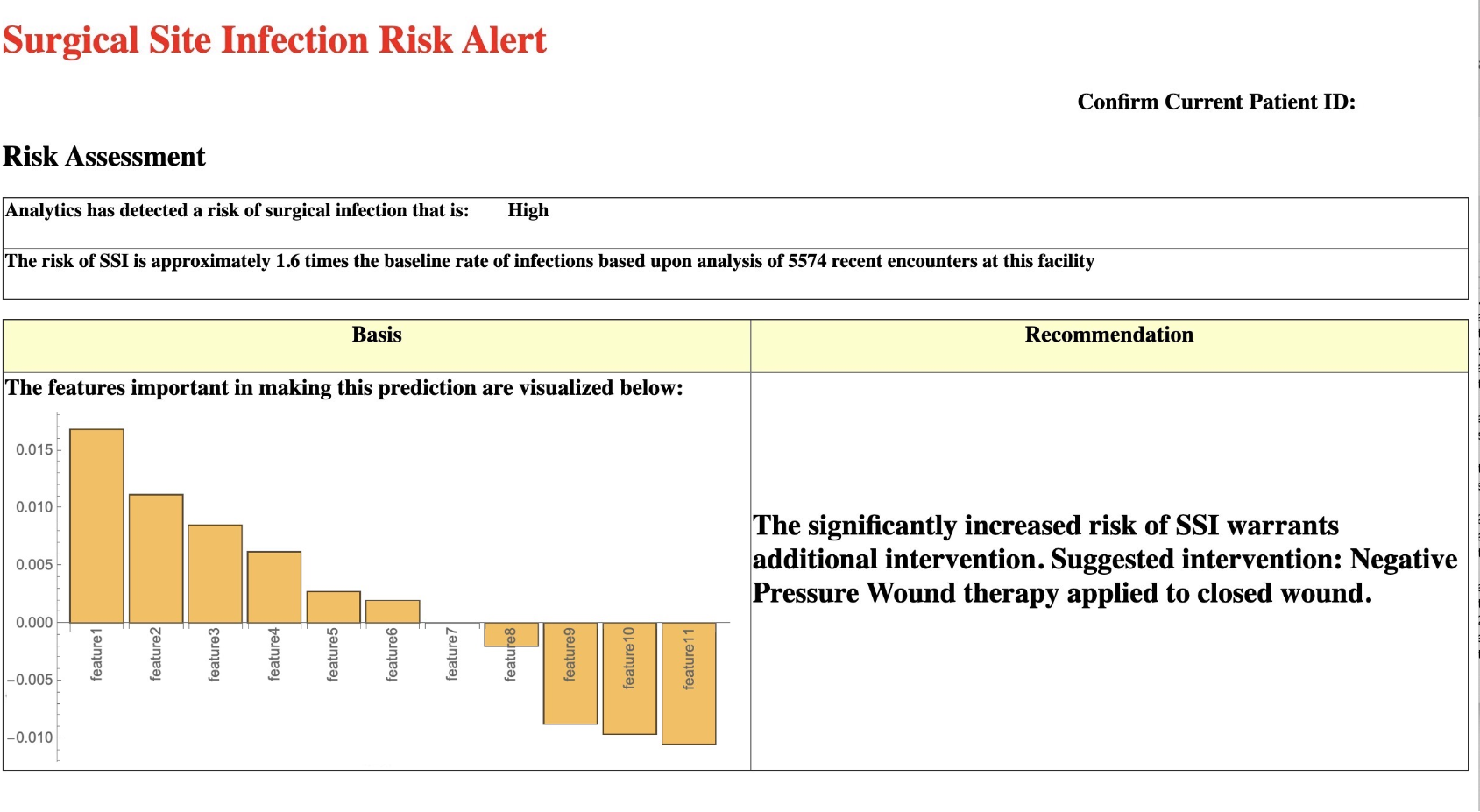
The intent is for this to be deployed by launching the appropriately formatted GET request and passing a patient identifier parameter at the appropriate time using a single click in the electronic health record. The features for the patient may then be obtained from a backend database. With deployment on a local web server, latency issues are minimized (this takes approximately 64 ms per request on a local installation). In high risk cases, the surgeon will be notified of high risk of infection via the browser interface in appropriate cases and may choose to use wound management recommendations for negative pressure wound therapy or delayed primary closure to mitigate the risk in these patients. Future work to be done includes prospective validation on real-time data and implementation testing with front-line healthcare providers.