My project consisted of taking in chords or MIDI files as input and creating an animated tutorial video. My implementation looks for the pitches that match a chord on the fretboard in a localized area. To account for some commonly used patterns, I use the CAGED system on guitar. This project also includes an implementation of major scale patterns and tab sheet implementation.
Introduction
Introduction
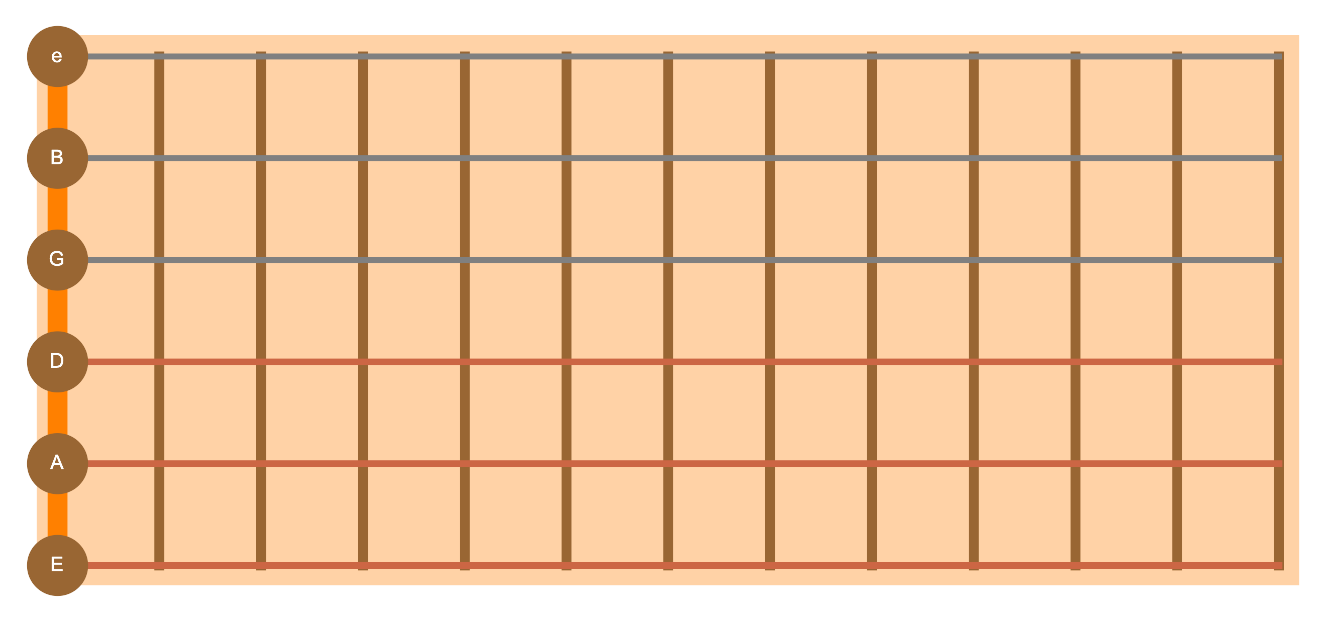
Many guitar tutorial websites and tab sheets don't have visually pleasing interfaces. I wanted to create a set of tools to generate effective animated tutorials in addition to tab sheets in order for guitar players to have a better experience learning and playing songs. I also thought it would be interesting to generate chords automatically as opposed to hard coding them.A guitar neck is broken up into 6 strings and about 20 frets. Frets separate the neck into different segments, each of which has a different pitch. Each string has a different note associated with it, as shown below:In my project, each of those 120 positions are uniquely represented with a Note object, which contains the string number, the fret number, and the pitch associated with that position. One common way of representing music notation on guitar is tab sheets, which I also interpret in this project. Instead of denoting the notes in a song such as in sheet music, tab sheets display where to put your finger on the guitar.
Setting Up Musical Representations
Setting Up Musical Representations
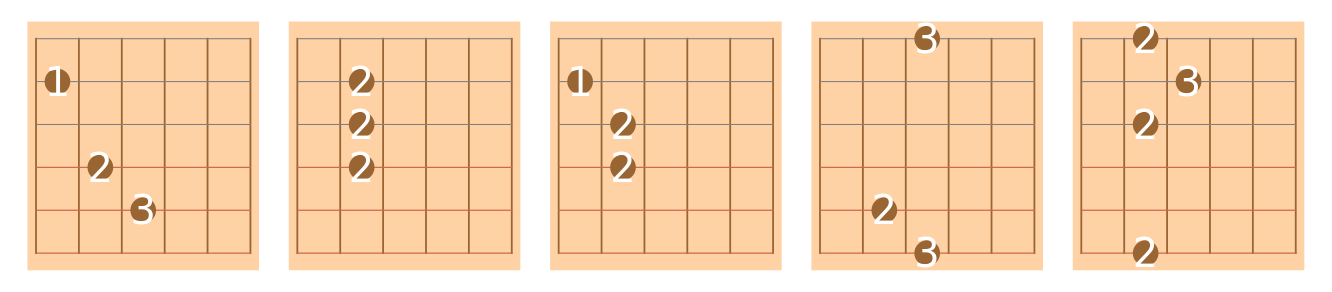
I created a fret-by-fret pitch representation of pitches on the guitar board. To make this workable with a chord system, I used a notation to represent chords called pitch set notation, which numerically represents the 3 notes that make up a chord. I also set up a pattern recognition template, which is normally known as the CAGED system. The CAGED system is simply an acronym for the 5 most common fingering positions across the fretboard, known as shapes: C shape, A shape, G shape, E shape, and D shape. I also added in the A minor shape as it's equally common. These shapes are visualized below in order of C,A,Am,G,E,D:
Represents the open position pitches for each string:
In[]:=
strings = Association[1->4,2->-1,3->-5,4->-10,5->-15,6->-20];
Demonstrating that strings are in the right positions:
In[]:=
AudioJoin[Sound[SoundNote[#,1,"Guitar"]]&/@Reverse[Values[strings]]]
Out[]=
Maps the pitches for each string and each fret:
In[]:=
allStrings=Table[Table[Note[i,ii,(Key[i][strings]+ii)],{ii,0,20}],{i,Keys[strings]}];
A list of pitch set notations to generate commonly used chords:
In[]:=
cChord={0,4,7};gChord={7,11,2};dChord={2,6,9};bChord={11,3,6};fChord={5,9,0};emChord={4,7,11};amChord={9,0,4};aChord={9,1,4};eChord={4,8,11};cmChord={0,3,7};dmChord={2,5,9};fmChord={5,8,0};gmChord={7,10,2};bmChord={11,2,6};cm7Chord={0,4,7,11};dm7Chord={2,6,9,1};dsChord={3,7,10};fsChord={6,10,1};csChord={1,5,8};asChord={10,2,5};gsChord={8,0,3};
Groups chords into respective categories:
In[]:=
allChords=<|"C"->cChord,"D"->dChord,"B"->bChord,"F"->fChord,"Em"->emChord,"G"->gChord,"Am"->amChord,"A"->aChord,"E"->eChord,"Cm"->cmChord,"Dm"->dmChord,"Fm"->fmChord,"Gm"->gmChord,"Dm7"->dm7Chord,"D#"->dsChord,"C#"->csChord,"F#"->fsChord,"A#"->asChord,"G#"->gsChord|>;scaleChords=<|"A"->aChord,"A#"->asChord,"B"->bChord,"C"->cChord,"C#"->csChord,"D"->dChord,"D#"->dsChord,"E"->eChord,"F"->fChord,"F#"->fsChord,"G"->gChord,"G#"->gsChord|>;
Common pattern systems for fret fingering on guitar (which is why they differ from the pitches above) known as the CAGED System:
In[]:=
cAged[x_]:=x+{0,2,2,2,0,0};cAmged[x_]:=x+{0,1,2,2,0,0};Caged[x_]:=x+{0,1,0,2,3,0};cagEd[x_]:=x+{0,0,1,2,2,0};cagEmD[x_]:=x+{0,0,0,2,2,0};caGed[x_]:=x+{2,0,0,0,1,2};allCaged={cAged,cAmged,Caged,cagEd,cagEmD,caGed};
Generating Chords
Generating Chords
The method I used to generate chords was through looking for the pitches associated with the chord on the fretboard, constraining the search to the first few frets, and doing pattern matching to common hand positions. If something didn't match a specified pattern, I would simply choose the frets that were the lowest which represented the correct pitches. I would also put finger representations across the entire fret if the chord was a barre chord, which is when a chord is played by placing your finger across the entire fret.
Helper Functions
Helper Functions
Checks the pattern against the CAGED system:
In[]:=
CAGED[elms_List,s_Integer]:=Flatten@Cases[Table[Flatten[Table[If[#[[2]]==ii[s][[i]],#,Nothing]&/@elms[[i]],{i,Length@elms}]],{ii,allCaged}],{_,_,_,_,_,_}]
Gets a pitch given a certain string and fret number:
In[]:=
getPitch[s_Integer,f_Integer]:=Flatten[allStrings/.{n_Note/;n[[1]]!=s->Nothing,n_Note/;n[[2]]!=f->Nothing}][[1]][[3]]
Checks if the chord is a barre chord and properly formats it:
In[]:=
BarreQ[positions_List,s_Integer]:=Module[{newpositions,len,posbar},If[Length[Flatten@positions]!=6,positions,newpositions=Flatten@positions;posbar=First@GatherBy[positions,#[[2]]&];len=Length[posbar];If[len>=3,AppendTo[newpositions,Table[Note[i,s,getPitch[i,s]],{i,1,6}]]];newpositions]]
Gets rid of any open positions (no frets pressed):
In[]:=
no0th[elms_List]:=elms/.{n_Note/;n[[2]]==0->Nothing}
Checks to see if a note matches a pitch in a lists of pitches:
In[]:=
PitchQ[pitch_List][note_Note]:=Or@@(Mod[#-note[[3]],12]==0&/@pitch);
getChord Function
getChord Function
This function gets fingering positions (in the form of a list of note objects) which match a chord’s pitch set notation. To verify those positions, it checks it first against the CAGED system patterns. If it doesn’t match that system, it selects the lower fretted positions. Then, it will remove all open positions.
Generates chord positions:
In[]:=
getChord[c_List,p_Integer:1]:=Module[{chord=c,position=p,Notes,firstPositionElements,rElements,cpositions,allR,nRElements,s},Notes=Select[Flatten[allStrings],PitchQ[chord][#]&];firstPositionElements=Partition[SortBy[Notes,#[[2]]&],Length[Select[Notes,0<=#[[2]]<5&]]][[1]];rElements=GatherBy[firstPositionElements,#[[1]]&];rElements=SortBy[rElements,#1[[1]]&];s=Part[First@First@rElements,2];cpositions=CAGED[rElements,s];If[Length[cpositions]==6,cpositions=no0th@cpositions,allR=Select[rElements,Length[#]>1&];allR=Flatten[SortBy[##,#[[2]]&][[2;;]]&/@allR];nRElements=rElements/.{n_Note/;MemberQ[allR,n]==True->Nothing};cpositions=no0th@nRElements;];BarreQ[cpositions,s]]
Alternate Use Case Definition
Alternate Use Case Definition
This function works exactly the same as the first but excludes the last step of removing open positions. This is used for generating audio for a chord since without the open strings, the audio won’t be accurate.
Generates chord positions:
Creating the Fretboard
Creating the Fretboard
After experimenting with a demonstration for a while, I decided to make our own fretboard to have a more streamlined and obvious coordinate system based on the lines on the board as well as a customizable range of frets. This allows for a scale visualization to have 12 frets visualized and a visualization of a C chord to just have 5.
Preset colors:
Range-dependent strings and frets:
Used in the chord sheet version to get a single line where the orange fretboard indicator normally is:
Putting everything together:
Alternate Definitions
Alternate Definitions
◼
Fretboard provides a basic representation of a fretboard
◼
ChordSheetFretBoard provides a representation of fretboard without the orange line at the beginning which denotes the start of the fretboard
◼
TabFretBoard provides a fretless representation of fretboard to accurately represent guitar tabs
Chord sheet version of the fretboard:
Tab sheet version of the fretboard:
Generates a graphical representation of an empty fretboard with 12 frets:
Chord Representations
Chord Representations
Before combining the chord generation and representation systems, fingers have to be represented in their correct spots. In a normal representation of guitar strings, string number 1 (the high e string) is on top while in a coordinate system that would really be represented as a value of 6. Each string had to be converted from their string number to their coordinate representation.
While in my Note representation the first string is the topmost one, in my coordinate representation of a fretboard the bottommost string has a One interesting challenge relating to this was that the first string on guitar is normally represented as the topmost string, so we had to account for that.
While in my Note representation the first string is the topmost one, in my coordinate representation of a fretboard the bottommost string has a One interesting challenge relating to this was that the first string on guitar is normally represented as the topmost string, so we had to account for that.
Generates a disk object at a specified position:
Adds a label to the disk :
Converts from string notation to actual representation:
Graphical Fretboard Representations
Same graphic using fret labels:
If a user input chords separated by commas this code would be able to take it in and display those chords:
Audio Representations
Audio Representations
Another smaller part of my project was adding sound into my animated tutorial to accompany chord switches. I did this by using the alternate use case definition of getChord and converting the pitches in the Note objects generated by getChord to SoundNotes, which would automatically play.
Converts my Note object to a SoundNote object:
Generates a sound representation of a chord:
Animates the graphics and sound simultaneously; Since community cannot display audio, download the notebook to see:
Generating Tabs
Generating Tabs
Helper Functions
Helper Functions
Association mapping string name to number:
Splits tab data on every new line (splits based on each string):
Gets the string number for each line in a tab sheet:
One of the problems I faced was that the number of the fret in a tab is different from the position of the fret in the tab. For example, if a line has a 2 then a 1, the positions being based on the fret number would lead to an incorrect order of elements. The way I solved this was through using the position of the numbers in the tab string to get the positions and the numbers for the labels. I then took in another parameter to account for a different label than position with the finger disk representation.
Get the frets denoted in the tabs and their positions respectively:
Creates a representation for each string consisting of the fret numbers, and fret positions:
Formats properly:
Gets the position/label for a singular disk:
Given a list of tab positions gets the label and position for the finger disks:
Combines all of the helper functions to properly format a full numerical tab representation of string number, fret number, and fret position:
Final Function
Final Function
Preprocesses user inputted tabs and generates a graphical representation of them:
Scales
Scales
Pattern for scales
Some chords, such as minors and 7ths, don't have separate scales than their root notes so they were excluded:
Separate fretboard graphic to accommodate for scales:
MIDI Files
MIDI Files
One approach we tried to use was taking in MIDI files as input and generating chords based on the notes in the MIDI data. We ran into a lot of issues here such as the guitar parts in MIDI files often not being representative of an actual guitar part.The notes would switch much too quickly to be an actual guitar part. Sometimes, songs with a guitar part would have other instruments representing the guitar such as a piano. The way we decided to interpret them was by grouping elements that were within 10 milliseconds of each other then generating chords based on that data. Instead of doing the whole song, we did the first 10 groups as it would be less computationally intensive.
Import sound data:
Gets the start and ending times for each notes:
Gets the duration of a note:
Checks if two notes are within a specified range:
Gets all the instances of a specific instrument in a MIDI file:
Figures out how long each note in a sequence should last by getting the duration of every note in sound and scaling it by a factor of 10:
Gathers MIDI notes close to each other, get their pitches, map it to chords:
Conclusion
Conclusion
Overall, I am very pleased with the final outcome of this project. While not everything functions perfectly, I'm happy with where I got in terms of creating my own fretboard, taking in various forms of input, and being able to generate tab sheets. Throughout the project, I was constantly surprised by the complexity of implementing simple and seemingly obvious rules and patterns in playing guitar. The process of finding chord positions using pitch set notation was another particularly interesting part of the project, as I didn't expect things to work so well by just following the rules.
Future Extensions
Future Extensions
◼
Adding support for finding chords across the fretboard
◼
Figuring out which set of chords is best for a particular song based on tone and proximity to the others
◼
Taking in other types of sound input and translating tabs based on those with PitchRecognize
◼
Listening to user input and checking it against tabs or scales
Acknowledgements
Acknowledgements
Thank you to my mentor, Eric, for everything he has done to help me throughout this project. I was able to learn so much about Wolfram Language and how to solve problems from him. Thank you to the directors for managing the program so effectively and to the rest of the TA's and Mentors for helping me through the various issues I faced daily.
Citations
Citations
“A Major Guitar Scale.” Guitarscale.org, www.guitarscale.org/a-major.html. Accessed 13 July 2023.
“Led Zeppelin - Stairway to Heaven (Tab).” Tabs.ultimate-Guitar.com, 2021, tabs.ultimate-guitar.com/tab/led-zeppelin/stairway-to-heaven-tabs-9488.
OpenAI. “ChatGPT.” Chat.openai.com, OpenAI, 2023, chat.openai.com/.
“Wonderwall-Oasis.mid — Free MIDI.” BitMidi, 14 July 2018, bitmidi.com/wonderwall-oasis-mid. Accessed 13 July 2023.
“Led Zeppelin - Stairway to Heaven (Tab).” Tabs.ultimate-Guitar.com, 2021, tabs.ultimate-guitar.com/tab/led-zeppelin/stairway-to-heaven-tabs-9488.
OpenAI. “ChatGPT.” Chat.openai.com, OpenAI, 2023, chat.openai.com/.
“Wonderwall-Oasis.mid — Free MIDI.” BitMidi, 14 July 2018, bitmidi.com/wonderwall-oasis-mid. Accessed 13 July 2023.
CITE THIS NOTEBOOK
CITE THIS NOTEBOOK
Generating animated guitar tutorials
by Nikhil Mani
Wolfram Community, STAFF PICKS, July 13, 2023
https://community.wolfram.com/groups/-/m/t/2964193
by Nikhil Mani
Wolfram Community, STAFF PICKS, July 13, 2023
https://community.wolfram.com/groups/-/m/t/2964193