In the cold vastness of space, a sentinel orbits the cosmic expanse, peering into the heart of our celestial furnace. Launched on February 11, 2010 by NASA, the Solar Dynamics Observatory (SDO) embarked on a quest as part of the Living With a Star (LWS) program, seeking to unravel the mysteries of the Sun.
But how does it see the Sun? Therefore, it is more accurate to say that humans have trichromatic vision, which is based on the three types of cone cells in the retina. The peak sensitivity of these cone cells is not strictly red, green, and blue, but more like yellow-orange, greenish-yellow, and blue-violet.
SDO can record in Extreme Ultraviolet. I will pick 3 close wave-length in that range and visualize those data in human color space called LAB. You can see the final resulting video embedded below (or slightly compressed here: https://vimeo.com/908117507 ):
The goal of the SDO is to understand the Sun’s influence on Earth and near-Earth space by studying the solar atmosphere on small scales of space and time. The SDO is a sun-pointing semi-autonomous spacecraft that allows nearly continuous observations of the Sun. The SDO is designed to help us understand how solar activity is created and how Space Weather, which is the effects of solar activity on Earth’s magnetosphere, comes from that activity. This understanding is crucial for predicting solar variations that influence life on Earth and humanity’s technological systems.
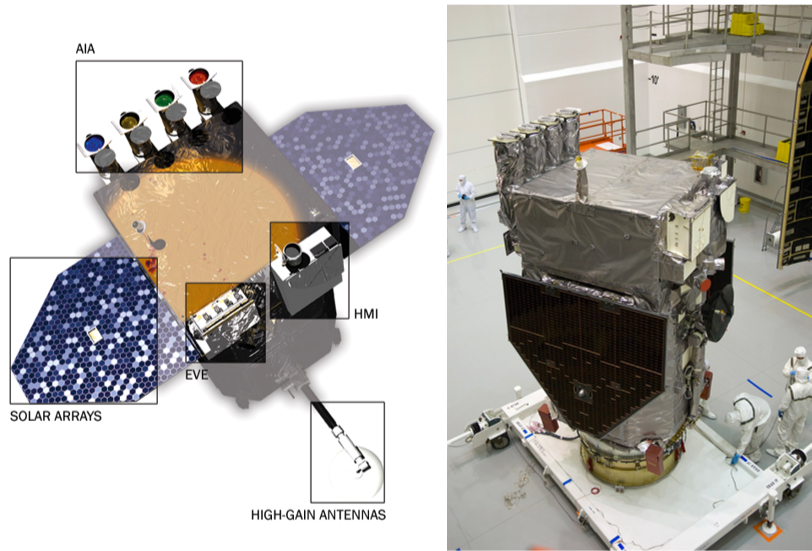
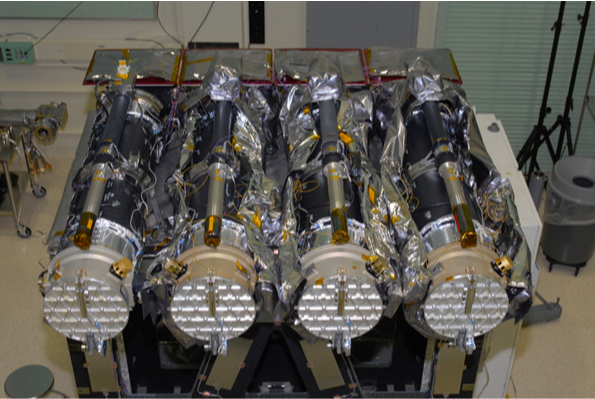
The SDO carries three main instruments: the Helioseismic and Magnetic Imager (HMI), the Atmospheric Imaging Assembly (AIA), and the Extreme Ultraviolet Variability Experiment (EVE). Here I deal only with the AIA that images the solar atmosphere in multiple wavelengths to link changes in the surface to interior changes. It observes the solar corona in eight wavelengths of ultraviolet light every 10 seconds.
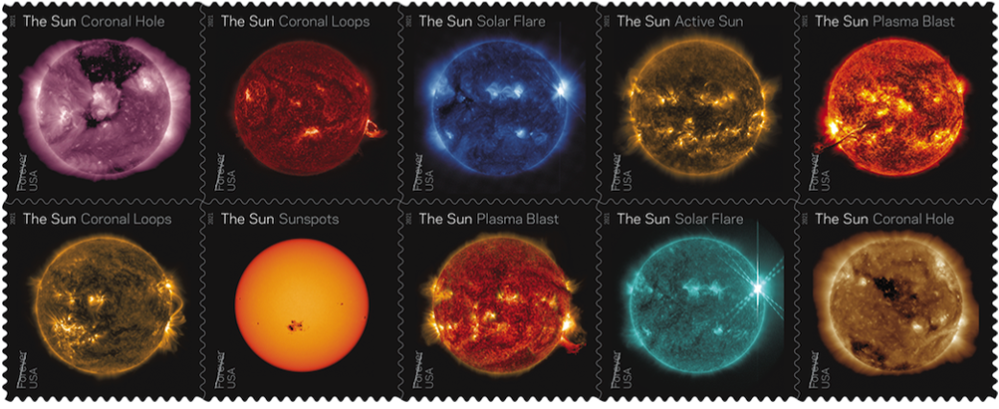
USPS-issued forever stamps featuring images of the Sun:
Quoting a recent Jeff Bryant article: “The Helioviewer Project, a joint program of NASA and ESA, provides an API that gives access to most of this imagery. Many of the images obtained from the API are 4096x4096 pixels in dimensions so are quite large and are scaled down by default. Using the Wolfram Function Repository item, “SolarImage” these images can be retrieved, viewed and processed using the Wolfram Language.”
We will be interested in the following SDO AIA instruments:
In[]:=
Lookup["InstrumentAssociation"],{10,11,12}
Out[]=
{AIA 171,AIA 193,AIA 211}
◼
AIA171: This channel is especially good at showing coronal loops – the arcs extending off of the Sun where plasma moves along magnetic field lines. The brightest spots seen here are locations where the magnetic field near the surface is exceptionally strong.
Where: Quiet corona and upper transition region
Wavelength: 171 angstroms (0.0000000171 m) = Extreme Ultraviolet
Primary ions seen: 8 times ionized iron (Fe IX)
Characteristic temperature: 1 million K (1.8 million F)
Where: Quiet corona and upper transition region
Wavelength: 171 angstroms (0.0000000171 m) = Extreme Ultraviolet
Primary ions seen: 8 times ionized iron (Fe IX)
Characteristic temperature: 1 million K (1.8 million F)
◼
AIA 193: This channel highlights the outer atmosphere of the Sun – called the corona – as well as hot flare plasma. Hot active regions, solar flares, and coronal mass ejections will appear bright here. The dark areas – called coronal holes – are places where very little radiation is emitted, yet are the main source of solar wind particles.
Where: Corona and hot flare plasma
Wavelength: 193 angstroms (0.0000000193 m) = Extreme Ultraviolet
Primary ions seen: 11 times ionized iron (Fe XII)
Characteristic temperature: 1.25 million K (2.25 million F)
Where: Corona and hot flare plasma
Wavelength: 193 angstroms (0.0000000193 m) = Extreme Ultraviolet
Primary ions seen: 11 times ionized iron (Fe XII)
Characteristic temperature: 1.25 million K (2.25 million F)
◼
AIA211: This channel (as well as AIA 335) highlights the active region of the outer atmosphere of the Sun – the corona. Active regions, solar flares, and coronal mass ejections will appear bright here. The dark areas – called coronal holes – are places where very little radiation is emitted, yet are the main source of solar wind particles.
Where: Active regions of the corona
Wavelength: 211 angstroms (0.0000000211 m) = Extreme Ultraviolet
Primary ions seen: 13 times ionized iron (Fe XIV)
Characteristic temperature: 2 million K (3.6 million F)
Where: Active regions of the corona
Wavelength: 211 angstroms (0.0000000211 m) = Extreme Ultraviolet
Primary ions seen: 13 times ionized iron (Fe XIV)
Characteristic temperature: 2 million K (3.6 million F)
Quoting another Jeff Bryant post: “Then, on October 28, began a sequence of powerful solar flares that resulted in coronal mass ejections form the Sun that were Earth directed. The spikes in solar X-rays were among the most powerful detected, saturating the detectors of GOES satellites.” Hence my selection of dates:
In[]:=
dates=DateRange[DateObject[{2023,10,17,0}],DateObject[{2023,10,17,0}]+Quantity[27,"Days"],Quantity[1,"Hours"]];dates//Length
Out[]=
649
Going with 1 hour increment over 27 days results in 649 frames. SDO is in a geosynchronous orbit that matches the Earth’s rotation. The Sun exhibits differential rotation, meaning different parts of the Sun rotate at different rates. In SDO reference frame 27 days is close to the period of the Sun surface rotation. So I am trying to catch images of single complete spin of the Sun in October 2023. This is how we get the images:
In[]:=
events10=[dates,10,ImageSize->1080];//AbsoluteTiming
Out[]=
{2079.18,Null}
In[]:=
events11=[dates,11,ImageSize->1080];//AbsoluteTiming
Out[]=
{2004.28,Null}
In[]:=
events12=[dates,12,ImageSize->1080];//AbsoluteTiming
Out[]=
{1988.68,Null}
Some of the images where blank and I will delete them:
triFRAME=Transpose[Drop[#,{201,204}]&/@{events10["Values"],events12["Values"],events11["Values"]}];
Each sensor gives as monochromatic data. We can “colorize” them by combining 3 channels in LAB color space. The LAB color space is a color model that is designed to be more perceptually uniform than other color spaces. It expresses color as three values: L* for perceptual lightness and a* and b* for the four unique colors of human vision: red, green, blue, and yellow. The L* value represents the lightness from 0 to 100, where 0 is black and 100 is white. The a* value represents the color’s position between red and green, with negative values for green and positive values for red. The b* value represents the color’s position between blue and yellow, with negative values for blue and positive values for yellow. This color space is widely used in various industries, such as graphic design, photography, and manufacturing, due to its wide color gamut and device-independent nature.
If you have 3 frames there are 6 different way to distribute them over color channels:
In[]:=
Permutations[{1,2,3}]
Out[]=
{{1,2,3},{1,3,2},{2,1,3},{2,3,1},{3,1,2},{3,2,1}}
These is how that would look in RGB:
In[]:=
ColorCombine[#1,"RGB"]&/@Permutations[triFRAME[[200]]]//ImageCollage
Out[]=
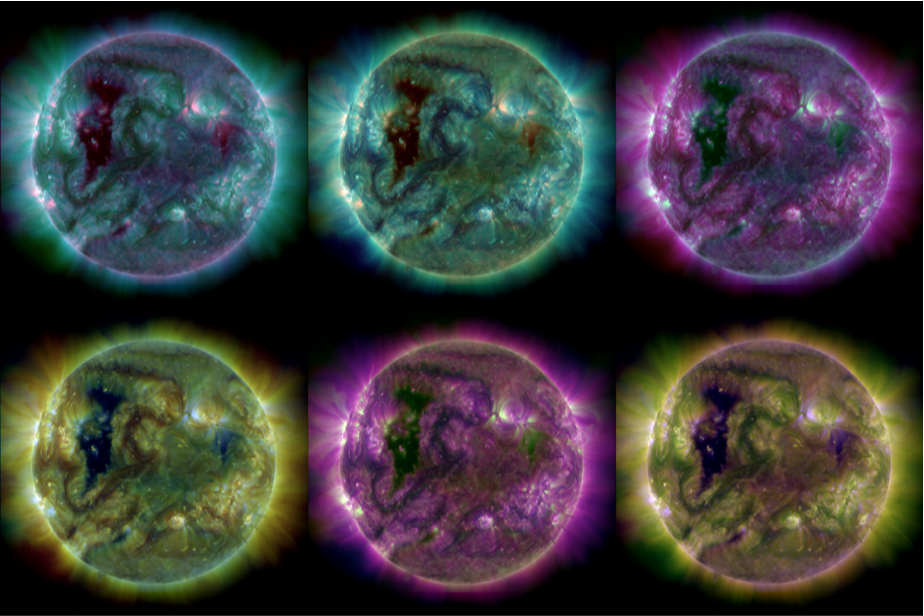
These is how that would look in LAB:
In[]:=
ColorCombine[#1,"LAB"]&/@Permutations[triFRAME[[200]]]//ImageCollage
I picked LAB {1,3,2} or {AIA 171, AIA 211, AIA 193} combination. This creates colored frames:
And this is how easy it is to make a video speeding up via Parallelize over multiple CPU cores (see the resulting video embedded at the top of the post):
By default, FrameListVideo places the new video under the “Video” directory in $WolframDocumentsDirectory.
CITE THIS NOTEBOOK
CITE THIS NOTEBOOK
Imaging the Sun from SDO orbital telescope extreme ultraviolet data
by Vitaliy Kaurov
Wolfram Community, STAFF PICKS, January 31, 2024
https://community.wolfram.com/groups/-/m/t/3113323
by Vitaliy Kaurov
Wolfram Community, STAFF PICKS, January 31, 2024
https://community.wolfram.com/groups/-/m/t/3113323