Idea
Idea
The objective of this project is to develop a machine learning model capable of classifying the quality of wine based on a range of chemical properties and sensory evaluations. By utilizing a well-established dataset from Wolfram, which includes key attributes such as acidity, sugar content, pH levels, and alcohol concentration, the model is designed to predict quality ratings on a scale. By applying classification techniques, the project seeks to enhance the understanding of the factors that contribute to wine quality, thereby aiding winemakers and enthusiasts in making informed decisions.We will also assess important metrics such as accuracy, precision, and recall to evaluate the model’s effectiveness in differentiating between quality ratings.The ultimate goal is to create a reliable tool that can assist in the selection and evaluation of wines, promoting a deeper appreciation of this complex beverage.
Data Organization Strategy
Data Organization Strategy
When I started thinking about how to train my model, I realized that effectively organizing the dataset would be crucial. I decided to use a data grouping method to aggregate samples that share the same quality label.
This approach allows for a clear association between each label and its corresponding features, facilitating better analysis and understanding of the data.
By grouping the data in this manner, I can streamline the modeling process and examine the characteristics of wines within each quality category more effectively.
This organized structure not only enhances my classification efforts but also improves the overall accuracy of the model.
This approach allows for a clear association between each label and its corresponding features, facilitating better analysis and understanding of the data.
By grouping the data in this manner, I can streamline the modeling process and examine the characteristics of wines within each quality category more effectively.
This organized structure not only enhances my classification efforts but also improves the overall accuracy of the model.
Metrics and Evaluation
Metrics and Evaluation
After organizing the data, the next crucial step is to assess the performance of the machine learning model through various evaluation metrics.
Utilizing a range of metrics will provide valuable insights into the model’s effectiveness in classifying wine quality.
This comprehensive evaluation approach allows us to identify strengths and weaknesses, ensuring we have a clear understanding of how well the model performs across different quality categories.
By carefully selecting and applying these metrics, we can make informed decisions about adjustments needed for improving the model’s accuracy and reliability.
Utilizing a range of metrics will provide valuable insights into the model’s effectiveness in classifying wine quality.
This comprehensive evaluation approach allows us to identify strengths and weaknesses, ensuring we have a clear understanding of how well the model performs across different quality categories.
By carefully selecting and applying these metrics, we can make informed decisions about adjustments needed for improving the model’s accuracy and reliability.
Source
Source
Initial Setup
Initial Setup
For this project, I utilized the dataset available from Wolfram Cloud, specifically the “Sample Data: Wine Quality.”
This resource provides a comprehensive collection of data related to wine characteristics and quality ratings, making it an ideal foundation for training the machine learning model.
This resource provides a comprehensive collection of data related to wine characteristics and quality ratings, making it an ideal foundation for training the machine learning model.
In[]:=
sampleData=ResourceData[ResourceObject["Sample Data: Wine Quality"]]
Out[]=


After it I gonna shuffle it to prepare it for separating to training and test data.
In[]:=
data=RandomSample[sampleData]
Out[]=
I organized the dataset into training and test sets using the GroupBy function. The trainData contains 4500 samples.
In[]:=
trainData=GroupBy[Table[ToString[data[i][[1]]]Normal[Values[data[i][[2;;10]]]],{i,1,4500}],FirstLast];
Test data contains 298 samples.
In[]:=
testData=GroupBy[Table[ToString[data[i][[1]]]Normal[Values[data[i][[2;;10]]]],{i,4601,4898}],FirstLast];
To train the machine learning model, I used the Classify function on the trainData, creating a classifier that learns to identify wine quality based on the features provided.
After training, I applied the classifier to the testData to generate predictions, allowing me to assess how well the model classifies the training samples.
After training, I applied the classifier to the testData to generate predictions, allowing me to assess how well the model classifies the training samples.
In[]:=
classifier=Classify[trainData]
Out[]=
ClassifierFunction


In[]:=
predictions=classifier[trainData]
Out[]=
5
Model Evaluation with Metrics
Model Evaluation with Metrics
In this segment of code, I assess the performance of the trained classifier using various metrics on the testData.
The baselineAccuracy provides a reference accuracy level for the model, while errorProbability calculates the percentage of misclassified instances.
The evaluationTime measures how long it took to evaluate the classifier, and meanCrossEntropy gives insight into the model’s predictive uncertainty.
MeanDecisionUtility evaluates the utility of the decisions made by the model, and scotPi measures the overall performance of the classifier.
The perplexity metric helps gauge how well the model predicts a sample, while logLikelihood provides a measure of the probability of the observed data given the model.
Together, these metrics provide a comprehensive view of the model’s effectiveness and reliability..
The baselineAccuracy provides a reference accuracy level for the model, while errorProbability calculates the percentage of misclassified instances.
The evaluationTime measures how long it took to evaluate the classifier, and meanCrossEntropy gives insight into the model’s predictive uncertainty.
MeanDecisionUtility evaluates the utility of the decisions made by the model, and scotPi measures the overall performance of the classifier.
The perplexity metric helps gauge how well the model predicts a sample, while logLikelihood provides a measure of the probability of the observed data given the model.
Together, these metrics provide a comprehensive view of the model’s effectiveness and reliability..
In[]:=
baselineAccuracy=ClassifierMeasurements[classifier,testData,"AccuracyBaseline"]evaluationTime=ClassifierMeasurements[classifier,testData,"EvaluationTime"]meanCrossEntropy=ClassifierMeasurements[classifier,testData,"MeanCrossEntropy"]meanDecisionUtility=ClassifierMeasurements[classifier,testData,"MeanDecisionUtility"]scotPi=ClassifierMeasurements[classifier,testData,"ScottPi"]errorProbability=Round[100*ClassifierMeasurements[classifier,testData,"Error"]]prepexity=ClassifierMeasurements[classifier,testData,"Perplexity"]logLikeHood=ClassifierMeasurements[classifier,testData,"LogLikelihood"];
Out[]=
0.463087
Out[]=
0.0014
Out[]=
1.05578
Out[]=
0.651007
Out[]=
0.477074
Out[]=
35
Out[]=
2.87422
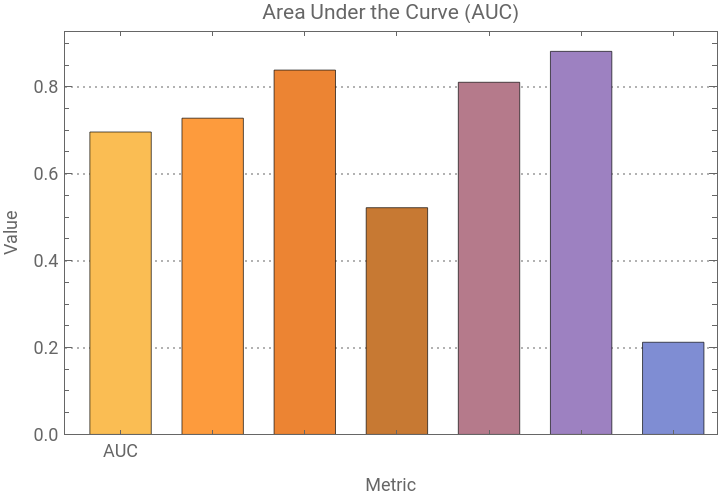
In this section, I calculate the Area Under the Receiver Operating Characteristic Curve (AUC) using the ClassifierMeasurements function, which provides a measure of the classifier’s ability to distinguish between classes.
The resulting value is list with digital elements. The result stored in the variable auc variable.
To visualize this metric, I create a bar chart labeled “AUC,” displaying the value with appropriate axes and a detailed plot theme.
This visual representation helps in assessing the classifier’s performance in a more intuitive manner.
The resulting value is list with digital elements. The result stored in the variable auc variable.
To visualize this metric, I create a bar chart labeled “AUC,” displaying the value with appropriate axes and a detailed plot theme.
This visual representation helps in assessing the classifier’s performance in a more intuitive manner.
In[]:=
auc=Values[ClassifierMeasurements[classifier,testData,"AreaUnderROCCurve"]];aucPlot=BarChart[{auc},ChartLabels{"AUC"},PlotLabel"Area Under the Curve (AUC)",FrameTrue,FrameLabel{"Metric","Value"},BarSpacing0.5,PlotTheme"Detailed"]
Out[]=
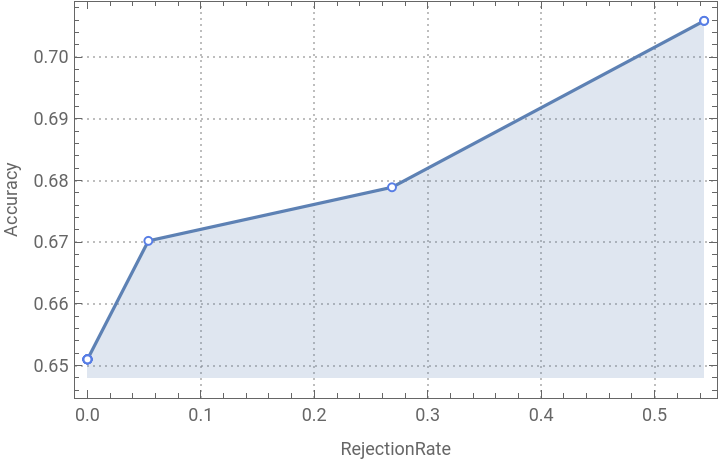
Additionally, I generate the accuracy rejection plot, stored in aucRejection, which illustrates the classifier’s accuracy at various thresholds for rejecting classifications.
This plot provides insights into the trade-offs between sensitivity and specificity, further enhancing our understanding of the model’s performance.
This plot provides insights into the trade-offs between sensitivity and specificity, further enhancing our understanding of the model’s performance.
In[]:=
aucRejection =ClassifierMeasurements[classifier,testData, "AccuracyRejectionPlot"]
Out[]=
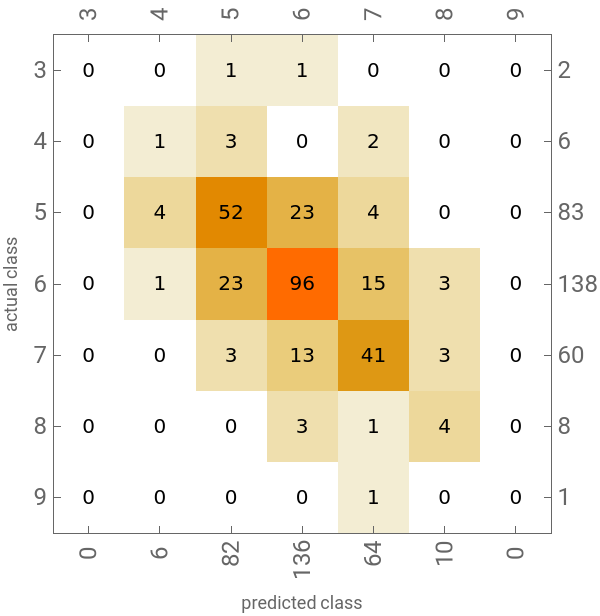
I compute the confusion matrix, stored in the variable confMatrix, to evaluate the classifier’s performance in terms of true positives, false positives, true negatives, and false negatives across different classes.
To visualize this data, I generate a confusion matrix plot, stored in confPlot, which offers a clear graphical representation of the classification results
To visualize this data, I generate a confusion matrix plot, stored in confPlot, which offers a clear graphical representation of the classification results
In[]:=
confMatrix=ClassifierMeasurements[classifier,testData,"ConfusionMatrix"];confPlot=ClassifierMeasurements[classifier,testData,"ConfusionMatrixPlot"]
Out[]=
The F1 score, stored in the variable f1Score, is calculated to evaluate the balance between precision and recall for the classifier across various thresholds.
To visualize these scores, I create a bar chart, stored in f1ScorePlot, which displays the F1 scores by threshold.
This visualization helps in understanding how changes in the classification threshold impact the F1 score, guiding adjustments for optimal performance.
To visualize these scores, I create a bar chart, stored in f1ScorePlot, which displays the F1 scores by threshold.
This visualization helps in understanding how changes in the classification threshold impact the F1 score, guiding adjustments for optimal performance.
The false negative rates, stored in the variable fnsRates, are calculated to assess the proportion of actual positive instances that were incorrectly classified as negative across different classes.
To visualize these rates, I create a bar chart, stored in fnsRatesPlot, which displays the false negative rates by class.
The chart features labeled axes and employs a rainbow color function for a visually appealing representation.
This visualization allows for a clear comparison of how each class performs in terms of false negatives, helping to identify areas where the classifier may need improvement.
To visualize these rates, I create a bar chart, stored in fnsRatesPlot, which displays the false negative rates by class.
The chart features labeled axes and employs a rainbow color function for a visually appealing representation.
This visualization allows for a clear comparison of how each class performs in terms of false negatives, helping to identify areas where the classifier may need improvement.
The Matthews Correlation Coefficient (MCC), stored in the variable mcc, is calculated to provide a single metric that reflects the quality of the classifier by considering true and false positives and negatives.
To visualize this metric, I create a bar chart, stored in mccPlot, which displays the MCC value.
The chart includes labeled axes and uses a rainbow color function for visual appeal, along with larger bar spacing for clarity.
This representation effectively summarizes the classifier’s overall performance, allowing for quick assessment and comparison with other metrics.
To visualize this metric, I create a bar chart, stored in mccPlot, which displays the MCC value.
The chart includes labeled axes and uses a rainbow color function for visual appeal, along with larger bar spacing for clarity.
This representation effectively summarizes the classifier’s overall performance, allowing for quick assessment and comparison with other metrics.
The precision metric, stored in the variable precision, is calculated to evaluate the accuracy of the positive predictions made by the classifier across different classes.
To visualize this metric, I create a bar chart, stored in precisionPlot, which displays the precision values for each class.
The chart includes labeled axes and employs a rainbow color function for an engaging visual presentation, along with larger bar spacing for better clarity.
This visualization helps in understanding how effectively the classifier identifies true positives for each class, allowing for insights into areas that may require enhancement.
To visualize this metric, I create a bar chart, stored in precisionPlot, which displays the precision values for each class.
The chart includes labeled axes and employs a rainbow color function for an engaging visual presentation, along with larger bar spacing for better clarity.
This visualization helps in understanding how effectively the classifier identifies true positives for each class, allowing for insights into areas that may require enhancement.
The probabilities, stored in the variable probabilities, indicate the confidence levels of the classifier’s predictions for each class.
To visualize this data, I generate a probability histogram, stored in probabilityHistogram, which shows the distribution of predicted probabilities across the classes.
This histogram helps assess the classifier’s confidence in its predictions, providing insights into areas of certainty and uncertainty in the model’s behavior.
To visualize this data, I generate a probability histogram, stored in probabilityHistogram, which shows the distribution of predicted probabilities across the classes.
This histogram helps assess the classifier’s confidence in its predictions, providing insights into areas of certainty and uncertainty in the model’s behavior.
The recall metric, stored in the variable recall, measures the classifier’s ability to correctly identify positive instances across different classes.
To visualize this metric, I create a bar chart, stored in recallPlot, which displays the recall values for each class.
The chart features labeled axes and utilizes a rainbow color function for an engaging visual presentation, along with larger bar spacing for clarity.
This visualization allows for a quick assessment of how well the classifier captures true positives for each class, helping to identify strengths and weaknesses in its performance.
To visualize this metric, I create a bar chart, stored in recallPlot, which displays the recall values for each class.
The chart features labeled axes and utilizes a rainbow color function for an engaging visual presentation, along with larger bar spacing for clarity.
This visualization allows for a quick assessment of how well the classifier captures true positives for each class, helping to identify strengths and weaknesses in its performance.
The specificity metric, stored in the variable specificity, measures the classifier’s ability to correctly identify negative instances across different classes.
To visualize this metric, I create a bar chart, stored in specificityPlot, which displays the specificity values for each class.
The chart includes labeled axes and uses a rainbow color function for an appealing visual presentation, along with larger bar spacing for clarity.
This visualization provides insights into how effectively the classifier distinguishes true negatives for each class, highlighting areas where performance can be improved.
To visualize this metric, I create a bar chart, stored in specificityPlot, which displays the specificity values for each class.
The chart includes labeled axes and uses a rainbow color function for an appealing visual presentation, along with larger bar spacing for clarity.
This visualization provides insights into how effectively the classifier distinguishes true negatives for each class, highlighting areas where performance can be improved.
Conclusion
Conclusion
Overall, by using Wolfram’s built-in dataset and its metrics, we successfully developed a wine quality classifier.In the end, we obtained a reliable tool for assessing wine quality, allowing winemakers and enthusiasts to make more informed decisions.
This project highlights the potential of data-driven approaches in the wine industry, contributing to a deeper understanding of the factors that influence wine quality and enhancing appreciation for this complex beverage.
This project highlights the potential of data-driven approaches in the wine industry, contributing to a deeper understanding of the factors that influence wine quality and enhancing appreciation for this complex beverage.
Acknowledgements
Acknowledgements
We want to thank our mentor Mher Mkrtchyan for his immeasurable help and support throughout this project.
Affiliation
Affiliation
In December 2020 the Wolfram Lab opened at RAU (Russian-Armenian University, Yerevan, Armenia). The Wolfram Lab was created on the basis of the RAU research laboratory for mathematical modeling of quantum systems. This laboratory became the first laboratory in the world created by Wolfram Research on a university basis. Currently, the laboratory teaches courses for undergraduate students (major in programming and physics) and high school students (major in physical and mathematical sciences). Mher Mkrtchyan (mherm@wolfram.com) (Group: Sound & Vision, Manager: Shadi Ashnai) is responsible for the Wolfram Lab at RAU.
The project was completed by 12th grade students.
The project was completed by 12th grade students.
CITE THIS NOTEBOOK
CITE THIS NOTEBOOK
Wine quality classifier model
by Leo Hovhannisyan
Wolfram Community, STAFF PICKS, September 27, 2024
https://community.wolfram.com/groups/-/m/t/3286055
by Leo Hovhannisyan
Wolfram Community, STAFF PICKS, September 27, 2024
https://community.wolfram.com/groups/-/m/t/3286055