I can just about manage one more Wimpy Tour post before I set off on the 1st July. It’s just under a week now before I start my tour of all the UK’s Wimpy restaurants and there are a final few pieces of code I need to write before I head off. I need to make a data visualisation and a couple of web applications, the first of which gives the nutritional information of my meal.
Making a nutritional data application
Making a nutritional data application
To get the nutritional information of my meals I need some data. Wimpy’s nutrition guide contains all the information and I can import this directly from the web as a plain text file.
In[]:=
$PDFLocation="https://wimpy-uk.s3-eu-west-2.amazonaws.com/static/Nutrition%20Guide.pdf";unprocessedImport=Import[$PDFLocation,"Plaintext"];
When looking at the imported data, I found that the information I was interested in was in the form of a name followed by 9 numbers, which correspond to nutritional values. I can split the imported file by newlines and look specifically for lines which match this pattern.
In[]:=
split=StringSplit[unprocessedImport,"\n"];
In[]:=
pattern=__~~WordCharacter...~~StringExpression@@Riffle[Table[NumberString,9]," "];Short[unprocessedMenuItems=Select[split,StringContainsQ[pattern]]]
Out[]//Short=
{3 Chicken Strips 1032 247 13.7 4.8 15.8 0.5 0.7 16.8 1.2,5 Chicken Strips 1721 411 22.8 8.0 26.3 0.9 1.1 28.0 2.0,176,Thick Shake – Salted Caramel 1333 319 6.3 3.4 57.5 54.1 0.2 7.9 0.2}
From there I process each string into an Association, giving these converting these values in Quantities and adding a key.
In[]:=
allWimpyMenuItems=Dataset[Association@@StringCases[name__~~WordCharacter...~~" "~~energy:NumberString~~" "~~energyKcal:NumberString~~" "~~fat:NumberString~~" "~~sats:NumberString~~" "~~carbs:NumberString~~" "~~sugars:NumberString~~" "~~fibre:NumberString~~" "~~prot:NumberString~~" "~~salt:NumberString:>StringReplace[name,"– "->""]-><|"Calories"->Quantity[energyKcal//ToExpression,"DietaryCalories"],"Fat"->Quantity[fat//ToExpression,"Grams"],"Saturates"->Quantity[sats//ToExpression,"Grams"],"Sugars"->Quantity[sugars//ToExpression,"Grams"],"Carbohydrates"->Quantity[carbs//ToExpression,"Grams"],"Fibre"->Quantity[fibre//ToExpression,"Grams"],"Protein"->Quantity[prot//ToExpression,"Grams"],"Salt"->Quantity[salt//ToExpression,"Grams"]|>][unprocessedMenuItems]]
Out[]=


To get the nutritional information of my meal, I can give it a list of my menu items.
In[]:=
meal=allWimpyMenuItems[{"3 Chicken Strips","Wimpy Chips","Pepsi Max"}]
Out[]=
To include a total of these values, I can append to the Dataset like so.
In[]:=
mealWithTotal=Append[meal,<|"Total"->Normal[meal[Total]]|>]
Out[]=
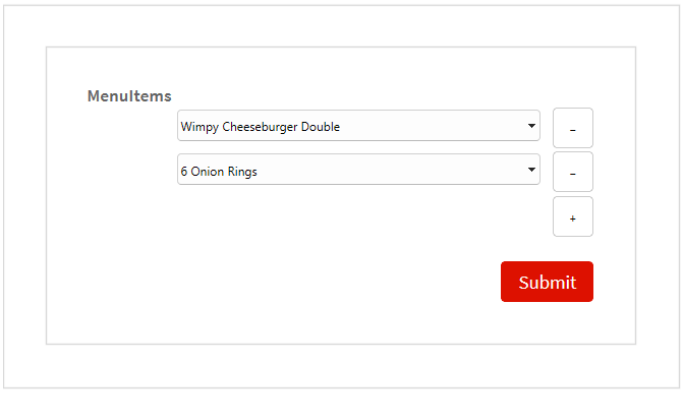
I want to be able to use this on my phone, so I’ve chosen to make a FormPage. I’ve made a field called “MenuItems” that contains a List of all the menu items, whose values will show up in PopupMenu. I have wrapped this in RepeatingElement so that I can select multiple menu items. The function uses the code above to create my Dataset with totals as above. Finally I wrap ExportForm around the result to return a PNG (On the Cloud only). You test the FormPage first in a notebook if you want.
nutritionForm=FormPage {"MenuItems"->RepeatingElement[Sort[Normal[Keys[allWimpyMenuItems]]],{1,Infinity}]}, Module {meal,mealWithTotal}, meal=allWimpyMenuItems[#MenuItems]; mealWithTotal=Append[meal,<|"Total"->Normal[meal[Total]]|>]; ExportForm[mealWithTotal,"PNG"] &
Finally, I deploy this FormPage so I can access this on all my devices.
In[]:=
CloudDeploy[nutritionForm,"WimpyNutritionalInformation",Permissions->"Public"]
Out[]=
Submitting Wimpy Visit Data
Submitting Wimpy Visit Data
The other important aspect of my tour is record keeping, so I need an application that can log each Wimpy visit.
From my previous post I can easily extract the names of all the Wimpys. I’ve just given the List here for convenience.
In[]:=
allWimpyNames={"Addlestone","Aldershot","Ashford Middlesex","Ashford Kent","Aylesbury","Barnstaple","Basingstoke","Beckenham","Benfleet","Bermondsey","Bexleyheath","Bicester","Birkenhead","Borehamwood","Bourne End","Brentwood","Cheshunt","Clacton-on-Sea","Colchester","Dartford","Dingwall","Dorking","Eastbourne","Eltham","Farnborough","Felixstowe","Fraserburgh","Grays Lakeside","Grays","Harlow","High Wycombe","Hornchurch","Horsham","Huddersfield","Kilmarnock","King's Lynn","Leigh-on-Sea","Littlehampton","Watney Market","Loughton","Lowestoft","Maidstone","Milford","Morden","Orpington","Portslade","Rayleigh","Rickmansworth","Rotherham","Ruislip","Shrewsbury","Sittingbourne","Southend Churchill Square","Southsea","Streatham","Strood","Swanage","Tonbridge","Upminster","Wembley","Westcliff-on-Sea","Woolwich","Worthing"};
I want to give my meals some sort of rating, and have elected to give it a tier system, from S (best) to F (worst), a popular way to rank things.
In[]:=
$Tiers={"S","A","B","C","D","E","F"};
The information I want to record is a date, the Wimpy, the food I ate, the tier and an optional image and notes. Below is a FormFunction which contains all those elements. All data is put into a CloudSymbol called “WimpyVisitData”.
wimpyVisitForm=FormFunction (*Addapre-filledvaluetoDatewhichistoday'sdate*) "Date"-><|"Input"->DateString[Today],"Interpreter"->"Date"|>, "Wimpy"->allWimpyNames, "MenuItems"->RepeatingElement[Sort[Normal[Keys[allWimpyMenuItems]]],{1,Infinity}], "Tier"->$Tiers, (*AllowimagestobeuploadedasaCloudObject*) "Image"->Restricted["UploadedFile","Image"]->None, "Notes"->"String"->None , Module {data=#}, (*Createsymbolifitdoesnotexist*) If FailureQ[CloudSymbol["WimpyVisitData"]], CloudSymbol["WimpyVisitData"]={} ; (*AdddatatoCloudSymbol*) AppendTo[CloudSymbol["WimpyVisitData"],data] &
You can check your submission by calling the CloudSymbol.
And I can deploy this like my nutritional FormPage, which allows me to easily submit data from my phone.
Creating the Tier List Generator
Creating the Tier List Generator
Now that I can submit my information, I want to display some of my findings. I created a tier list generator below. You need to specify a list of tiers and tier data. The tier data needs to be a list of Associations which contain an image and a tier. It uses the ImageSaliencyCrop ResourceFunction to make a square aspect ratio.
I’ve made an example here for you to try out the function:
I will say that these aren’t the greatest pictures of all time, as the food I have eaten at Wimpy so far has been extremely limited.
And that’s it! I’ve now got 2 Wolfram Cloud web applications and a visualisation function to display some of my data in the form of a tier list. I plan to create a ResourceFunction for my tier list generator, but before I do that I want to add some more functionality. Enjoy!
CITE THIS NOTEBOOK
CITE THIS NOTEBOOK
Creating nutritional information cloud apps for the Wimpy Tour
by Anthony Zupnik
Wolfram Community, STAFF PICKS, June 25, 2024
https://community.wolfram.com/groups/-/m/t/3199317
by Anthony Zupnik
Wolfram Community, STAFF PICKS, June 25, 2024
https://community.wolfram.com/groups/-/m/t/3199317