This demonstration includes a selection of procedures that can be used for placing something to somewhere. Some of them are the simplified versions of my published demonstrations. The rest includes novelties.
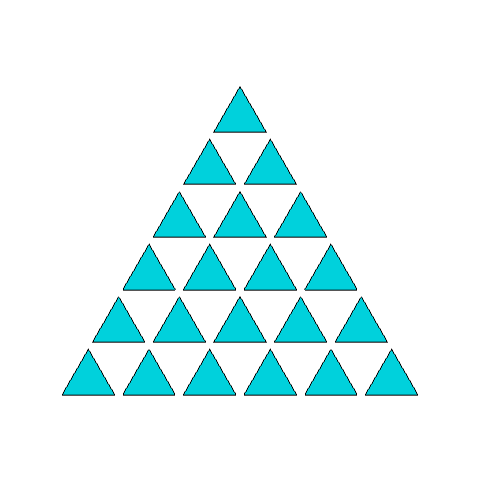
Placing polygons to triangular points
Placing polygons to triangular points
In[]:=
d=1;n=3;k=5;poly=Polygon[dTable[{Sin[i2Pi/n],Cos[i2Pi/n],0},{i,n}]];points=Table[{2j-i,Sqrt[3]i,0},{i,0,k},{j,i,k}];assy=Map[Translate[{poly},#]&,points];Graphics3D[{Cyan,assy},Boxed->False,SphericalRegionTrue,ViewPoint{0,0,100}]
Out[]=
Placing objects at triangular points
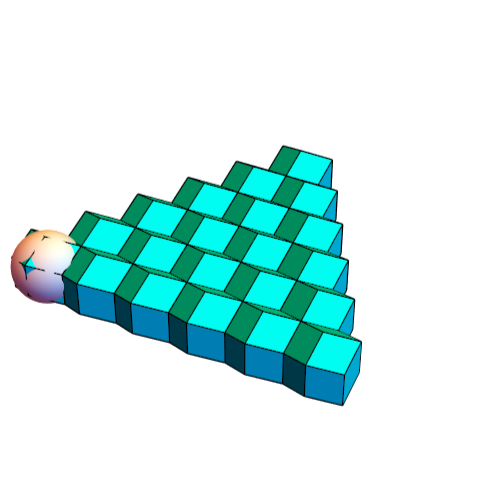
Placing objects at triangular points
In[]:=
n=5;sp=Sphere[];rdv=0.82Table[{2j-i,Sqrt[3]i,0},{i,0,n},{j,i,n}];rd=PolyhedronData["RhombicDodecahedron","Faces"];rdn=Rotate[rd,ArcTan[Sqrt[2]],{1,0,0}];tri=Map[Translate[rdn,#]&,rdv];Graphics3D[{sp,Cyan,tri},BoxedFalse,SphericalRegionTrue]
Out[]=
Placing object to vertices of polyhedra
Placing object to vertices of polyhedra
In the cluster the rt have the same orientation as placed at the vertices of tico. The multiplier 2.7527 is the distance of parallel faces of rt. Other poly can be substituted.
In[]:=
rt=PolyhedronData["RhombicTriacontahedron","Faces"];rh=PolyhedronData["RhombicHexecontahedron","Faces"];rt=rh;rtn=Rotate[rt,Pi,{0,0,1}];ticov=PolyhedronData["TruncatedIcosahedron","VertexCoordinates"];rt60={Map[Translate[rtn,#]&,1.6×2.7527*ticov]};tico=PolyhedronData["TruncatedIcosahedron","Faces"];ticon=Scale[tico,4];Graphics3D[{ticon,Yellow,rt60},BoxedFalse,SphericalRegionTrue,ImageSize300,ViewPoint{0,0,100}]
Out[]=

srd fits to its own vertices
In[]:=
srd=PolyhedronData["SmallRhombicosidodecahedron","Faces"];srdv=srd[[1]];rt=PolyhedronData["RhombicTriacontahedron","Faces"];rtf=Rotate[rtn,ArcTan[1/GoldenRatio],{0,1,0}];srd60={Map[Translate[srd,#]&,1.618^3srdv]};Graphics3D[{srd60},BoxedFalse,SphericalRegionTrue,ImageSize300,ViewPoint{0,0,100}]
Out[]=

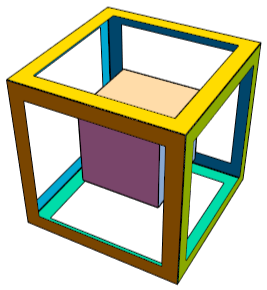
Placing objects to faces of polyhedra
Placing objects to faces of polyhedra
The dual of polyhedron has to be used with the function Normalize.
In[]:=
perforate=0.8;face={{-1,-1,0},{1,-1,0},{1,1,0},{-1,1,0}};s1=perforate*face;k=Polygon[face->s1];octv=PolyhedronData["Octahedron","VertexCoordinates"];cube=Map[Translate[Rotate[k,{{0,0,1},Normalize[#-{0,0,0}]}],#]&,Sqrt[2]octv];cub=PolyhedronData["Cube","Faces"];Graphics3D[{cub,FaceForm[Yellow,Cyan],cube},Boxed->False,ImageSize->200]
Out[]=
In[]:=
cone=Cone[];sp=Sphere[];cone1=Map[Translate[Rotate[cone,{{0,0,1},Normalize[#-{0,0,0}]}],#]&,2.9octv];Graphics3D[{Yellow,cube,Cyan,cone1},Boxed->False,ImageSize->200]
Linear arrangement of objects
Linear arrangement of objects
Selecting nth points from a set and connecting them
Selecting nth points from a set and connecting them
Along helices.
The same arrangement using a spiral. Try another Fibonacci numbers also. Any of them could be used depending on the range of points
Extracting subset from a set
Extracting subset from a set
Extracting primes from a set created with golden angle spiral
Extracting primes from a set created with golden angle spiral
Spirals are created when 2 Pi is not divisible by the angle.
Extracting primes from a set created with one radian spiral
Extracting primes from a set created with one radian spiral
pp contains the prime numbers up to 20000.
ppp contains the primes up to 1400.
ppp is extracted from p1.
subset contains the spheres representing the primes.
ppp contains the primes up to 1400.
ppp is extracted from p1.
subset contains the spheres representing the primes.
Placing objects at gradually decreasing distances (producing infinite series)
Placing objects at gradually decreasing distances (producing infinite series)
Combined placing to vertices and to decreasing distances
Combined placing to vertices and to decreasing distances
Placing objects to grid points, and move them to form shapes
Placing objects to grid points, and move them to form shapes
Placing lines (tubes) between points of a circle
Placing lines (tubes) between points of a circle
Placing polyhedra in a hexagonal lattice
Placing polyhedra in a hexagonal lattice
Placing lines (tubes) between two circles
Placing lines (tubes) between two circles
Placing cylinders between two lines
Placing cylinders between two lines
Placing lines (tubes) between two axes
Placing lines (tubes) between two axes
Placing polygons to the faces of polyhedra using the symmetry properties starting from a single polygon
Placing polygons to the faces of polyhedra using the symmetry properties starting from a single polygon
Placing rectangles between two lines to create a zone, and then repeating the zone
Placing rectangles between two lines to create a zone, and then repeating the zone
Placing object around a circle to form a ring
Placing object around a circle to form a ring
Placing slabs in a stack with constant total height
Placing slabs in a stack with constant total height
Vary the number of slabs (pcs) without changing the total height.
Stacking cylinders with constant total height to form a sinusoid
Stacking cylinders with constant total height to form a sinusoid
CITE THIS NOTEBOOK
CITE THIS NOTEBOOK
Placing objects to determined locations
by Sándor Kabai
Wolfram Community, STAFF PICKS, January 11, 2024
https://community.wolfram.com/groups/-/m/t/3100072
by Sándor Kabai
Wolfram Community, STAFF PICKS, January 11, 2024
https://community.wolfram.com/groups/-/m/t/3100072