A library for fine-tuning YOLOv2 object detection neural networks on your own datasets - written in the Wolfram Language. Currently, it supports loading any PASCAL VOC style datasets for training.
Most object detection models take a lot of data to train, but we start with a pre-trained YOLOv2 model from the Wolfram Neural Net repository. In these examples, I will be training on only a few hundred images.
With this library, it is easy to build your own dataset with an open-source image labeling tool and train your own object detector for your specific domain!
If you would like to help this project grow, or view the library code, I am using GitHub to host this project’s source: https://github.com/alecGraves/WolfDetector
Most object detection models take a lot of data to train, but we start with a pre-trained YOLOv2 model from the Wolfram Neural Net repository. In these examples, I will be training on only a few hundred images.
With this library, it is easy to build your own dataset with an open-source image labeling tool and train your own object detector for your specific domain!
If you would like to help this project grow, or view the library code, I am using GitHub to host this project’s source: https://github.com/alecGraves/WolfDetector
Demo: Fruit Detection! 🍍🍊🍓🍌
Demo: Fruit Detection! 🍍🍊🍓🍌
Let’s get started!
First, set your notebook directory to the location of the WolfDetector folder (containing the WolfDetector.m file).
Then import the library.
First, set your notebook directory to the location of the WolfDetector folder (containing the WolfDetector.m file).
Then import the library.
In[]:=
SetDirectory[FileNameJoin[{$HomeDirectory,"IdeaProjects","WolfDetector","WolfDetector"}]];Get["WolfDetector`"]
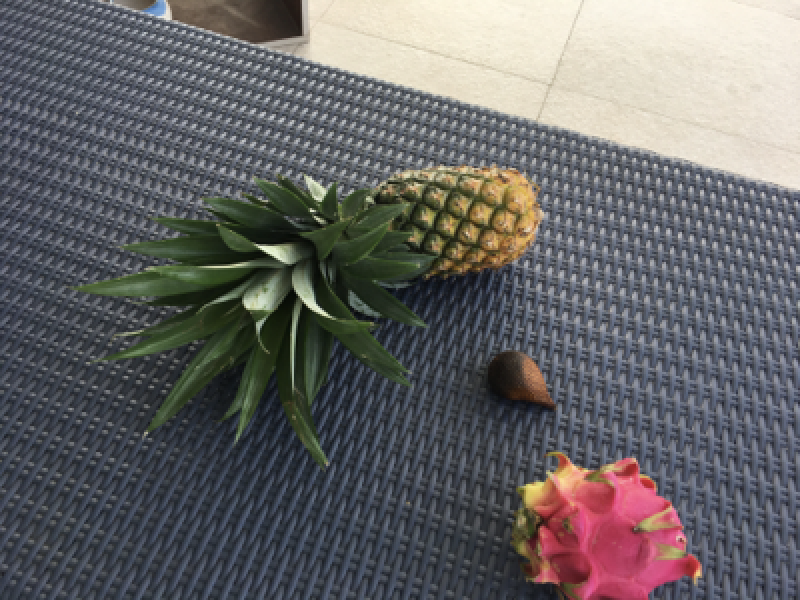
Now, let’s load our first dataset. I have downloaded the [Fruit Images for Object Detection dataset from Kaggle ( https://www.kaggle.com/mbkinaci/fruit-images-for-object-detection )
No modifictation to the dataset is required! The WolfDetector library knows how to read all correctly-formatted voc-style datasets.
Note that I remove the first image from the dataset so we can use it to test later!
No modifictation to the dataset is required! The WolfDetector library knows how to read all correctly-formatted voc-style datasets.
Note that I remove the first image from the dataset so we can use it to test later!
In[]:=
dataset=WolfDetectorLoadDataset["E:\\datasets\\fruits_detection","voc"];Length[dataset]img=Import[First@Keys@dataset]dataset=Rest[dataset];Length[dataset]
Out[]=
200
Out[]=
Out[]=
199
We only use 199 images!
Next, we need to extract useful information about the dataset (number of classes and good bounding box priors) and convert our dataset into numeric data that will be good for training on.
In[]:=
dataInfo=WolfDetectorDataInfo[dataset]trainingDataset=WolfDetectorTrainingDataset[dataset,dataInfo];
Out[]=
classExtractorNetEncoder,anchors{{0.427462,0.495952},{0.0607151,0.0783495},{0.212759,0.32766},{0.156532,0.18888},{0.108254,0.15788}}

After this, we need to build our YOLOv2 neural network. Note that I use arguments to resize the network for 224x224 inputs, rather than using the default 416x416 inputs. This will speed up training.
In[]:=
{net,outputLayer}=BuildWolfDetector[dataInfo,224]loss=WolfDetectorLoss[outputLayer]
Out[]=
NetGraph,NetGraph

Out[]=
NetGraph
Next, we can begin training on our trainingDataset using our custom YOLOv2 loss function, and finally, we can run prediction.
I have enabled training on multiple GPUs with TargetDevice{“GPU”, All}, but you can remove that if you only have a CPU.
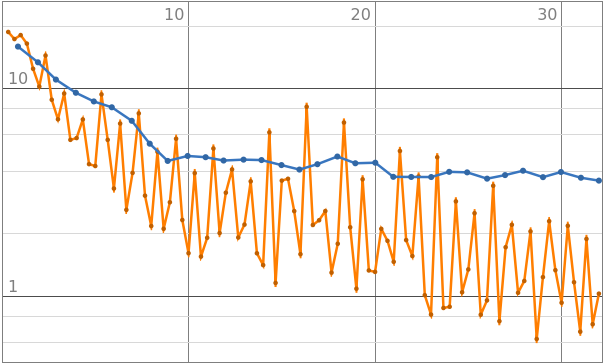
Also note that I enable gradient clipping - this helps avoid a common error “NetTrain::arrdiv: Training was stopped early because one or more trainable parameters of the net diverged.”
I have enabled training on multiple GPUs with TargetDevice{“GPU”, All}, but you can remove that if you only have a CPU.
Also note that I enable gradient clipping - this helps avoid a common error “NetTrain::arrdiv: Training was stopped early because one or more trainable parameters of the net diverged.”
In[]:=
trained=NetTrain[net,trainingDataset,All,LossFunction->loss,MaxTrainingRounds->32,TargetDevice{"GPU",All},ValidationSet->Scaled[0.5],BatchSize->32,Method->{"SGD","GradientClipping"->0.001}]predictor=NetChain[{trained["TrainedNet"],outputLayer}]pred=predictor[img];outputLabels=WolfDetectorOutput[pred,dataInfo]output=WolfDetectorVisualize[img,outputLabels]
Out[]=
NetTrainResultsObject

Out[]=
NetChain

Out[]=
{Rectangle[{0.112473,0.347127},{0.666443,0.782795}]pineapple,Rectangle[{0.672314,0.76143},{0.850765,1.}]dragon fruit}
{2,2,2}
Out[]=
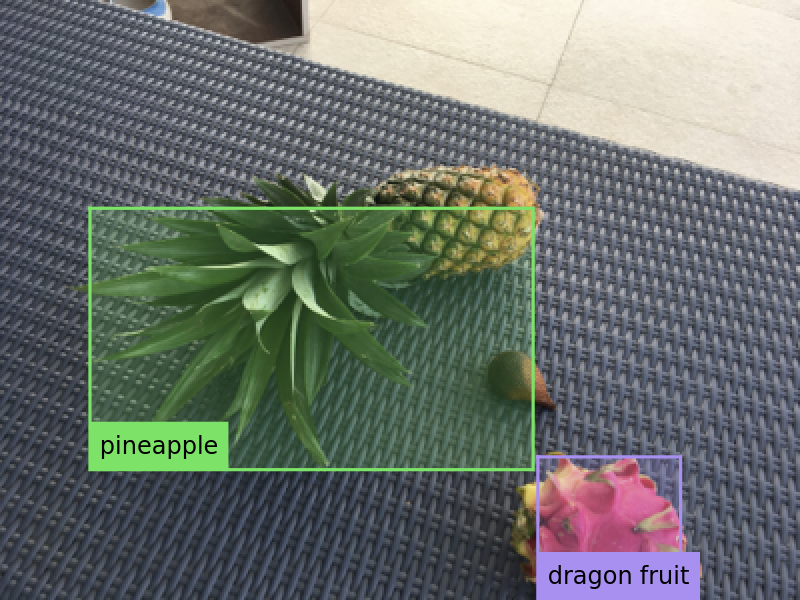
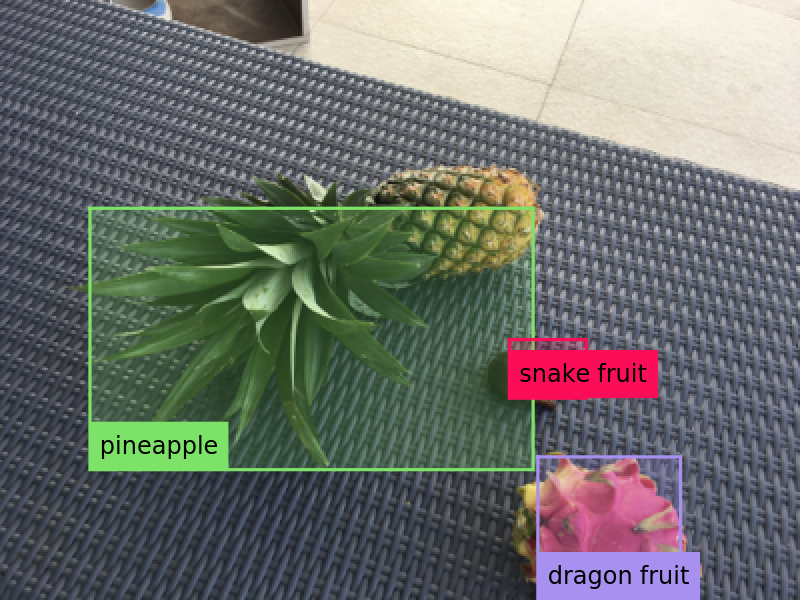
Note, WolfDetectorOutput can be modified to allow for less-confident predictions. In this block, I lower the confidence threshold from 0.5 to 0.4, and the less-confident snake-fruit prediction appears.
WolfDetectorOutput is currently implemented as the Non Maximum Suppression algorithm, commonly used with object detectors.
WolfDetectorOutput is currently implemented as the Non Maximum Suppression algorithm, commonly used with object detectors.
In[]:=
pred=predictor[img];outputLabels=WolfDetectorOutput[pred,dataInfo,0.4]output=WolfDetectorVisualize[img,outputLabels]
Out[]=
{Rectangle[{0.112473,0.347127},{0.666443,0.782795}]pineapple,Rectangle[{0.672314,0.76143},{0.850765,1.}]dragon fruit,Rectangle[{0.636685,0.566013},{0.733224,0.663572}]snake fruit}
{2,2,3}
Out[]=
Demo: Microcontroller Detection ⚡
Demo: Microcontroller Detection ⚡
Now, let’s load a new VOC-style dataset!
This time, I use the Microcontroller Detection dataset from Kaggle: https://www.kaggle.com/tannergi/microcontroller-detection - Again, no modifications required!
I remove the first image in the dataset from, as before...
This time, I use the Microcontroller Detection dataset from Kaggle: https://www.kaggle.com/tannergi/microcontroller-detection - Again, no modifications required!
I remove the first image in the dataset from, as before...
In[]:=
dataset=WolfDetectorLoadDataset["E:\\datasets\\microcontroller_detection","voc"];Length[dataset]img=Import[First@Keys@dataset]dataset=Rest[dataset];Length[dataset]
Out[]=
149
Out[]=
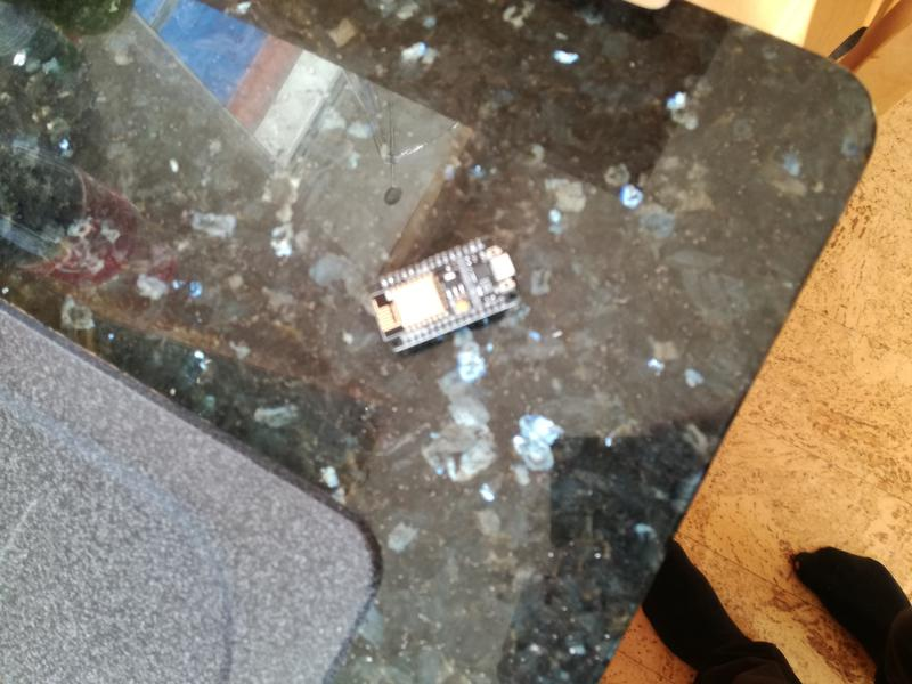
Wow! Only 148 images!
Now, let’s extract this dataset’s info, build a new model, train and predict!
This time, the detection is correct even with the default box confidence threshold of 0.5.
Chess ♟🐴 (Negative Example ❌)
Chess ♟🐴 (Negative Example ❌)
Finally, we will try another dataset (which is not as good for training neural networks: Many of the images are not representative of the test set, and there are very few views of each chess piece in the set).
You can get this data from the Chess Piece Detection dataset on Kaggle: https://www.kaggle.com/tannergi/chess-piece-detection
This example shows the importance of taking varied pictures if you only have a few images for your domain!!
You can get this data from the Chess Piece Detection dataset on Kaggle: https://www.kaggle.com/tannergi/chess-piece-detection
This example shows the importance of taking varied pictures if you only have a few images for your domain!!
Note how the validation loss does not really decrease during training. This dataset is not very optimal for training neural networks. There are only very few images of each chess piece, and the chess pieces are not on a chess board as you would normally see them. Finally, the images are mostly in the center of the image, with a single chess piece standing alone. This kind of data is not very good for training a neural network chess piece detector, so our results are not very good.
This is why it is very important to take lots of pictures with lots of objects together, apart, and in all corners of the image, especially if there are only a hundred images. It is always important to understand your data!!
We can modify our non-max-suppression confidence threshold, but the results will not improve, since the network is trained on bad data:
This is why it is very important to take lots of pictures with lots of objects together, apart, and in all corners of the image, especially if there are only a hundred images. It is always important to understand your data!!
We can modify our non-max-suppression confidence threshold, but the results will not improve, since the network is trained on bad data:
You have reached the end of the demo!
If you want to learn more, comment below, or check out the source code here: https://github.com/alecGraves/WolfDetector
If you want to learn more, comment below, or check out the source code here: https://github.com/alecGraves/WolfDetector