CITE THIS NOTEBOOK: Cooking recipes with GPT-3, Dall-e and the Wolfram Language by Jofre Espigule-Pons. Wolfram Community MAR 10 2023.
The goal of this post is to show how we can combine the power of Large Language Models (LLMs) to process natural language and the computational knowledge of the Wolfram Language, in order to create an app that can process cooking recipes in a more efficient and accurate way. We will exploit one of the emergent abilities of LLMs, which small language models are lacking; this is the apparently mysterious phenomenon of in-context learning. LLMs can learn new tasks only based on contexts augmented with a few examples without the need of fine-tuning or re-training them. In particular, we will focus in the so called “Few-Shot Learning”.
Few-Shot Learning
Few-Shot Learning
In NLP, we can use Few-Shot Learning with LLMs, which we have trained to perform a vast array of tasks implicitly during pre-training on large text datasets. This equips the model with the ability to generalize, meaning it can comprehend related but previously unseen tasks with just a few examples.
Few-Shot NLP examples consist of three main components:
Few-Shot NLP examples consist of three main components:
Task Description
Task Description
A short description of what the model should do, e.g. “Translate English to French”
Examples
Examples
A few examples showing the model what it is expected to predict, e.g. “sea otter => loutre de mer”
Prompt
Prompt
The beginning of a new example, which the model should complete by generating the missing text, e.g. “cheese => “
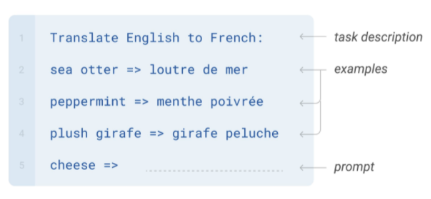
Image from Language Models are Few-Shot Learners
Extract unstructured textual data with GPT-3
Extract unstructured textual data with GPT-3
Cooking recipes typically have a list of ingredients with their associated quantities and they also have some written instructions or directions on how to cook the meal. They might have different formats and they can be quite hard to parse using traditional NLP techniques. Following the previous section on “Few-Shot Learning”, we can define the main components of the prompt as follows:
Task Description
Task Description
We want the task description to be as much specific as possible, so the model “gets” the task at hand.
In[]:=
taskDescription="Extract ingredients with asssociated quantities(if the Quantity is not available use Missing[\"NotAvailable\"]). Create a graph of a cooking recipe as a list of nodes representing the ingredients and the instructions using only Mathematica Wolfram Language code:";
One-Shot Learning Example
One-Shot Learning Example
Here we can split the example into two components: the raw textual recipe that we obtain from cooking books or sites and the target parsed recipe with structured data with Wolfram Language syntax.
In[]:=
exampleRecipe="6 slices French bread1/4 cup ricotta cheese1/4 cup cottage cheese, whipped2 tablespoons lowfat cream cheese2 teaspoons white sugar2 teaspoons vanilla extract2 large sweet onionsCut a pocket in each slice of bread. Open carefully. In a large bowl, combine the ricotta, cottage cheese and cream cheese. Add sugar and flavoring extract and beat until smooth. Spread the mixture evenly into each bread pocket.";
In[]:=
exampleParsedRecipe=ToString[Hold[<|"Ingredients"-><|"ing1"->{Interpreter["Food"]["French bread"],Quantity[6,"Slices"],"6 slices French bread"},"ing2"->{Interpreter["Food"]["ricotta cheese"],Quantity[1/4,"Cups"],"1/4 cup ricotta cheese"},"ing3"->{Interpreter["Food"]["cottage cheese"],Quantity[1/4,"Cups"],"1/4 cup cottage cheese, whipped"},"ing4"->{Interpreter["Food"]["lowfat cream cheese"],Quantity[2,"Teaspoons"],"2 tablespoons lowfat cream cheese"},"ing5"->{Interpreter["Food"]["white sugar"],Quantity[2,"Teaspoons"],"2 teaspoons white sugar"},"ing6"->{Interpreter["Food"]["vanilla extract"],Quantity[2,"Teaspoons"],"2 teaspoons vanilla extract"},{Interpreter["Food"]["onions"],Quantity[2,"Pieces"],"2 large sweet onions"}|>,"Instructions"-><|"inst1"->"Cut a pocket in each slice of bread.","inst2"->"Open carefully.","inst3"->"In a large bowl, combine the ricotta, cottage cheese and cream cheese.","inst4"->"Add sugar and flavoring extract and beat until smooth.","inst5"->"Spread the mixture evenly into each bread pocket."|>,"RecipeGraph"->{"ing1"->"inst1","inst1"->"inst2","ing2"->"inst3","ing3"->"inst3","ing4"->"inst3","inst3"->"inst4","ing5"->"inst4","ing6"->"inst4","inst4"->"inst5","inst2"->"inst5"}|>],InputForm];
This parsed recipe consists of an association with three components: “Ingredients”, “Instructions” and “RecipeGraph”. We assigned a numbered label to each ingredient and instruction. We set the ingredients to have the following structure:
◼
Food entity. Using Interpreter[“Food”] we will generate the corresponding entity:
In[]:=
Interpreter["Food"]["French bread"]
Out[]=

◼
Quantity. It indicates the units in which the ingredients are specified in the recipe:
In[]:=
Quantity[6,"Slices"]
Out[]=
◼
Raw ingredient label. This is the recipe unformatted string associated to each ingredient:
"6 slices French bread"
OpenAI API
OpenAI API
In my previous post on GPT models (Shakespearean GPT from scratch), at the end of the post we saw how to communicate with OpenAI’s API via the OpenAILink paclet created by Christopher Wolfram:
In[]:=
PacletInstall["ChristopherWolfram/OpenAILink"]
Out[]=
PacletObject

Needs["ChristopherWolfram`OpenAILink`"]
SystemCredential["OPENAI_API_KEY"]="key goes here..."
Prompt Template
Prompt Template
Then we can create a prompt template function in order to join the task description, our 1-shot example and the target recipe:
In[]:=
parseRecipePrompt[recipe_String]:=taskDescription<>"\n\n"<>"Input: "<>exampleRecipe<>"\nOutput: "<>exampleParsedRecipe<>"\n\n"<>"Input: "<>recipe<>"\nOutput: "
ParseRecipe with OpenAICompletion
ParseRecipe with OpenAICompletion
When we apply Few-Shot Learning to LLMs we typically want the model to generate text in a very specific format. For this reason we set the “Temperature” to be 0. If we wanted the model to generate text in more creative way like in ChatGPT we would increase the “Temperature” to 0.7 for example. By default, OpenAICompletion model is “text-davinci-003”, which is one of the best models from the GPT-3 family:
In[]:=
ParseRecipe[recipe_String]:=OpenAICompletion[ parseRecipePrompt[recipe], OpenAITemperature->0, OpenAITokenLimit->2000 ]
Parse an unseen new recipe
Parse an unseen new recipe
Now we are ready to copy-paste a new recipe from internet and see the magic happen! This particular recipe is called “Cajun Chicken Fettuccine”:
In[]:=
rawRecipe="8 ounces uncooked fettuccine1 large sweet onion, halved and sliced1 medium green pepper, cut into 1/4-inch strips1 medium sweet red pepper, cut into 1/4-inch strips2 tablespoons olive oil2 cups cubed cooked chicken4 teaspoons Cajun seasoning1 teaspoon minced garlic1 jar (15 ounces) Alfredo sauce1/2 cup spaghetti sauce2 cups shredded part-skim mozzarella cheese1/2 cup grated Parmesan cheeseDirectionsPreheat oven to 375°. Cook fettuccine according to package directions. Meanwhile, in a large skillet, saute onion and peppers in oil until tender. Add the chicken, Cajun seasoning and garlic; heat through. Transfer to a large bowl. Drain fettuccine; add to chicken mixture. Stir in Alfredo and spaghetti sauces.Transfer to a greased 13x9-in. baking dish. Sprinkle with cheeses. Cover and bake for 15 minutes. Uncover; bake until golden brown, 10-15 minutes longer.";
Let’s see how GPT-3 processes our prompt:
recipeDataset=ParseRecipe[rawRecipe];
In[]:=
data=ReleaseHold@ToExpression@recipeDataset
Out[]=
Ingredientsing1,,8 ounces uncooked fettuccine,ing2,,1 large sweet onion, halved and sliced,ing3,,1 medium green pepper, cut into 1/4-inch strips,ing4,,1 medium sweet red pepper, cut into 1/4-inch strips,ing5,,2 tablespoons olive oil,ing6,,2 cups cubed cooked chicken,ing7,,4 teaspoons Cajun seasoning,ing8,,1 teaspoon minced garlic,ing9,,1 jar (15 ounces) Alfredo sauce,ing10,,1/2 cup spaghetti sauce,ing11,,2 cups shredded part-skim mozzarella cheese,ing12,,1/2 cup grated Parmesan cheese,Instructionsinst1Preheat oven to 375°.,inst2Cook fettuccine according to package directions.,inst3Meanwhile, in a large skillet, saute onion and peppers in oil until tender.,inst4Add the chicken, Cajun seasoning and garlic; heat through.,inst5Transfer to a large bowl.,inst6Drain fettuccine; add to chicken mixture.,inst7Stir in Alfredo and spaghetti sauces.,inst8Transfer to a greased 13x9-in. baking dish.,inst9Sprinkle with cheeses.,inst10Cover and bake for 15 minutes.,inst11Uncover; bake until golden brown, 10-15 minutes longer.,RecipeGraph{ing1inst1,inst1inst2,ing2inst3,ing3inst3,ing4inst3,ing5inst3,inst3inst4,ing6inst4,ing7inst4,ing8inst4,inst4inst5,inst5inst6,inst6inst7,inst7inst8,inst8inst9,ing9inst9,ing10inst9,ing11inst9,ing12inst9,inst9inst10,inst10inst11}
Compute ingredients calories
Compute ingredients calories
Now with this freshly generated structured data we can perform several computations on top of it. The Wolfram Language has a large food knowledge base integrated within it and we can obtain hundreds of properties for each food ingredient:
Here, we can compute the calories of each ingredient of the recipe using the following helper function:
Nice! We can see that the third most caloric ingredient is the Alfredo sauce, so be careful with sauces if you don’t want to gain weight ;)
Create a Recipe Knowledge Graph
Create a Recipe Knowledge Graph
Now let's display the graph that GPT-3 extracted from the textual recipe. With VertexShapeFunction we can distinguish nodes corresponding to ingredients and to instructions:
Second recipe example
Second recipe example
We can also visualize another recipe and quickly check wether this recipe is more or less complex to cook:
Maybe in the near future we will have cooking bots that can cook for us if we show them such recipe graphs :)
Visualize the food ingredients with Dall-e
Visualize the food ingredients with Dall-e
Another really cool thing that we can easily do with the OpenAILink paclet is to generate images with Dall-e 2. We just need to write a good prompt for generating realistic food items:
We can generate a green pepper like this:
We can get the textual ingredients from our first dataset:
We can generate first all the ingredients at once:
Then we can compare it with the prompt using only the name of the recipe instead of using the list of ingredients:
Finally, let’s create an image collage with all the ingredients of the recipe:
Here we can see the results of a second try:
Nice! We can see that Dall-e 2 has still problems at writing proper words. AREFOOO! Which is not the same as Alfredo sauce. XD
Cooking Recipe Generator
Cooking Recipe Generator
We can also use a similar workflow to generate some cool recipes given just the name of a particular known recipe or by giving a list of ingredients available in our fridge:
One-Shot Learning Example
One-Shot Learning Example
Here we can split the example into two components: the raw textual recipe that we obtain from cooking books and the target parsed recipe with structured data with Wolfram Language syntax. For this particular case we will use two example: one with the name of the recipe alone and the other just with a list of available ingredients:
Prompt Template
Prompt Template
As before, we join the task description alongside the few-shot learning examples:
RecipeSynthesize
RecipeSynthesize
GPT invents a “Homemade chicken ramen” recipe
GPT invents a “Homemade chicken ramen” recipe
Oops!! It seems that Dall-e 2 doesn’t like the word “breasts” even if it’s next to “chicken”... LoL. Ok, but we can display the other ingredients of the homemade Rammen:
GPT creates a new recipe from a given list of available ingredients
GPT creates a new recipe from a given list of available ingredients
Ok, this is a brand new recipe that we probably shouldn’t try at home, but it might inspire us some cooking recipes. The possibilities are endless, and we could try a similar approach to tackle other unrelated natural language tasks that involve parsing unstructured textual data. Hope that this post inspire other to explore and create some new cool apps.
PS: Generating the header image of a Wolf Cooking Robot
PS: Generating the header image of a Wolf Cooking Robot
I would like to finish showing the prompt to generate the header image of the Wolf Cooking Robot: