Importing data
Importing data
One can obtain the COVID-19 data everyday from John Hopkins CSSE as following. If you want to update the following fitting result, it is enough to re-evaluate the following notebook in Mathematica.
Ref: https://community.wolfram.com/groups/-/m/t/1891140
Ref: https://community.wolfram.com/groups/-/m/t/1891140
In[]:=
names={"Confirmed","Deaths","Recovered"};urls="https://raw.githubusercontent.com/CSSEGISandData/COVID-19/master/csse_covid_19_data/csse_covid_19_time_series/time_series_19-covid-"<>#<>".csv"&/@names;imports=Import/@urls;
In[]:=
nowday=imports[[1,1,-1]];zeroday=imports[[1,1,5]];data:=imports[[;;,;;,5;;]];countries=If[#[[1]]""||#[[1]]#[[2]],#[[2]],#[[1]]<>"@"<>#[[2]]]&/@imports[[1]];t1=Length[data[[1,1]]];
Fitting
Fitting
We use the following smooth step function as a logistic function (the Fermi distribution function) of time t (days):
In[]:=
expr=A/(Exp[-(t-t0)/T]+1)
Out[]=
A
1+
-t+t0
T
Here, A is a total number of confirmed/died/recovered people , T is a changing (spreading or recovering) time-width, and t0 is a day of “turning point”. It should be noted that this function, known as the Fermi distribution function, is just a simple example to define the turning point and has no mathematical model for COVID-19 (for example, see https://community.wolfram.com/groups/-/m/t/1896178 ). It is quite reasonable to expect two or more steps in data. However, until now (03/15/20), this single step function is enough to fit major data sets of China. (See the fitting results with the same function https://community.wolfram.com/groups/-/m/t/1890271 )
In order to avoid numerical error in automatic fitting, we set parameter-ranges as constraints for the fitting function “FindFit” and initial guess of parameters as following;
In order to avoid numerical error in automatic fitting, we set parameter-ranges as constraints for the fitting function “FindFit” and initial guess of parameters as following;
In[]:=
guesst0[dat_]:=Max[1,t/.FindRoot[Interpolation[dat][t]Last[dat]/2,{t,Length[dat]/2,1,Length[dat]}]];fitd[dat_,minimumDataNumber_:5,maxRatioOfA_:100]:=If[!NumberQ[Last[dat]]||Last[dat]<minimumDataNumber,{A0,t00,T1},FindFit[dat,{expr,A>=Last[dat],A<maxRatioOfA*Last[dat],T>0.1,100>T,t0>0,t0<10*Length[dat]},{{A,Last[dat]},{t0,guesst0[dat]},{T,2}},t]];
You might notice that above numerical fitting strongly depends on parameter-ranges and initial guess. In addition, you will get tons of warnings in all-data fitting as below;
In[]:=
os=Map[fitd,data,{2}];
Please be careful about low accuracy of this numerical fitting and check each fitting-curve with data when you see figures. At least, fitted data are useless for predictions.
Visualization: ranking plot
Visualization: ranking plot
Now we have obtained all fitted results in the variable “os”. Then, we define a plot function with data sorted by turning point(TP) day for three data sets (id=1:Confirmed/2:Deaths/3:Recovered). The following is a quick hack:
In[]:=
plotTop[id_,numsin_:30,days4prediction_:10]:=Block[{},name=names[[id]];o=os[[id]];ds=data[[id]];n0s=(If[A>0,100/A,0])/.o;t0s=If[A0||t00,Infinity,t0]/.o;nums=Min[numsin,Length[Select[t0s,#≠Infinity&]]];ord0=Ordering[t0s][[1;;nums]];t2=t1+days4prediction;legend=ToString[#[[1]]]<>","<>name<>":"<>ToString[#[[2]]]<>"="<>ToString[Round[#[[3]]]]<>"%, TP=day "<>ToString[Round[#[[4]]]]<>"th"&/@Transpose[{countries,ds[[;;,-1]],((n0s*(expr/.o))/.tt1),t0s}];l2v[x_,l_]:={x,#}&/@l;plot[shift_:50,ord_:ord0]:=Block[{},shifter=(Length[ord]-Range[Length[ord]]);Show[Plot[Evaluate[(n0s*(expr/.o))[[ord]]+shift*shifter],{t,0,t2},GridLinesAll,PlotStyle"Rainbow",PlotLabelslegend[[ord]],PlotRangeAll],ListPlot[Tooltip@@#&/@Transpose[{(l2v[1,n0s]*(If[t0>1&&t0<t1,{t0,A/2},Missing]/.o))[[ord]]+l2v[0,shift*shifter],legend[[ord]]}],PlotStyleBlack],ListPlot[(n0s*ds)[[ord]]+shift*shifter,PlotStyle"Rainbow",PlotRangeAll],PlotRange{{0,t2},All},FrameTrue,FrameLabel{"days from "<>zeroday,"estimated "<>name<>" %(shifted)"},PlotLabelname<>" data @ "<>nowday<>"(day "<>ToString[t1]<>"th)"]];plot[]];
Plot ranking top-50 of turning point(TP) day for confirmed cases(id=1):
In[]:=
Show[plotTop[1,50],AspectRatio2]
Out[]=
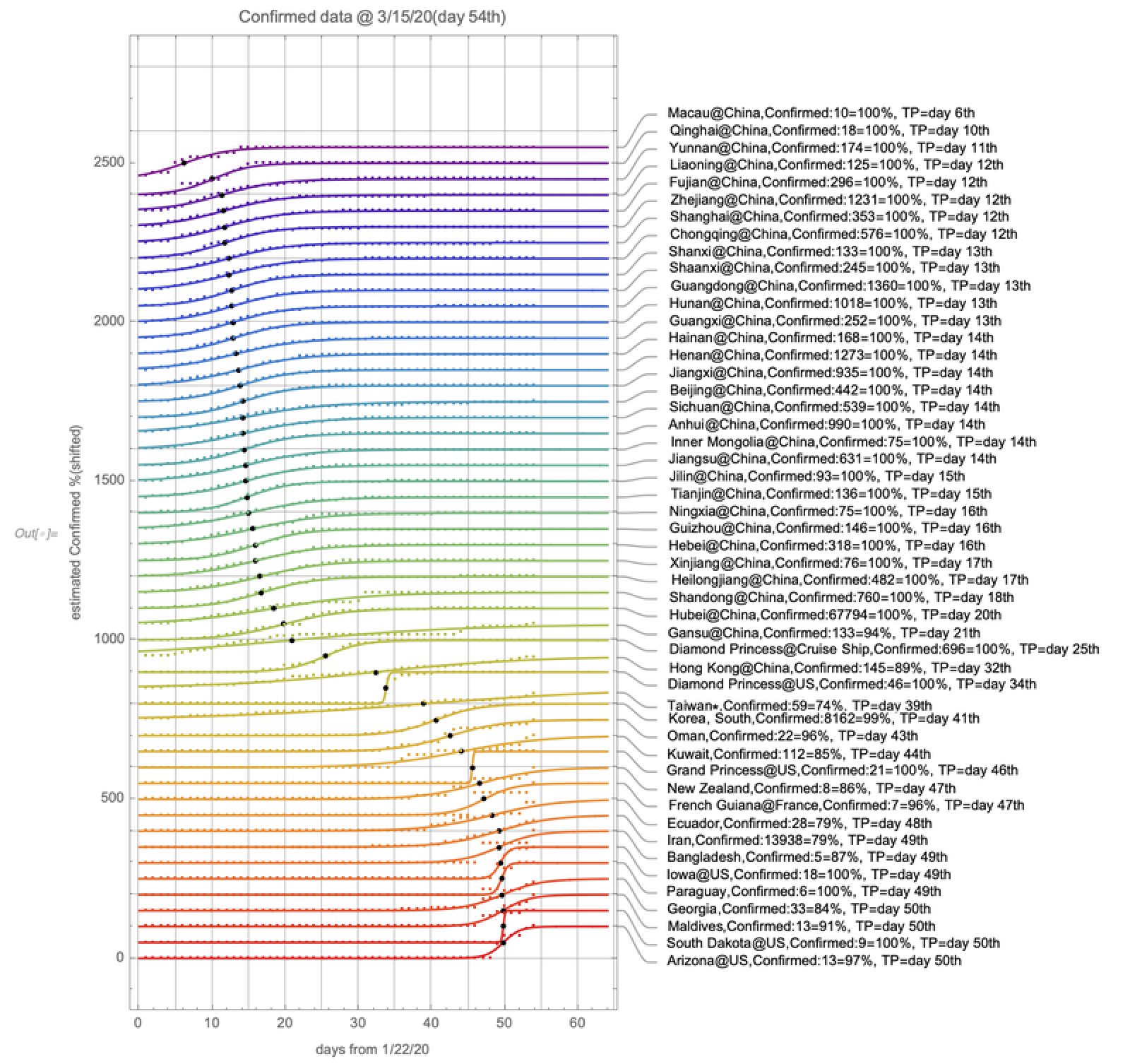
Remind that low accuracy of fitting for recently changed data, while one can find saturated behavior for Chinese cases with early TP day.
Plot turning point (TP) day for deaths cases(id=2). In this case, there is not enough data for ranking 50.
Plot turning point (TP) day for deaths cases(id=2). In this case, there is not enough data for ranking 50.
In[]:=
Show[plotTop[2,50],AspectRatio2]
Out[]=
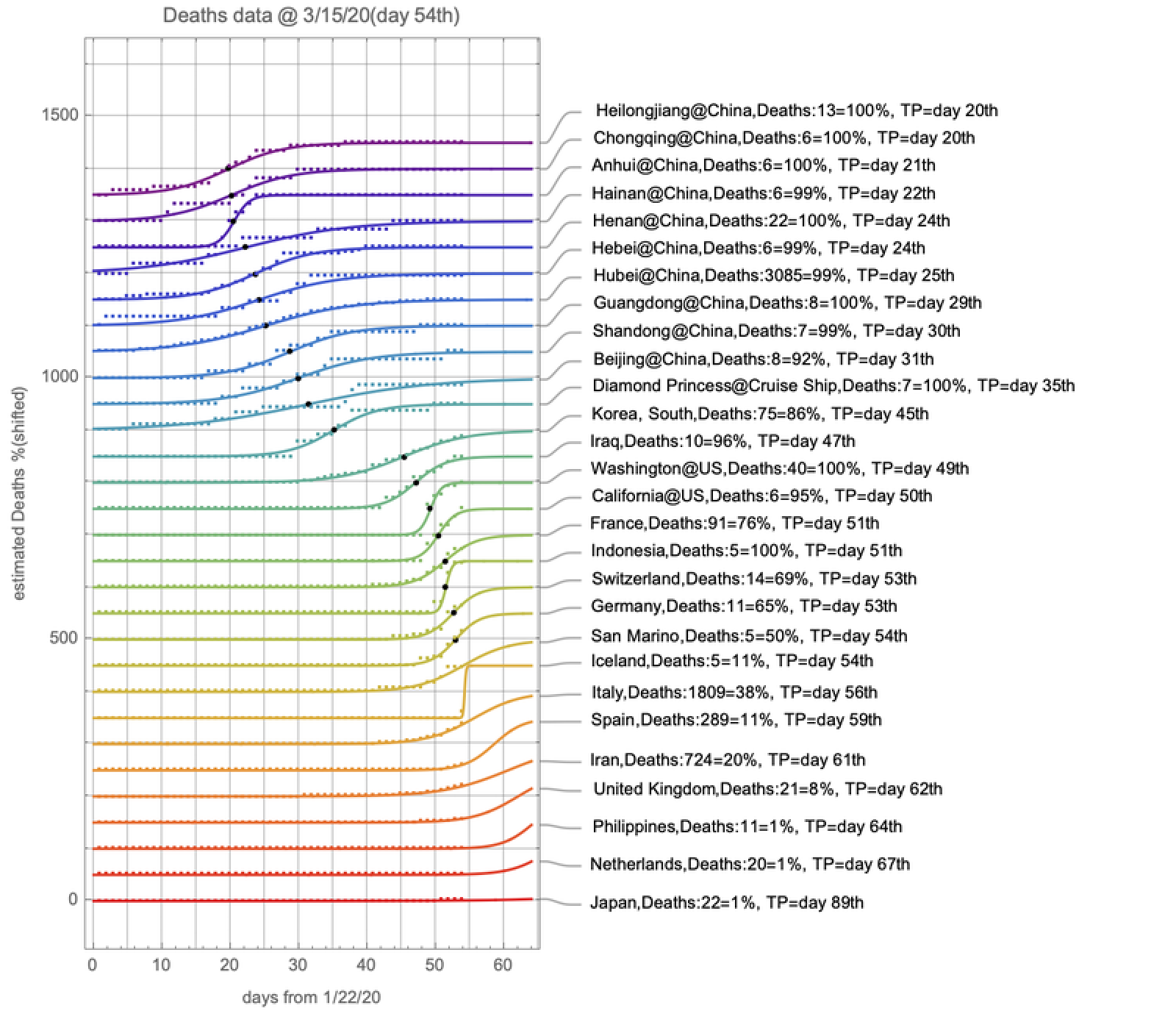
Plot turning point (TP) day ranking 50 for recovered cases(id=3) :
Visualization: ranking table
Visualization: ranking table
Above figures provide some information for you. In order to show more quantitative data, we need a table for three data sets (id=1:Confirmed/2:Deaths/3:Recovered). One can use the function “sort” to show a sorted table by total number of people and the function “sortTP” to show a sorted table by turning point (TP) day. Since the table includes the “id for plot”, one can use it with the function “plotCountry”.
Plot top-10 ranking table of TP-day “t0” for data set id=2(Deaths):
One can find several features, for example, an inequality: t0(Confirmed) < t0(Deaths) < t0(Recovered). Especially, we can define a recovering time-width as t0(Recovered) - t0(Confirmed). The recovering time-width for Hubei@China(id=157) is about 19days as shown in the following figure:
The recovering time-period can be informative for us if we can understand that the figure shows large discrepancy for confirmed cases and lack of data in recent days for recovered cases.
Plot top - 10 ranking table for data set id = 2 (Deaths) :
Plot top - 10 ranking table for data set id = 2 (Deaths) :
It should be noted again that fitted data are useless for predictions, i.e., future TP days shown with arrows in the following figures (past TP days shown with circles):
If you want to predict something, you need to add error bars at least. Hopefully, these features will be provided by another user of Mathematica.