ORIGINAL ARTICLE: Zu, R., Wang, B., He, J. et al. Analytical and numerical modeling of optical second harmonic generation in anisotropic crystals using ♯SHAARP package. npj Computational Materials 8, 246 (2022). https://doi.org/10.1038/s41524-022-00930-4
DOCUMENTATION: https://shaarp.readthedocs.io/
GITHUB: https://github.com/Rui-Zu/SHAARP
DOCUMENTATION: https://shaarp.readthedocs.io/
GITHUB: https://github.com/Rui-Zu/SHAARP
Article Abstract: Electric-dipole optical second harmonic generation (SHG) is a second-order nonlinear process that is widely used as a sensitive probe to detect broken inversion symmetry and local polar order. Analytical modeling of the SHG polarimetry of a nonlinear optical material is essential to extract its point group symmetry and the absolute nonlinear susceptibilities. Current literature on SHG analysis involves numerous approximations and a wide range of (in)accuracies. We have developed an open-source package called the Second Harmonic Analysis of Anisotropic Rotational Polarimetry (♯SHAARP.si) which derives analytical and numerical solutions of reflection SHG polarimetry from a single interface (.si) for bulk homogeneous crystals with arbitrary symmetry group, arbitrary crystal orientation, complex and anisotropic linear dielectric tensor with frequency dispersion, a general SHG tensor and arbitrary light polarization. ♯SHAARP.si enables accurate modeling of polarimetry measurements in reflection geometry from highly absorbing crystals or wedge-shaped transparent crystals. The package is extendable to multiple interfaces.
Introduction
Introduction
♯SHAARP.si is an open-source package for deriving and simulating reflected optical second harmonic generation (SHG) from a single interface (), typically the surface of a single crystal. Optical SHG describes the process where two photons of frequency interact with a nonlinear medium (a crystal) to create a photon at , so called the SHG process. (A followup package for multiple interfaces is currently being developed).This package builds in the most general approach to both analytically and numerically solving the surface SHG response of a single crystal surface with arbitrary crystal symmetry, arbitrary orientation and a complex dielectric function (complex refractive indices).As a very brief primer, the SHG interaction is given by =, where E are the fundamental electric fields of photons at frequency, is the nonlinear polarization at frequency created inside the crystal, and is a third rank polar tensor describing the nonlinear optical property of the crystal. The subscripts are dummy subscripts denoting the polarization directions of the respective quantities; each of these indices can be 1, 2, or 3, that represent the orthogonal crystal physics axes denoted in ♯SHAARP as . The SHG tensor, , thus has 3x3x3=27 terms; however crystal symmetry can significantly reduce the number of non-zero terms in the tensor. As described in the manual in detail, besides the crystal physics axes, there are four other sets of axes we will use in this package, namely, the crystallographic axes , the lab axes, , principal axes, and the polarization axes ; relationships between them is important to understand in order to usefully employ this package in experiments.One critical application of the code is to provide analytical expressions to provide insight of intrinsic properties through the experimental observation. By such fitting, one can obtain structural information, polarization direction, as well as nonlinear optical susceptibilities. A second application is to simulate SHG response under various polarization states of incident photons, orientations and geometric considerations.
si
2ω
2ω
P
i
d
ijk
ω
E
j
ω
E
k
ω
P
2ω
d
ijk
i,j,k
(,,)
Z
1
Z
2
Z
3
d
ijk
(a,b,c)
(,,)
L
1
L
2
L
3
(
principal
Z
1
,
principal
Z
2
,
principal
Z
3
)
(s,p)
Installation
Installation
1. Open the file SHAARP_si.nb (attached below to this post)
- Note: It is recommended to keep all the files in the same directory to access the full features of ♯SHAARP.si
- Make sure that the Dynamic Evaluation has been enabled (it is enabled by default).
- Note: It is recommended to keep all the files in the same directory to access the full features of ♯SHAARP.si
- Make sure that the Dynamic Evaluation has been enabled (it is enabled by default).
2. From the menu Evaluate -> Evaluate Notebook
- Note: This process will clear out all the definitions from other notebooks and enable the “Notation” package for the analytical solutions.
- Note: This process will clear out all the definitions from other notebooks and enable the “Notation” package for the analytical solutions.
3. After ~30s waiting time for initialization, you will see the main panel:
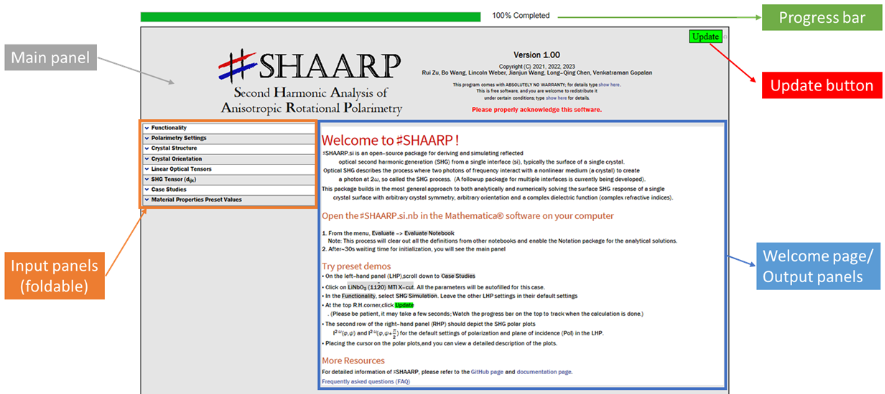
4. The main panel contains four parts
- Input panels specify all the input parameters
- Output panels give the output diagrams and equations
- Progress bar show the progress after clicking the Update button
- Update button execute the program by clicking it
- Input panels specify all the input parameters
- Output panels give the output diagrams and equations
- Progress bar show the progress after clicking the Update button
- Update button execute the program by clicking it
Usage examples
Usage examples
Detailed instructions and examples can be found in the documentation (https://shaarp.readthedocs.io/en/latest/ ).
GaAs (111)
GaAs (111)
GaAs crystallizes in a cubic structure with the point group 4m and its linear and nonlinear optical properties have been extensively studied. In this example, the polarized nonlinear optical response will be simulated and derived both numerically and analytically.
3
SHG Simulation
SHG Simulation
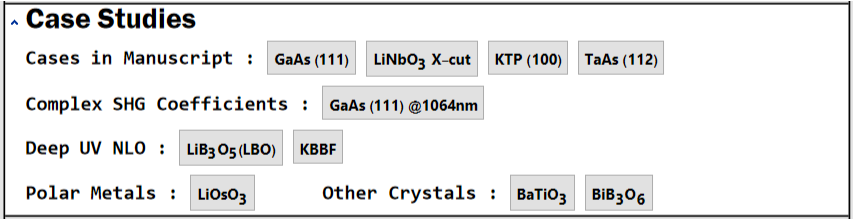
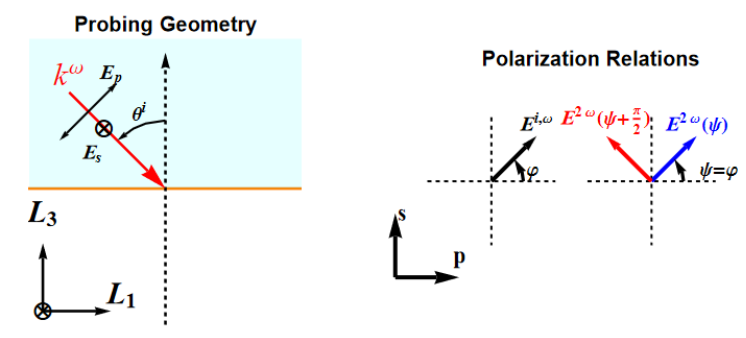
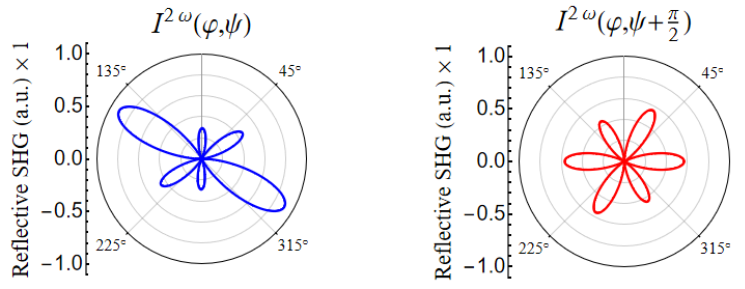
Follow Open the ♯SHAARP.si.nb in the Mathematica® software on your computer to initiate the Mathematica notebook. · Click SHG Simulation in the Functionality section. · Click the dropdown button next to the Case Studies to expand the content in the section.Figure. Case Studies Panel· Click GaAs (111) to update input parameters for Crystal Structure, Crystal Orientation, Linear Optical Tensors and SHG Tensors (). The lattice parameters can be found in the CIF file. The complex linear optical properties can be found in RefractiveIndex.Info and the nonlinear optical tensors were evaluated by the Ref. · Click Update to evaluate the new input.The output results will be shown in the right-hand panel. The Probing Geometry and Polarization Relations shows the orientation of crystals and polarization configuration.Figure. Probing Geometry and polarization settings for GaAs (111)Here, in the geometry plot, (,,) depicts the lab coordinate system forming a right-handed coordinate, and the normal of surface (111) plane is parallel to the direction. The − forms the plane of incidence (PoI) as colored in blue. The input [hkl]->Direction Perpendicular to Plane of Incidence is set parallel to the direction. In the polarization plot, the both incident polarization at ω frequency and output SHG polarization at 2ω frequency are rotated simultaneously with a same azimuthal angle φ. Two output SHG electric fields (colored in blue and red) with orthogonal polarization are collected.· The intensity of the selected electric fields are plotted as a function of (φ,Ψ) and plotted with the same color code as presented in Polarization Relations.Figure. SHG polar plots as a function of (φ,Ψ). The directions of output polarization share the same set of color codes as presented in the Polarization Relations plot.· The Effective refractive index and Ellipticity of incident light at ω are shown in the third row. In the Effective refractive index plot, the real parts of effective refractive indices are shown as a function of incident angle. Superscript 1 and 2 refer to ordinary and extraordinary waves. In cubic GaAs case, refractive indices are the same regardless of the directions of electric fields. In the Ellipticity plot, the phase relation of and is shown. If linear polarization is rotated, the ellipticity of light will be shown with φ=45°, otherwise the explicit direction of will be shown.Figure. Effective refractive index shows the effective refractive indices for both ordinary and extraordinary waves as a function of incident angle at ω frequency. Ellipticity exhibits phase relations between and at ω frequency.
d
ijk
L
1
L
2
L
3
L
3
L
1
L
3
L
2
E
p
E
s
ω
E
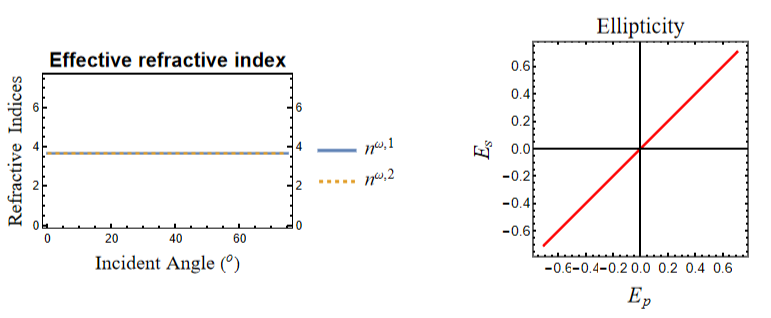
E
p
E
s
SHG Partial Analytical Expressions
SHG Partial Analytical Expressions
· Follow Open the ♯SHAARP.si.nb in the Mathematica® software on your computer to initiate the Mathematica notebook.· Click SHG Partial Analytical Expressions in the Functionality section.· Click the dropdown button next to the Case Studies to expand the content in the section.· Click GaAs (111) to update input parameters for Crystal Structure, Crystal Orientation, Linear Optical Tensors and SHG Tensors (). The lattice parameters can be found in the CIF file. The complex linear optical properties can be found in RefractiveIndex.Info and the nonlinear optical tensors were evaluated by the Ref. Then click Figure. Output of partial analytical expressions. Types of variables are color-coded with distinct colors.
d
ijk
Update
to evaluate the new input.· The output results will be shown in the right-hand panel as presented below.· The partial analytical expressions are expressed with SHG coefficients variables and numerical values for the rest of the parameters.· The Copy button next to the equation allow direct copy of the equation to the clipboard.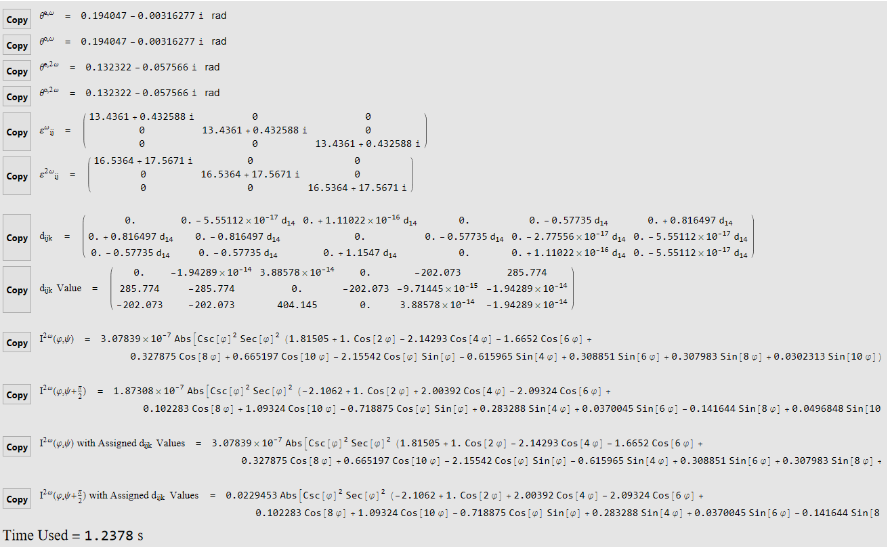
CITE THIS NOTEBOOK
CITE THIS NOTEBOOK
♯SHAARP: Optical second harmonic generation modeling in anisotropic crystal
by Rui Zu, Bo Wang
Wolfram Community, STAFF PICKS, January 16, 2023
https://community.wolfram.com/groups/-/m/t/2789660
by Rui Zu, Bo Wang
Wolfram Community, STAFF PICKS, January 16, 2023
https://community.wolfram.com/groups/-/m/t/2789660