This project involved analysis of existing timeseries data. In some datasets, there exists a phenomenon of interest in which there is a component with a time-varying frequency. This signal is weak, with an amplitude near the level of background noise. The goal of the summer school project was twofold: First, to discern datasets in which the events of interest occur, and second, to determine the frequency track. A dataset previously identified to contain the phenomenon was studied in detail. First, a spectrogram was created which showed the feature, but it did not stand out. Optimization of the spectrogram was performed, resulting in images which clearly show the phenomenon when present. This same approach was applied to additional datasets, and a classifier function was trained to distinguish the images displaying cases of the desired signal from those without. Additionally, a frequency track was identified by first detecting peaks in the spectrogram, and then retaining only those which were found to have a suitable number of ‘neighbor’ peaks, indicating a frequency track as opposed to random noise.
Spectrogram Display and Optimization
Spectrogram Display and Optimization
In this section, several steps are presented which improved the spectrogram appearance for the purpose of highlighting the signal of interest.
First, the data is loaded from a text file:
In[]:=
rawData=ReadList["FoleyWSS2023exampleData.dat",Number];
Next, a spectrogram is generated with the default settings:
Spectrogram[rawData,SampleRate->800000]
Out[]=
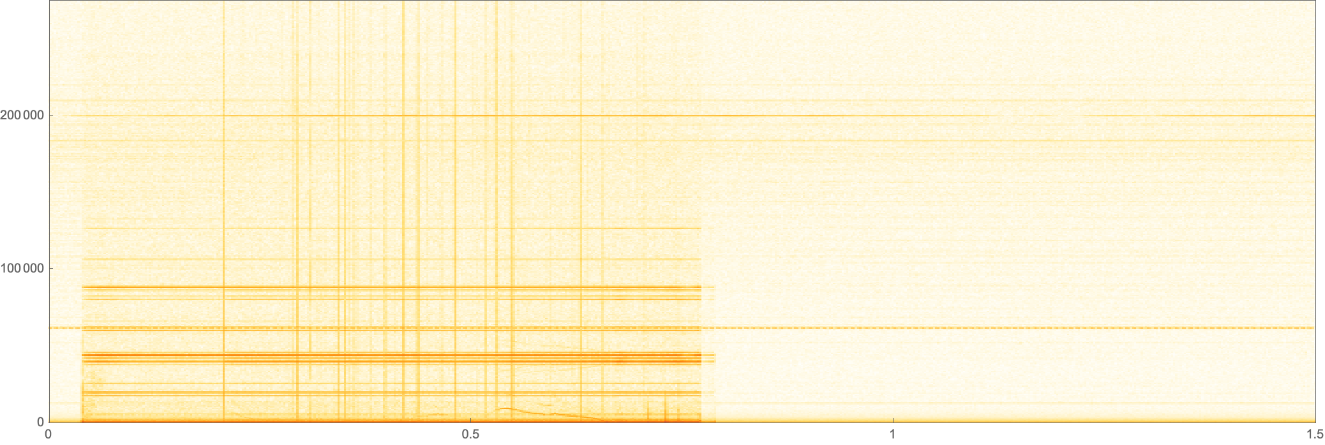
The spectrogram shows multiple vertical lines, representing discontinuities in the timeseries data. A careful review of the data revealed multiple ‘spike’ events, where the detector suffered an instantaneous disruption, and recovered over several additional data points. A routine was written to remove these sections of data and replace them with a linear interpolation from the neighboring points.
despikedData=deSpikerSevenLine[rawData,5];
The vertical lines are largely absent from the spectrogram now:
Spectrogram[despikedData,SampleRate->800000]
Out[]=
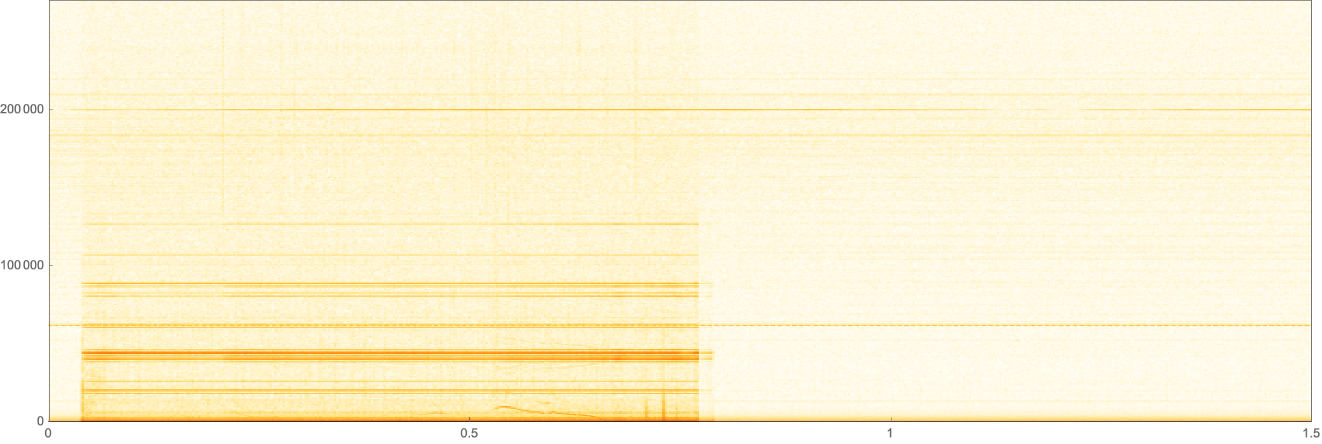
The phenomenon of interest which is present is still not obvious. Next, the spectrogram data is generated for further analysis, and the range of interest is assigned to an expression:
sAData=SpectrogramArray[despikedData,4800,10,KaiserBesselWindow];freqBins=Length[sAData[[1]]];fList=Table,n,1,;ffTvals=AbsMapTake#,Round&,sAData;fHighLimBinNum=Flatten[Position[fList,65000]][[1]];lowFlist=Take[fList,fHighLimBinNum];datalowFvals=Map[Take[#,fHighLimBinNum]&,ffTvals];
800000*n
freqBins
freqBins
2
Length[#]
2
A customized spectrogram makes the phenomenon visible. (if you are evaluating this, please be patient, it could take several seconds depending on your system)
In[]:=
ArrayPlot[Reverse@Transpose[datalowFvals[[10000;;60000]]],ColorFunctionScaling->False,ColorFunction->(myNewColorFunction@Rescale[Log[10,#1],{0.1,3},{0,1}]&),AspectRatio->0.5]
Out[]=
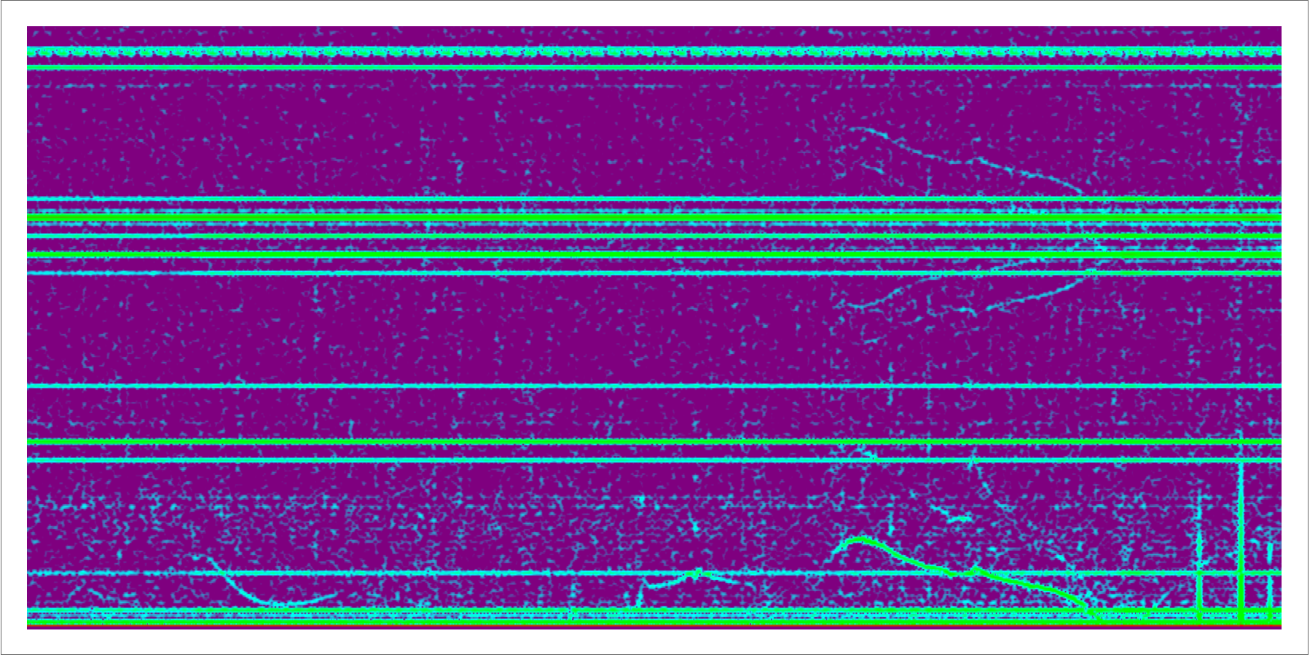
The faint fish-shaped tracks in the upper right of the above image are the data of interest. Here they are clearly visible!
Frequency Track Isolation and Detection
Frequency Track Isolation and Detection
In this section, the signal of interest is isolated and the frequency track detected.
The amplitude of the signal of interest in the spectrogram is similar to the level of random noise. It is discernable by eye because of the pattern of a continuous line that it makes. To generate a frequency track, first the region of interest is isolated, and then the symmetry of the track is exploited to improve the signal-to-noise.
highlightedRegion=getCleanTrack[datalowFvals,lowFlist];ArrayPlot[Reverse@Transpose[highlightedRegion[[10000;;60000]]],ColorFunctionScaling->False,ColorFunction->(myNewColorFunction@Rescale[Log[10,#1],{0.1,3},{0,1}]&),AspectRatio->0.5]
Out[]=
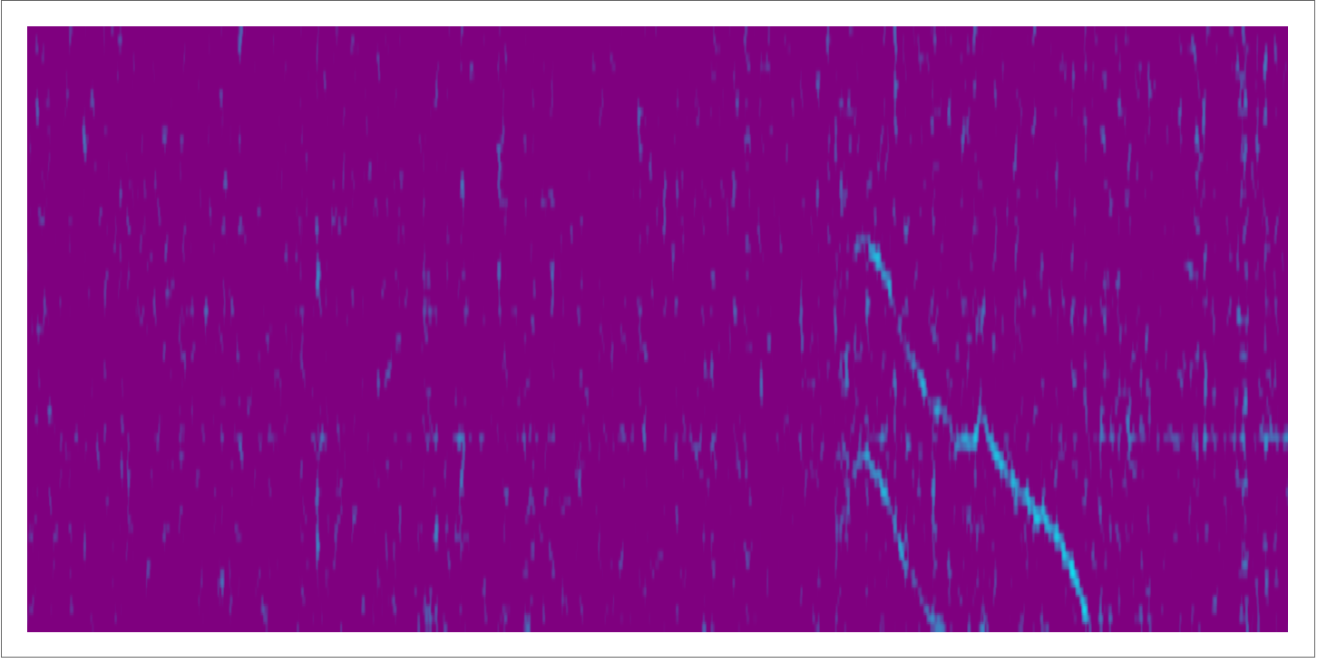
In the above graphic, the two tracks are clearly visible. Now that they stand out better from the background, another color function can enhance the visibility:
ArrayPlot[Reverse@Transpose[highlightedRegion[[10000;;60000]]],ColorFunction->"Rainbow",AspectRatio->0.5]
Out[]=
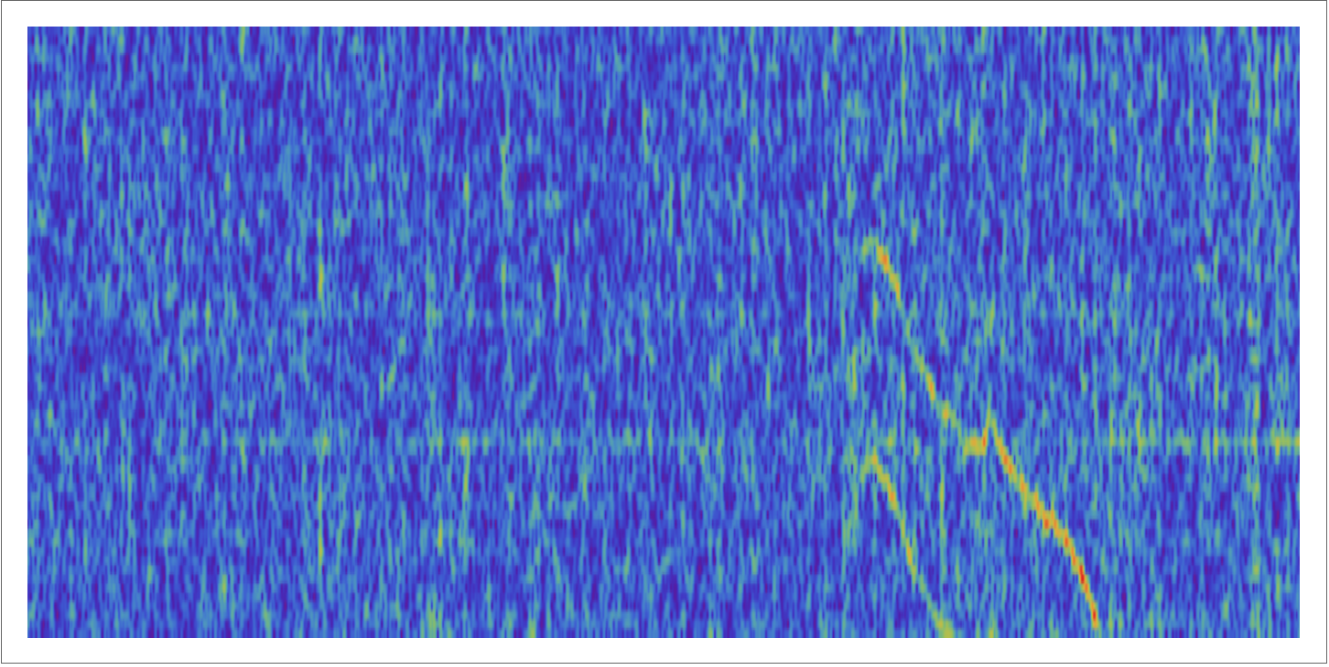
To detect the frequency track, first find all of the peaks in the spectrogram array above a specified threshold:
bigSetOfPeaks=getArrayOfPeaks[highlightedRegion,1.6];ArrayPlotOffset=10000;bigOffsetPeakSet=Map[{Subtract[#[[1]],ArrayPlotOffset],#[[2]]}&,bigSetOfPeaks];Show[ArrayPlot[Reverse@Transpose[highlightedRegion[[ArrayPlotOffset;;60000]]],ColorFunction->"Rainbow",AspectRatio->0.5],ListPlot[bigOffsetPeakSet,PlotMarkers->Automatic,PlotStyle->Red]]
Out[]=
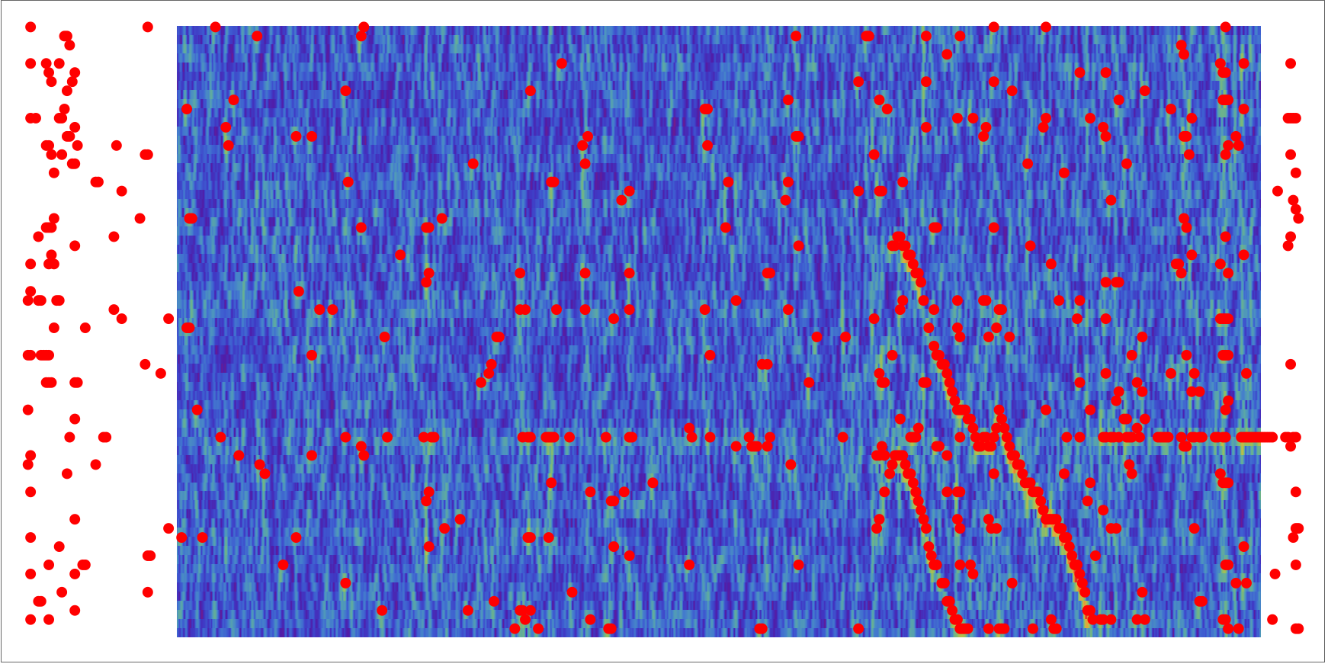
The graphic above illustrates that the peaks in the frequency track were detected. However, there are a significant number of similarly sized noise peaks scattered throughout the region, and a horizontal line at a nearby frequency indicating an unrelated distraction. These peaks are identified and removed:
Here, the frequency values on the track are easily identified.
Concluding remarks
Concluding remarks
Ongoing work includes adding to a set of spectrograms used train a classifier, and testing it on additional data. Initial results are promising.
Keywords
Keywords
◼
Wolfram Summer School
◼
Data Analysis
Acknowledgment
Acknowledgment
I am very grateful to my project mentor, Bob Nachbar, and additional Wolfram staff Timothée Verdier and Marius Jankowski for their guidance with this project.
CITE THIS NOTEBOOK
CITE THIS NOTEBOOK
Frequency track detection in polarimeter data
by Jill Foley
Wolfram Community, STAFF PICKS, July 12, 2023
https://community.wolfram.com/groups/-/m/t/2959232
by Jill Foley
Wolfram Community, STAFF PICKS, July 12, 2023
https://community.wolfram.com/groups/-/m/t/2959232