This was my first big project after finishing my astrophysics PhD at Cornell and heading to art school a year ago. This work won RISD’s Dorner Prize and can be viewed as an online exhibit on their museum site. (https://risdmuseum.org/exhibitions-events/exhibitions/complete-definitions) A big thanks goes to the RISD students and faculty who gave feedback on this project. I also need to thank the Wolfram community for all the support and inspiration to adapt Mathematica into a powerful art tool.
This project has a simple abstract: take any word of your choosing and look up its definition, then look up the definitions of all those words and so on until you have a finite closed set of words that can completely define every other word in the set. Language is finite and definitions repeat words so I knew this could be done but couldn’t find any research on this type of dataset. Using an Oxford English dictionary API license I was able to construct this program but quickly ran into a vast array of issues like:
- What to do with words with multiple definitions?
- How to deal with words that have different case and tense?
- How to deal with roman numerals, numbers, math symbols, temperatures, and chemical formulas?
- What about names, places, and other proper nouns?
- How about words that are in a definition but don’t have their own definition in OED?
- How do you deal with punctuation or lexical markings?
- What if the American definition uses a British word and isn’t defined in the American dictionary?
I was able to get through these issues and create a generator that would connect all of these words with their definitions to create intricate graphs to show how connected, complex, and ultimately closed language is. The code is quite long to go through step by step but I’ve included all of it here with comments. It requires an Oxford Research API which as a speed limit so the code is slow until you build up a lookup table of definitions you’ve already encountered. I found that no matter what word you use as the seed word you’ll ultimately end up with around 7882 words for a complete set after around 20 layers.
Link to video https://youtu.be/qdsXDKxe8iY
- What to do with words with multiple definitions?
- How to deal with words that have different case and tense?
- How to deal with roman numerals, numbers, math symbols, temperatures, and chemical formulas?
- What about names, places, and other proper nouns?
- How about words that are in a definition but don’t have their own definition in OED?
- How do you deal with punctuation or lexical markings?
- What if the American definition uses a British word and isn’t defined in the American dictionary?
I was able to get through these issues and create a generator that would connect all of these words with their definitions to create intricate graphs to show how connected, complex, and ultimately closed language is. The code is quite long to go through step by step but I’ve included all of it here with comments. It requires an Oxford Research API which as a speed limit so the code is slow until you build up a lookup table of definitions you’ve already encountered. I found that no matter what word you use as the seed word you’ll ultimately end up with around 7882 words for a complete set after around 20 layers.
Link to video https://youtu.be/qdsXDKxe8iY
Graph generation
Graph generation
SetDirectory[""];$OxfordAPIID="";(*insertIDandkey*)$OxfordAPIKey="";punct=Join[StringCases[CharacterRange[1,65535],PunctuationCharacter],"°","ʹ","−"]//Flatten;coredefs=Import["CoreDefs.mx"];(*Loadinalookuptablecontainingaround8000corewords.Tablecanbebuiltafterfirstcompleterun.*)
Word Lookup Function
Word Lookup Function
The main function of the code looks up words through the API or coredefs lookup table. Writing an AI to understand and detect how a word is being used in a sentence and which definition to pick is an open area of research do I did not go that route and most of the bug fixing with definitions being mixed up was done through trial and error. There were 4 main areas where human intervention was needed: multiple definitions, unrecognized derivatives, missing definitions, proper and math words. Things like numbers were fast enough to be handled using NumberQ[Interpreter[“SemanticNumber”],x]. The JSON file for each word contains some information that can be used to help define tricky words. You can check derivatives of the word and also switch to the British dictionary if needed. With this setup I was able to get a closed set of words that made sense when you tracked down the definition of each entry.
There a many stories to tell here when looking at the full list of words. Where do the cities and countries come from? Why is there so much talk about animals? What’s with all the chemical formulas? How does Jesus get mentioned so quickly? There are also stories about how dictionaries are put together. For example, the first definition of ‘primate’ is the christian religious figure, not the order of mammals. There is only one mathematical formula I came across, -Log10[c], which appears in the definition of ph.
In[]:=
Some examples of the lookup function output. The lemma is found and defined.
In[]:=
lookup["wanderers",1,"API"]//Column
Out[]=
wanderers |
a person who travels aimlessly |
{a,person,who,travels,aimlessly} |
{wanderersa,wanderersperson,wandererswho,wandererstravels,wanderersaimlessly} |
wanderers |
wanderer |
Network Generator Function
Network Generator Function
The generator of the association table is simple enough in concept. We take the seed word, look it up and add those new words to a list. Keep track of the new words, ones you’ve already defined, and ones you still have left and eventually you’ll end up with all words defined that stem from the single seed word. Doing this using the API for each word takes several hours due to the speed limit but once you run it, you can use the definition list you created to run different seed words in about a minute due to the overlap. If a definition isn’t in your coredef lookup table it will use the API.
For this project I wanted to use seed words that emphasized the concept of language’s confinement. I picked words that hold a great deal of value and are often used as a placeholder for something very hard to describe. These are words that we often use as if they have clear definitions outside of language, this project was to remind us that they don’t.
I have made graphs using the seed words Meaning, Rational, Knowledge, Change, Morality, Absurd, Value, Authentic, and Essence.
For this project I wanted to use seed words that emphasized the concept of language’s confinement. I picked words that hold a great deal of value and are often used as a placeholder for something very hard to describe. These are words that we often use as if they have clear definitions outside of language, this project was to remind us that they don’t.
I have made graphs using the seed words Meaning, Rational, Knowledge, Change, Morality, Absurd, Value, Authentic, and Essence.
Module[{seedword="meaning",break,mainassociations,mainvalues,coredif,deflist,level,values,recentvalues,lookupcheck,newassociations,newvalues,trend,list,i,nolema,nopos},mainassociations={};deflist={};trend={};mainvalues={ToLowerCase[seedword]};Print[lookup[mainvalues[[1]],0,"nocore"][[{1,2}]]];Do[values=If[j1,mainvalues,recentvalues];recentvalues={};newassociations={};If[values{},Print["No new words!"]&&Break[],Monitor[i=1;For[i=1,i≤Length[values],i++, (*Pause[0.2];*)(*<Activatewhennotusing"core"*)lookupcheck=lookup[values[[i]],0,"core"];newvalues=lookupcheck[[3]];newassociations=Thread[values[[i]]newvalues];recentvalues=Flatten[Append[recentvalues,newvalues]];mainassociations=Append[mainassociations,newassociations];deflist=DeleteDuplicates[Append[deflist,lookupcheck[[{1,2}]]]];];i,i+values[[i]]];break=Length[mainvalues]+1;mainvalues=DeleteDuplicates[Flatten[Append[mainvalues,recentvalues]]];recentvalues=mainvalues[[break;;All]];mainassociations=DeleteDuplicates[Flatten[mainassociations]];trend=Append[trend,{Length[mainvalues],Length[recentvalues]}];nolema=Count[deflist[[All,2]],"xxxxxxxxxxxxxxxxxxxxxxxxxxxxxxxxxxxxxxxxxxxxxxxxxnolemma"];nopos=Count[deflist[[All,2]],"xxxxxxxxxxxxxxxxxxxxxxxxxxxxxxxxxxxxxxxxxxxxxxxxxnopos"];Print[{DateString[],"Layer: "<>ToString[j],trend[[-1]],"Errors: "<>ToString[nopos+nolema]}];],{j,25}];coredif=DeleteCases[Gather[Join[coredefs[[All,1]],mainvalues]],{_,_}];Export["output/Final_"<>ToString[seedword]<>"_mainassociations.mx",mainassociations];Export["output/Final_"<>ToString[seedword]<>"_mainassociations.txt",Prepend[mainassociations,trend],"Table"];Export["output/Final_"<>ToString[seedword]<>"_deflist.mx",deflist];Export["output/Final_"<>ToString[seedword]<>"_deflist.txt",Prepend[deflist,trend],"Table"];Export["output/Final_"<>ToString[seedword]<>"_mainvalues.txt",mainvalues];Print["Done! Core difference: "<>ToString[Length[coredif]]];Print[Multicolumn[coredif//Flatten,5]];Print[ListLogPlot[{trend[[All,1]],trend[[All,2]]},GridLinesAutomatic,PlotRange{{1,21},{1,10^4}},JoinedTrue,FrameTrue,FrameLabel{"Layer","Words"},PlotLegends{"Cumulative words","New words per layer"}]];]
{meaning,implied or explicit significance.}
{Mon 12 Jul 2021 14:21:06,Layer: 1,{5,4},Errors: 0}
{Mon 12 Jul 2021 14:21:06,Layer: 2,{33,28},Errors: 0}
{Mon 12 Jul 2021 14:21:06,Layer: 3,{168,135},Errors: 0}
{Mon 12 Jul 2021 14:21:07,Layer: 4,{576,408},Errors: 0}
{Mon 12 Jul 2021 14:21:08,Layer: 5,{1290,714},Errors: 0}
{Mon 12 Jul 2021 14:21:11,Layer: 6,{2251,961},Errors: 0}
{Mon 12 Jul 2021 14:21:14,Layer: 7,{3321,1070},Errors: 0}
{Mon 12 Jul 2021 14:21:20,Layer: 8,{4389,1068},Errors: 0}
{Mon 12 Jul 2021 14:21:27,Layer: 9,{5386,997},Errors: 0}
{Mon 12 Jul 2021 14:21:35,Layer: 10,{6239,853},Errors: 0}
{Mon 12 Jul 2021 14:21:42,Layer: 11,{6883,644},Errors: 0}
{Mon 12 Jul 2021 14:21:49,Layer: 12,{7294,411},Errors: 0}
{Mon 12 Jul 2021 14:21:54,Layer: 13,{7551,257},Errors: 0}
{Mon 12 Jul 2021 14:21:57,Layer: 14,{7701,150},Errors: 0}
{Mon 12 Jul 2021 14:21:59,Layer: 15,{7784,83},Errors: 0}
{Mon 12 Jul 2021 14:22:00,Layer: 16,{7834,50},Errors: 0}
{Mon 12 Jul 2021 14:22:01,Layer: 17,{7865,31},Errors: 0}
{Mon 12 Jul 2021 14:22:01,Layer: 18,{7881,16},Errors: 0}
{Mon 12 Jul 2021 14:22:01,Layer: 19,{7882,1},Errors: 0}
{Mon 12 Jul 2021 14:22:01,Layer: 20,{7882,0},Errors: 0}
No new words!
Done! Core difference: 0
| | | | |
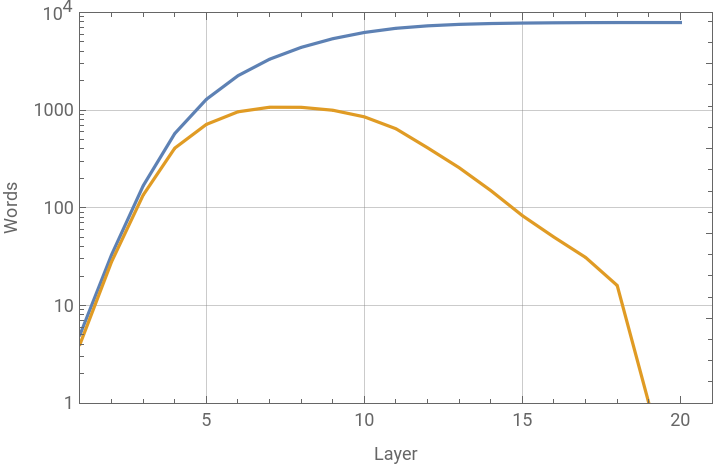


At this point we have a big file with the associations of words and words needed to define them and some interesting data on how the data was built. The growth rate is determined to first order by the size of the first definition.
Example output from the network generator.
The first layer contains the definition of the seed word, in this case ‘meaning’.
The first layer contains the definition of the seed word, in this case ‘meaning’.
Out[]=
{meaningimplied,meaningor,meaningexplicit,meaningsignificance}
The second contains definitions of those words.
Out[]=
{impliedsuggested,impliedbut,impliednot,implieddirectly,impliedexpressed,impliedimplicit,orused,orto,orlink,oralternatives,explicitstated,explicitclearly,explicitand,explicitin,explicitdetail,explicitleaving,explicitno,explicitroom,explicitfor,explicitconfusion,explicitor,explicitdoubt,significancethe,significancequality,significanceof,significancebeing,significanceworthy,significanceattention,significanceimportance}
And the third layer contains the definitions of any new words. Only the first few associations are shown, this layer contains definitions for 28 words. This continues until no new words are encountered, 20 layers and 80,000 associations later.
Out[]=
{suggestedput,suggestedforward,suggestedfor,suggestedconsideration,butused}
Rendering the graphs
Rendering the graphs
Now comes the tricky part, making it visual. A big challenge going from science to art is coding subjectivity. This is why Mathematica has been so wonderful, its really easy to quickly explore and find those subjectively successful moments.
These are large graphs and the success of the project hinged on Mathematica’s ability to render and export a graph with ~8000 nodes and ~80,000 edges. This took a bit effort to find the right method but GraphicsComplex was able to do the job. Once you have your association table from the generator you essentially turn it into a list of points and lines using an embedding algorithm. I had always imagined a star-embed pattern so I did that first but found many other techniques that emphasized different aspects of the data. The vector export outputs a single PDF page that’s around 40Mb which doesn’t sound like much but for a single page PDF it’s massive. I managed to load the PDFs into Illustrator and was able to tune the size, line weights, and opacity for rasterization ultimately ending up with 800Mb Tiffs. You can view a high detail image here https://i.micr.io/BWRII/en/no1_meaning_42_50_600-tif/feature-tour/1
Assoc[file_]:=Import["CompleteWords/V2.1/"<>file<>"/Final_"<>ToLowerCase[file]<>"_mainassociations.mx"];Defs[file_]:=Import["CompleteWords/V2.1/"<>file<>"/Final_"<>ToLowerCase[file]<>"_deflist.mx"];Indexgraph[file_]:=IndexGraph@Graph[Assoc[file]];Coords[file_,embedd_]:=GraphEmbedding[Indexgraph[file],embedd];wordlist[file_]:=DeleteDuplicates[Keys[Assoc[file]]];(*Thisfunctionexportsasimpleblacklinegraph.Pointmarkerscanbeaddedbutfurtherstylingsuchasopacitycanbreaktheexportofsuchalargefile.Ididhaveawaytoaddwordlabelsbutincludingthetextwouldalwaysbreaktheexport.*)networkImage[type_,word_,export_,part_,emb_,size_,line_,opacity_]:=Module[{tree,assoc,graph,coords},assoc=Assoc[word];graph=IndexGraph@Graph[assoc];coords=GraphEmbedding[graph,emb];Which[type"PDF",tree=Graphics[{AbsoluteThickness[100*line],GraphicsComplex[coords,{Line[List@@@EdgeList[graph]](*,Black,AbsolutePointSize[0.01],Point[coords]*)}]},ImageSizesize*100];,type"Raster",tree=Rasterize[Graphics[{Opacity[opacity],Thickness[line],GraphicsComplex[coords,{Line[List@@@EdgeList[graph]]}]},ImageSizesize]]];If[export"here",tree,Export[export,tree]]](*DefaulttemplatesnetworkImage["PDF","Meaning","Meaning.pdf",All,"StarEmbedding",42,0.001,0.1]networkImage["Raster","Meaning","Meaning.png",All,"StarEmbedding",1000,0.0001,0.1]networkImage["Raster","Meaning","here",All,"StarEmbedding",1000,0.0001,0.1]*)
This is the image I was going after for several months. The high resolution version is so rich in detail and every line is part of a micro and macro story. The dense shading at the top is thousands of lines converging on common words like ‘of’, ‘a’, and ‘or’. The ring that forms around the edge describes the rate at which new words are added. Subtle white rings of negative space can be seen at harmonics of the diameter as lines cross trying to reach evenly spaces words. Every word can be shown like this but their truest form of meaning lies outside the circle in our world, culture, and context all of which is passed through a human filter. High res version https://i.micr.io/BWRII/en/no1_meaning_42_50_600-tif/feature-tour/1
Exploring the data
Exploring the data
Example of embedding types
Layers by color first (seed word):red, second:yellow, third:green, fourth:blue, fifth:cyan
Layers by color first (seed word):red, second:yellow, third:green, fourth:blue, fifth:cyan
Figure below shows the differences between some embedding types using the same seed word. For star embedding the differences are subtle, every seed word will have its own unique order in which the words appear so the patterns will be unique.
Detail of balloon embedding. High res version here https://i.micr.io/qnumW/en/no2_knowledge_ 42_ 50_ 600-tif
No matter what seed word you pick there is a core set of words that will always appear. You can find this set easily if you use a seed word that is extremely common like ‘or’ since it will always be present in the complete definition of any less common word. With my code this core set is 7882 words and would be different depending on how I manually handled the hard coding at the start of the lookup function. Since every word in the set is completely defined within the set, all words in this core could also be the seed word and the set size wouldn’t change. New seed words can be seen as perturbations of this core where most of the differences occur in just the first definition if at all. If you’re interested in seeing the exhibit you can find it here through December https://publications.risdmuseum.org/complete-definitions If you’d like a print, I have some here https://jmadden.artstation.com/store/art_prints