The Semenov Model
Authors: Housam Binous and Ahmed Bellagi
The Semenov Model
Authors: Housam Binous and Ahmed Bellagi
Authors: Housam Binous and Ahmed Bellagi
Details about the Semenov model can be found in:
G. Nicolis, Dynamique Chimique, Thermodynamique, Cinétique et Mécanique Statistique, Dunod, Paris 2005.
The author would like to acknowledge the help of Professor Brian Higgins, Chemical Engineering Department, U C Davis who kindly provided notebooks on continuation methods.
G. Nicolis, Dynamique Chimique, Thermodynamique, Cinétique et Mécanique Statistique, Dunod, Paris 2005.
The author would like to acknowledge the help of Professor Brian Higgins, Chemical Engineering Department, U C Davis who kindly provided notebooks on continuation methods.
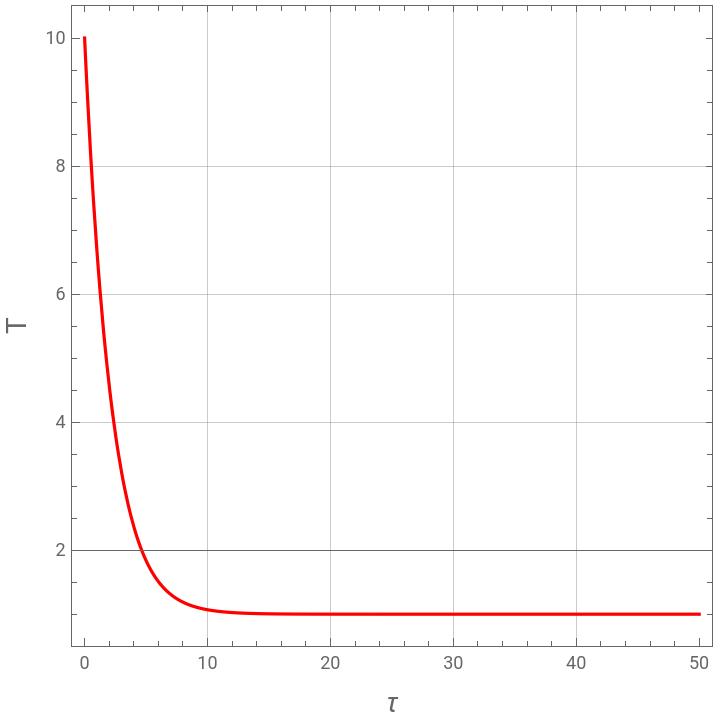
The Semenov model can be written as follows: =exp--γ(T-1)Let us solve the non linear ODE for ϵ=0.1 and γ=0.5.
dT
dτ
1
ϵT
In[]:=
Off[General::"spell1"]
In[]:=
ϵ=0.1;γ=0.5;
In[]:=
sol=NDSolve[{D[T[τ],{τ,1}]Exp[-1/(ϵT[τ])]-γ(T[τ]-1),T[0]10},{T[τ]},{τ,0,1000}]
Out[]=
T[τ]InterpolatingFunction[τ]


In[]:=
Plot[T[τ]/.sol,{τ,0,50},PlotStyleRGBColor[1,0,0],PlotRangeAll,FrameTrue,GridLinesAutomatic,AspectRatio1,FrameLabel{Style["τ",14],Style["T",14]}]
Out[]=
In[]:=
T[τ]/.sol/.τ1000(*steady-state*)
Out[]=
{1.00009}
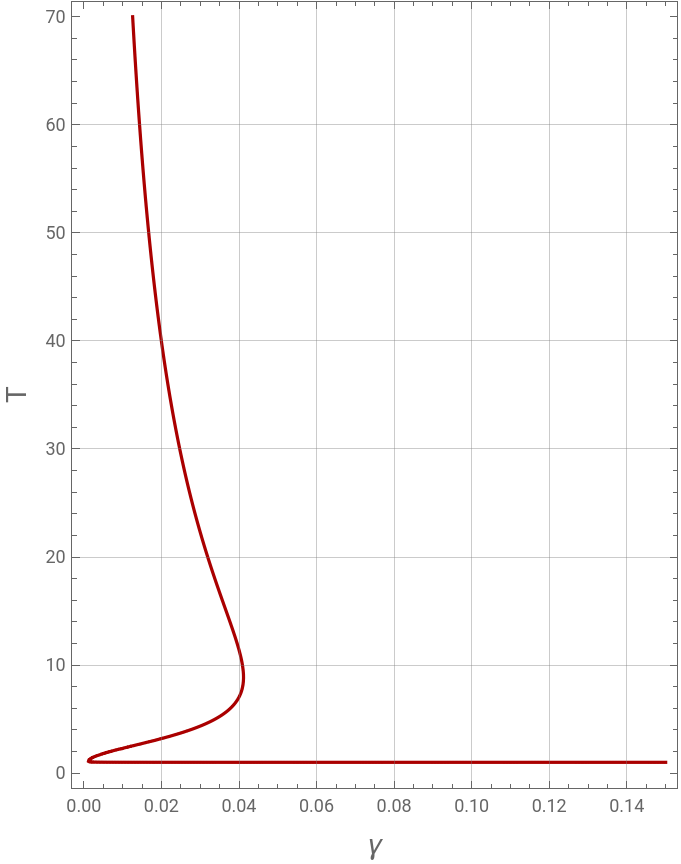
Let us find the steady state of the non linear ODE as a function of γ for ϵ=0.1 using ContourPlot.
The curve exhibits turning points and clearly there can be up to three steady-states for a particular range of γ values when ϵ=0.1.
The curve exhibits turning points and clearly there can be up to three steady-states for a particular range of γ values when ϵ=0.1.
In[]:=
γ=.
In[]:=
plt2=Quiet@ContourPlot[Exp[-1/(ϵT)]-γ(T-1)0,{γ,0,0.15},{T,0.01,70},AspectRatio1.3,PlotPoints100,GridLinesAutomatic,ContourStyleDarker@Red,FrameLabel{Style["γ",14],Style["T",14]}]
Out[]=
Let us find the steady state of the non linear ODE as a function of γ for ϵ=0.1 using the continuation method. Indeed, we use the arc-length continuation method to solve a single equation =exp--γ(T-1)=0 . Turning points , obtained using the command WhenEvent, are shown by the green dots .
dT
dτ
1
ϵT
In[]:=
eq1=Exp[-1/(ϵT)]-γ(T-1)0/.TT[s]/.γγ[s];eq2=1-[s];(*theauxiliaryequation*)init1=γ[0]0.5;init2=T[0](T/.FindRoot[Exp[-1/(ϵT)]-0.5(T-1)0,{T,1.00}]);{sol2,pts2}=Quiet@Reap@NDSolve[{eq1,eq2,init1,init2,WhenEvent[γ'[s]0,Sow[s]]},{T[s],γ[s]},{s,-1,1000}]
2
γ'[s]
2
′
T
Out[]=
T[s]InterpolatingFunction[s],γ[s]InterpolatingFunction[s],{{0.568286,8.31443}}


In[]:=
plt4=ParametricPlot[Evaluate[{γ[s],T[s]}/.sol2],{s,-1,500},FrameTrue,FrameLabel{Style["γ",16],Style["T",Italic,16]},PlotStyle{Thick,RGBColor[0,0,0.48],Dashed},PlotRange{{0,0.1},{0,80}},ImageSize{500,380},GridLinesAutomatic,AspectRatio1,PlotPoints1000,Epilog{PointSize[0.025],Green,Point[Flatten[{γ[s]/.sol2,T[s]/.sol2}/.sFlatten[pts2][[1]]]],Point[Flatten[{γ[s]/.sol2,T[s]/.sol2}/.sFlatten[pts2][[2]]]]},FrameLabel{Style["γ",14],Style["T",14]}]
Out[]=
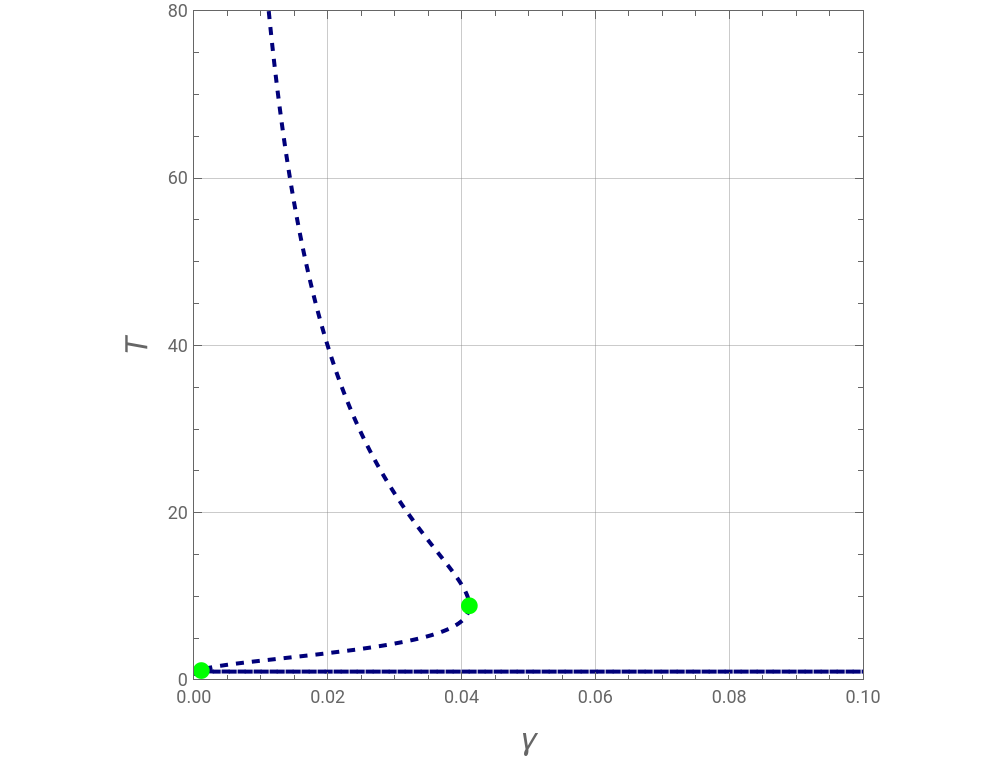
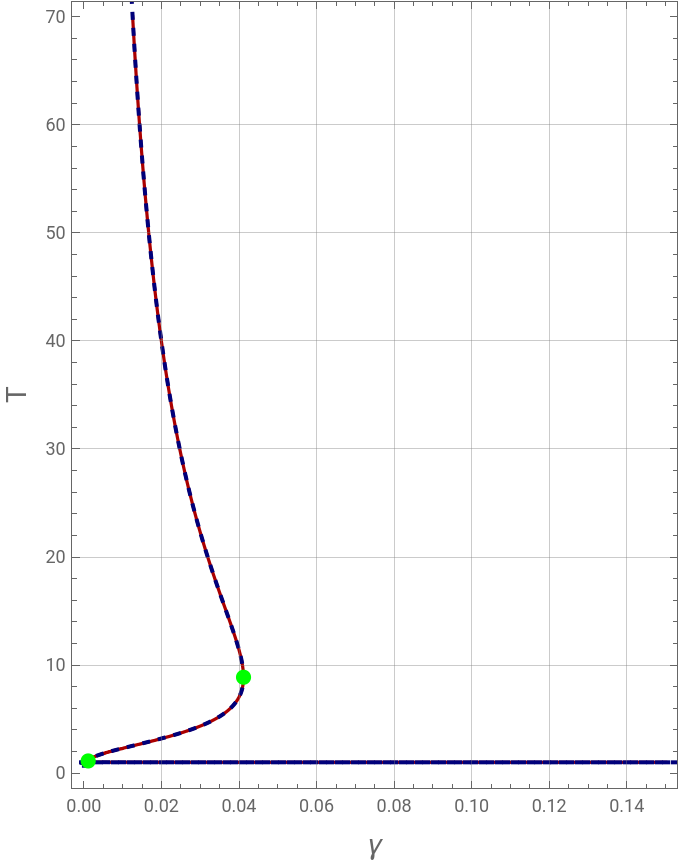
The arc-length continuation method and the calculation based on ContourPlot give the same result. We get the well known S-shape.
In[]:=
Show[plt2,plt4,Epilog{PointSize[0.025],Green,Point[Flatten[{γ[s]/.sol2,T[s]/.sol2}/.sFlatten[pts2][[1]]]],Point[Flatten[{γ[s]/.sol2,T[s]/.sol2}/.sFlatten[pts2][[2]]]]}]
Out[]=