Binary data may contain interesting messages and words. For example, blockchain transactions contain information about who mined the block and there are comments from the executable code developers. This project extracts meaningful words from executable files and bitcoin transactions. It uses a string parser to find words from a string using two different criteria, one depending on the length of the word, and the other on the frequency. Parts of speech patterns can then be used to locate meaningful messages.
Parsing a String to Find Words
Parsing a String to Find Words
A string without spaces, for example "bookkeeperhadadog" could be separated in a variety of ways. I implemented two recursive methods for separating the words. The first finds the longest possible word (with the help of Dictionary WordQ), transfers it into another word string, and repeats the process with the remaining string. The other method separates the words based on their frequency. Separating words based on a minimal frequency may surprisingly produce more accurate results than using a maximum frequency, as messages may contain vague and uncommon words.
Separating Words based on Length
Separating Words based on Length
The first step is to split the beginning of the string (the first 13 characters) into lists of characters to later identify possible words:
(Debug) In[]:=
seperate[s_String]:=Module[{wordlist={}},Table[Take[Characters[s],n],{n,1,If[StringLength[s]>13,13,StringLength[s]]}]]
(Debug) In[]:=
seperate["bookkeeperhadadog"]
(Debug) Out[]=
{{b},{b,o},{b,o,o},{b,o,o,k},{b,o,o,k,k},{b,o,o,k,k,e},{b,o,o,k,k,e,e},{b,o,o,k,k,e,e,p},{b,o,o,k,k,e,e,p,e},{b,o,o,k,k,e,e,p,e,r},{b,o,o,k,k,e,e,p,e,r,h},{b,o,o,k,k,e,e,p,e,r,h,a},{b,o,o,k,k,e,e,p,e,r,h,a,d}}
Rather than separating the entire string, only the first 13 characters (or the length of the string if it's less than that) are taken. This saves computational time, especially for very large files. Out of the separated characters, the findWords function returns all the valid dictionary words. However, DictionaryWordQ considers all letters to be words, so the findWords method finds words with a length greater than 1, with the exceptions of "I" and "a".
(Debug) In[]:=
findWords[s_String]:=Module[{wordspicked={}},wordspicked=If[(DictionaryWordQ[StringJoin[#]]&&StringLength[StringJoin[#]]>1)||StringJoin[#]"a"||StringJoin[#]"I"||StringJoin[#]"A",StringJoin[#],Nothing]&/@seperate[s]]
(Debug) In[]:=
findWords["bookkeeperhadadog"]
(Debug) Out[]=
{boo,book,bookkeeper}
In the case that there is more than one possible word from the beginning of the string, the firstselectOrder method picks the longest word.
(Debug) In[]:=
firstselectOrder[s_String]:=If[Length[findWords[s]]0,If[StringLength[s]0,Return[""],firstselectOrder[StringJoin[Drop[Characters[s],1]]]],First[Reverse[If[Length[Part[Characters/@findWords[s],1]]1,RotateLeft[findWords[s],1],findWords[s]]]]]
(Debug) In[]:=
firstselectOrder["bookkeeperhadadog"]
(Debug) Out[]=
bookkeeper
After a word has been found, the printWordList method recursively picks apart the words in the input string. It places the found word in a list, then removes the word from the rest of the string, and runs the function on the new (shorter) string again.
(Debug) In[]:=
printWordList[s_String]:=Module[{words={}},If[StringLength[firstselectOrder[s]]0,words,If[StringLength[s]>0,AppendTo[words,firstselectOrder[s]];words=If[First[Flatten[Position[Characters[s],Last[Characters[firstselectOrder[s]]]]]]StringLength[s],Return[words],Join[words,printWordList[StringJoin[Drop[Characters[s],First[Flatten[Position[Characters[s],Last[Characters[firstselectOrder[s]]]]]]]]]]];words,Return[]]]]
(Debug) In[]:=
printWordList["bookkeeperhadadog"]
(Debug) Out[]=
{bookkeeper,had,a,dog}
Min/Max Frequency Words
Min/Max Frequency Words
Another method of picking a word is based on the frequency of the word, rather than its length.
(Debug) In[]:=
firstselectOrder2[s_String]:=If[Length[findWords[s]]0,If[StringLength[s]0,Return[""],firstselectOrder2[StringJoin[Drop[Characters[s],1]]]],If[WordFrequencyData[Part[findWords[s],#]]==Min[WordFrequencyData/@findWords[s]],Part[findWords[s],#],Nothing]&/@Range[Length[findWords[s]]]]
Picking out the minimum frequency word
(Debug) In[]:=
firstselectOrder2["bookkeeperhadadog"]
(Debug) Out[]=
{boo}
The next method functions the same way as the previous recursive method, with a few differences in syntax.
(Debug) In[]:=
printWordList2[s_String]:=Module[{words={}},If[First[StringLength[firstselectOrder2[s]]]0,words,If[StringLength[s]>0,AppendTo[words,First[firstselectOrder2[s]]];words=If[First[Flatten[Position[Characters[s],Last[Flatten[Characters[firstselectOrder2[s]]]]]]]StringLength[s],Return[words],Join[words,printWordList[StringJoin[Drop[Characters[s],First[First[Position[Characters[s],Last[Flatten[Characters[firstselectOrder2[s]]]]]]]]]]]];words,Return[]]]]
(Debug) In[]:=
printWordList2["bookkeeperhadadog"]
(Debug) Out[]=
{boo,ok,keeper,had,a,dog}
Filtering Useful and Useless Words
Filtering Useful and Useless Words
Some words, with length greater than 1, are abbreviations and most likely do not contain any meaningful message since they are extracted from a seemingly random string of characters. Especially in blockchain transactions, it is useful to filter out all the two letter consonant "words", for example "HH or HM".
(Debug) In[]:=
filterString[s_String]:=If[StringLength[#]2,If[MemberQ[Characters["aeiou"],StringPart[#,1]]&&MemberQ[Characters["aeiou"],StringPart[#,2]],#,Nothing],#]&/@printWordList[s]
Analyzing Executable Files
Analyzing Executable Files
Running WordList on Executable Files
Running WordList on Executable Files
In executable files, bytes can be filtered to contain only ASCII Characters, and then the ASCII characters are converted into strings. The strings can then be analyzed using the recursive method.
(Debug) In[]:=
chromefile=Import["D:\\Yana\\WolframSummerCamp\\TestEXE\\chrome.exe","Byte"];
(Debug) In[]:=
firefoxfile=Import["D:\\Yana\\WolframSummerCamp\\TestEXE\\firefox.exe","Byte"];
(Debug) In[]:=
wolframfile=Import["D:\\Yana\\WolframSummerCamp\\TestEXE\\wolfram.exe","Byte"];
Bytes from the executable files are kept if they fall in the ASCII character range.
(Debug) In[]:=
asciiCharacterschrome=If[((91>#>64)||(123>#>96)),#,Nothing]&/@chromefile;
(Debug) In[]:=
asciiCharactersfirefox=If[((91>#>64)||(123>#>96)),#,Nothing]&/@firefoxfile;
(Debug) In[]:=
asciiCharacterswolfram=If[((91>#>64)||(123>#>96)),#,Nothing]&/@wolframfile;
The ASCII characters are then converted into a byte array so that the byte array can be a later converted into a string.
(Debug) In[]:=
ascciByteArraychrome=ByteArray[asciiCharacterschrome];
(Debug) In[]:=
ascciByteArrayfire=ByteArray[asciiCharactersfirefox];
(Debug) In[]:=
ascciByteArraywolfram=ByteArray[asciiCharacterswolfram];
(Debug) In[]:=
letterbytechrome=ByteArrayToString[ascciByteArraychrome];
(Debug) In[]:=
letterbytefire=ByteArrayToString[ascciByteArrayfire];
(Debug) In[]:=
letterbytewolfram=ByteArrayToString[ascciByteArraywolfram];
(Debug) In[]:=
chromewords=Flatten[Table[filterString[StringJoin[Take[Characters[letterbytechrome],{n,n+700}]]],{n,1,StringLength[letterbytechrome]-700,700}]];
firefoxwords=Flatten[Table[filterString[StringJoin[Take[Characters[letterbytefire],{n,n+700}]]],{n,1,StringLength[letterbytefire]-700,700}]];
wolframwords=Flatten[Table[filterString[StringJoin[Take[Characters[letterbytewolfram],{n,n+500}]]],{n,1,StringLength[letterbytechrome],500}]];
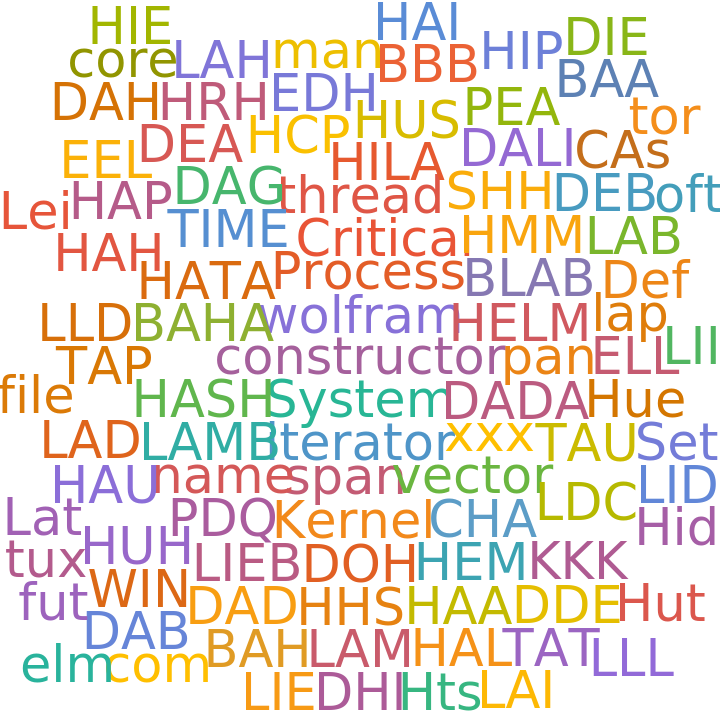
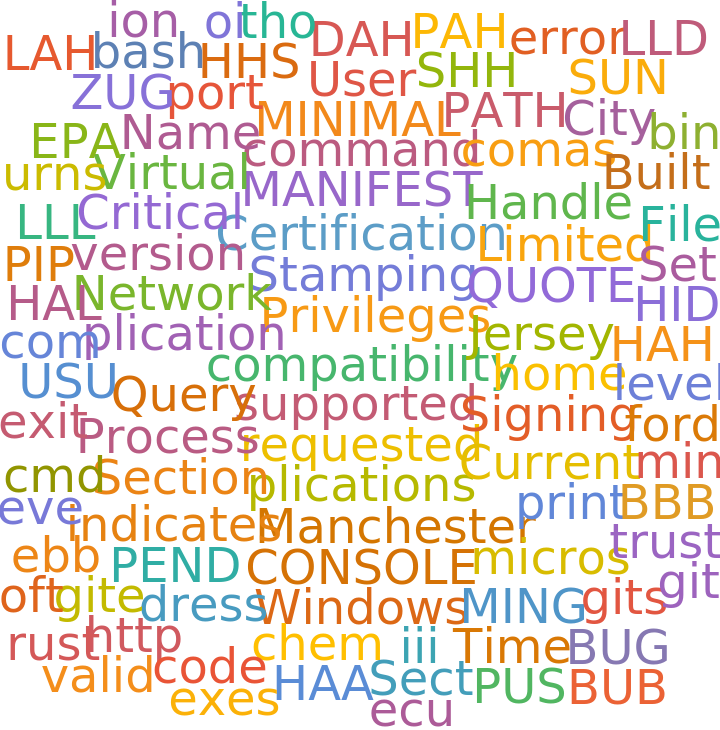
toVisualize={Labeled[WordCloud[DeleteStopwords[Flatten[wolframwords]]],"Wolfram EXE"],Labeled[WordCloud[DeleteStopwords[Flatten[chromewords]]],"Chrome EXE"],Labeled[WordCloud[DeleteStopwords[Flatten[firefoxwords]]],"Firefox EXE"]}
(Debug) Out[]=
,
,
Wolfram EXE |
Chrome EXE |
Firefox EXE |
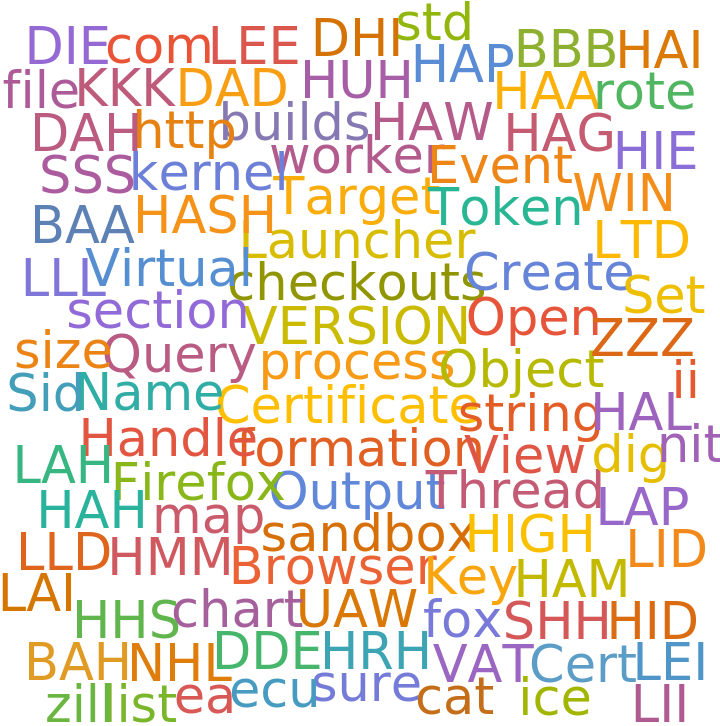
The graphic above shows the most common words in the wolfram, chrome, and firefox executable files! The DeleteStopwords function was run to get rid of words such as "the" and "a".
Analyzing Bitcoin Transactions
Analyzing Bitcoin Transactions
Analyzing Bytes on Bitcoin Transactions
Analyzing Bytes on Bitcoin Transactions
The bytearrayforblock takes in bitcoin block number, and the amount of transactions for the block that need to be analyzed. Then the stringbyteblocks converts the byte array of transactions into a string, which can then be analyzed by the recursive word picker function.
I am splitting the full set of bitcoin transactions into chunks because the analysis of the full data set is not feasible on a laptop.
I am splitting the full set of bitcoin transactions into chunks because the analysis of the full data set is not feasible on a laptop.
The variable below, words1000, is the list of found words in the last 1000 bitcoin blocks in the blockchain. Only the first transaction for each block is analyzed since that's where most of the useful data is.
Rather than analyzing the transactions at the end of the block chain, transactions can also be analyzed at the beginning, middle, and end of the chain to see if there is a pattern in the words and miner names. I used block 100,000 to represent the beginning of the chain, since many blocks before did not contain any strings. Then 200,000 is used to repent the middle, 300,000 the middle-end, 400,000 the almost end, and the previously calculated words 1000 for the very end to the block chain.
This data from the consecutive parts of the bitcoin block sequence is represented in the following section.
Visualizing Data
Visualizing Data
I used WordCloud to see patterns in the words of the last 1000 bitcoin blocks.
The following graphic shows the progression of the messages in the transactions of the bitcoin blockchain from the beginning, middle, and end. The beginning of the block chain does not seem to have any discernable messages.
Finding Bitcoin Miners
Finding Bitcoin Miners
The following code converts first transactions of a certain amount of blocks at the end of the blockchain into strings.
After the transaction bytes have been converted to strings, a part-of-speech pattern can be used to find the miners information. In the last thousand blocks of the blockchain, it is very common to see "Mined by NameOfMiner" in the first transaction. A pattern is used to isolate the NameOfMiner.
The BarChart below shows the counts of the miners that have mined more than two blocks in the data sample. AntPool was the main miner. It is unclear if AntPoolo and AntPooly are separate miners. Further work could be done to analyze bitcoin miners at the beginning of the block chain using a different pattern. I have observed the in the beginning of the chain, "from" sometimes precedes the miner name. This pattern can be used rather than selecting the word after "by".
Messages Based on Parts of Speech
Messages Based on Parts of Speech
Rather than finding messages based on word frequency, a part-of-speech pattern can be used. This is especially useful for bitcoin transactions as they are already separated into lists. This function isolates string where there is an noun followed by an adjective. Of course, it is very simple to change the pattern for other byte forms.
The noun-adjective construct works for only some cases on the bitcoin transactions. Depending on what is being analyzed, the pattern may need to change, for example, to isolate strings that have a verb following an adjective. Also, long strings of words will need to be broken up to optimal sections, making a list of lists of words.
Further Work
Further Work
Parts-of-Speech patterns can be generalized and made more flexible using natural language processing. For the bitcoin blockchain, different patterns can be used to identify the miner. For example, a miner name sometimes follows "from" in beginning of the blockchain. A pattern may emerge from the miner's names throughout the blockchain, and can be used to predict possible miner activity in the future.
This project focused on extracting obvious words that were not encrypted. The bitcoin transactions and executable files may contain messages that are encrypted or scrambled. I did not attempt to decrypt the possible messages, and this can be an interesting extension of this project.
This project focused on extracting obvious words that were not encrypted. The bitcoin transactions and executable files may contain messages that are encrypted or scrambled. I did not attempt to decrypt the possible messages, and this can be an interesting extension of this project.
Keywords
Keywords
◼
Bitcoin Blockchain
◼
Executable Files
◼
String Parsing