Version 0.8
MathematicaForPrediction at WordPress
RakuForPrediction at WordPress
RakuForPrediction-book at GitHub
November 2023
MathematicaForPrediction at WordPress
RakuForPrediction at WordPress
RakuForPrediction-book at GitHub
November 2023
Introduction
Introduction
The model "gpt-4-vision-preview" represents a significant enhancement to the GPT-4 model, providing developers and AI enthusiasts with a more versatile tool capable of interpreting and narrating images alongside text. This development opens up new possibilities for creative and practical applications of AI in various fields.
For example, consider the following Wolfram Language (WL), developer-centric applications:
◼
Narration of UML diagrams
◼
Code generation from narrated (and suitably tweaked) narrations of architecture diagrams and charts
◼
Generating presentation content draft from slide images
◼
Extracting information from technical plots
◼
etc.
A more diverse set of the applications would be:
◼
Dental X-ray images narration
◼
Security or baby camera footage narration
◼
How many people or cars are seen, etc.
◼
Transportation trucks content descriptions
◼
Wood logs, alligators, boxes, etc.
◼
Web page visible elements descriptions
◼
Top menu, biggest image seen, etc.
◼
Creation of recommender systems for image collections
◼
Based on both image features and image descriptions
◼
etc.
As a first concrete example, consider the following image that fable-dramatizes the name "Wolfram" (https://i.imgur.com/UIIKK9w.jpg):
In[]:=
RemoveBackground@Import[URL["https://i.imgur.com/UIIKK9wl.jpg"]]
Out[]=
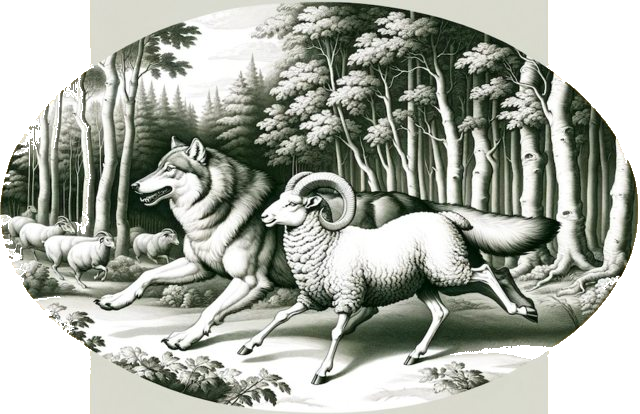
Here is its narration:
In[]:=
LLMVisionSynthesize["Describe very concisely the image","https://i.imgur.com/UIIKK9w.jpg","MaxTokens"->600]
Out[]=
You are looking at a stylized black and white illustration of a wolf and a ram running side by side among a forest setting, with a group of sheep in the background. The image has an oval shape.
Remark: In this notebook Mathematica and Wolfram Language (WL) are used as synonyms.
Ways to use with WL
Ways to use with WL
There are five ways to utilize image interpretation (or vision) services in WL:
◼
Dedicated Web API functions, [MT1, CWp1]
◼
◼
Any combinations of the above
In this document are demonstrated the second, third, and fifth. The first one is demonstrated in the Wolfram Community post "Direct API access to new features of GPT-4 (including vision, DALL-E, and TTS)" by Marco Thiel, [MT1]. The fourth one is still "under design and consideration."
Remark: The model "gpt-4-vision-preview" is given as a "chat completion model" , therefore, in this document we consider it to be a Large Language Model (LLM).
Packages and paclets
Packages and paclets
Here we load WL package used below, [AAp1, AAp2, AAp3]:
In[]:=
Import["https://raw.githubusercontent.com/antononcube/MathematicaForPrediction/master/Misc/LLMVision.m"]
Remark: The package LLMVision is "temporary" -- It should be made into a Wolfram repository paclet, or (much better) its functionalities should be included in the "LLMFunctions" framework, [WRIp1].
Images
Images
Here are the links to all images used in this document:
Out[]//TableForm=
Name | Link |
Wolf and ram running together in forest | |
LLM functionalities mind-map | |
Single sightseer | |
Three hunters | |
Cyber Week Spending Set to Hit New Highs in 2023 |
Document structure
Document structure
Here is the structure of the rest of the document:
◼
LLM synthesizing
... using multiple image specs of different kind.
... using multiple image specs of different kind.
◼
LLM functions
... workflows over technical plots.
... workflows over technical plots.
◼
Dedicated notebook cells
... just excuses why they are not programmed yet.
... just excuses why they are not programmed yet.
◼
Combinations (fairytale generation)
... Multi-modal applications for replacing creative types.
... Multi-modal applications for replacing creative types.
◼
Conclusions and leftover comments
... frustrations untold.
... frustrations untold.
LLM synthesizing
LLM synthesizing
The simplest way to use the OpenAI's vision service is through the function LLMVisionSynthesize of the package "LLMVision", [AAp1]. (Already demoed in the introduction.)
If the function LLMVisionSynthesize is given a list of images, a textual result corresponding to those images is returned. The argument "images" is a list of image URLs, image file names, or image Base64 representations. (Any combination of those element types can be specified.)
Before demonstrating the vision functionality below we first obtain and show a couple of images.
Images
Images
In[]:=
Import[URL["https://i.imgur.com/LEGfCeql.jpg"]]
Out[]=
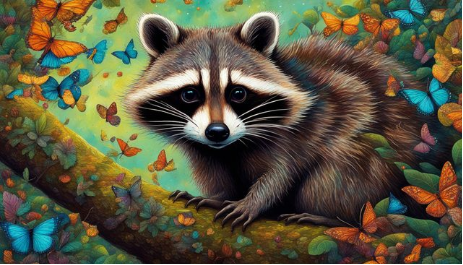
OpenAI's vision endpoint accepts POST specs that have image URLs or images converted into Base64 strings. When we use the LLMVisionSynthesize function and provide a file name under the "images" argument, the Base64 conversion is automatically applied to that file.
In[]:=
img1=Import[$HomeDirectory<>"/Downloads/ThreeHunters.jpg"];ColumnForm[{img1,Spacer[10],ExportString[img1,{"Base64","JPEG"}]//Short}]
Out[]=
/9j/4AAQSkZJRgABAQEASABIAAD/4QDURXhpZgAASUkqAAgAAAAIAAABCQABAAAAgAIAAAE…Vil7429DGIwQOox3qdIt3GcBcdutFFdj2MiysKAhlyCuevelVySeAM88fSiisyr6H/9k= |


Image narration
Image narration
Here is an image narration example with the two images above, again, one specified with a URL, the other with a file path:
In[]:=
LLMVisionSynthesize["Give concise descriptions of the images.",{"https://i.imgur.com/LEGfCeql.jpg",$HomeDirectory<>"/Downloads/ThreeHunters.jpg"},"MaxTokens"->600]
Out[]=
1. The first image depicts a single raccoon perched on a tree branch, surrounded by a plethora of vibrant, colorful butterflies in various shades of blue, orange, and other colors, set against a lush, multicolored foliage background.2. The second image shows three raccoons sitting together on a tree branch in a forest setting, with a warm, glowing light illuminating the scene from behind. The forest is teeming with butterflies, matching the one in the first image, creating a sense of continuity and shared environment between the two scenes.
Description of a mind-map
Description of a mind-map
Here is an application that should be more appealing to WL-developers -- getting a description of a technical diagram or flowchart. Well, in this case, it is a mind-map from [AA2]:
Here are get the vision model description of the mind-map above (and place the output in Markdown format):
Converting descriptions to diagrams
Converting descriptions to diagrams
Here from the obtained description we request a (new) Mermaid-JS diagram to be generated:
Here is a diagram made with Mermaid-JS spec obtained above using the resource function of "MermaidInk", [AAf1]:
Below is given an instance of one of the better LLM results for making a Mermaid-JS diagram over the "vision-derived" mind-map description.
Code generation from image descriptions
Code generation from image descriptions
Here is an example of code generation based on the "vision derived" mind-map description above:
Analyzing graphical WL results
Analyzing graphical WL results
Consider another "serious" example -- that of analyzing chess play positions. Here we get a chess position using the paclet "Chess", [WRIp3]:
Here we describe it with "AI vision":
Remark: In the our few experiments with these kind of image narrations, fair amount of the individual pieces are described to be at wrong chessboard locations.
Remark: In order to make the AI vision more successful, we increased the size of the chessboard frame tick labels, and turned the “a÷h” ticks uppercase (into “A÷H” ticks.) It is interesting to compare the vision results over chess positions with and without that transformation.
LLM Functions
LLM Functions
Let us show more programmatic utilization of the vision capabilities.
Here is the workflow we consider:
1
.Ingest an image file and encode it into a Base64 string
2
.Make an LLM configuration with that image string (and a suitable model)
3
.Synthesize a response to a basic request (like, image description)
◼
Using LLMSynthesize
4
.Make an LLM function for asking different questions over image
◼
Using LLMFunction
5
.Ask questions and verify results
◼
⚠️ Answers to "hard" numerical questions are often wrong.
◼
It might be useful to get formatted outputs
Image ingestion and encoding
Image ingestion and encoding
Here we ingest an image and display it:
Configuration and synthesis
Configuration and synthesis
Here we synthesize a response of a image description request:
Repeated questioning
Repeated questioning
Here we define an LLM function that allows the multiple question request invocations over the image:
Remark: Numerical value readings over technical plots or charts seem to be often wrong. OpenAI's vision model warns about this in the responses often enough.
Formatted output
Formatted output
Here we make a function a specially formatted output that can be more easily integrated in (larger) workflows:
Here we invoke the that function (in order to get the money per year "seen" OpenAI's vision):
Remark: The above result should be structured as shopping-day:year:value. But occasionally ig might be structured as year::shopping-day::value. In the latter case just re-run LLM invocation.
Here we parse the obtained JSON into WL association structure:
Remark: Currently LLMVisionFunction does not have an interpreter (or "form") parameter as LLMFunction does. This can be seen as one of the reasons to include LLFVisionFunction in the "LLMFunctions" framework.
Here we convert the money strings into money quantities:
Here is the corresponding bar chart and the original bar chart (for comparison):
Remark: The comparison shows "pretty good vision" by OpenAI! But, again, small (or maybe significant) discrepancies are observed.
Dedicated notebook cells
Dedicated notebook cells
In the context of the "well-established" notebook solutions OpenAIMode, [AAp2], or Chatbook, [WRIp2], we can contemplate extensions to integrate OpenAI's vision service.
The main challenges here include determining how users will specify images in the notebook, such as through URLs, file names, or Base64 strings, each with unique considerations. Additionally, we have to explore how best to enable users to input prompts or requests for image processing by the AI/LLM service.
This integration, while valuable, it is not my immediate focus as there are programmatic ways to access OpenAI's vision service already. (See the previous sections.)
Combinations (fairytale generation)
Combinations (fairytale generation)
Consider the following computational workflow for making fairytales:
1
.Draw or LLM-generate a few images that characterize parts of a story.
2
.Narrate the images using the LLM "vision" functionality.
3
.Use an LLM to generate a story over the narrations.
Remark: Multi-modal LLM / AI systems already combine steps 2 and 3.
Remark: The workflow above (after it is programmed) can be executed multiple times until satisfactory results are obtained.
Here are image generations using DALL-E for four different requests with the same illustrator name in them:
Here we display the images:
Here we get the image narrations (via the OpenAI's "vision service"):
Here we extract the descriptions into a list:
Here we generate the story from the descriptions above (using OpenAI's ChatGPT):
Conclusions and leftover comments
Conclusions and leftover comments
◼
The new OpenAI vision model, "gpt-4-vision-preview", as all LLMs produces too much words, and it has to be reined in and restricted.
◼
The functions LLMVisionSynthesize and LLMVisionFunction have to be part of the "LLMFunctions" framework.
◼
For example, "LLMVision*" functions do not have an interpreter (or "form") argument.
◼
The package "LLMVision" is meant to be simple and direct, not covering all angles.
◼
Very likely similar motivation was behind the creation of the post/notebook "Direct API access to new features of GPT-4 (including vision, DALL-E, and TTS)", [MT1].
◼
The package "LLMVision" uses the simple, OpenAI access providing package "OpenAIRequest", [AAp3], which is based on code from "OpenAILink", [CWp1].
◼
It would be nice a dedicated notebook cell interface and workflow(s) for interacting with "AI vision" services to be designed and implemented.
◼
The main challenge is the input of images.
◼
Generating code from hand-written diagrams might be really effective demo using WL.
◼
It would be interesting to apply the "AI vision" functionalities over displays from, say, chess or play-cards paclets.
References
References
Articles
Articles
[AA1] Anton Antonov, "Workflows with LLM functions (in WL)", August 4, (2023), Wolfram Community, STAFF PICKS.
[AA2] Anton Antonov, "Raku, Python, and Wolfram Language over LLM functionalities", (2023), Wolfram Community.
[MT1] Marco Thiel, "Direct API access to new features of GPT-4 (including vision, DALL-E, and TTS)", November 8, (2023), Wolfram Community, STAFF PICKS.
[OAIb1] OpenAI team, "New models and developer products announced at DevDay" , (2023), OpenAI/blog .
Functions, packages, and paclets
Functions, packages, and paclets
[WRIp1] Wolfram Research, Inc., LLMFunctions, WL paclet, (2023), Wolfram Language Paclet Repository.
Videos
Videos
CITE THIS NOTEBOOK
CITE THIS NOTEBOOK
AI vision via Wolfram Language
by Anton Antonov
Wolfram Community, STAFF PICKS, November 26, 2023
https://community.wolfram.com/groups/-/m/t/3072318
by Anton Antonov
Wolfram Community, STAFF PICKS, November 26, 2023
https://community.wolfram.com/groups/-/m/t/3072318