High Dimensional data is difficult to work with computationally and analytically. Principal Component Analysis (PCA) provides a way to find a latent lower-dimensional representation of a redundant and noisy high dimensional data by finding the directions along which the greatest variance in the data is captured. PCA involves eigendecomposing the sample covariance matrix of the data to find the principal components that span the -dimensional subspace with maximal variance.
k
k
1. Introduction
High-dimensional data is often quite cumbersome to work with, both computationally and analytically. This is due to challenges such as increased computational cost, difficulty in visualization, and the sparsity of data in high-dimensional spaces. As a result, we often seek to extract a latent lower dimensional structure that captures the essential patterns hidden within the redundant and noisy high-dimensional data. Principal Component Analysis (PCA) is a widely used algorithm for dimensionality reduction. It constructs a lower-dimensional representation of a large dataset while preserving as much of the information contained in the original data. As we will see later, what “keeping as much information as possible” practically means in PCA is to find the directions along which the greatest variance is captured—called principal components.
2. The Goal of Principal Component Analysis
The main objective of PCA is succinctly summarized as follows:
“Find the projections of sample data points onto a lower-dimensional subspace while keeping as much information as possible.”
n
2.1 Variance Measures the Amount of Information
2.1 Variance Measures the Amount of Information
The idea of “keeping as much information as possible” is rather abstract and ill-defined. What does it actually mean to lose information? In the context of our data points, losing information means losing what makes them distinct from one another. The worst-case scenario would be if, after projecting them to a lower-dimensional subspace, they all collapse into each other. If they all land on the same spot in the subspace, we’ve lost everything and those data points no longer contain any meaningful information.
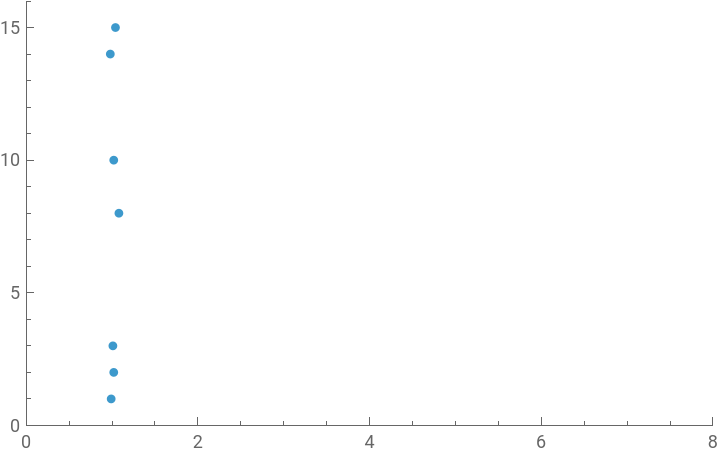
Let’s consider the following data points in 2D as an example.
Data points in 2D:
In[]:=
a={{0.99,1},{1.02,2},{1.01,3},{1.08,8},{1.02,10},{0.98,14},{1.04,15}}
Out[]=
{{0.99,1},{1.02,2},{1.01,3},{1.08,8},{1.02,10},{0.98,14},{1.04,15}}
FIGURE 1: Data points in 2D
In[]:=
ListPlot[a,PlotRange->{{0,8},{0,16}}]
Out[]=
We can try projecting them onto a 1-dimensional subspace of the original space 2D: x- and y-axes.
Projecting the data points onto the x -axis
In[]:=
aprojx=Projection[#,{1,0}]&/@a
Out[]=
{{0.99,0.},{1.02,0.},{1.01,0.},{1.08,0.},{1.02,0.},{0.98,0.},{1.04,0.}}
FIGURE 2: Projecting the data points onto the x -axis
In[]:=
ListPlot[aprojx,PlotRange->{{0,8},Automatic}]
Out[]=
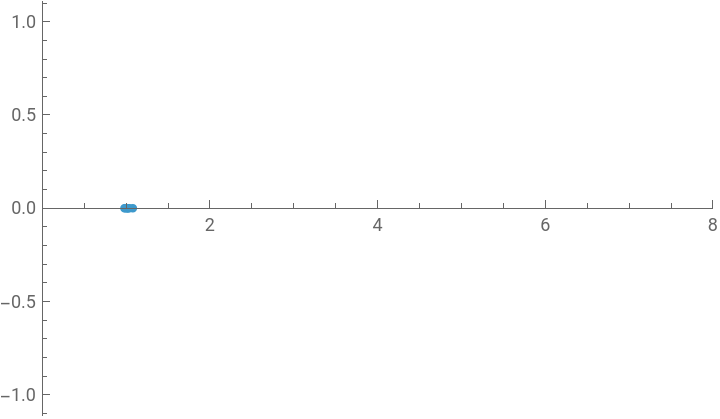
Figure 2 shows the result of projecting the data onto the x-axis. This projection demonstrates a significant loss of information. The points are now clustered closely together and largely indistinguishable, having lost the vertical spread that originally made them distinct.
FIGURE 3: Projecting the data points onto the y-axis
In[]:=
aprojy=Projection[#,{0,1}]&/@a
Out[]=
{{0.,1.},{0.,2.},{0.,3.},{0.,8.},{0.,10.},{0.,14.},{0.,15.}}
In[]:=
ListPlot[aprojy,PlotRange->{Automatic,{0,16}}]
Out[]=
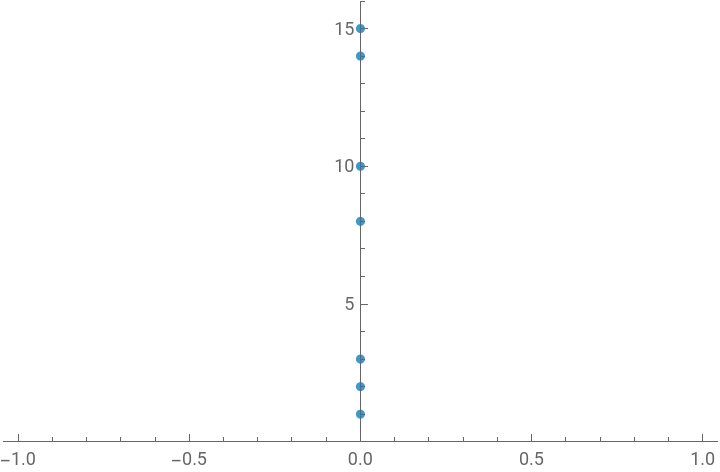
Conversely, Figure 3 shows the projection onto the y-axis. Here, the separation between the points is preserved because it aligns with the direction of the data’s greatest spread. Consequently, this projection retains the meaningful information inherent in the data’s original structure.
Therefore, we want to choose a projection onto a lower-dimensional subspace where the separation between our data points is preserved, maximizing the spread. This is how PCA makes the abstract concrete. The “amount of information” is quantified by the variance of the projected data—a direct statistical measure of their spread. A high variance means the points are distinguishable and we’ve kept the information. A low variance means they’ve collapsed and we’ve lost it.
3. Data Structures in PCA
3.1 Data Matrix
3.1 Data Matrix
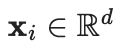
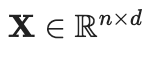
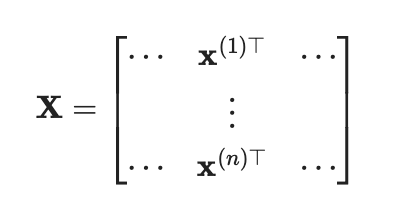
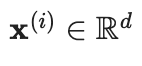
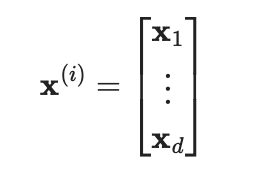
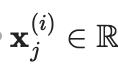
In PCA, we are dealing with a high-dimensional dataset of observations or or variables for individuals or examples. This dataset basically comes in as an data matrix , and each data point is represented by a -dimensional vector.
d
n
nd

d
◼
n
d
◼
i
d
◼
j
i
3.2 Example Dataset
3.2 Example Dataset
In this Computational Essay, we will consider the MNIST dataset for example.
Importing the MNIST dataset
dataset=ResourceData[ResourceObject["MNIST"]];
Forming the data matrix
In[]:=
X=ArrayReshape[ImageData[#[[1]]],{28*28}]&/@dataset
Out[]=
Data Labels
In[]:=
Y=#[[2]]&/@dataset
Out[]=
Let’s check the size of our data matrix.
Dimensions of the data matrix
In[]:=
Dimensions[X]
Out[]=
{60000,784}
Our data matrix contains 60,000 data points, each with 784 features. It is high-dimensional data for which each data point represented by a 784-dimensional vector.
3.3 Covariance Matrix
3.3 Covariance Matrix
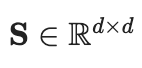
A very important matrix in PCA is the sample covariance matrix containing the covariances between the variables of our data.
d
Mean of a d-dimensional random vector x
Mean of a -dimensional random vector
d
x
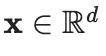
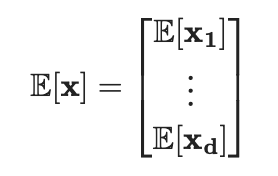
Given a random vector , it mean is also a -dimensional vector given by the following formula:
d
Computing the sample mean for the data points
Computing the centered data matrix
Computing the sample covariance matrix
4. Projection onto a Lower-Dimensional Subspace
4.1 Lower-Dimensional Representation
4.1 Lower-Dimensional Representation
Function for transforming a data point into its lower-dimensional representation
Function for projecting a data point onto the lower-dimensional subspace
5. Maximum Variance Formulation
As we mentioned in Section 2.1, the information contained in the data is quantified by the spread of the data, more specifically the variance. Thus, PCA can be formulated as a dimensionality reduction method that finds a lower-dimensional subspace (the line the figure below) that retains the maximum variance when the data (blue points) is projected onto this subspace (orange points). Essentially, we want to the find the line such that the orthogonal distance (orange lines) is minimized.
5.1 Variance of the Projected Data Point
5.1 Variance of the Projected Data Point
5.2 Direction with Maximal Variance
5.2 Direction with Maximal Variance
Constrained Optimization Problem
Constrained Optimization Problem
Direction with maximal variance
Direction with maximal variance
For the full proof, refer to the following section.
PROBLEM
PROBLEM
6.1 Symmetric Matrix and the Spectral Theorem
6.1 Symmetric Matrix and the Spectral Theorem
The properties make symmetric matrices orthogonal diagonalizable. As a result of this property, we have the Spectral Theorem.
Spectral Theorem
Spectral Theorem
SOLUTION
SOLUTION
7. Implementing Principal Component Analysis
Now that we have found the solution to the maximization problem, we can implement PCA on the MNIST data.
Step 1. Eigendecompose the Covariance Matrix
Step 1. Eigendecompose the Covariance Matrix
Computing the eigenvectors of the covariance matrix
Computing the eigenvalues of the covariance matrix
Total Variance
Total Variance
Computing the total variance
Variance Explained by PCA
Variance Explained by PCA
Computing the variance explained by PCA
Effective Rank and the Scree Plot
Effective Rank and the Scree Plot
Scree Plot
We want to consider the following criteria
Plotting the proportion of explained variance
Step 3. Project the data onto Lower-Dimensional Subspace
Step 3. Project the data onto Lower-Dimensional Subspace
Lower-dimensional representation of the original data
Lower-dimensional representation of the original data
Recall that the lower-dimensional representation of each data point is given by
Lower-dimensional representation of the data
Projection onto the lower-dimensional subspace
Projection onto the lower-dimensional subspace
Recall that the projection of each data point onto the lower-dimensional subspace is given by
Lower-dimensional representation of the data
Projection onto the lower-dimensional subspace
This provides a low-rank approximation to our data matrix. Let’s compare the reconstructed image with the original one.
Original Digit Image
Reconstructed Digit Image
Interestingly, the digit is still visible! This example directly demonstrates how PCA can help us denoise the data, that is, find the most meaningful part in the data.
8. Data Visualization
Not only does PCA help denoise data, but it also allows us to visualize high-dimensional data by reducing its dimensions. When we reduce the dimension of our data to 2D, we can visualize the data points by plotting them in the 2D space.
Transformation Matrix
2D representation of the data
Plotting the data in 2D space
We can use different colors for each class to observe the clusters.
Defining the colors for each class
Mapping each class label to its specified color
Plotting the dataset with class colors
We can see how these data points, originally in 784-dimension, clearly form clusters according to their class in 2-dimension.
8. Conclusion
References
◼
Bishop, C. M. (2006). _Pattern recognition and machine learning_. Springer Verlag
◼
Deisenroth, M. P., Faisal, A. A., & Ong, C. S. (2020). _Mathematics for machine learning_. Cambridge University Press.
◼
Strang, G. (2019). *Linear Algebra and Learning from Data*. Wellesley-Cambridge Press.
◼
Rigollet, P. (2016). Statistics for applications. MIT OpenCourseWare