Introduction
Introduction
My main goal when I came to the Wolfram Summer school was to create a project related to accessibility. From this wish, and from my mentoring process, the project theme emerged: textually describe wolfram language expressions based only in the symbolic structure of it. More precisely, my challenge would be to describe graphics expressions. In some way, this theme is related to accessibility, because the automatic generated texts could be used as alternative texts for this graphics, helping people with visual impairment, for example.
With the theme defined, I started working to find some path to create a general form of describing graphics. The first steps were to explore the already built-in functions that make similar things, check the symbolic composition of graphics expressions and explore the wolfram language symbols properties. After that , I was secure enough about what path to follow.
Initially, I created functions to describe colors, and then, graphics primitives symbols (the main, but not the only, functions that can be used to create shapes in graphics). After some iterations of the project, it was decided to reduce the scope of it and initially describe more precisely the triangle shapes. From this point, I focused in creating specific functions to describe more properties related to this polygon. In the next sections, I explain in detail each part of this process, what I discovered on each of them, and the output related to my project.
Wolfram Language symbols
Wolfram Language symbols
I started my work by exploring the Wolfram Language symbols. In this phase, I discovered the WolframLanguageData function. This function provides informations about every symbol of the Wolfram Language. In special, this function allowed me to get the , the and the properties for each symbol. These informations were important for the next steps. In this phase I learned that every symbol in the Wolfram Language also contains its related data, and this data can be used to say things, and to do things, with the own symbols. And that was the approach for this project - use the own informations about the symbols to describe expressions formed with them.
In[]:=
(*GettingeveryWolframLanguagesymbol*)WolframLanguageData[]//Length
Out[]=
5605
Already built-in functions to describe Wolfram Language expressions
Already built-in functions to describe Wolfram Language expressions
During the mentoring process, I saw that there are already some built-in functions to transform expressions into texts. The most famous one is the ToString function, but also there are the TextString and SpokenString. So, my next step were to check the output of each of these functions with a Graphics expression. And this was the result:
Out[]=
Graphics | ToString | TextString | SpokenString |
 | -Graphics3D- | Graphics3D[{RGBColor[1, 0, 0], Sphere[{0, 0, 0}]}] | a three-dimensional graphic consisting of a sphere |
-Graphics- | Graphics[…] | a graphic consisting of 11 polygons, a line connecting 574 points, a line connecting 541 points, a line connecting 556 points and a line connecting 610 points | |
-Graphics- | Graphics[…] | a graphic consisting of 103 arrows and 103 disks |
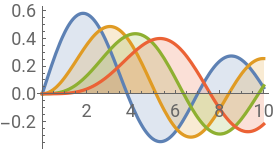
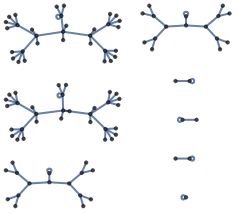
As it can be seen, the most human-readable version was the SpokenString function output. Even this, there are some cases in which it doesn’t bring a meaningful description, like in the second and third cases - it probably wouldn’t be possible to have a clear idea of the figure only with the texts. Also, it discards some aspects of the figure, like the color. Because of that, it was decided that the first small step would be to describe colors, for then integrate it into a more complete description function for graphics.
In this part I also created two functions to describe any wolfram language symbol - Description, to get the name of it; and TranslatedDescription, to get the translated name of it. Both of them use the WolframLanguageData presented previously. Here are some tests:
someWLSymbols={List,Table,Range,Graphics,Image,ColorQ,Number,Grid,Entity,Values,Map,Thread,Function,MapThread};symbolDescriptionTests=Block[{descriptions=Description@someWLSymbols,spanish,portuguese,japanese},spanish=TranslatedDescription[someWLSymbols,"Spanish"];portuguese=TranslatedDescription[someWLSymbols,"Portuguese"];japanese=TranslatedDescription[someWLSymbols,"Japanese"];MapThread[{#1,#2,#3,#4,#5}&,{someWLSymbols,descriptions,spanish,portuguese,japanese}]];Grid[PrependTo[symbolDescriptionTests,Style[#,Bold]&/@{"Original","Description","Spanish","Portuguese","Japanese"}],FrameAll]
Out[]=
Original | Description | Spanish | Portuguese | Japanese |
List | List | lista | lista | リスト |
Table | Table | tabla | tabela | リストを作成 |
Range | Range | rango | intervalo de valores | 範囲 |
Graphics | Graphics | gráfico | representação gráfica | グラフィックス |
Image | Image | imagen | imagem | 画像 |
ColorQ | Color Q | ¿color? | Cor? | 色かどうか |
Number | Number | número | número | 数 |
Grid | Grid | rejilla | grade | 格子 |
Entity | Entity | entidad | entidade | 実体 |
Values | Values | valores | lista de valores de associação | 値 |
Map | Map | aplica a todos | aplica-se ao primeiro nível | 適用 |
Thread | Thread | atraviesa | através das listas | 縫い込む |
Function | Function | función | função | 関数 |
MapThread | Map Thread | aplica a través | aplica à ligação de elementos correspondentes | 縫込み適用 |
Describing colors
Describing colors
Before starting describing colors, I discovered that the Wolfram Language have a set of named colors. These colors are the most common ones, and each has its own symbol in the Wolfram Language. Each of these symbols also have its own informations. My first objective was to filter, among all the symbols, the ones that are named colors. Once I had it, the idea was to create a function that would receive any RGBColor expression, compare it with all the named colors that I found, and return the name of the closest color.
For filtering the named colors among the Wolfram Language symbols, I saw that the property for these symbols always was the value ColorSymbols. With that, I just filtered all the symbols that had this value for the cited property, and checked if they were a colors using the ColorQ function.
(*Gettingthe`functionalityareas`propertyfortheRedcolor.*)EntityValueWolframLanguageData["Red"],
Out[]=
{ColorSymbols}
In[]:=
(*FilteringeverynamedcoloramongtheWolframLanguagesymbols,basedonthe`functionalityareas`property.*)functionalityAreasOfAllWLSymbols=MapThread{#1,#2}&,WolframLanguageData[],EntityValueWolframLanguageData[],;colorSymbols=Select[functionalityAreasOfAllWLSymbols,(Length@Last@#)1&&((First@Last@#)"ColorSymbols")&]〚All,1〛;namedColors=Select[colorSymbols,ColorQ@RGBColor@#["Name"]&]
Out[]=
,,,,,,,,,,,,,,,,,
After that I needed to address the problem of calculating the similarity between two RGBColor expressions. My idea was to create a function the get the average of the differences of each color channel. For that, I created the ColorDistanceByAverage functions (I ended up not using this implementation in my final color description function because the built-in Nearest function uses the Euclidean distance by default).
In[]:=
ColorDistanceByAverage[color1_RGBColor,color2_RGBColor]:=N[Mean[MapThread[Abs[#1-#2]&,{List@@color1,List@@color2}]]]
In[]:=
ColorDistanceByAverage[Red,#]&/@{Red,Green,Blue,Pink}
Out[]=
{0.,0.666667,0.666667,0.333333}
Then, I created the Description function for RBGColor expressions. I also created the TransletedDescription version of it, that works similar to the TransletedDescription for symbols.
Description[color_RGBColor]:=Blockcolors=,,,,,,,,,,,,,,,,,,similar,entity,similar=First@Nearest[Keys@colors,color,1];entity=colors@similar;Description[color]=ResourceFunction["FromCamelCase"]@entity@"Name"outputComparations=With[{color=RGBColor@#},{color,ToString@color,TextString@color,SpokenString@color,Description@color}]&/@RandomReal[1,{10,3}];Grid[PrependTo[outputComparations,Style[#,Bold]&/@{"RGB color","ToString","TextString","SpokenString","Description"}],FrameAll]


Out[]=
RGB color | ToString | TextString | SpokenString | Description |
RGBColor[{0.138346, 0.10944, 0.0970552}] | RGBColor[{0.138346, 0.10944, 0.0970552}] | RGB color 0.138, 0.109, 0.097 | Black | |
RGBColor[{0.699811, 0.0131068, 0.74539}] | RGBColor[{0.699811, 0.0131068, 0.74539}] | RGB color 0.7, 0.013, 0.745 | Purple | |
RGBColor[{0.410987, 0.867152, 0.662325}] | RGBColor[{0.410987, 0.867152, 0.662325}] | RGB color 0.411, 0.867, 0.662 | Light Green | |
RGBColor[{0.637156, 0.798598, 0.257136}] | RGBColor[{0.637156, 0.798598, 0.257136}] | RGB color 0.637, 0.799, 0.257 | Light Green | |
RGBColor[{0.548305, 0.72585, 0.181924}] | RGBColor[{0.548305, 0.72585, 0.181924}] | RGB color 0.548, 0.726, 0.182 | Green | |
RGBColor[{0.881816, 0.476203, 0.106749}] | RGBColor[{0.881816, 0.476203, 0.106749}] | RGB color 0.882, 0.476, 0.107 | Orange | |
RGBColor[{0.295004, 0.907996, 0.701488}] | RGBColor[{0.295004, 0.907996, 0.701488}] | RGB color 0.295, 0.908, 0.701 | Light Green | |
RGBColor[{0.439796, 0.354638, 0.0129218}] | RGBColor[{0.439796, 0.354638, 0.0129218}] | RGB color 0.44, 0.355, 0.013 | Gray | |
RGBColor[{0.106096, 0.963003, 0.866667}] | RGBColor[{0.106096, 0.963003, 0.866667}] | RGB color 0.106, 0.963, 0.867 | Cyan | |
RGBColor[{0.844313, 0.934476, 0.110191}] | RGBColor[{0.844313, 0.934476, 0.110191}] | RGB color 0.844, 0.934, 0.11 | Yellow |


When compared with the built-in functions output, it can be said that the created function represents an improvement to describe colors. This part of the project was important to validate the path I was following by showing concrete results. Following, the version to return translated texts, and some examples.
Describing graphics
Describing graphics
This, beyond allowing me to create the related Description and TranslatedDescription functions specifically for the graphics primitives symbols (they were created right after that), also allowed me to have a better notion of the project’s scope. After that I also created the GraphicsPrimtiveQ function to identify if a given string, symbol or expression represents a graphics primitive or not.
The next step was to create a function to finally describe a Graphics expression. So, I did it. The created function is capable of describing a Graphics expression in terms of graphics primitives symbols and colors.
Despite its limitation, the Description function for Graphics also presents an improvement for the generated text. From this point, the next steps were to continue improving the description functions to add more characteristics of the expressions. Because of the great amount of primitives, the focus was given to a single one - the triangle. This way, the next improvements of the project were related to describing these polygons in more details.
Working with triangles
Working with triangles
The initial goal was to identify and say the type of triangle that is being displayed (right, equilateral, isosceles, scalene and obtuse). To achieve that, initially I created some auxiliary functions:
◼
TrianglePointsQ : receives a list of points of the same dimension and returns if it forms a triangle or not.
◼
TrianglePolygonQ: receives a triangle Polygon expression and returns if it is a triangle or not.
◼
TriangleQ: is a generalization of the two previous ones. It can receive both a list of points of the same dimension or a polygon, and return if they are a triangle or not.
Later on, I created a TriangleTypeQ function for each triangle type. All of them receives a triangle polygon and returns if it is of the given type or not. The name of the created functions are: TriangleRightQ, TriangleEquilateralQ, TriangleIsoscelesQ, TriangleScaleneQ and TriangleObtuseQ. Following, some usage examples:
With these functions I was already able to describe the triangles classification. To help me with this process, I created the TriangleCharacteristics function. This function receives a triangle polygon and returns a list of string with the name of each characteristic of the given triangle.
Now, I need to describe one more thing about triangles: the orientation of the greatest side (is it a vertical, horizontal or diagonal line?). For doing so, it was necessary to develop an algorithm composed of three steps: 1) find the coordinates of the greatest side of a triangle, 2) get the inclination of this line and 3) decide the orientation of this line. For the first step, I created the TriangleGreatestSide function. Bellow, its definition and some examples.
To define the orientation of the greatest side I defined some angle regions for each possible orientation. For that, the trigonometric circle was divided in 32 small parts, with 4 of them to the horizontal orientation, other 4 to the vertical orientation and the rest to the diagonal orientation. Being this, any line that has the inclination that is inside of one of this regions is going to be considered in the respective orientation. The next figure illustrates each of these regions.
After getting the greatest side coordinates, I create another point, with the x coordinate from the second point, and the y coordinate from first point. With this new point, and with the previous ones I create another triangle, and get the internal angle formed at the first point of this triangle. This angle gives me the inclination of the greatest side of the triangle. So this I can properly classify the orientation using my sectioned trigonometric circle. Bellow, I show the functions to each of this processes (Angle and AngleOrientation), and also some auxiliary plots.
The last step was to put all the functions related to triangles into a single functions capable of describing triangles in a Graphics expression, returning a human-readable string. For this task I created the following code, that produces the results at the end.
It is important to note that for equilateral triangles the greatest side orientation is not being described, because all the sides are equal.
Conclusion and future works
Conclusion and future works
This project presented a challenging task, with a very large scope of implementation. In this first step, some important progress was made related to textually describing Wolfram Language expressions, in special for Graphics, and for triangle figures. Following, some of the future works that can be done.
◼
Merge the Description and TranslatedDescription functions for symbols into a single one that can receive the language as an option.
◼
Merge the Description and TranslatedDescription functions for colors into a single one that can receive the language as an option.
◼
Improve the Description function implementation for graphics, so this it can support more graphics primitives, and also the other components of the Graphics expressions.
◼
Enhance the Description function implementation for graphics, so this it also can describe points and lines plots properly.
◼
Put the TriangleDescription function inside a more generic Description function that supports any type of polygon.
◼
Increase the scope of the project for other types of expressions.
◼
Test the output quality for the description functions for graphics and triangles.
◼
Create functions and/or applications that can be used with visually impaired people. For example , an application to help with the geometry teaching.