About seven years ago, I’ve made a post about finding coordinates from a line plot image. This needed various functions(ImageKeypoints, ImageGraphics, ImageCorners, TextRecognize, etc) and some boring manual manipulation.
Now, we get multimodal LLMs(Gemini, GPT-4o, etc) that understand and explain an image.
I used Gemini to find the coordinates from a line plot image.
In[]:=
image=
;
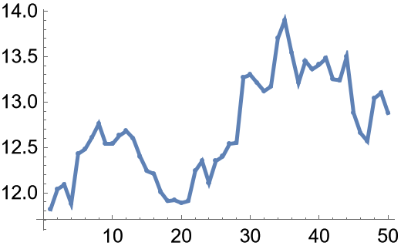
Please get the coordinates of the figure in Wolfram Language format.
There must be 50 points.
The coordinates of the leftmost point are {1, 11.8}, the coordinates of the middle point are {25, 12.4}, and the coordinates of the rightmost point are {50, 12.9}.
The coordinates of each point should be obtained while checking that the position of each point is correct in relation to the neighboring points.
There must be 50 points.
The coordinates of the leftmost point are {1, 11.8}, the coordinates of the middle point are {25, 12.4}, and the coordinates of the rightmost point are {50, 12.9}.
The coordinates of each point should be obtained while checking that the position of each point is correct in relation to the neighboring points.
Input the above image and prompt to Gemini 1.5 Flash and receive the following response.
In[]:=
response="{{1, 11.8}, {2, 12.1}, {3, 12.1}, {4, 11.8}, {5, 12.4}, {6, 12.5}, {7, 12.6}, {8, 12.7}, {9, 12.8}, {10, 12.5}, {11, 12.5}, {12, 12.6}, {13, 12.7}, {14, 12.6}, {15, 12.4}, {16, 12.2}, {17, 12.1}, {18, 11.9}, {19, 11.9}, {20, 11.9}, {21, 11.9}, {22, 12.2}, {23, 12.3}, {24, 12.1}, {25, 12.4}, {26, 12.4}, {27, 12.5}, {28, 12.6}, {29, 13.3}, {30, 13.3}, {31, 13.2}, {32, 13.1}, {33, 13.2}, {34, 13.7}, {35, 13.9}, {36, 13.6}, {37, 13.2}, {38, 13.4}, {39, 13.3}, {40, 13.5}, {41, 13.3}, {42, 13.2}, {43, 13.5}, {44, 13.4}, {45, 12.8}, {46, 12.6}, {47, 12.5}, {48, 12.9}, {49, 13.1}, {50, 12.9}}";
Interpret the response as Wolfram Language input and plot.
In[]:=
data=ToExpression@response;ListLinePlot,data,ImageSize->Medium,PlotLegends->{"Ground Truth","Prediction"}
Out[]=
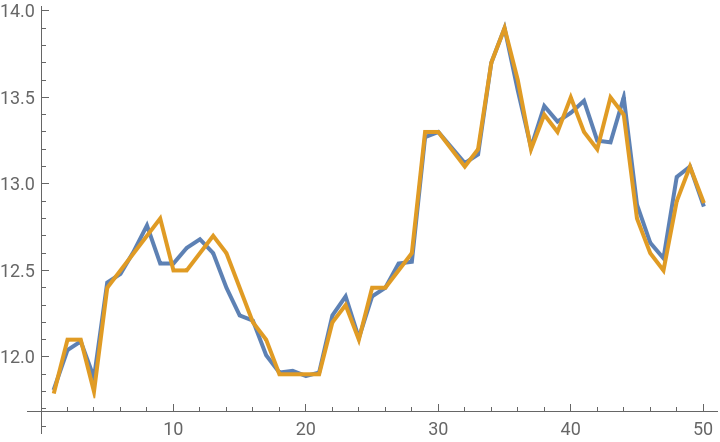


Get a pretty good result with a simple prompt.