As the east coast of US is being hit by tornadoes and unprecedented flash floods, the west coast and some other parts are badly hit by drought. Also, scientists are getting a better picture of how climate change may have played an important role in rise and decline of many civilizations in history (eg, see this). In this short computational essay, I’ve transformed the data of U.S. Drought Monitor into WL and explore them a bit. A quick looks into last 10 yrs of data may suggest what we have now is as bad as summer 2013.
What is US Drought Map
What is US Drought Map
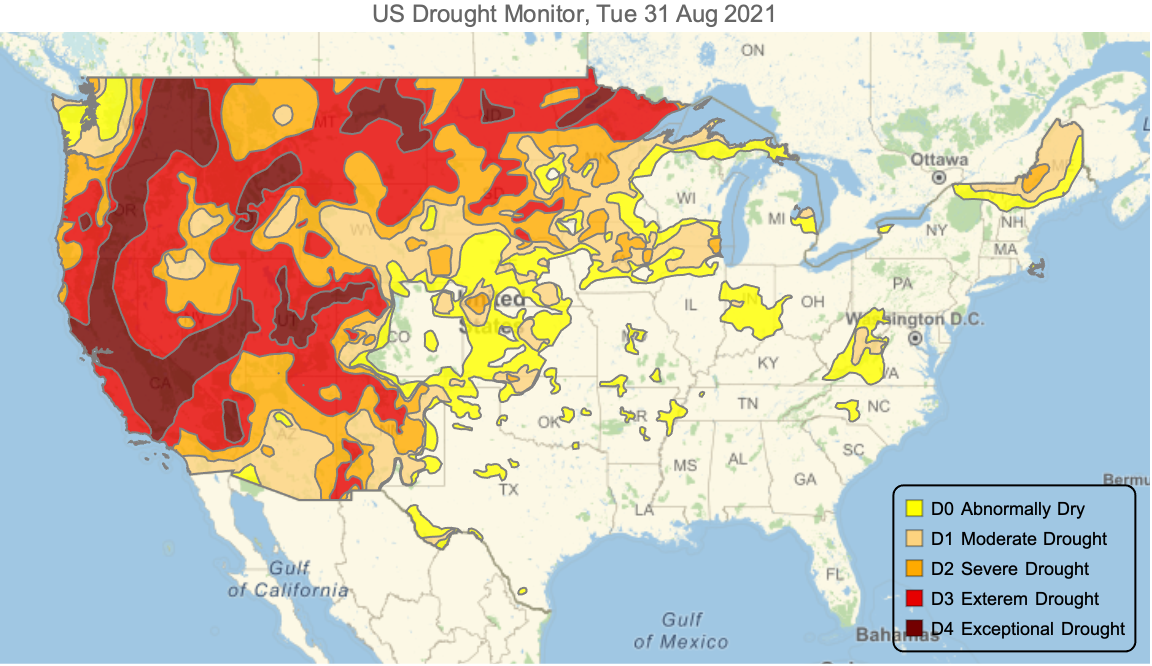
Here is a quick note from USDM webpage: The U.S. Drought Monitor is a map released every Thursday, showing parts of the U.S. that are in drought. The map uses five classifications: abnormally dry (D0), showing areas that may be going into or are coming out of drought, and four levels of drought: moderate (D1), severe (D2), extreme (D3) and exceptional (D4).
Most current US Drought Monitor Map
Most current US Drought Monitor Map
In this section, I shall scrape the data from the US Drought Monitor and transform them into proper format in WL.
Get SHP files:
In[]:=
url="https://droughtmonitor.unl.edu/data/shapefiles_m/USDM_current_M.zip";
Get the data:
In[]:=
dt=Import[url,"Data"];
Data dimensions:
In[]:=
dt//Dimensions
Out[]=
{1,4}
Keys (labels) in data:
In[]:=
dt[[1,All,1]]
Out[]=
{LayerName,Geometry,Labels,LabeledData}
In[]:=
(Lookup["Shape_Area"]@Lookup["LabeledData"]@dt[[1]])
Out[]=
,,,,
Get the corresponding date from LayerName:
In[]:=
date=StringSplit[Lookup["LayerName"]@dt[[1]],"_"]//Last//DateObject
Out[]=
Generate the Drought Monitor color scheme:
In[]:=
colors=AssociationThreadRange[0,4],,,,,;


Create legends for color scheme:
In[]:=
legend=SwatchLegend[Values[colors],{"D0 Abnormally Dry","D1 Moderate Drought","D2 Severe Drought","D3 Exterem Drought","D4 Exceptional Drought"},LabelStyle->{FontSize->9},LegendFunction->"Frame",LegendLayout->"Column"]
Out[]=


Calculate geo area of each category of drought indicator:
In[]:=
AssociationThread{"D0 Abnormally Dry","D1 Moderate Drought","D2 Severe Drought","D3 Exterem Drought","D4 Exceptional Drought"},UnitConvert(Lookup["Shape_Area"]@Lookup["LabeledData"]@dt[[1]]),
Out[]=
D0 Abnormally Dry,D1 Moderate Drought,D2 Severe Drought,D3 Exterem Drought,D4 Exceptional Drought
Note that the first number correspond to areas that are only in D0 category, the 2nd one to D0 and D1, the 3rd D0, D1 and D2, the fourth one to D0, D1, D2, and D3, and the last one to D0 through D4. Therefore, to get the overall area that are under eg D2 one has to add D2 through D4; or the overall area under D3, one has to add D3 through D4. In other words, ,..., are subset of . So for cumulative areas, one gets:
D
i+1
D
4
D
i
In[]:=
AssociationThread{"D0 Abnormally Dry","D1 Moderate Drought","D2 Severe Drought","D3 Exterem Drought","D4 Exceptional Drought"},Reverse@Accumulate@Reverse@UnitConvert(Lookup["Shape_Area"]@Lookup["LabeledData"]@dt[[1]]),
Out[]=
D0 Abnormally Dry,D1 Moderate Drought,D2 Severe Drought,D3 Exterem Drought,D4 Exceptional Drought
Add proper color for each geo-regions based on color scheme:
In[]:=
regions=Transpose[{GeoStyling[#,Opacity[.8]]&/@Values[colors],Lookup["Geometry"]@dt[[1]]}];
Generate geo-viz:
In[]:=
GeoGraphics{EdgeForm[Gray],regions,Inset[legend,GeoPosition[{28,-71.5}]]},GeoRange,GeoProjection"Mercator",PlotLabel"US Drought Monitor, "<>DateString[date],ImageSizeLarge

Out[]=
SHP over yrs
SHP over yrs
Given what we achieved in the previous section, we now process the available data since 2000.
In[]:=
yrs=First/@Import["https://droughtmonitor.unl.edu/data/shapefiles_m//"<>ToString[#]<>"_USDM_M.zip",{"*.zip","Data"}]&/@Range[2010,2021];
Dimensions (10 yrs, each one 52 weeks, and for each week, 4 labeled data):
In[]:=
yrs//Dimensions
Out[]=
{12}
Flatten data (609 data points per each week)
In[]:=
Flatten[yrs,1]//Dimensions
Out[]=
{609,4}
Take a week sample:
In[]:=
sample=RandomChoice[Flatten[yrs,1]];
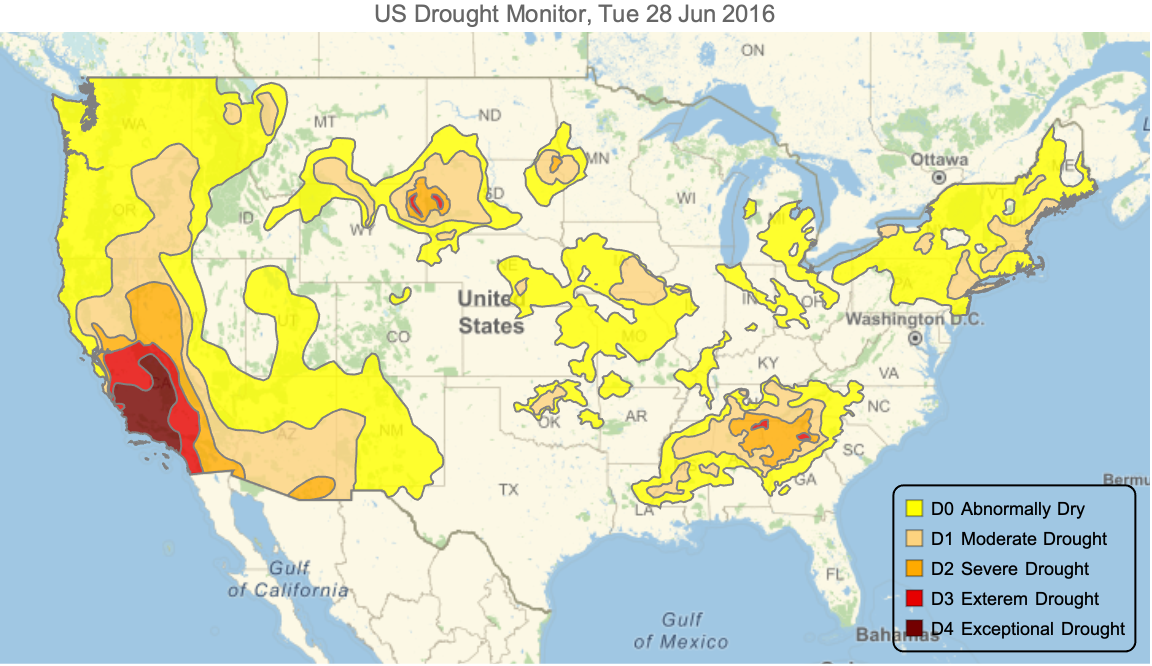
Note that not all categories are included for each week. For example, in above sample, we have only D0, D1 and D2.
In[]:=
Lookup["DM"][Lookup["LabeledData"][sample]]
Out[]=
{0,1,2,3,4}
In[]:=
newcolors=colors[#]&/@Lookup["DM"][Lookup["LabeledData"][sample]]
Out[]=
,,,,
In[]:=
regions=Transpose[{GeoStyling[#,Opacity[.8]]&/@newcolors,Lookup["Geometry"]@sample}];
In[]:=
date=StringSplit[Lookup["LayerName"]@sample,"_"]//Last//DateObject
Out[]=
In[]:=
GeoGraphics{EdgeForm[Gray],regions,Inset[legend,GeoPosition[{28,-71.5}]]},GeoRange,GeoProjection"Mercator",PlotLabel"US Drought Monitor, "<>DateString[date],ImageSizeLarge
Out[]=
Merge all previous steps into a function:
geoViz[sample_]:=Module{newcolors,regions,date},newcolors=colors[#]&/@Lookup["DM"][Lookup["LabeledData"][sample]];regions=Transpose[{GeoStyling[#,Opacity[.8]]&/@newcolors,Lookup["Geometry"]@sample}];date=StringSplit[Lookup["LayerName"]@sample,"_"]//Last//DateObject;GeoGraphics{EdgeForm[Gray],regions,Inset[legend,GeoPosition[{28,-71.5}]]},GeoRange,GeoProjection"Mercator",PlotLabel"US Drought Monitor, "<>DateString[date],ImageSizeLarge
Generate all geo viz:
Export it as GIF
Exploring areas of each category
Exploring areas of each category
Define a function to generate area of each drought category:
Generate ares for all data:
A peak into areas:
Turn it into a dataset:
A peak into dataset:
Turn the data of each drought category into a time series visualize it together with 1-mo MovingAverage:
Let us now calculate the % of US area that is in each drought category.
Get US area:
Generate viz of each %:
Overall, it seems that what US is experiencing now is as worth as summer 2013.
Acknowledgment
Acknowledgment